Repository navigation
Releases: bclml/mcIRC
Release list
mcIRC 2026.10.23-4 - one alert per earthquake, not one per area; settings can't be wiped

mcIRC 2026.10.23-4: one alert per earthquake, not one per area; settings can't be wiped
One alert per earthquake, not one per area (Area alerts 2.1.3). With several areas chosen, one earthquake near all of them went out once per area ("... 80 km from area A", "... 170 km from area B", ...), eight messages for one quake. Now an event found for several of your areas goes out once, worded for the nearest area. If you broadcast alerts, please update.
Reworded alerts aren't sent twice (Area alerts 2.1.3). When an agency rewords or republishes an alert it already sent (a new id, the same words), it is shown in the Area alerts window as (again, not sent) and not broadcast again for 6 hours.
Your settings can't be wiped any more. gui_settings.json is now saved whole or not at all, so a crash or power cut while saving can't leave half a file. If the file can't be read at startup, it is kept as gui_settings.json.broken-<date-time> and mcIRC starts with defaults; if it can't be opened (cloud sync such as OneDrive, or antivirus, holding it), mcIRC never saves over it that session. Either way the Status window says what happened and what to do. Before, mcIRC quietly started with defaults and saved them over your settings.
Everything from 2026.10.23-3 is included.
Updating: Help > Check for updates (update the addons too), then restart mcIRC, or click the red UPDATE square on the toolbar.
mcIRC 2026.10.23-3 - weather answers never carry a callsign; a red UPDATE square
mcIRC 2026.10.23-3: weather answers never carry a callsign; a red UPDATE square
Weather answers never use a node's name (Area alerts 2.1.2). wx without a place answers for where the asker is - their node, else the first repeater their message reached. When the town there couldn't be looked up, the answer was named after that repeater, so people near it got the repeater owner's callsign back. Now it says "Near you" instead - never a repeater's or the asker's node name - and a town lookup that failed (the service was busy) is tried again after 10 minutes instead of sticking for the whole session. If you run the weather commands, please update.
A big red UPDATE square flashes at the start of the toolbar while an update is waiting - mcIRC or an addon. Click it to install (it opens Help > Check for updates). It stays after a restart until the update is installed, then goes away by itself.

Everything from 2026.10.23-1 is included (the map shows streets again).
Updating: Help > Check for updates (update the addons too), then restart mcIRC (the "Restart mcIRC" box does it). From this version on, the red UPDATE square tells you when the next one is ready.
mcIRC 2026.10.23-1 - the map shows streets again
mcIRC 2026.10.23-1: the map shows streets again
The map window showed "Access blocked" tiles instead of streets. OpenStreetMap blocks the generic name the map library sends ("TkinterMapView"), so it refused everyone's tiles.
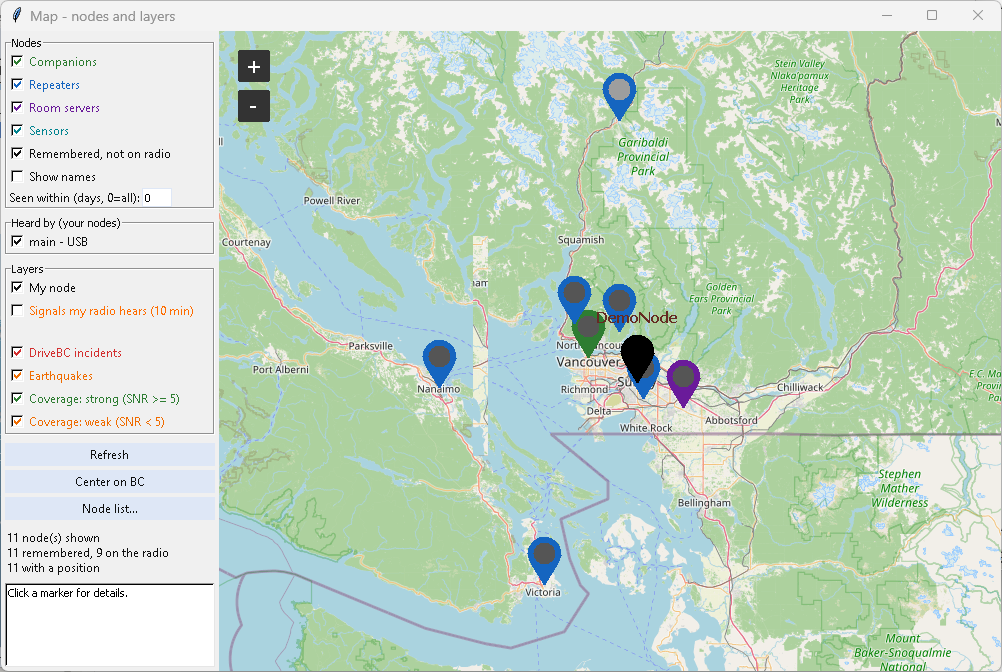
- Tiles are now asked for the way OpenStreetMap's tile policy asks: under mcIRC's own name with a link to the project, from the single
tile.openstreetmap.orgaddress, over one kept-open connection. - Tiles are kept on your PC for 7 days (the
tile_cachefolder), so the same ones aren't downloaded again. - If OpenStreetMap ever refuses again, the map shows your nodes without streets (no "blocked" pictures), waits 10 minutes before asking again, and Status says why once.
Everything from 2026.10.22-1 is included (Daily weather times and channels, no bot answers in Public).
Updating: Help > Check for updates, then restart mcIRC (the "Restart mcIRC" box does it).
mcIRC 2026.10.22-1 - Daily weather times and channels; no bot answers in Public
mcIRC 2026.10.22-1: Daily weather times and channels; no bot answers in Public
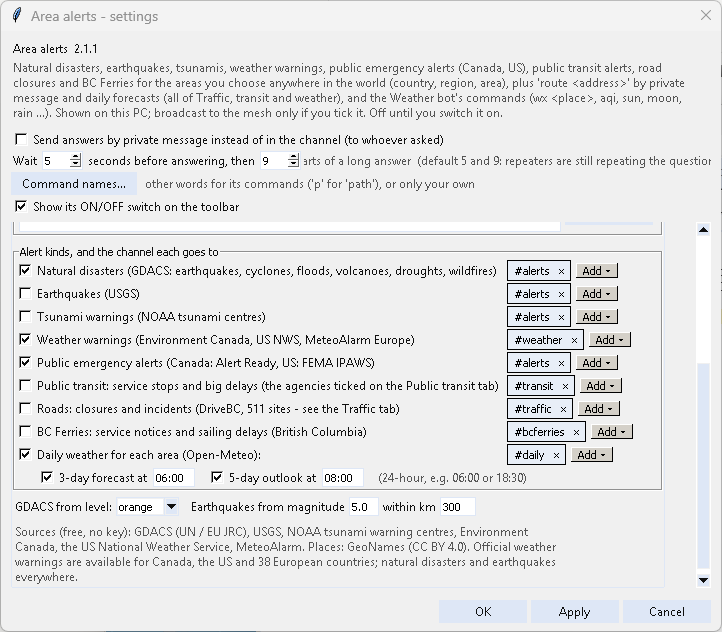
Daily weather - your times, your channels (Area alerts 2.1.1). On the Areas and alerts tab, Daily weather now has its own channels (empty: the Weather warnings channels, as before) and a time for each post: the 3-day forecast (06:00 by default) and the 5-day outlook (08:00), each with its own checkbox. Times are 24-hour; 6:30 PM and 7am work too. Each goes out once a day within the hour after its time - mcIRC started later in the day doesn't post a stale one.
No bot answers in Public. A bot set to answer privately can only message someone in node memory (an advert heard from them). Before, for anyone else it answered in the channel instead - Public included (e.g. Auto reply's "test" rule). Now a question in Public (any node's) from someone it can't message isn't answered; Status says so. In other channels it still answers there. Options > Let bots post in Public still allows it.
- Dependabot no longer proposes a meshcore update for Python 3.10 / 3.11 (meshcore 2.3.16 needs Python 3.12; those keep 2.3.15).
Everything from 2026.10.15-4 is included (the Weather bot in Area alerts, @name: answers, extra nodes' channels).
Updating: Help > Check for updates (update the addons too), then restart mcIRC (the "Restart mcIRC" box does it).
mcIRC for Linux & macOS 0.1.0 (experimental) - refreshed for mcIRC 2026.10.23-4
Refresh of the experimental Linux and macOS edition (still "edition 0.1.0"), now on the same code as mcIRC 2026.10.23-4. It has still had no testing on real Linux or macOS machines, so testers are very welcome. It replaces the 2026.10.23-3 release.
Install
- Python 3.10+ with Tk: Debian/Ubuntu
sudo apt install python3-tk, Fedorasudo dnf install python3-tkinter, macOSbrew install python-tk(or the python.org installer) - Get the source: download this release's source, or
git clone https://github.com/bclml/mcIRC - Install the packages:
pip install -r requirements.txt, or with uv justuv run mcIRC.py(the repo has auv.lockthat covers Windows, Linux and macOS) - Linux USB:
sudo usermod -aG dialout $USER(some distrosuucp), then log out and in. Ports look like/dev/ttyUSB0or/dev/ttyACM0. macOS USB:/dev/cu.usbserial-... - Start with
./Run_GUI.sh(Linux), double-clickRun_GUI.command(macOS; first timechmod +x Run_GUI.sh Run_GUI.command), orpython3 mcIRC.py. Trypython3 mcIRC.py --demofirst (no radio needed)
What is new since 2026.10.23-3
- Area alerts 2.1.3: one earthquake (or any event) near several of your areas is sent once, worded for the nearest area - not once per area
- Area alerts 2.1.3: an alert the agency rewords or republishes isn't broadcast again for 6 hours
- Your settings file is saved whole or not at all; one that can't be read is kept aside, and one that can't be opened is never saved over
- Same code as the Windows release; the automatic tests cover it
Known differences / risks on Linux and macOS (unchanged)
- macOS ignores button colours, so unread private-message buttons are less obvious; right-click is Control-click on a one-button Mac mouse
- Sounds use
afplay(macOS) orcanberra-gtk-play/paplay(Linux) - Bluetooth works through
bleakbut is untested; Wayland screenshots and macOS Screen Recording permission may block the bug-report screenshot - The USB reset-line option is for Windows-tested CP210x / CH340 / FTDI boards only and was only tested on a simulated port
- The firmware builder and firmware update were only tried on Windows
Please report what you find: Help > Report a bug... attaches a troubleshooting log (versions, serial ports, connection steps, firmware; never message text, passwords, your position or full keys) and an optional screenshot that hides chat text and names, and it records which system you use.
Help > Check for updates keeps you on the newest code. Wiki: https://github.com/bclml/mcIRC/wiki
mcIRC for Linux & macOS 0.1.0 (experimental) - refreshed for mcIRC 2026.10.23-3
Refresh of the experimental Linux and macOS edition (still "edition 0.1.0"), now on the same code as mcIRC 2026.10.23-3. It has still had no testing on real Linux or macOS machines, so testers are very welcome. It replaces the 2026.10.23-1 release.
Install
- Python 3.10+ with Tk: Debian/Ubuntu
sudo apt install python3-tk, Fedorasudo dnf install python3-tkinter, macOSbrew install python-tk(or the python.org installer) - Get the source: download this release's source, or
git clone https://github.com/bclml/mcIRC - Install the packages:
pip install -r requirements.txt, or with uv justuv run mcIRC.py(the repo has auv.lockthat covers Windows, Linux and macOS) - Linux USB:
sudo usermod -aG dialout $USER(some distrosuucp), then log out and in. Ports look like/dev/ttyUSB0or/dev/ttyACM0. macOS USB:/dev/cu.usbserial-... - Start with
./Run_GUI.sh(Linux), double-clickRun_GUI.command(macOS; first timechmod +x Run_GUI.sh Run_GUI.command), orpython3 mcIRC.py. Trypython3 mcIRC.py --demofirst (no radio needed)
What is new since 2026.10.23-1
- Weather answers never use a node's name (a repeater's callsign showed up in replies); failed town lookups are retried
- A big red UPDATE square flashes on the toolbar while an update is waiting
- Same code as the Windows release; the automatic tests cover it
Known differences / risks on Linux and macOS (unchanged)
- macOS ignores button colours, so unread private-message buttons are less obvious; right-click is Control-click on a one-button Mac mouse
- Sounds use
afplay(macOS) orcanberra-gtk-play/paplay(Linux) - Bluetooth works through
bleakbut is untested; Wayland screenshots and macOS Screen Recording permission may block the bug-report screenshot - The USB reset-line option is for Windows-tested CP210x / CH340 / FTDI boards only and was only tested on a simulated port
- The firmware builder and firmware update were only tried on Windows
Please report what you find: Help > Report a bug... attaches a troubleshooting log (versions, serial ports, connection steps, firmware; never message text, passwords, your position or full keys) and an optional screenshot that hides chat text and names, and it records which system you use.
Help > Check for updates keeps you on the newest code. Wiki: https://github.com/bclml/mcIRC/wiki
mcIRC for Linux & macOS 0.1.0 (experimental) - refreshed for mcIRC 2026.10.23-1
Refresh of the experimental Linux and macOS edition (still "edition 0.1.0"), now on the same code as mcIRC 2026.10.23-1. It has still had no testing on real Linux or macOS machines, so testers are very welcome. It replaces the 2026.10.22-1 release.
Install
- Python 3.10+ with Tk: Debian/Ubuntu
sudo apt install python3-tk, Fedorasudo dnf install python3-tkinter, macOSbrew install python-tk(or the python.org installer) - Get the source: download this release's source, or
git clone https://github.com/bclml/mcIRC - Install the packages:
pip install -r requirements.txt, or with uv justuv run mcIRC.py(the repo has auv.lockthat covers Windows, Linux and macOS) - Linux USB:
sudo usermod -aG dialout $USER(some distrosuucp), then log out and in. Ports look like/dev/ttyUSB0or/dev/ttyACM0. macOS USB:/dev/cu.usbserial-... - Start with
./Run_GUI.sh(Linux), double-clickRun_GUI.command(macOS; first timechmod +x Run_GUI.sh Run_GUI.command), orpython3 mcIRC.py. Trypython3 mcIRC.py --demofirst (no radio needed)
What is new since 2026.10.22-1
- The map shows streets again: tiles are fetched the way OpenStreetMap asks, and kept on disk for 7 days
- Same code as the Windows release; the automatic tests cover it
Known differences / risks on Linux and macOS (unchanged)
- macOS ignores button colours, so unread private-message buttons are less obvious; right-click is Control-click on a one-button Mac mouse
- Sounds use
afplay(macOS) orcanberra-gtk-play/paplay(Linux) - Bluetooth works through
bleakbut is untested; Wayland screenshots and macOS Screen Recording permission may block the bug-report screenshot - The USB reset-line option is for Windows-tested CP210x / CH340 / FTDI boards only and was only tested on a simulated port
- The firmware builder and firmware update were only tried on Windows
Please report what you find: Help > Report a bug... attaches a troubleshooting log (versions, serial ports, connection steps, firmware; never message text, passwords, your position or full keys) and an optional screenshot that hides chat text and names, and it records which system you use.
Help > Check for updates keeps you on the newest code. Wiki: https://github.com/bclml/mcIRC/wiki
mcIRC for Linux & macOS 0.1.0 (experimental) - refreshed for mcIRC 2026.10.22-1
Refresh of the experimental Linux and macOS edition (still "edition 0.1.0"), now on the same code as mcIRC 2026.10.22-1. It has still had no testing on real Linux or macOS machines, so testers are very welcome. It replaces the 2026.10.15-4 release.
Install
- Python 3.10+ with Tk: Debian/Ubuntu
sudo apt install python3-tk, Fedorasudo dnf install python3-tkinter, macOSbrew install python-tk(or the python.org installer) - Get the source: download this release's source, or
git clone https://github.com/bclml/mcIRC - Install the packages:
pip install -r requirements.txt, or with uv justuv run mcIRC.py(the repo has auv.lockthat covers Windows, Linux and macOS) - Linux USB:
sudo usermod -aG dialout $USER(some distrosuucp), then log out and in. Ports look like/dev/ttyUSB0or/dev/ttyACM0. macOS USB:/dev/cu.usbserial-... - Start with
./Run_GUI.sh(Linux), double-clickRun_GUI.command(macOS; first timechmod +x Run_GUI.sh Run_GUI.command), orpython3 mcIRC.py. Trypython3 mcIRC.py --demofirst (no radio needed)
What is new since 2026.10.15-4
- Area alerts' Daily weather: your own times and channels
- Bots never answer in Public when they can't answer privately
- Same code as the Windows release; the automatic tests cover it
Known differences / risks on Linux and macOS (unchanged)
- macOS ignores button colours, so unread private-message buttons are less obvious; right-click is Control-click on a one-button Mac mouse
- Sounds use
afplay(macOS) orcanberra-gtk-play/paplay(Linux) - Bluetooth works through
bleakbut is untested; Wayland screenshots and macOS Screen Recording permission may block the bug-report screenshot - The USB reset-line option is for Windows-tested CP210x / CH340 / FTDI boards only and was only tested on a simulated port
- The firmware builder and firmware update were only tried on Windows
Please report what you find: Help > Report a bug... attaches a troubleshooting log (versions, serial ports, connection steps, firmware; never message text, passwords, your position or full keys) and an optional screenshot that hides chat text and names, and it records which system you use.
Help > Check for updates keeps you on the newest code. Wiki: https://github.com/bclml/mcIRC/wiki
mcIRC 2026.10.15-4 - the Weather bot is now part of Area alerts
mcIRC 2026.10.15-4: the Weather bot is now part of Area alerts
Weather commands in Area alerts (2.1.0). The Weather bot's commands - wx <place>, gwx, aqi, sun, moon, solar, sf, hfcond, satpass, airplanes, rain, aurora, channels, status, contact - and its rain warning now live on Area alerts' new Weather commands tab. When you update, the Weather bot's settings (every node's) are added to Area alerts and the Weather bot switches itself off - nothing is deleted, and Area alerts' own alert checks are not switched on by this.
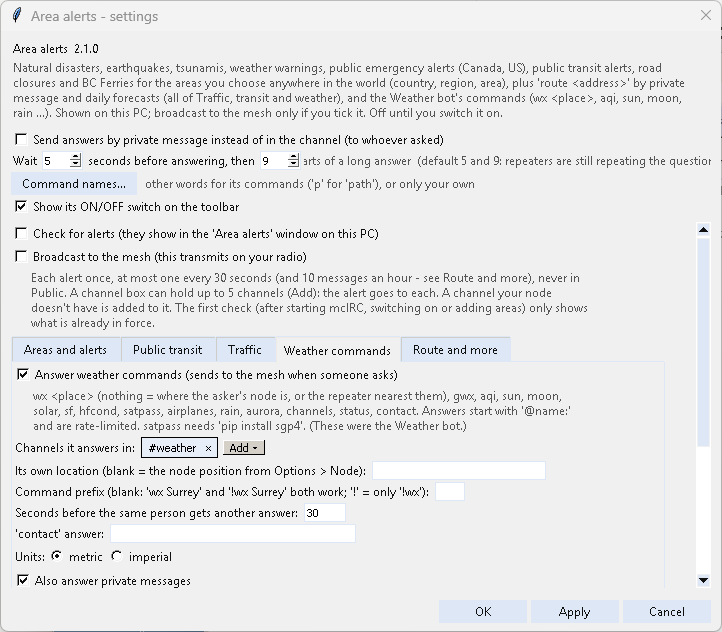
- Daily weather - the 6 AM 3-day forecast and 8 AM 5-day outlook - has its own checkbox on the first tab (Areas and alerts), no longer tied to Weather warnings.
- Answers say who they are for: every addon's answer in a channel starts with
@name:(@[Bob Smith]:for a name with spaces). The bots leave room for it, so answers stay mesh-sized. - Extra nodes get their addons' channels: the channels an addon uses on another node (Options > More nodes) are added to that node for you - when it connects, when you save the addon's settings or switch it on - in its first free slot. Each node's tab in an addon's settings has Use this addon on node ...: an addon only works (and only adds channels) on the nodes it is ticked for.
- The window tree: an extra node looks like the main one - its Status first, then a Channels folder.
- Addon updates: Area alerts 2.1.0, Weather bot 2.0.0 (hand-over only, no longer in the catalog), Fun bot 1.1.3, Mesh bot 1.2.14, Channel list 1.2.6, Bot help 1.0.9, Auto reply 1.1.10.
Everything from 2026.10.15-3 is included.
Updating: Help > Check for updates (update the addons too), then restart mcIRC (the "Restart mcIRC" box does it).
mcIRC 2026.10.15-3 - emoji in the chat windows
mcIRC 2026.10.15-3: emoji in the chat windows
Emoji in messages now show as small pictures in mcIRC's chat windows: the sun, clouds, rain and snowflakes in forecast posts, 🚨 / ✅ in alerts, faces in chat. Before, they turned into black blobs or gaps, because mcIRC left them out for older versions of Python's window toolkit, which couldn't draw them.

- Black and white: Python's window toolkit (Tk 8.6) can't draw colour emoji. Phones on the mesh still see them in colour.
- They're drawn in Windows' Segoe UI Emoji / Segoe UI Symbol fonts (Apple Color Emoji / Noto Color Emoji on Mac / Linux), at the chat's text size.
- On an older Tk (before 8.6.10) they're left out, as before.
- What is sent over the mesh and written to the logs doesn't change.
Everything from 2026.10.15-2 is included (Area alerts 2.0, channel lists, the Python 3.10 / 3.11 fix).
Updating: Help > Check for updates, then restart mcIRC (the "Restart mcIRC" box does it).