Building DB Schema
In order for your conference rooms to be displayed in roomRequest, you need to add them to the buildings mongoDB collection. I have included a sample building called ORD with an array of conference rooms. To add your conference rooms simply add a new document with the following structure. Below would add a building called HQ with a single conference room called Boardroom.
{
    "buildingId": "HQ",
    "buildingName": "Example HQ",
    "address1": "",
    "address2": "",
    "city": "Chicago",
    "state": "IL",
    "phone": "",
    "type": "Demo Office",
    "lattitude": "",
    "longitude": "",
    "floors": [
        {
            "floorID": "1",
            "floorName": "1ST FLOOR",
            "drawingName": "",
            "status": "Online"
        }
    ],
    "timeZoneId": "America/Chicago",
    "offset": -21600,
    "conferenceDetails": [
        {
            "spnamePretty": "Boardroom",
            "schedname": "Boardroom (12)",
            "spaceCap": 1,
            "videoConferencing": "Y",
            "tpscreen": "MX800",
            "proxyStatus": "PUBLIC",
            "tpScreenNumber": 2,
            "EmailAddress": "boardroome@example.onmicrosoft.com"
        }
    ],
    "dstOffset": 60
}
If leveraging Heroku and mLab for the mongoDB. This document can easily be added following these steps:
- Open the Heroku dashboard and select your application.
- Click on "Resources" and then click on "mLab"
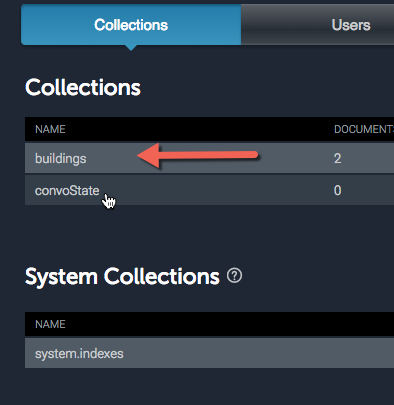
- Click on the "buildings" collection.
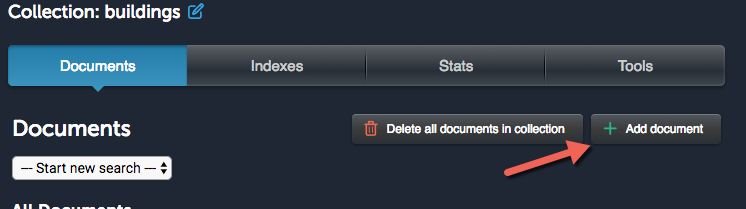
- Click on "Add document"
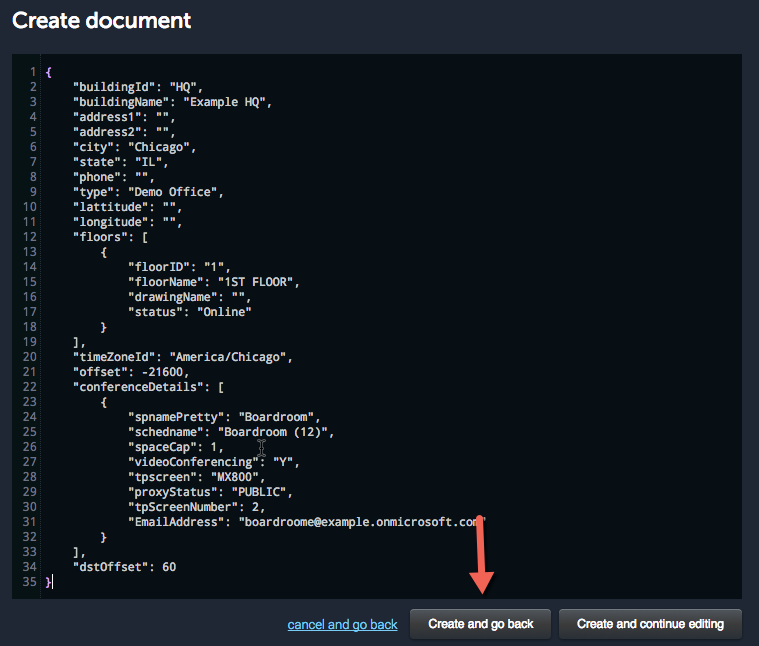
- Paste in the new building in the format outline above. Click "Create and go back"
- Finally Log In to api.ai and edit the "location" entity. Add a new row for "HQ" or whatever the name of the new building is.