This repository contains launch files that enables you to calibrate a monocular camera and use calibrated camera. The theory of camera calibration has been also reviewed.
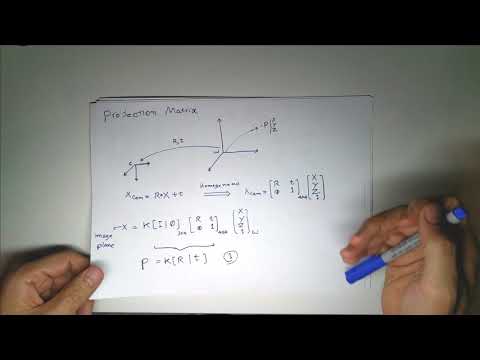

ROS use OpenCV for camera calibration but the format that it stores the data is different than OpenCV. Also, you need to know where to place the camera calibration files so ROS can find it and publish it.
sudo apt-get install ros-kinetic-usb-cam uvcdynctrl
Open a terminal and run roscore:
roscore
Turn off the autofocus of your camera (if your camera supports autofocus). Check if your camera supports autofocus:
uvcdynctrl --device=/dev/video0 --clist
turn off the autofocus:
uvcdynctrl --device=/dev/video0 --set='Focus, Auto' 0
check if the autofocus is off:
uvcdynctrl --device=/dev/video0 --get='Focus, Auto'
Publish the data from your camera, for example, via use usb_cam:
rosrun usb_cam usb_cam_node
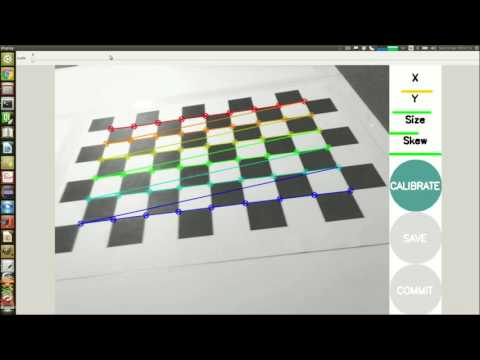
Connect camera_calibratio to the node publishing camera images: (node and topic name should be adjusted: image:=/usb_cam/image_raw camera:=/usb_cam) and a checkerboard with 0.02517-meter squares:
rosrun camera_calibration cameracalibrator.py --size 9x6 --square 0.02517 image:=/usb_cam/image_raw camera:=/usb_cam --no-service-check
After getting enough images click on the calibrate and then save. If you click on the commit button if will copy calibration data into:
/home/<username>/.ros/camera_info/head_camera.yaml
Fix the calibration URL. Put the YAML file in the following:
/home//.ros/camera_info/head_camera.yaml
First, open your text editor and paste the following text into it:
<!--
Example of run:
roslaunch usb_cam_stream_publisher.launch video_device:=/dev/video0 image_width:=640 image_height:=480
-->

<launch>
<arg name="video_device" default="/dev/video0" />
<arg name="image_width" default="640" />
<arg name="image_height" default="480" />
<arg name="image_topic_name" default="/usb_cam/image_raw" />
<arg name="camera_info_topic_name" default="/usb_cam/camera_info" />


<node name="usb_cam" pkg="usb_cam" type="usb_cam_node" output="screen" >
<param name="video_device" value="$(arg video_device)" />
<param name="image_width" value="$(arg image_width)" />
<param name="image_height" value="$(arg image_height)"/>
<param name="pixel_format" value="mjpeg" />
<param name="io_method" value="mmap"/>

<!-- update these line accroding to your setting, here are some examples:-->
<!-- <param name="camera_info_url" value="package://your_cameras/info/camera.yaml"/> -->
<!-- <param name="camera_info_url" value="file:///home/behnam/.ros/camera_info/head_camera.yaml"/> -->
<param name="camera_info_url" value="file://${ROS_HOME}/camera_info/head_camera.yaml"/>
<remap from="/usb_cam/camera_info" to="$(arg camera_info_topic_name)"/>
<remap from="/usb_cam/image_raw" to="$(arg image_topic_name)"/>
</node>
</launch>
make the necessary changes and save it under usb_cam_stream_publisher.launch
Now run it:
roslaunch usb_cam_stream_publisher.launch
Open another text document and paste the following into it:
<launch>
<arg name="name_space" default="usb_cam" />
<!-- this line is for: ROS_NAMESPACE=usb_cam rosrun image_proc image_proc -->
<node name="image_proc" pkg="image_proc" type="image_proc" ns="$(arg name_space)"/>


<!-- this line is for: rosrun image_view image_view image:=usb_cam/image_rect_color -->
<node name="image_rect_color" pkg="image_view" type="image_view" >
<remap from="image" to="$(arg name_space)/image_rect_color" />
</node>

<node name="image_raw" pkg="image_view" type="image_view" >
<remap from="image" to="$(arg name_space)/image_raw" />
</node>
</launch>
save it under image_proc.launch. Now run it:
roslaunch image_proc.launch
