Skip to content
Demis Bellot edited this page Mar 18, 2014 · 7 revisions

API

ServiceStack provides a high-level Messaging API exposing a number of essential messaging features in order to publish and receive messages as well as registering and processing handlers for different message types. A class diagram of the core interfaces is below:
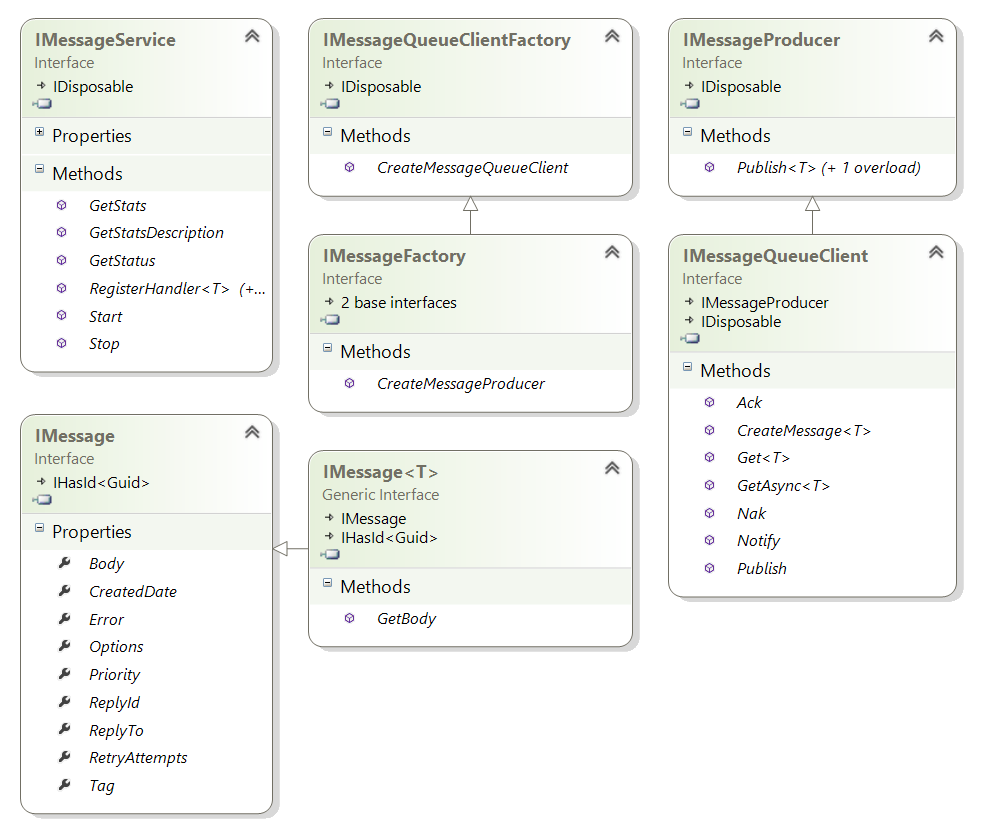
Messaging API

There are currently 3 supported MQ Server options:

Like other ServiceStack providers, all MQ Servers are interchangeable, visible in the shared MQ Server tests below:

Benefits of Message Queues

One of the benefits of using ServiceStack is its integrated support for hosting MQ Servers allowing your Services to be invoked via a MQ Broker. There are a number of reasons why you'd want to use a MQ as an alternative to HTTP including:

  • Sender is decoupled from Receiver, eliminating point-to-point coupling and configuration
  • Allows no-touch deploy of new clients and servers without updating any configuration
  • Removes time-coupling allowing clients and servers to be deployed independently without downtime
  • Better reliability, consumers can still send messages when servers are down and vice-versa
  • Durable, messages can be persisted and survive application or server reboots
  • Allows for CPU Intensive or long operations without disrupting message workflow
  • Instant response times by queuing slow operations and executing them in the background
  • Allows for natural load-balancing where throughput can be increased by simply adding more processors or servers
  • Message-based design allows for easier parallelization and introspection of computations
  • Greater throttling and control of message throughput, message execution can be determined by server
  • Reduces request contention and can defer execution of high load spikes over time
  • Better recovery, messages generating server exceptions can be retried and maintained in a dead-letter-queue
  • DLQ messages can be introspected, fixed and later replayed after server updates and rejoin normal message workflow

More details of these and other advantages can be found in the definitive Enterprise Integration Patterns.


  1. Getting Started
    1. Create your first webservice
    2. Your first webservice explained
    3. ServiceStack's new API Design
    4. Designing a REST-ful service with ServiceStack
    5. Example Projects Overview
  2. Reference
    1. Order of Operations
    2. The IoC container
    3. Metadata page
    4. Rest, SOAP & default endpoints
    5. SOAP support
    6. Routing
    7. Service return types
    8. Customize HTTP Responses
    9. Plugins
    10. Validation
    11. Error Handling
    12. Security
    13. Debugging
  3. Clients
    1. Overview
    2. C# client
    3. Silverlight client
    4. JavaScript client
    5. Dart Client
    6. MQ Clients
  4. Formats
    1. Overview
    2. JSON/JSV and XML
    3. ServiceStack's new HTML5 Report Format
    4. ServiceStack's new CSV Format
    5. MessagePack Format
    6. ProtoBuf Format
  5. View Engines 4. Razor & Markdown Razor
    1. Markdown Razor
  6. Hosts
    1. IIS
    2. Self-hosting
    3. Messaging
    4. Mono
  7. Security
    1. Authentication/authorization
    2. Sessions
    3. Restricting Services
  8. Advanced
    1. Configuration options
    2. Access HTTP specific features in services
    3. Logging
    4. Serialization/deserialization
    5. Request/response filters
    6. Filter attributes
    7. Concurrency Model
    8. Built-in caching options
    9. Built-in profiling
    10. Form Hijacking Prevention
    11. Auto-Mapping
    12. HTTP Utils
    13. Virtual File System
    14. Config API
    15. Physical Project Structure
    16. Modularizing Services
    17. MVC Integration
  9. Plugins 3. Request logger 4. Swagger API
  10. Tests
    1. Testing
    2. HowTo write unit/integration tests
  11. Other Languages
    1. FSharp
    2. VB.NET
  12. Use Cases
    1. Single Page Apps
    2. Azure
    3. Logging
    4. Bundling and Minification
    5. NHibernate
  13. Performance
    1. Real world performance
  14. How To
    1. Sending stream to ServiceStack
    2. Setting UserAgent in ServiceStack JsonServiceClient
    3. ServiceStack adding to allowed file extensions
    4. Default web service page how to
  15. Future
    1. Roadmap

Clone this wiki locally