Loaders, in three prints.
Six states. Three visual worlds. One API.
Most loader libraries give you one look and hope it suits your product. Intermission fixes the states and lets you swap the world. The state vocabulary is identical across every print, so changing worlds is a one-line change that never moves a pixel of layout.
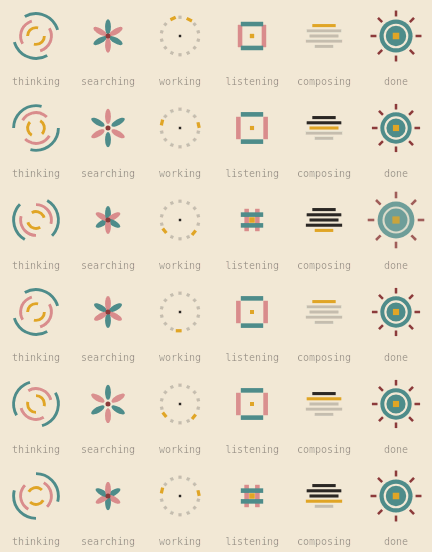
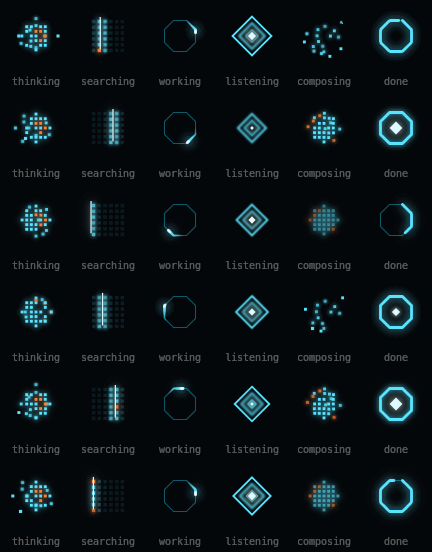
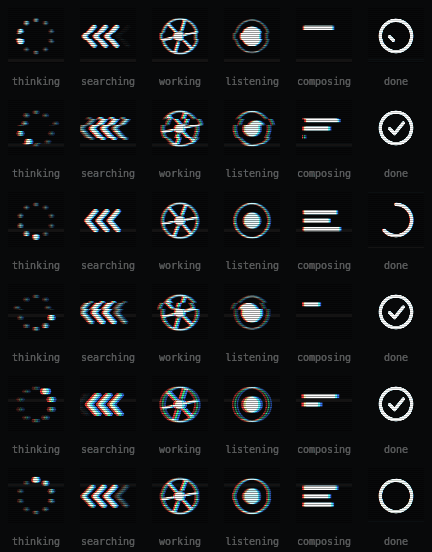
Try them live → - switch prints, change speed, scrub through states.
npm install intermissionReact is an optional peer dependency - the core works without it.
import { Loader, IntermissionProvider } from "intermission/react";
import { tape } from "intermission/tape";

export default function App() {
  return (
    <IntermissionProvider print={tape}>
      <Loader state="thinking" />
      <Loader state="done" size={20} />
    </IntermissionProvider>
  );
}
Set the print once at the root and every loader below follows it. Or pass one per instance, with no provider at all:
import { Loader } from "intermission/react";
import { grid } from "intermission/grid";

<Loader state="searching" print={grid} size={48} />;A Print is an object of drawing functions, and functions cannot be passed
from a Server Component to a Client Component. So this fails:
// app/page.tsx - a Server Component by default
import { IntermissionProvider } from "intermission/react";
import { tape } from "intermission/tape";

<IntermissionProvider print={tape}>  {/* ✗ Functions cannot be passed… */}
Import the print inside a client boundary instead, so it never crosses:
// app/providers.tsx
"use client";

import { IntermissionProvider } from "intermission/react";
import { tape } from "intermission/tape";
import type { ReactNode } from "react";

export function Providers({ children }: { children: ReactNode }) {
  return <IntermissionProvider print={tape}>{children}</IntermissionProvider>;
}
// app/page.tsx - still a Server Component
import { Loader } from "intermission/react";
import { Providers } from "./providers";
export default function Home() {
return (
<Providers>
<Loader state="thinking" />
</Providers>
);
}<Loader> itself is fine in a Server Component - state, size and speed are
all serializable. It is only print that has to stay client-side.
The same applies to print={grid} as a direct prop: pass it from a client
component, or use the provider.
The state names are deliberately generic, so they can come straight off an existing machine without a mapping layer:
const [phase, setPhase] = useState<LoaderState>("listening");

// …later
setPhase(response.streaming ? "composing" : "done");

<Loader state={phase} />;At small sizes, let the text do the announcing and hide the loader from screen
readers with label={null}:
<span style={{ display: "inline-flex", alignItems: "center", gap: 8 }}>
  <Loader state="searching" size={16} label={null} />
  Searching your documents…
</span>print overrides the provider per instance:
<IntermissionProvider print={academy}>
  <Loader state="working" />              {/* academy */}
  <Loader state="working" print={grid} /> {/* grid    */}
</IntermissionProvider>Each print declares the ground it was drawn for:
<div style={{ background: tape.ground }}>
  <Loader state="thinking" print={tape} />
</div><Loader state="thinking" speed={0.5} /> {/* half speed */}
<Loader state="done" paused /> {/* freeze on a still */}paused defaults to the user's prefers-reduced-motion setting, so passing it
explicitly is an override in both directions.
Every print implements all six. Five loop; done plays once and holds.
| State | For |
|---|---|
thinking |
Working something out, no visible progress |
searching |
Looking through a corpus, scanning, retrieving |
listening |
Waiting on input - a mic, a stream, a webhook |
working |
A task in flight with a definite end |
composing |
Assembling output - writing, drafting, building |
done |
Finished. Settles once, then holds. |
Because the vocabulary is fixed, state can be driven straight from your own
machine without a mapping layer.
| Reference | The rules it never breaks | |
|---|---|---|
| Academy | Wes Anderson | Bilateral symmetry every frame · stepped timing, nothing eases · flat fill, no gradients · built for a cream ground |
| Grid | TRON | No curves - every ring is a polygon · additive glow only · trails decay behind the head · orange stays rare enough to mean something |
| Tape | VHS | Colour channels drift apart · scanlines over everything · rows occasionally slip · shapes stay plain, the medium carries them |
The reference lives in the motion grammar, not in costume. That's what keeps these usable next to a paragraph of text instead of reading as a novelty.
Each print declares the ground it was designed against:
import { academy } from "intermission/academy";

academy.ground; // "#F2E8D5"
academy.palette; // ["#2B2724", "#8C3B3B", …]
Nothing enforces it - a print will draw on any background - but Academy on black or Grid on white will not look like the demo.
| Prop | Type | Default | |
|---|---|---|---|
state |
LoaderState |
- | Required. One of the six. |
print |
Print |
from context | Falls back to the nearest provider. |
size |
number |
64 |
Edge length in CSS pixels. Always square. |
speed |
number |
1 |
Time multiplier. |
paused |
boolean |
reduced-motion | Rest on a representative still. |
label |
string | null |
the state name | Announced to assistive tech. null hides it. |
className |
string |
- | |
style |
CSSProperties |
- |
Changing state, print, size or speed updates in place - the canvas is
never torn down mid-animation.
By default a loader is role="img" with aria-label set to the state name. When
adjacent text already says it, hide the loader instead of announcing it twice:
<span>
  <Loader state="thinking" size={20} label={null} />
  Thinking…
</span>The core has no framework dependency.
import { mount } from "intermission";
import { academy } from "intermission/academy";

const handle = mount(canvas, {
  print: academy,
  state: "working",
  size: 64,
  speed: 1,
});
mount returns a handle. Every method updates in place:
| Method | |
|---|---|
setState(state) |
Also restarts the clock, so done replays. |
setPrint(print) |
Swap worlds without remounting. |
setSize(size) |
Re-scales for device pixel ratio. |
setSpeed(speed) |
|
setPaused(paused) |
|
destroy() |
Removes it from the shared animation loop. |
mount also takes paused and maxDpr (default 2 - beyond that costs more
than it shows).
A print is six draw functions plus some metadata. The primitives the built-in three are made from are exported for exactly this:
import { TAU, stepq, polygon, polyPoint, hash, type Print } from "intermission";

const pulse = (c: CanvasRenderingContext2D, t: number, s: number) => {
  const r = s * 0.3 * (0.75 + 0.25 * Math.sin(t * 3));
  c.fillStyle = "#E0A526";
  c.beginPath();
  c.arc(s / 2, s / 2, r, 0, TAU);
  c.fill();
};

export const mine: Print = {
  name: "mine",
  title: "Mine",
  ground: "#111111",
  palette: ["#111111", "#E0A526"],
  settleDuration: 0.8,
  states: {
    thinking: pulse,
    searching: pulse,
    working: pulse,
    listening: pulse,
    composing: pulse,
    done: pulse,
  },
};
A draw function receives a context already scaled for device pixel ratio and
already cleared. Draw in CSS pixels against a size × size box with the origin
at its top left.
Two things worth knowing:
trestarts when the state changes, which is what letsdoneplay once and hold rather than looping.- Anything drawn outside the box is clipped by the canvas. If you use
shadowBlur, inset the artwork enough that the glow lands inside - otherwise it gets a hard square edge cut through it.npm run verifychecks for this.
stepq is what gives Academy its snap; polyPoint is what runs Grid's light
trail along a path without curves.
Per entry point, minified and gzipped:
| Entry | Minified | Gzipped |
|---|---|---|
intermission (core) |
2.3 kB | 1.2 kB |
intermission/react |
2.5 kB | 1.2 kB |
intermission/academy |
2.6 kB | 1.2 kB |
intermission/tape |
3.4 kB | 1.6 kB |
intermission/grid |
4.1 kB | 1.7 kB |
Prints are separate entry points and the package is marked sideEffects: false,
so importing one never bundles the others. A React app using a single print ships
roughly 3.6 kB gzipped.
- One animation frame, shared. Twenty loaders on a page cost one
requestAnimationFramecallback, not twenty. - Server-safe. The React entry ships
"use client", so<Loader>can be used directly inside a Server Component. It renders a plain<canvas>on the server and starts animating on hydration. The one exception is theprintprop, which has to be passed from a client boundary. See Next.js App Router. - Respects
prefers-reduced-motionby resting on a representative still frame. Passpausedexplicitly to override in either direction. - ESM and CommonJS, with types for both, verified against a real install on every CI run.
- Requires the Canvas 2D API - every browser since roughly 2015.
npm run build      # bundle to dist/ (ESM + CJS + types)
npm run typecheck  # tsc --noEmit
npm run verify     # render all 18 states headlessly; fail if any is blank,
                   # frozen, or drawing outside its box
npm run demo # build the self-contained landing page to demo/distnpm version minor
git push --follow-tagsCI verifies the tag matches package.json, then publishes to npm with
provenance and cuts the GitHub release.
MIT © Ben Howdle