Home

clITK (for Command Line Insight Toolkit) is a toolbox for medical image processing and analysis. This set of solutions includes algorithms for pre-processing, segmentation, registration, analysis, evaluation of the results obtained as well as the VV visualization tool and more! This wiki presents you the installation steps of the tutorials for using these tools.
- clITK ?
- Pre-requisite sources and tools
- Download clITK
- Compiling clITK
- clITK tools Wiki and examples
- Create a new tool for clITK
To use clitk, your system needs the following third party software (click on the link to get the download links a step by step installation instructions):
- Visual Studio 2022 Download and Install
- ITK 4.13.3
- VTK 8.2
- Qt 5.12
- Git 2.36.1
Other versions are compatible but not tested yet, we advise you to use the one indicated.
Create on your computer a folder “YOURclITKFOLDER”. Depending on your use of clITK there are 2 ways to download it:
- For users, simple download of the archive
- For contributors, use git to download and upload files)
For users
Click on the link below: https://github.com/benpresles/vv
Click on “Code” green button > “Download ZIP”
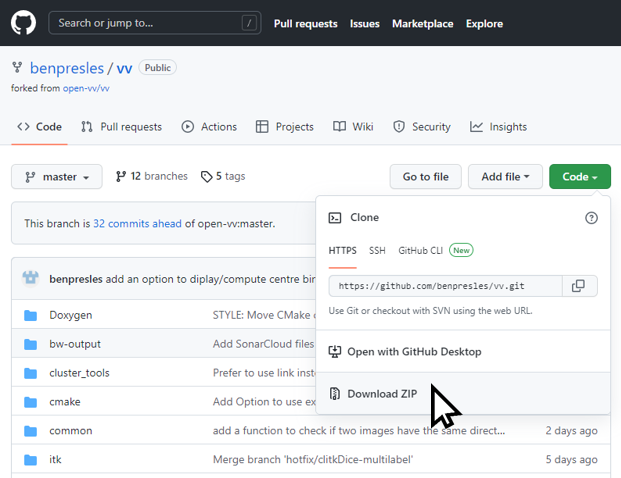
Uncompressed the vv-master.zip files in the folder “YOURclITKFOLDER\vv-master”
For contributors
Click on the link below: https://github.com/benpresles/vv
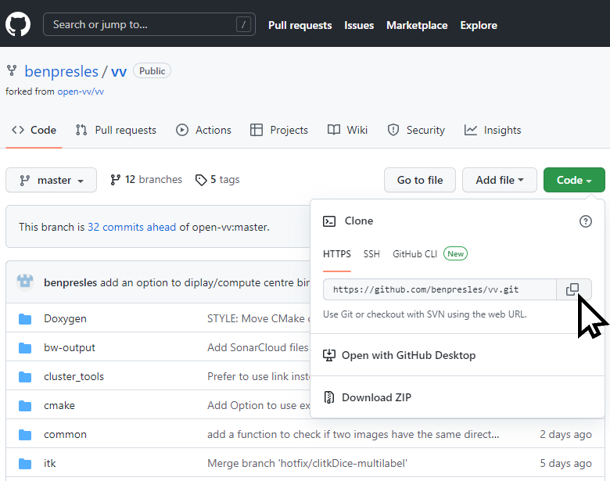
Click on “Code” green button and then click on the button next to the URL to copy it.
In your Git folder, launch “git-cmd.exe”
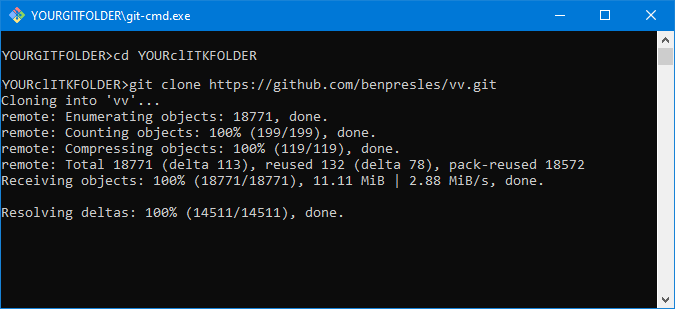
Go to “YOURclITKFOLDER” and enter the command “git clone” + paste the copied URL (https://github.com/benpresles/vv.git) > “press “Enter”. The clitkPoject is now in “YOURclITKFOLDER\vv”.