Releases: beyond5525/MCPMender
Release list
MCPMender 0.3.0 Beta 5 / 协议修匠 0.3.0 测试版 5

MCPMender 0.3.0 Beta 5
MCPMender (协议修匠) 0.3.0 Beta 5 adds automatic discovery of the standard VSCodium user-level MCP configuration on Windows, macOS, and Linux.
What's new
- Automatically discovers VSCodium's standard user configuration:
- Windows:
%APPDATA%\VSCodium\User\mcp.json - macOS:
~/Library/Application Support/VSCodium/User/mcp.json - Linux:
$XDG_CONFIG_HOME/VSCodium/User/mcp.jsonor~/.config/VSCodium/User/mcp.json
- Windows:
- Reuses MCPMender's existing VS Code-compatible parsing, diagnostics, backup, and safe-repair flow.
- Adds English, Simplified Chinese, and Japanese AppImage/FUSE fallback guidance.
- Updates the trilingual product gallery and discovery documentation.
- Thanks to @adity982 for the initial VSCodium implementation.
Downloads
- Windows x64:
MCPMender.zip— extract the versionlessMCPMenderfolder and runMCPMender.exe. - Linux x64: AppImage or
.tar.gz. - macOS: Apple Silicon (
arm64) or Intel (x64).dmg/.zip. - CLI:
mcpmender-0.3.0-beta.5.tgzfor Node.js 20.3 or newer.
Verification
- Release tag:
v0.3.0-beta.5 - Source commit:
4256263191e6e50ab81c0f33727c8bd155e17ccd - Native Windows, Linux, macOS arm64, macOS x64, and CLI workflow: all passed.
- Local Windows release: 82 tests passed, type checks and production builds passed, production dependency audit reported no known vulnerabilities, final ZIP independently extracted and smoke-tested.
- Windows ZIP SHA-256:
59a21fe0f950496f366883b44ecadcae67043be7d1aecb3722b9d08f8bd68783 - Platform checksum files are attached.
Important notes
- The Windows executable uses the project's self-signed community certificate, so Windows may still display a SmartScreen warning.
- macOS packages are ad-hoc signed but not Apple-notarized, so Gatekeeper may require manual confirmation.
- VSCodium named-profile configuration folders are not automatically discovered yet; this release supports the standard user-level
mcp.jsonpath. - The npm registry package has not been published; use the attached CLI tarball for now.
简体中文
Beta 5 新增 Windows、macOS、Linux 上的 VSCodium 标准用户级 MCP 配置自动发现,并复用现有的检测、诊断、备份和安全修复流程。Linux 教程补充了 AppImage 在缺少 FUSE 时的三语解决方法。本次 Windows 正式包已在本机完整测试、签名、解压复核和启动验证;macOS/Linux 原生构建也已在 GitHub Actions 全部通过。
Windows 解压 MCPMender.zip 后运行 MCPMender.exe;Linux 可选择 AppImage 或 tar.gz;macOS 请按芯片选择 arm64 或 x64。Windows 为自签名证书,macOS 未做 Apple 公证,首次运行可能出现系统安全提示。
日本語
Beta 5 では、Windows、macOS、Linux の VSCodium 標準ユーザーレベル MCP 設定を自動検出できるようになりました。既存の診断、バックアップ、安全修復機能をそのまま利用できます。AppImage で FUSE が利用できない場合の英語・中国語・日本語ガイドも追加しました。Windows の最終パッケージはローカルで完全検証済みで、macOS / Linux のネイティブビルドも GitHub Actions で成功しています。
Windows は MCPMender.zip を展開して MCPMender.exe を実行してください。Linux は AppImage または tar.gz、macOS は arm64 / x64 の該当パッケージを選択してください。Windows は自己署名、macOS は Apple の公証なしのため、初回起動時にセキュリティ警告が表示される場合があります。
MCPMender 0.3.0 Beta 4 / 协议修匠 0.3.0 测试版 4
MCPMender(协议修匠)0.3.0 Beta 4 is a cross-platform beta for detecting and safely repairing local MCP client configuration problems.
What changed
- Force-closes timed-out stdio MCP server probes so diagnostics do not leave background processes behind on Linux or macOS.
- Completes native build, launch, screenshot, shutdown, signature, archive, CLI, and test validation on Windows x64, Linux x64, macOS arm64, and macOS x64.
- Keeps the command-line interface available on Windows, macOS, and Linux.
- Includes English, Simplified Chinese, and Japanese UI and offline help.
Product tour · 产品介绍 · 製品紹介
English
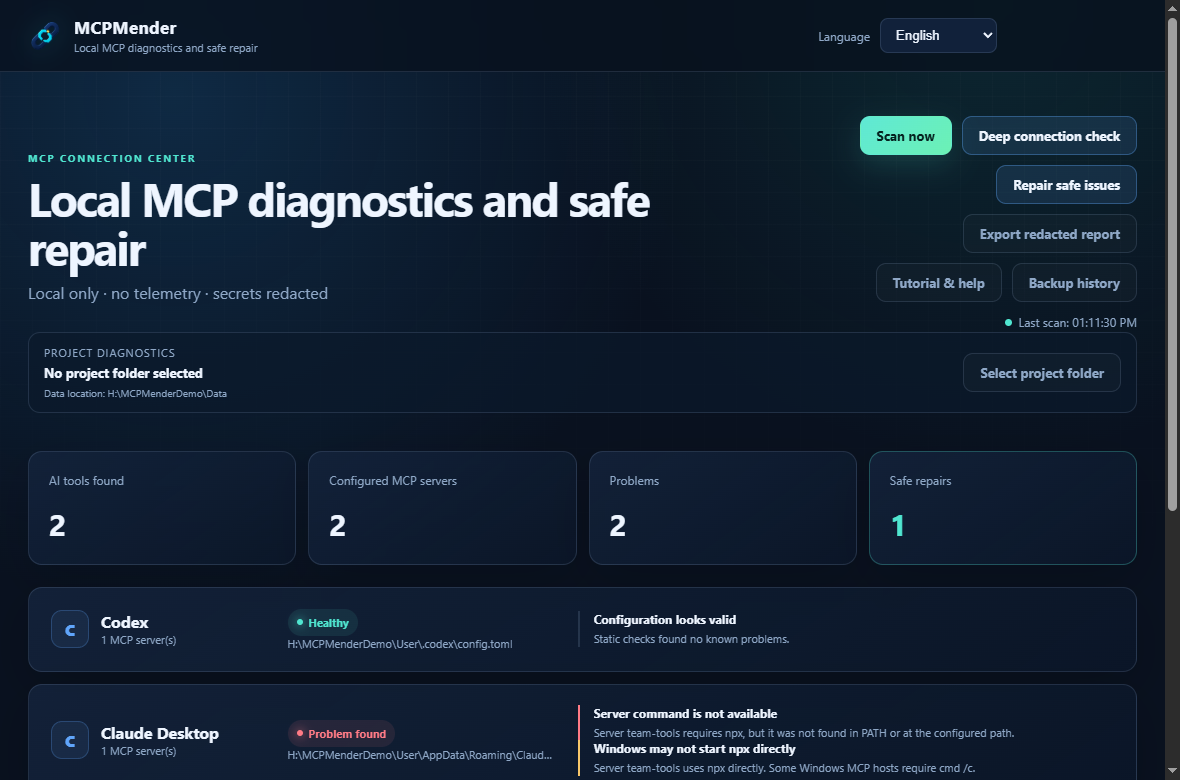
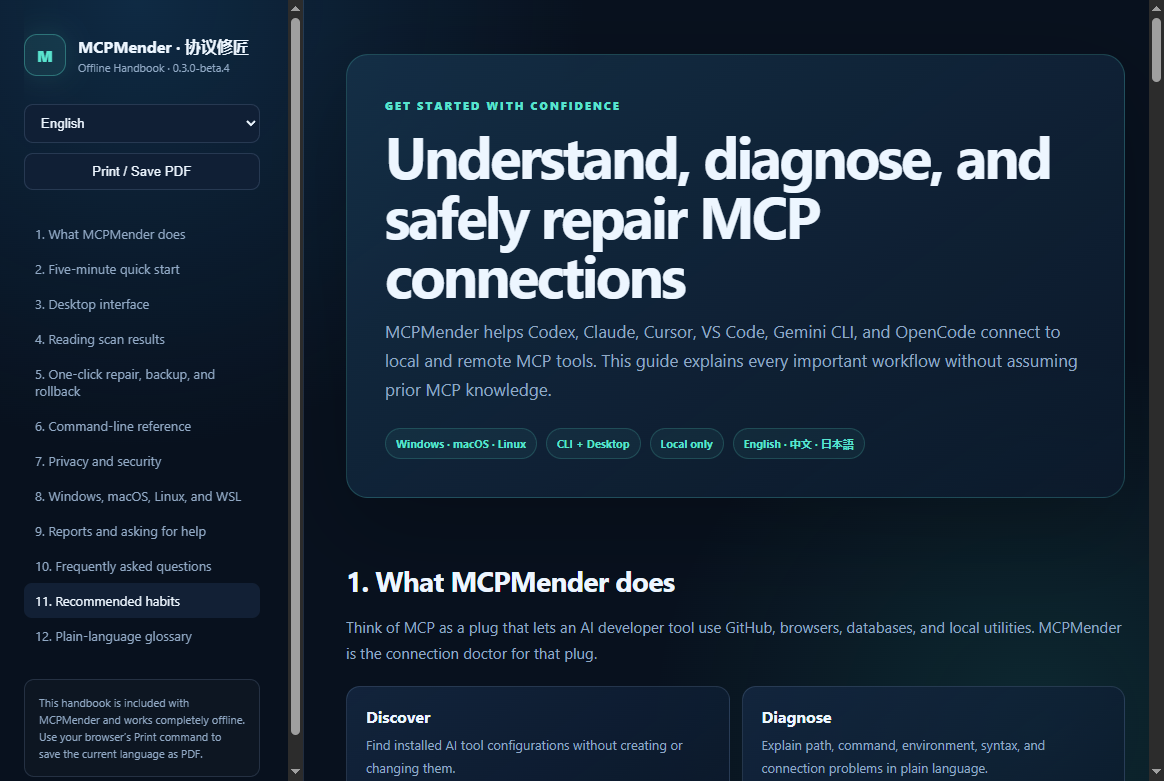
MCPMender is a local desktop and command-line tool for diagnosing MCP
configuration problems in Codex, Claude Desktop, Cursor, VS Code, Gemini CLI,
and OpenCode.
Start with a read-only scan, optionally run a real connection check, and preview
eligible low-risk repairs before applying them. Every applied repair creates a
backup and rollback record. The interface, CLI, and bundled offline handbook
are available in English, Simplified Chinese, and Japanese on Windows, macOS,
and Linux.
| Diagnostics and safe repair | Offline tutorial and help |
|---|---|
 |
 |
简体中文
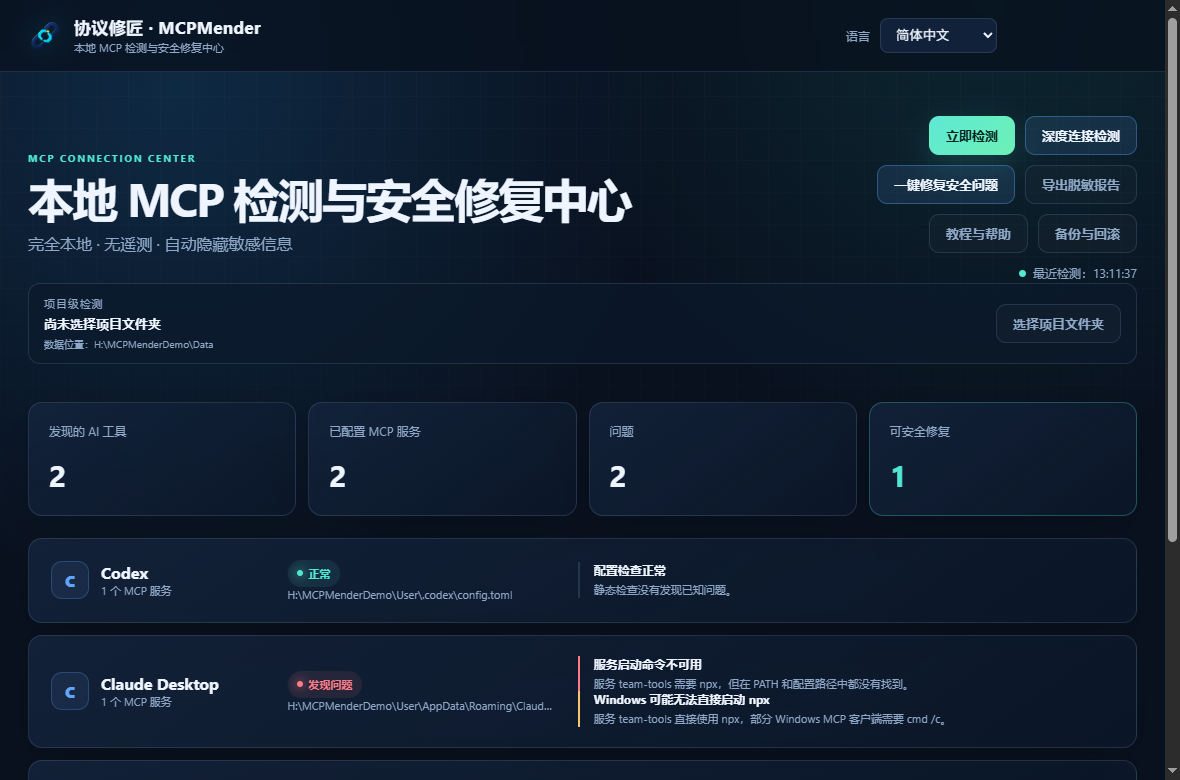
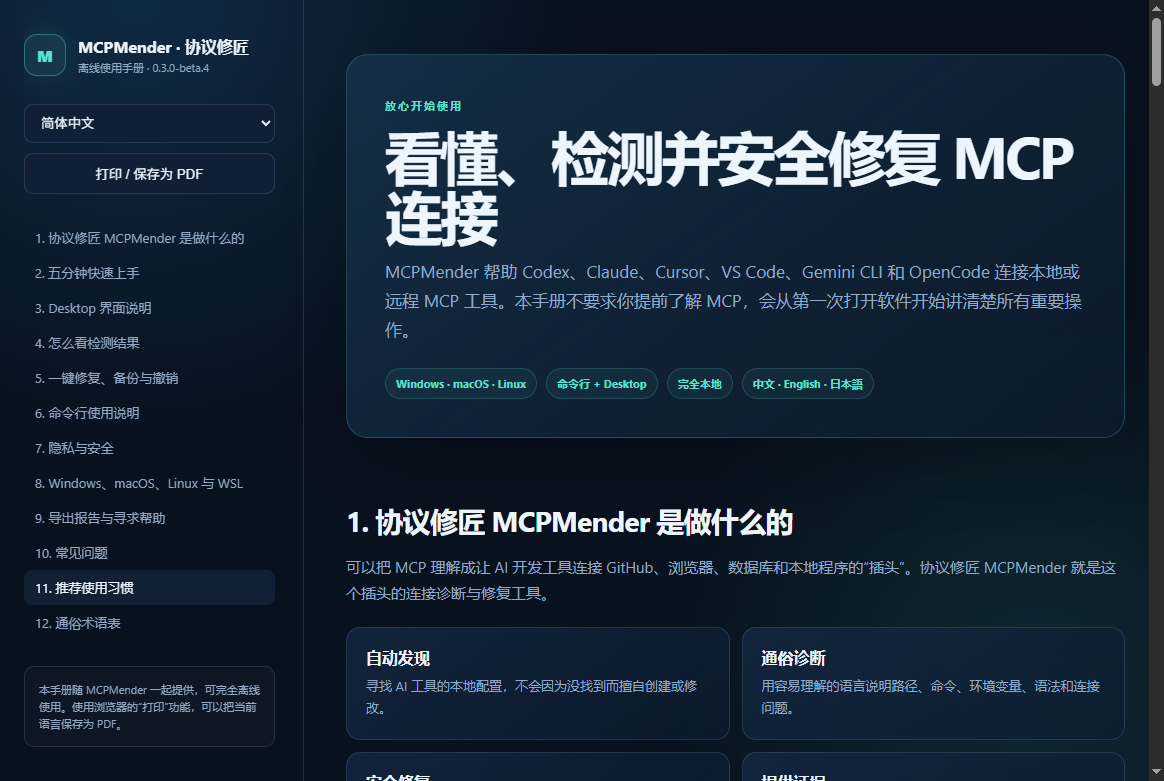
协议修匠是一款在本地运行的桌面端和命令行 MCP 配置诊断工具,可检查 Codex、
Claude Desktop、Cursor、VS Code、Gemini CLI 和 OpenCode 的 MCP 配置问题。
打开软件后先点击“立即检测”进行完全只读的安全扫描;需要时可以再运行真实连接
检查。只有明确符合安全规则的低风险问题才会提供自动修复,并且会先展示修改
内容,应用时自动备份,之后还可回滚。Windows、macOS 和 Linux 均可使用,
界面、命令行和离线教程支持英文、简体中文和日语。
| 本地检测与安全修复 | 中文离线教程与帮助 |
|---|---|
 |
 |
日本語
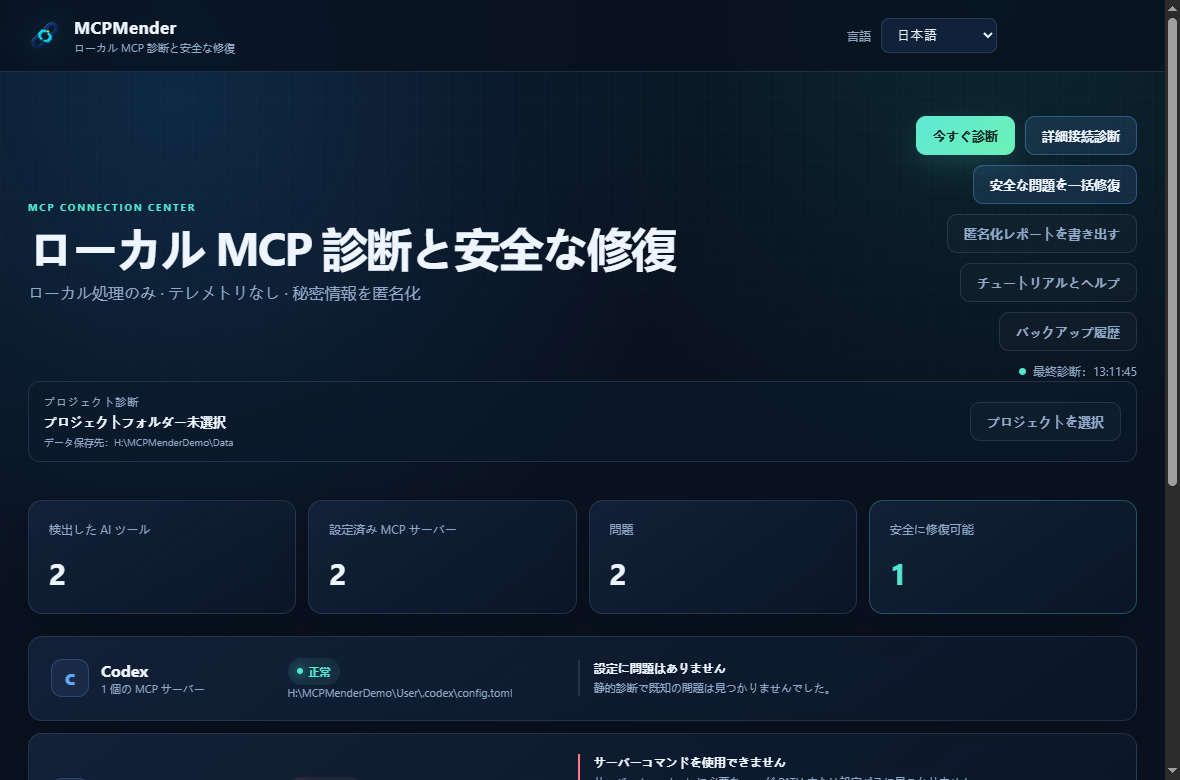
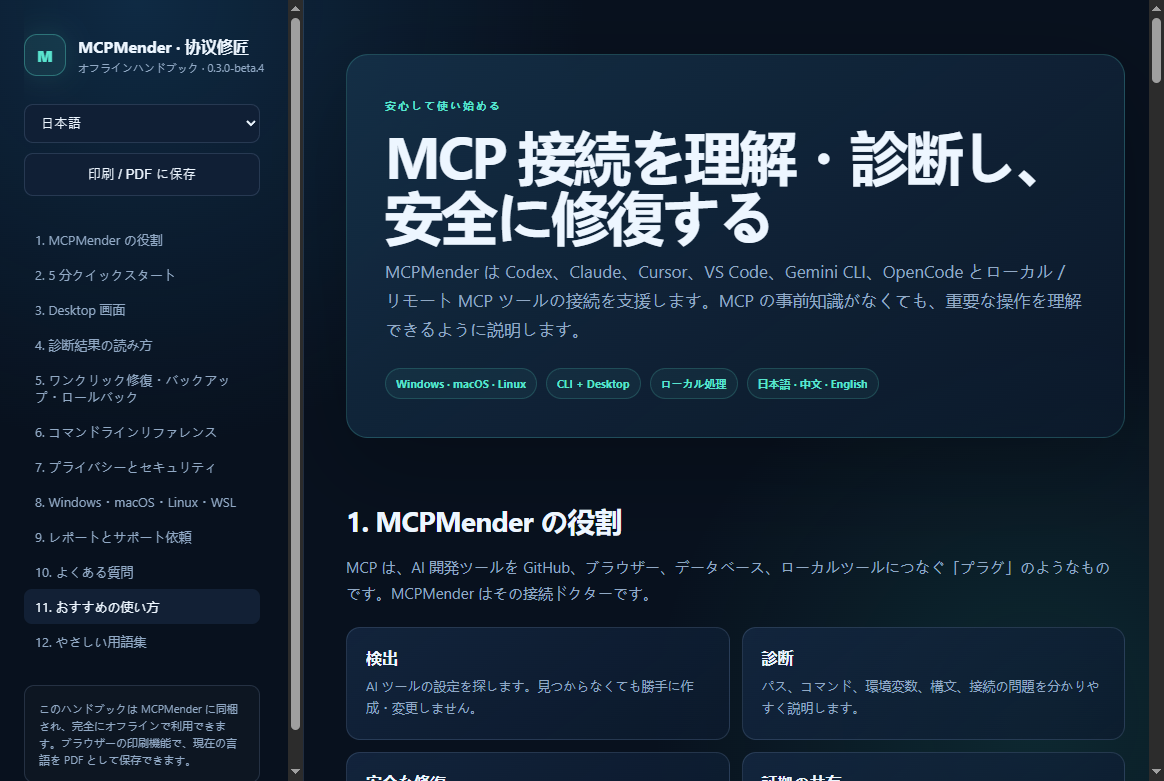
MCPMender は、Codex、Claude Desktop、Cursor、VS Code、Gemini CLI、
OpenCode の MCP 設定問題を診断する、ローカル動作のデスクトップ/
コマンドラインツールです。
まず読み取り専用のスキャンを実行し、必要な場合だけ実際の接続確認を行えます。
安全条件を満たす低リスクの修復候補は、変更内容を確認してから適用でき、
バックアップとロールバック記録も自動的に作成されます。Windows、macOS、
Linux に対応し、画面、CLI、オフラインヘルプを英語、簡体字中国語、日本語で
利用できます。
| ローカル診断と安全な修復 | 日本語オフラインチュートリアル |
|---|---|
 |
 |
Downloads
- Windows x64:
MCPMender.zip— versionlessMCPMenderfolder containing the portable Desktop client, CLI tarball, trilingual handbook, checksums, notices, certificate fingerprint, and SBOM. - Linux x64: AppImage for the simplest portable launch, or
.tar.gzfor manual extraction. - macOS Apple Silicon:
macOS-arm64.dmgor.zip. - macOS Intel:
macOS-x64.dmgor.zip. - CLI only:
mcpmender-0.3.0-beta.4.tgz(requires Node.js 20.3 or later).
Verification
- Source tag:
v0.3.0-beta.4 - Source commit:
800734abd96336bb0b04eeca84bddee8b7a37261 - Native workflow: https://github.com/beyond5525/MCPMender/actions/runs/30512572695
- Windows archive SHA-256:
4a00d3582c95e2ac35336ea54dcb8a2ada6842c98b706b3b10f4f08cd36ff6c2 - Platform-specific checksum files are attached for Linux and macOS.
Signing and first-launch warnings
The Windows EXE has an Authenticode signature and timestamp using the self-signed MCPMender Community Build certificate, thumbprint 88BE2E41D12479CC665B5809400B4A48308C99F5. This verifies file integrity and publisher fingerprint but is not a commercially trusted identity, so Windows SmartScreen may still warn.
The macOS applications are ad-hoc signed and were verified on native GitHub-hosted macOS runners. They are not Apple-notarized, so Gatekeeper may require the user to approve the first launch.
This remains a beta release. Back up important configuration files and review the proposed changes before using automatic repair.
MCPMender 0.3.0 Beta 3 / 协议修匠 0.3.0 测试版 3
MCPMender / 协议修匠 0.3.0 Beta 3 is the first reviewed public beta release.
Download
MCPMender.zip— Windows portable Desktop app plus the bundled cross-platform CLI package and offline trilingual handbook.MCPMender.zip.sha256— SHA-256 checksum for the archive.
No installation is required for the Windows Desktop app: extract the archive and run Windows/MCPMender/MCPMender.exe.
Highlights
- Local MCP configuration diagnostics for Codex, Claude Desktop, Cursor, VS Code, Gemini CLI, and OpenCode.
- Safe static scanning, opt-in live connection probes, repair previews, backups, and rollback history.
- English, Simplified Chinese, and Japanese UI, CLI messages, and offline help handbook.
- Expanded credential redaction, configuration schema support, cancellation cleanup, BOM-safe repair, and atomic Desktop history.
Platform note
This upload contains the natively validated Windows Desktop build and the cross-platform Node.js CLI package. Native macOS and Linux Desktop packages are intentionally not claimed in this Windows-built archive; they will be published only after their matching native CI jobs pass. The CLI requires Node.js 20.3 or newer.
Signature note
The Windows executable is self-signed and timestamped. It is not equivalent to a commercially trusted code-signing certificate, so Windows SmartScreen may still warn. Verify the published SHA-256 before running.
This is a beta release. Review every repair preview and keep backups of important configuration files.