feat(desktop): keyboard shortcut for next/previous channel in sidebar - #3377
Open
enzowilliam wants to merge 1 commit into
Open
feat(desktop): keyboard shortcut for next/previous channel in sidebar#3377enzowilliam wants to merge 1 commit into
enzowilliam wants to merge 1 commit into
Conversation


Adds Option+Down/Option+Up (macOS) and Ctrl+Alt+Down/Ctrl+Alt+Up
(Windows/Linux) to move the active channel selection down/up the
sidebar's stream-channel list. Windows/Linux includes Ctrl because
plain Alt+arrows are bound to back/forward navigation.

- Extracts the sidebar's displayed-order flattening (starred -> custom
  sections in order -> unassigned, each honoring its own sort
  preference) into a shared sidebarChannelOrder helper used by both
  AppSidebar and the new useChannelNavigationShortcuts hook, so the
  two cannot drift.
- Muted channels are skipped; the selection stops at both ends (no
  wraparound); no-op on the home feed, forums, and DMs.
- Registers both shortcuts in the Navigation category so they appear
  in Settings -> Keyboard Shortcuts.
- Extracts the inline global action shortcut effect from AppShell into
  useGlobalActionShortcuts to stay under the 1000-line file ceiling.
- Unit tests for ordering/adjacency and an e2e case in
  navigation.spec.ts.

Closes block#3078

Co-Authored-By: Claude Fable 5 <noreply@anthropic.com>
Signed-off-by: Enzo William <enzowilliam99@gmail.com>


Author
|
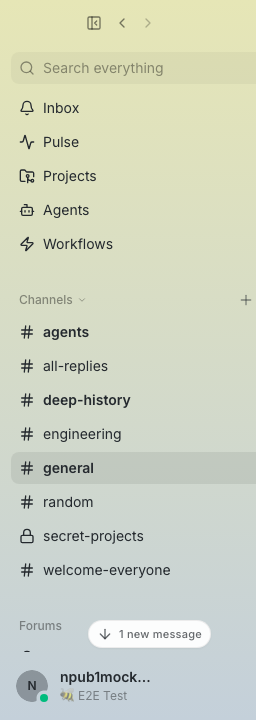
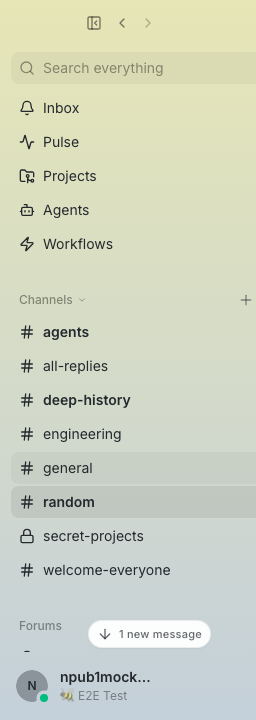
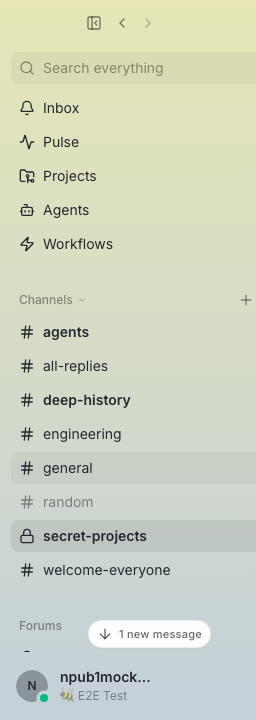
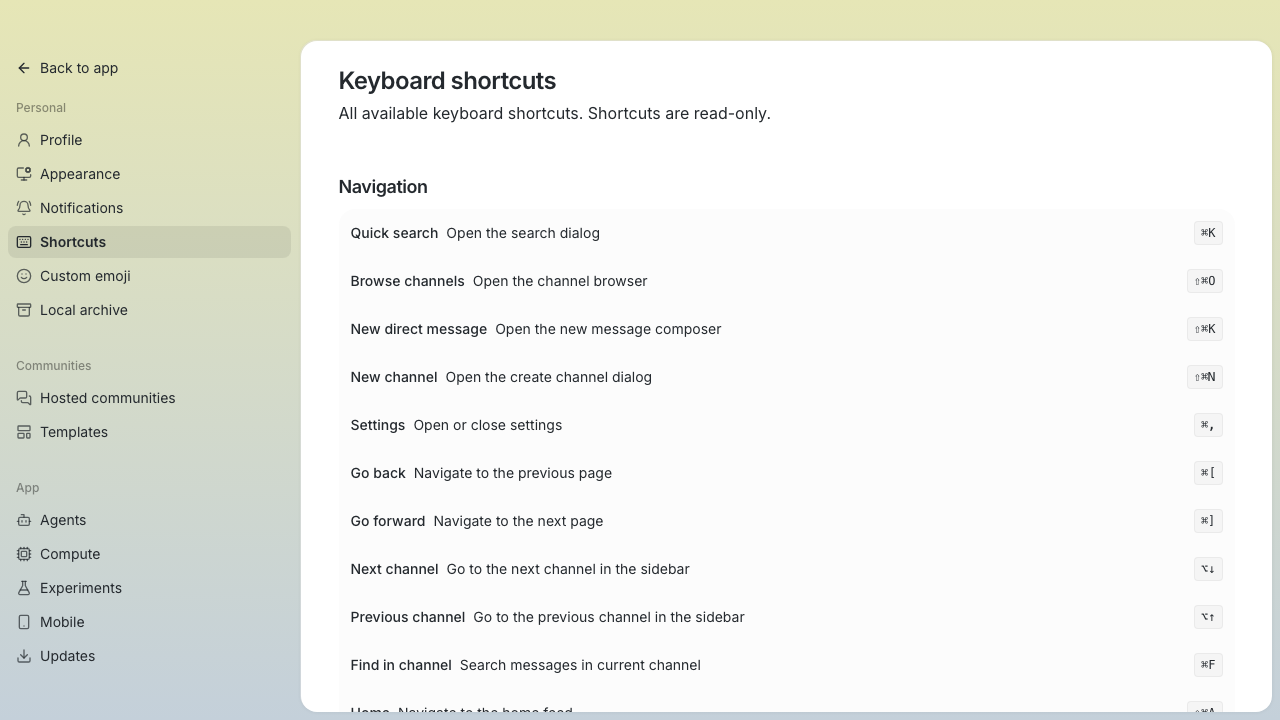
Screenshots for the channel-navigation shortcut (captured via the e2e mock bridge, sidebar shots cropped to the sidebar). Before
After one press of ⌥↓Selection moves to the next channel in sidebar order,
Muted channels are skippedWith
Settings → Keyboard ShortcutsBoth shortcuts registered under Navigation.
|
wpfleger96
added a commit
that referenced
this pull request
Aug 2, 2026



…and swipe gestures (#3778)

## Problem

Two related gaps in global back/forward navigation. Fixes #3775.

1. The keyboard shortcuts almost never fire in real use — users fall
back to clicking the toolbar chevrons and assume the shortcuts don't
exist.
2. On macOS, mouse back/forward buttons (X1/X2) and horizontal swipe
gestures do nothing, although they navigate in every browser and in
Slack.

**Duplicate check:** searched open PRs and issues — none found beyond
#3775 (filed alongside this fix). #3078 / #3377 are
next/previous-*channel* navigation, a different feature.

## Root causes

**Keyboard:** `useBackForwardControls`'s keydown handler bailed whenever
the event target was editable — but `useComposerAutofocus` deliberately
focuses the message composer (a ProseMirror contenteditable) on mount
and on every channel switch. In steady state focus almost always lives
in the composer, so the chords were silently swallowed. Invisible to CI
because `navigation.spec.ts` only ever clicked the `global-back` /
`global-forward` buttons, never pressed the keys.

**Mouse/swipe:** on macOS, WKWebView never delivers X1/X2 button events
or swipe gestures to the page (Safari handles them natively in the app
layer, not in page JS), and Buzz had no native handler.

## Fix

### Keyboard chords (web layer)

Match the existing platform chord regardless of the event target and
drop the editable-target guard:

- `⌘[` / `⌘]` have no text-editing semantics in macOS text fields, and
the TipTap/StarterKit editor config binds no `Mod-[` / `Mod-]` shortcuts
(checked `useRichTextEditor.ts` — list indentation is Tab/Shift-Tab).
- `preventDefault()` keeps the chord out of the editor — asserted in the
e2e test.

This matches browsers and Slack, where back/forward chords work while a
text field is focused. Chord matching is extracted into a pure helper,
`app/navigation/backForwardChords.ts`, so it can be unit tested;
behavior (bindings, modifier exclusivity, `code`-based matching for
non-US layouts) is unchanged.

### macOS mouse buttons and swipe gestures (native layer)

An NSEvent local monitor in `mouse_nav.rs` catches what the webview
can't see and emits a `mouse-nav` Tauri event to the main window
(`emit_to`, so navigation stays scoped if multi-window ever lands) that
the frontend acts on. Two AppKit event shapes map to navigation:

- `otherMouseUp` with button 3/4 — mice whose X1/X2 buttons arrive as
plain button events. These are swallowed after emitting so nothing
downstream double-handles them.
- `swipe` with a horizontal delta — AppKit's page-swipe gesture
(`swipeWithEvent:`): `deltaX > 0` back, `deltaX < 0` forward. Sent by
mouse drivers that synthesize a page-swipe gesture for the back/forward
buttons instead of button-3/4 events (the hardware this was verified
on). Stock Apple trackpad and Magic Mouse swipes arrive as phased
scroll-wheel events instead, which this PR does not handle — that path
(`ScrollWheel` + `trackSwipeEventWithOptions:`, which also needs
scroll-edge detection) is deferred to a follow-up. Swipes are passed
through (swallowing mid-gesture events could confuse AppKit gesture
tracking).

The swipe path was verified end to end on hardware whose back/forward
buttons emit only swipe gestures, never button-3/4 events — an
instrumented event monitor confirmed the events arrive as
`NSEventType::Swipe` with `deltaX ±1`, and navigation worked after
mapping them.

## Tests

- **13 unit tests** for the web-side chord matcher
(`backForwardChords.test.mjs`): supported chords, modifier exclusivity,
`code` fallback, and preservation of line-editing shortcuts.
- **6 Rust unit tests** for the native mapping helpers (`mouse_nav.rs`):
button 3/4 directions, other buttons ignored, swipe delta sign →
direction, zero-delta (gesture-begin) ignored.
- **e2e regression case** in `navigation.spec.ts`: presses the platform
chord *while the composer is focused* — the missing coverage. Verified
it fails against the pre-fix implementation and passes with the fix.
- Full desktop unit suite: 3832/3832 pass. Full Rust suite (`cargo
test`, buzz-desktop): 1888 passed / 0 failed. `pnpm typecheck`, `biome
check`, `pnpm check`, `cargo fmt --check`, `cargo clippy`: clean (no new
warnings).
- Full Playwright e2e: 958 passed; 6 failures are relay-infrastructure
tests (live relay seeding / relay state seam) that fail identically
without this change — `navigation.spec.ts` is fully green.

## Manual test

1. Open a channel, then another (composer autofocuses on each switch).
2. `⌘[` — returns to the previous channel; `⌘]` — forward again. Typing
`[` / `]` in the composer inserts normally.
3. Mouse back/forward buttons navigate the same way, from anywhere in
the window (verified on macOS on hardware using both event shapes).

## Update — 2026-07-31

Removed the redundant DOM mouse-button handler after verifying it was
unnecessary. The native macOS path remains unchanged and was revalidated
manually.

---------

Signed-off-by: npub1yvnq5equak5errqpku8stskushny9wsvt0fc2ywcpwt79yslwaqswe7tse <23260a641ceda9918c01b70f05c2dc85e642ba0c5bd38511d80b97e2921f7741@buzz.block.builderlab.xyz>
Signed-off-by: Matheus Iser <matheusiser@squareup.com>
Signed-off-by: Will Pfleger <pfleger.will@gmail.com>
Co-authored-by: npub1yvnq5equak5errqpku8stskushny9wsvt0fc2ywcpwt79yslwaqswe7tse <23260a641ceda9918c01b70f05c2dc85e642ba0c5bd38511d80b97e2921f7741@buzz.block.builderlab.xyz>
Co-authored-by: npub1mn7jgtj4w2pd0g0zeuhxsa6jy6p0rewxz4kujt98my82ahfmp72sxjexk7 <dcfd242e557282d7a1e2cf2e6877522682f1e5c6156dc92ca7d90eaedd3b0f95@buzz.block.builderlab.xyz>
Co-authored-by: Will Pfleger <pfleger.will@gmail.com>
This file contains hidden or bidirectional Unicode text that may be interpreted or compiled differently than what appears below. To review, open the file in an editor that reveals hidden Unicode characters.
Learn more about bidirectional Unicode characters
Sign up for free
to join this conversation on GitHub.
Already have an account?
Sign in to comment
1 participant

Add this suggestion to a batch that can be applied as a single commit.This suggestion is invalid because no changes were made to the code.Suggestions cannot be applied while the pull request is closed.Suggestions cannot be applied while viewing a subset of changes.Only one suggestion per line can be applied in a batch.Add this suggestion to a batch that can be applied as a single commit.Applying suggestions on deleted lines is not supported.You must change the existing code in this line in order to create a valid suggestion.Outdated suggestions cannot be applied.This suggestion has been applied or marked resolved.Suggestions cannot be applied from pending reviews.Suggestions cannot be applied on multi-line comments.Suggestions cannot be applied while the pull request is queued to merge.Suggestion cannot be applied right now. Please check back later.
Problem
There is no keyboard path to move between channels — every switch requires the mouse or a
⌘Kround-trip. Closes #3078.Duplicate check: searched open PRs and issues — none found beyond issue #3078 itself. The issue author sketched this exact design in the issue body; this PR follows that spec as written. If they have work in flight, happy to defer or hand this over.
What this adds
⌥↓/⌥↑(macOS) andCtrl+Alt+↓/Ctrl+Alt+↑(Windows/Linux) move the active channel selection down/up the sidebar list. Windows/Linux includesCtrlbecause plainAlt+arrows are already back/forward (useBackForwardControls.ts).Per the issue spec:
keyboard-shortcuts.ts, so it shows up in Settings → Keyboard Shortcuts automatically.Implementation
features/sidebar/lib/sidebarChannelOrder.ts— the sidebar's displayed-order flattening, extracted fromAppSidebar.tsxinto a shared helper (buildSidebarChannelGroups/flattenSidebarChannelGroups/adjacentSidebarChannelId) so the shortcut and the sidebar can't drift.AppSidebarnow renders from it; rendering is unchanged.app/useChannelNavigationShortcuts.ts— new hook mirroringuseMarkAsReadShortcuts, wired inAppShell. Section membership and per-group sort prefs are read from their relay-scoped localStorage stores at keypress time — the same stores the sidebar hooks keep in sync (including remote NIP-78 updates) — avoiding a duplicate relay subscription.app/useGlobalActionShortcuts.ts— the pre-existing inline ⌘K/⇧⌘K/⇧⌘N/⇧⌘O/⇧⌘A keydown effect moved verbatim out ofAppShell. Not drive-by churn: the addition pushedAppShell.tsxover the enforced 1000-line ceiling (check:file-sizessays split, never bump). AppShell is now 951 lines.Tests
sidebarChannelOrder.test.mjs): section order, per-group sort, orphaned assignments, muted skipping, boundary stops, empty/unselected no-ops.navigation.spec.ts: steps through sidebar channels without wrapping, platform-aware combo. Ran with the smoke project: 13 passed, 1 skipped (pre-existingtest.fixme).pnpm typecheck, biome,pnpm check(file sizes, px-text, pubkey-truncation): pass.just cipasses locally.Manual test
⌥↓/⌥↑(orCtrl+Alt+↓/↑): selection walks the sidebar order, skips the muted channel, stops at the ends.Deferred (per the issue)
AppSidebar; lifting it is explicitly deferred in the issue).⌥⇧↓/⌥⇧↑for next/previous unread.Screenshots follow in a comment (via
scripts/post-screenshots.sh).🤖 Generated with Claude Code