QA Testing
Panel plugins talk to servers, so most of what can go wrong needs a server to go wrong against. The repository carries a sandbox for that: Docker environments that build mc from the working tree and run it against a host serving the same files over sftp, ssh, ftp and samba -- by hand, or with the keys pressed from a script.
Everything below lives in tests/misc/docker.
tests/misc/docker/sandbox.sh debian-12 up
That builds two images, starts the server and builds mc -- a few minutes the first time, seconds afterwards. Then:
tests/misc/docker/sandbox.sh debian-12 mc      # mc in the container, by hand
tests/misc/docker/sandbox.sh debian-12 test    # the keys pressed from a script
tests/misc/docker/sandbox.sh ui                # the same, chosen from a menu
mc is built from your working tree. Nothing is written into the tree itself:
the sources are mounted read-only, copied inside, and the build lives in a
Docker volume. The environment name may be left out; debian-12 is the
default, or whatever $MC_SANDBOX says.
After editing the sources, rebuild without leaving the sandbox:
tests/misc/docker/sandbox.sh debian-12 build
The rest of the commands:
| command | what it does |
|---|---|
up |
images, server and mc, from nothing |
mc |
run mc against the environment |
build |
rebuild mc, keeping the object files: build [-f profiles]
|
test |
press the keys in the cases: test [-c subject] [-w transports] [-l locale] [-o key=value]... [-k keymap] [-g] [dir...]
|
ui |
the same, chosen from a menu |
check |
can every plugin be loaded, and does every protocol answer |
shell |
a shell next to mc: ssh, curl, smbclient are there |
remote |
a shell on the server |
logs |
what the server has to say |
down |
stop the containers |
clean |
stop them and throw the build away |
list |
the environments, subjects, transports, profiles and keymaps there are |
What is chosen is chosen apart:
-
the environment (
envs/<name>/): the image mc is built and run in.debian-12is the everyday one;debian-12-minimalhas nofile,unzip,zip,7z,bzip2;alpine-remotekeeps mc on Debian and puts the far end on Alpine (musl, busybox);debian-10is the oldest GLib the project takes, 2.58, with libarchive 3.3, curl 7.64 and libssh2 1.8 around it. Base images are pinned by digest. -
the subject (
cases/<name>/): the files and thecases.tsvof what to press on them.archivesopens archives over every transport;editorpresses keys in mcedit (the line filter, the search dialog);terminalpresses them in the embedded terminal (a command, Ctrl-L against Ctrl-Alt-L, the keybar, Ctrl-F1, insert mode in the shell's line);structopens a u-boot image and an MBR through the mcstruct plugin;panelpresses the quick filter, quick cd and the find dialog;luaopens a dBase table, an ELF and a picture through the viewers written in Lua;fileopscopies, moves and deletes;shellsdrives mc from every shell there is. The rest --cmdline,sqlite,arcmc,links-- press keys on the command line, on a database, on a format onlyarcmc.iniknows, and on symbolic links. Everything butarchivesandlinksis local only: they press keys on mc itself, not on a file a server holds. A picture is read as chafa's characters, which is what the script draws where the terminal has no sixel; sixel itself is not checked and cannot be, since it reaches the terminal as a DCS the screen library never sees. -
how mc is run there: the transport (
local,sftp,ftp,smb,shfor shell-link), the locale (-l ru_RU.KOI8-R), the shell mc drives (-s dash), ini values written before mc starts (-o old_esc_mode=true), a keymap fromcommon/keymaps/(-k shift-tab-complete), and a build profile fromcommon/features.ini(build -f all,ncurses,-f asan; each set of features keeps its own build directory).
Before blaming the code, ask the sandbox whether it is alive:
$ tests/misc/docker/sandbox.sh debian-12 check
  sftp         ok
  ftp          ok
  ssh          ok
  smb          ok
  mc           ok
  plugins:     arcmc docker ftp git hello k8s panelize s3 samba sftp shell-link sqlite systemd
This needs no terminal, so it also works from a script. A protocol that says
FAILED here is a server that never came up, not a plugin that misbehaves.
The plugins: line says what configure left out: on debian-10 there is no
sftp (libssh2 1.8 is older than the 1.9 configure asks for) and no s3
(curl 7.64).
One host, one tree, four ways in. The user is mc and the password is mc
everywhere.
| panel | host / UNC | port | remote path |
|---|---|---|---|
| SFTP | remote |
22 | /home/mc/cases/archives |
| Shell link | remote |
22 | empty, or the same |
| FTP | remote |
21 | /cases/archives |
| SMB | //remote/cases |
-- | archives |
localhost will not do: mc runs in its own container and the server is the
one next to it, reachable by the name remote.
The same tree is in /work/local/archives inside the mc container, for
whatever needs no server at all. test writes the connections into the
plugins' ini files itself; by hand, make one with S-F4 in the plugin's panel.
One directory per situation, and in each a cases.tsv saying what its files
are for -- read it as a checklist, or let test walk it:
$ cat 03-nested/cases.tsv
file            key                                           expect                  why                                                   transports
outer.tar       Enter                                         archive panel           then Enter on small.zip inside it
outer.tar       Enter,on small.zip,Enter,..,..                the panel it came from  twice: inner archive, outer archive, then sftp or ftp
zip-in-zip.zip  cd zip-in-zip.zip/uzip://                     extfs panel             utar:// is gone, uzip:// is the filesystem left to try  local
zip-in-zip.zip  cd zip-in-zip.zip/uzip://,on small.zip,Enter  extfs panel             a file inside an mc filesystem is left to mc.ext.ini    local
| directory | what it is for |
|---|---|
01-formats |
tar, zip and 7z, including one past libarchive's buffer |
02-content |
archives with no extension, and plain text named as one |
03-nested |
an archive inside an archive, and one inside uzip://
|
04-non-ascii |
Cyrillic and spaces in names, inside the archives and out |
The keys go comma separated, in order: Enter, F3, F5, F6, F8,
C-o, .. (up one level), on <name> (the cursor goes there), cd <path>
(the Quick cd box), type <text>, key <name> and width <n>. The
expectations: archive panel, listing, error dialog, nothing, no error, the panel it came from, extfs panel, copy to the other panel
(the file is then in /tmp, as big as mc said), the name as written (the
shell printed it), no process left (mc was asked to quit and is gone),
text: <what the screen must show>, no text: <what it must not> and
clipfile: <what mc copied>. The last two columns name the transports and
the shells a row is for; empty means all of them.
The archives are generated from a seed, so they are the same bytes wherever they are made, and screens can be compared between runs.
The interesting part is not the file, it is which panel you are standing in when you press the key.
sftp and shell link hand the archive over as a stream, so it opens
without being downloaded first. 01-formats/big.7z is the case that only
works because that stream can seek: a 7z keeps its directory at the end of
the file.
ftp and samba cannot supply a stream yet, so mc fetches a local copy first and you will see the pause.
A local panel in /work/local/archives covers the same ground with no
server. 03-nested/zip-in-zip.zip is the odd one: cd zip-in-zip.zip/uzip://
puts the panel inside an mc filesystem, where a file is not something
open(2) can reach, so Enter on the archive inside it goes to mc.ext.ini
rather than to a plugin, and opens as uzip:// again.
Anywhere, 02-content is what happens when the name does not say:
magic.ini knows archives by extension, so noext is left alone everywhere,
and notanarchive.tar.gz -- plain text with a lying name -- gets an error
box from the operation that was asked to open it. Silence there would hide
the mistake.
tests/misc/docker/sandbox.sh debian-12 test -c fileops
tests/misc/docker/sandbox.sh debian-12 test -c fileops 01-copy   # one directory
tests/misc/docker/sandbox.sh debian-12 test -c fileops -v        # keep every screen
Twenty-two cases, local panel only: a file operation from a plugin panel is another story and has none yet.
| directory | what it presses |
|---|---|
01-copy |
F5 on a file and on a directory, Enter to copy to the other panel, a target that is already there, and a target filesystem with no room left |
02-move |
F6: the dialog, a name typed instead of a path (a rename in place), a move onto a file that exists |
03-delete |
F8: the question, the listing afterwards, Escape at the question, and a directory that is not empty |
04-links |
F8 and F6 on a symbolic link, including one that points at nothing |
$ cat 01-copy/cases.tsv
file         key                                          expect                        why
copy-me.txt  F5                                           text: Follow links            F5 on a file opens the copy dialog
copy-me.txt  F5,Enter                                     copy to the other panel       Enter copies it to the other panel
copy-me.txt  F5,key C-a,key C-k,type target,Enter         text: Overwrite this file?    a target that is already there is a question
big.bin      F5,key C-a,key C-k,type /small,Enter         text: No space left on device a full filesystem is an error dialog
C-a and C-k clear the "to:" input of the dialog before the case types its
own path into it -- that is how a case picks a target other than the panel
opposite.
Three things worth knowing:
- Most rows read the dialog, not the result: what mc asks before it overwrites is the part that breaks, and stopping there leaves the tree alone. The rows that do finish the operation -- a rename, a delete -- are the ones whose result is the point.
- The files are built again whenever a case moved or deleted something,
so a case never inherits what the last one did and a second run starts
where the first one did. That is
fixtures.shrun again, and it costs a moment, not a rebuild. - The full filesystem is
/small, a 64k tmpfs every environment mounts for this one case.big.binis 256k, so the copy cannot end well.
A file that cannot be read is not here: mc runs as root in these containers, and root reads everything.
tests/misc/docker/sandbox.sh debian-12 test -c shells -s dash
tests/misc/docker/sandbox.sh debian-12 test -c shells -s tcsh
tests/misc/docker/ci.sh debian-12 -c shells      # all of them, one report each
-s is the shell mc is told to drive; without it mc takes the image's own
$SHELL, which is zsh. cases/shells/shells.txt is the list ci.sh walks:
sh, bash, zsh, dash, the ash of busybox, mksh, tcsh and fish. The debian-12
image carries all of them; where a shell is missing the run says so and is
reported as "not run", not as a failure.
Six cases, the same under each shell:
| the case | what it proves |
|---|---|
key Escape |
mc starts at all and draws the listing |
key C-o |
Ctrl-O leaves the shell, with the terminal's own key bar |
key C-o,type echo SHELLMARK,key Enter |
the shell behind the panels runs a command |
the same, then key C-o
|
Ctrl-O brings the panels back |
key C-o,type cd elsewhere,key Enter,key C-o |
a cd in the shell moves the panel |
key F10 |
quitting mc leaves no process behind (pgrep -x mc finds nothing) |
The panel follows a cd only where the terminal can teach the shell to
report its directory: bash, zsh, fish, dash and busybox ash have a prompt
hook or a PS1 mc can drive, mksh and tcsh have neither, so OSC 7 is never
enabled there and the panel stays where it was. The cases say so: a row may
name the shells it is for in its sixth column, and there are two rows for
that one case -- the panel moves under six shells, and does not under two.
F10 quits without a question because the subject brings its own
config/ini with confirm_exit=false in it.
tests/misc/docker/sandbox.sh debian-12 test -w local,sftp,ftp,smb,sh
tests/misc/docker/sandbox.sh debian-12 test -w sh 01-formats
tests/misc/docker/sandbox.sh debian-12 test -l ru_RU.KOI8-R -o old_esc_mode=true -k shift-tab-complete
tests/misc/docker/sandbox.sh alpine-remote test -w sftp,sh,ftp,smb
run-cases.sh starts mc under tmux in the case directory (through the
plugin's connection list for a remote one), finds the file by quick search,
presses the keys and reads what came of it: an Arcmc: panel title, the
viewer's button bar, an Error box, the file in /tmp, or plainly
text: <what the screen must show> and no text: <what it must not>. A key
is Enter, F3, F5, C-o, .., on <name>, cd <path>, type <text>,
or key <name> for anything tmux has a name for: F4, M-S, C-M-l,
Escape. What mc keeps between runs -- the cursor position per file, the
history of every dialog -- is thrown away before each case, so one case does
not hand the next its state. mc's stderr is
read as well; an assertion or a critical warning fails the case whatever the
screen shows. Each line comes out as ok, FAIL (with the screen mc showed),
known, FIXED or skip; the exit status is 0 when nothing failed.
An environment that expects something else says so in envs/<name>/expect.tsv:
dir/file, key, expectation, and optionally the transports it applies to;
* stands for any case or any key. An expectation known: <why> marks a
failure that is understood -- the ftp plugin cannot fetch a name with
spaces, shell-link against a busybox host shows non-ASCII names as question
marks, there is no sftp plugin on Debian 10 -- so it stays out of the
failures, and is reported as FIXED the day it passes.
Every run writes reports/<stamp>-<env>/: index.md with a table per
transport and the failures, and under <transport>/ a results.tsv (case,
keys, expectation, verdict, milliseconds, reason), the screen of every
failure and mc's stderr per case. index.md is what goes into a release
issue.
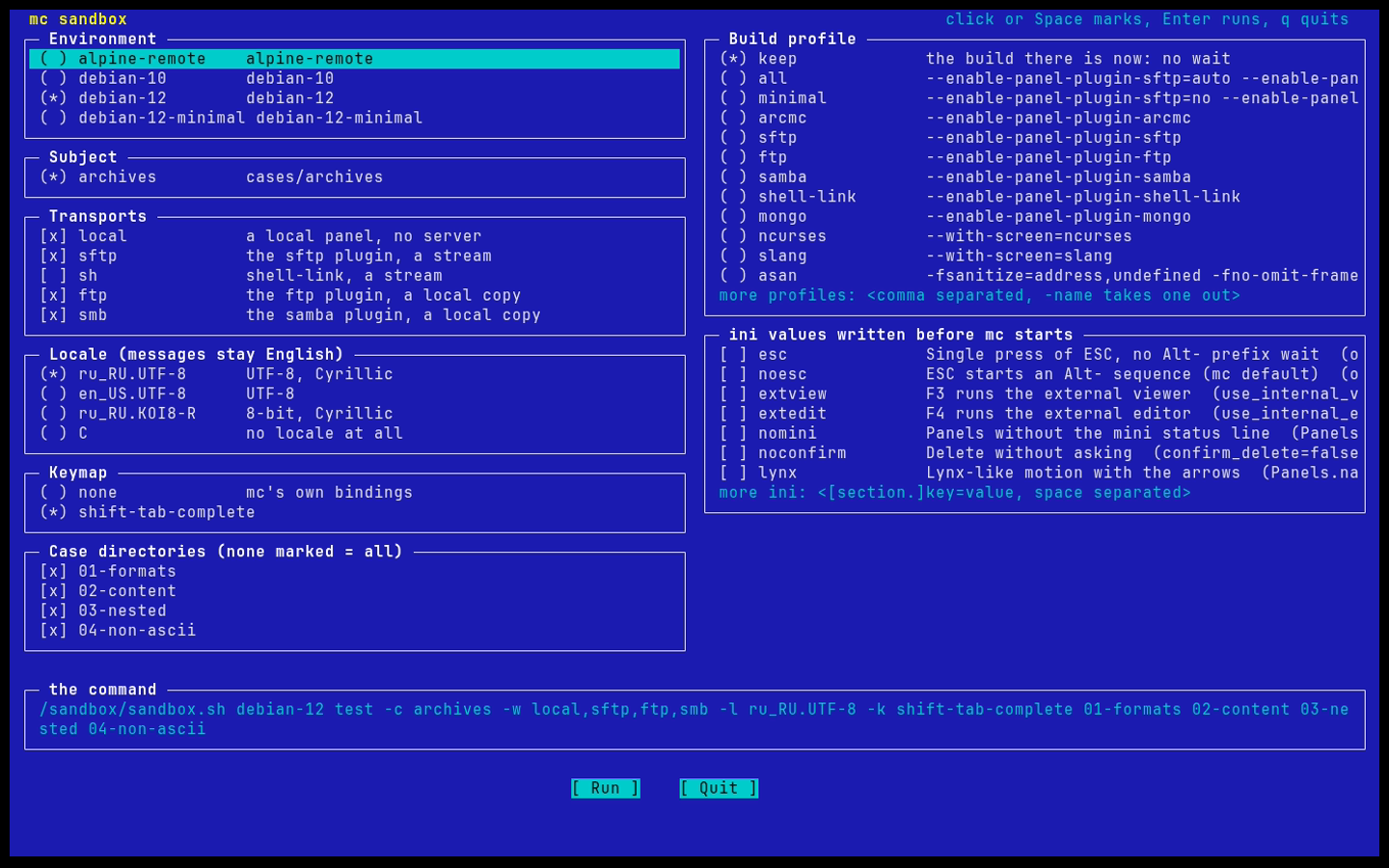
sandbox.sh ui draws the whole choice on one screen -- environment,
subject, transports, locale, build profile, ini values, keymap, case
directories -- with the mouse or the arrows, shows the command it adds up
to, runs it and opens the screens of what failed. It holds nothing the
command line cannot do; the last choice is kept in reports/last.ui and the
last command in reports/last.cmd.
tests/misc/docker/ci.sh debian-12                     # every subject, local panel
tests/misc/docker/ci.sh debian-12 -w local,sftp,ftp,smb,sh
tests/misc/docker/ci.sh debian-12 -c editor,panel -l ru_RU.KOI8-R
ci.sh walks the subjects, one test each, and writes them into one report
directory with an index.md over the lot. It does not stop at the first
subject that fails, it tells a subject that could not be run at all from one
whose cases failed, and its exit status is that of the worst one. A subject
with a shells.txt -- shells is the one -- is run once under each shell
named in it.
This is what CI runs. .github/workflows/ci-sandbox.yml builds the image and
mc, asks whether every plugin loads, and presses the keys of every subject on
a local panel; ci.yml calls it on a push and on a pull request. Over the
network the same cases take about three times as long, so the protocols run
nightly and from workflow_dispatch. A failing run keeps the whole reports/
directory as an artifact, the screens of the failures in it, and index.md
goes into the job summary either way.
$SLOW multiplies every wait; the job sets it to 2, because a runner is
slower than the machine the waits were written on and a wait that runs out
fails a case that would have passed.
The same cases, with mc running under memcheck:
tests/misc/docker/sandbox.sh debian-12 build -f all,debug
tests/misc/docker/sandbox.sh debian-12 test -g -w local 01-formats
The debug profile builds with -O0 -g3 -fno-omit-frame-pointer, so a stack
in the log reads as source lines instead of addresses. -g starts mc under
valgrind --tool=memcheck.
It costs time: about 28 seconds a case against 3 without it, three minutes for
a directory of five cases. So a run under memcheck is one directory at a time,
not the whole subject over every transport. Every wait in the script is
multiplied by six for it, and $SLOW sets another factor for a slow machine.
mc is asked to quit with F10 at the end of a case instead of being killed,
because a killed process writes no summary; confirm_exit is turned off for
the run so that F10 does not stop at a question. The screen of the case is
taken before that.
What fails a case is an invalid read, write or free, or a jump on an uninitialised value with mc in the stack -- whatever the screen shows. What is definitely lost is written down and left to a person: mc frees little on the way out by design.
common/valgrind.supp holds what the libraries never free -- glib, ncurses,
S-Lang, dlopen, iconv, libmagic, samba, curl -- and names no frame of mc's
own. One thing it cannot hold is the regex engine: pcre2 compiles a pattern to
machine code of its own and reads the subject a word at a time past its end,
which memcheck reports as a jump on uninitialised bytes with a stack of bare
addresses. A suppression that matches an unnamed frame matches every error
there is, so those are counted apart instead, as opaque, and fail nothing.
A panel drawn with file highlighting on gives seven of them, the viewer about
a hundred.
The log of each case is kept next to its screen as <case>.<key>.valgrind,
<transport>/valgrind.tsv counts them, and index.md gains a table:
| transport | case                  | key   | errors | invalid | opaque | definitely lost |
|-----------|-----------------------|-------|--------|---------|--------|-----------------|
| local     | 01-formats/small.zip  | Enter | 7      | 0       | 7      | 0               |
Only debian-12 has valgrind in its image; -g in another environment says so
and stops. sandbox.sh ui offers it as Memory check.
Keys pressed while mc is still coming up are dropped -- the shell in the terminal has not printed its prompt yet -- and memcheck stretches that window from a fraction of a second to several seconds, which is why the script waits before it presses anything.
tests/misc/docker/sandbox.sh debian-12 check
Before it asks the protocols for a listing, check asks whether every plugin
the build installed can be loaded: it reads the symbols each .so needs and
looks for them in the mc binary and in the libraries the process carries.
This is not a formality. mc links lib/ as a static archive unless
--enable-mclib is given, and a linker takes out of an archive only what the
program itself refers to. A widget that only a plugin uses is left behind, and
the plugin then fails at g_module_open with an undefined symbol -- which is
how the mcstruct plugin came not to load in a clean build, while it worked in
a tree configured with --enable-mclib. Nothing else catches that until
someone presses the key.
Add a directory under envs/ with a docker-compose.yml in it. That is the
whole of it: sandbox.sh finds environments by looking for that file, and
each one is a separate compose project with its own network, containers and
build volume. An existing environment is never edited, never rebuilt, and
never fights another one for a port.
One that only changes what is installed -- an older distribution, fewer
tools, another shell -- is a Dockerfile.mc with a different FROM and the
same COPY lines from common/; build-mc.sh does not care which
distribution it is on. One that changes the far end reuses the mc image and
points remote at another Dockerfile, as alpine-remote does. Copy
envs/debian-12/docker-compose.yml, change the project name, the
SANDBOX_ENV value and the dockerfile: lines, add a README.md saying
what the environment is meant to catch and an expect.tsv (the header line
is enough), and:
tests/misc/docker/sandbox.sh <name> up
Pin the base image by digest: a run should be the same run next month.
tests/misc/docker/sandbox.sh debian-12 remote   # a shell on the server
tests/misc/docker/sandbox.sh debian-12 shell    # a shell next to mc
tests/misc/docker/sandbox.sh debian-12 clean    # containers and build gone
The unit tests run in there as well, against the same build:
tests/misc/docker/sandbox.sh debian-12 shell
cd /work/build-all/tests && make check
The sandbox is not finished, and these are the holes a person should know about before trusting a green run:
-
One terminal type.
run-cases.shstarts mc withTERM=xterm-256colorand nothing else.linux,vt100andscreendraw and send keys differently, and none of them is pressed by a script. - Spell. No image carries aspell or hunspell, so the four states mc can find itself in -- no engine, aspell only, hunspell only, both -- are checked by hand or not at all.
-
Half the protocols. The remote host serves sftp, ssh, ftp and samba.
s3 (minio), mongo, the docker plugin over
/var/run/docker.sock, the git panel and k8s inkindhave no container next to mc and no cases. - A file that goes away mid-copy, and a connection that drops in the middle of one. Both need a second process to interfere at the right moment.
- A file that cannot be read. mc runs as root in these containers, and root reads everything, so a permission case would pass without proving anything.
- FreeBSD sh, and FreeBSD at all: that needs a virtual machine, not a container.
-
Colour and sixel. A captured screen is text: a skin that draws the
permission field in the wrong colour, or a picture drawn in sixel, reaches
nobody who is looking at
capture-pane. Those stay a job for a person.