awwbot is an example app that brings the cuteness of r/aww straight to your Discord server, hosted on Cloudflare workers. Cloudflare Workers are a convenient way to host Discord bots due to the free tier, simple development model, and automatically managed environment (no VMs!).
The tutorial for building awwbot is in the developer documentation
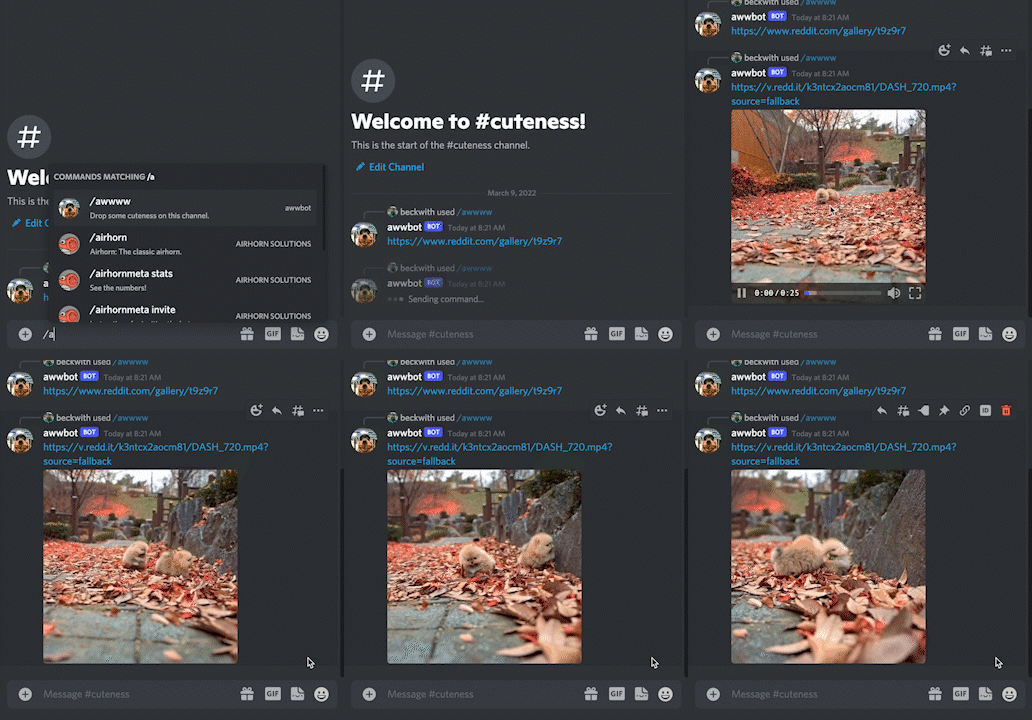
- Discord Interactions API
- Cloudflare Workers for hosting
- Reddit API to send messages back to the user
Below is a basic overview of the project structure:
├── .github/workflows/ci.yaml -> Github Action configuration
├── src
│   ├── commands.js           -> JSON payloads for commands
│   ├── reddit.js             -> Interactions with the Reddit API
│   ├── register.js           -> Sets up commands with the Discord API
│   ├── server.js             -> Discord app logic and routing
│   ├── storage.js            -> User data storage utilities
├── test
|   ├── test.js               -> Tests for app
├── wrangler.toml             -> Configuration for Cloudflare workers
├── package.json
├── README.md
├── .eslintrc.json
├── .prettierignore
├── .prettierrc.json
└── .gitignore
lcBot supports the following 11 slash commands:
Mark a LeetCode question as completed. This will:
- Track the question ID in your completion history
- Update your daily streak (consecutive days with completions)
- Display the question title and difficulty (fetched from LeetCode API)
- Provide encouraging feedback with streak information
Example: /complete 1234 → Shows "Great job! You completed 1. Two Sum (🟢 Easy)!"
View your personal statistics including:
- Current daily streak
- Total questions completed
- Last completion date
- Recent question IDs
View everyone's completion statistics including:
- Leaderboard ranked by total completed questions
- Each user's current streak and total questions
- Group summary with totals and averages
- Daily activity overview
View detailed statistics for a specific player:
- Select any registered user from a dropdown menu
- View their current daily streak and total questions
- See their last completion date
- Check their recent question history
- Compare individual performance
View the group's completion history and streak progression:
- See group streaks over time with dates
- Track when streaks were broken and restarted
- View daily participation patterns
- Analyze group consistency and performance trends
- Historical data for motivation and insights
View and track the daily group streak where:
- All required members (razar0200, bobrandy, esshaygod) must complete a question each day to maintain the streak
- Shows current group streak count
- Displays today's participation status
- Clearly lists who has/hasn't completed questions today
- Provides motivation to keep the group streak alive!
- Streak only increments when ALL required members participate on the same day
Get detailed information about any LeetCode question:
- Question title and number (e.g., "1. Two Sum")
- Difficulty level with color-coded emojis (🟢 Easy, 🟡 Medium, 🔴 Hard)
- Access type (🆓 Free or 🔒 Premium)
- Like/dislike counts from the community
- Topic tags (Arrays, Hash Table, etc.)
- Direct link to the problem
Example: /question-info 1 or /question-info two-sum
View comprehensive LeetCode user profiles:
- Basic info: Real name, global ranking, reputation
- Problem statistics: Total solved, breakdown by difficulty
- Recent submissions: Latest 3 completed problems
- Profile details: Company, school, location
- Direct link to their LeetCode profile
Example: /leetcode-profile khuang891
View today's LeetCode daily coding challenge:
- Today's challenge with problem title and number
- Difficulty and acceptance rate
- Topic tags for the problem
- Video solution availability
- Direct link to solve the challenge
Perfect for coordinating group attempts at the daily challenge!
Individual Tracking:
- Personal Streaks: Track your consecutive days with completions
- Question History: Never count the same question twice
- Personal Stats: View your progress and recent questions
Group Features:
- Group Leaderboard: See how everyone compares
- Group Daily Streak: Everyone must participate to maintain the streak
- Group Statistics: Total questions, averages, and daily activity
- Persistent Storage: Uses Cloudflare KV storage for all data
LeetCode Integration:
- Real-time question data: Fetch titles, difficulty, and details
- Enhanced completion feedback: See what you actually solved
- Profile exploration: Check out other users' LeetCode stats
- Daily challenge tracking: Stay motivated with daily problems
Visual Feedback:
- Personal streaks: ✅ → ⚡ → 🔥
- Group streaks: 🏆 → ⚡⚡ → 🔥🔥
Timezone:
- All dates and streaks are calculated using Australian timezone (AEST/AEDT)
- Daily resets occur at midnight Sydney time
Before starting, you'll need a Discord app with the following permissions:
botwith theSend MessagesandUse Slash Commandpermissionsapplications.commandsscope
⚙️ Permissions can be configured by clicking on the
OAuth2tab and using theURL Generator. After a URL is generated, you can install the app by pasting that URL into your browser and following the installation flow.
Next, you'll need to create a Cloudflare Worker.
- Visit the Cloudflare dashboard
- Click on the
Workerstab, and create a new service using the same name as your Discord bot
First clone the project:
git clone https://github.com/discord/cloudflare-sample-app.git
Then navigate to its directory and install dependencies:
cd cloudflare-sample-app
npm install
⚙️ The dependencies in this project require at least v18 of Node.js
💡 More information about generating and fetching credentials can be found in the tutorial
Rename example.dev.vars to .dev.vars, and make sure to set each variable.
.dev.vars contains sensitive data so make sure it does not get checked into git.
For question tracking functionality, you'll need to set up Cloudflare KV storage:
- In your Cloudflare dashboard, go to Workers → KV
- Create a new namespace called
USER_DATA - Note the namespace ID and update
wrangler.toml:- Replace
your_kv_namespace_id_herewith your production namespace ID - Replace
your_preview_kv_namespace_id_herewith your preview namespace ID
- Replace
Alternatively, create the KV namespace using wrangler CLI:
npx wrangler kv:namespace create "USER_DATA"
npx wrangler kv:namespace create "USER_DATA" --preview
The following command only needs to be run once:
$ npm run register
Now you should be ready to start your server:
$ npm start
When a user types a slash command, Discord will send an HTTP request to a given endpoint. During local development this can be a little challenging, so we're going to use a tool called ngrok to create an HTTP tunnel.
$ npm run ngrok

This is going to bounce requests off of an external endpoint, and forward them to your machine. Copy the HTTPS link provided by the tool. It should look something like https://8098-24-22-245-250.ngrok.io. Now head back to the Discord Developer Dashboard, and update the "Interactions Endpoint URL" for your bot:

This is the process we'll use for local testing and development. When you've published your bot to Cloudflare, you will want to update this field to use your Cloudflare Worker URL.
This repository is set up to automatically deploy to Cloudflare Workers when new changes land on the main branch. To deploy manually, run npm run publish, which uses the wrangler publish command under the hood. Publishing via a GitHub Action requires obtaining an API Token and your Account ID from Cloudflare. These are stored as secrets in the GitHub repository, making them available to GitHub Actions. The following configuration in .github/workflows/ci.yaml demonstrates how to tie it all together:
release:
  if: github.ref == 'refs/heads/main'
  runs-on: ubuntu-latest
  needs: [test, lint]
  steps:
    - uses: actions/checkout@v3
    - uses: actions/setup-node@v3
      with:
        node-version: 18
    - run: npm install
    - run: npm run publish
      env:
        CF_API_TOKEN: ${{ secrets.CF_API_TOKEN }}
CF_ACCOUNT_ID: ${{ secrets.CF_ACCOUNT_ID }}The credentials in .dev.vars are only applied locally. The production service needs access to credentials from your app:
$ wrangler secret put DISCORD_TOKEN
$ wrangler secret put DISCORD_PUBLIC_KEY
$ wrangler secret put DISCORD_APPLICATION_ID
Feel free to post an issue here, or reach out to @justinbeckwith!