Repository navigation
Reporting a problem
If a game won't start, crashes, or PC5 itself does something wrong, please report it as an issue on GitHub, with the game's log attached. The log is what lets the cause be found. This page explains where to report, what to include, and where to find the log.
Report problems as GitHub issues: https://github.com/bornaradusin/PC5/issues
Please don't report problems in ProsperoStore comments. Comments can't hold a log file, and they can't be followed up the way an issue can.
- Update to the newest PC5 and try again. A log from an older version often shows a problem that is already fixed. See Updating PC5.
-
Check the program. If the game closes at once, PC5 may have started the wrong
.exe. See Choosing the right program. - Try another controller mode if the game doesn't react to the controller. See Controllers.
- Look at Troubleshooting and at the existing issues: someone may have reported it already.
-
The PC5 version, from Settings › About PC5 (press Options in the library). For example
1.8.7. - The game: its name, and the program PC5 starts for it (shown in the game's menu under Manage › Change program).
- What happened: what you did, where it stopped, what was on screen, and whether it happens every time.
- How the game is set up, if you changed anything: its controller mode, frame generation, and any launch options.
- The log of that session: the zip PC5 kept, attached as a file (see below).
PC5 keeps logs in:
/data/prospero-win/logs/
While a game runs, its log is written as session-N.log, and put on the console's storage every two seconds, so it survives even if the console freezes and has to be switched off. When PC5 next opens, it files the sessions that have ended, each as one zip:
- A session that went wrong is kept as
issue-<when>_<game>.zip: the game crashed, closed within a minute without showing anything, or didn't close when asked and had to be ended. - Each game's newest session is kept as
log-<when>_<game>.zipeven when nothing went wrong, so a problem without a crash (no sound, a wrong picture, a freeze) still has its log. Playing that game again replaces it. - PC5's own sessions that went well are deleted, unless Settings › System › Keep all logs is On (then every session is kept).
- Nothing in
logs/is kept longer than seven days.
<when> is the date and time the session began, on the console's clock (2026-10-25_14-17), and <game> is the game's id (neon-drift, for example; launcher for PC5's own sessions).
The zip holds everything a report needs:
| In the zip | What it is |
|---|---|
issue-…_<game>.log (with -earlier and -start for a long session, and -crash when it went on long after a crash) |
PC5's log of the session; -crash is the part with the crash |
about.txt |
what PC5 saw, the program, the console's firmware, and the list of the game's files below |
game/… |
the files the game itself wrote while it ran: its own logs, crash reports and crash dumps (Unity's Player.log, a log.txt in My Games, crash.xml, .dmp files), from its folders under C:\users and its own folder |
Attach the zip as it is. You don't need to look for the game's own logs.
When a session went wrong, PC5 tells you the next time it opens, and names the zip it kept:
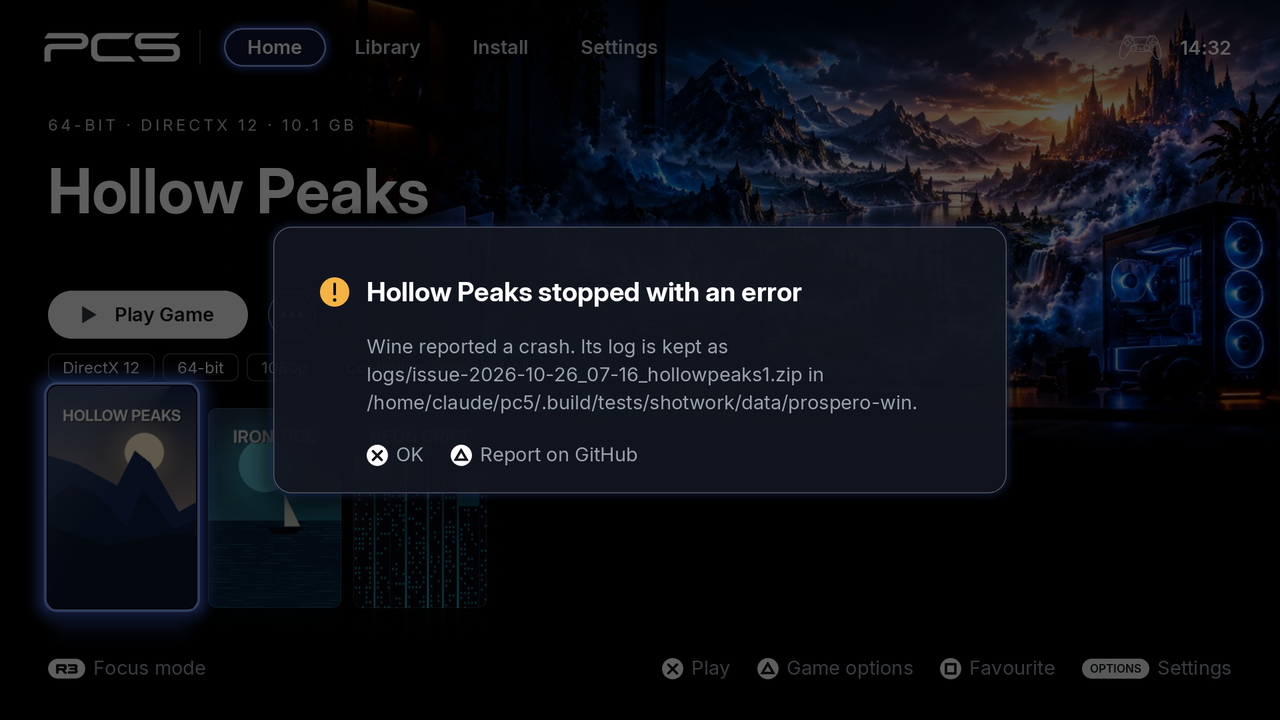 After a crash, PC5 names the log it kept. △ reports it on GitHub.
| PC5 says | What happened |
|---|---|
| Game stopped with an error | Wine reported a crash in the game, or the game's own crash handler caught one. |
| Game closed before showing anything | The game ended within a minute of starting without showing a picture, or Wine couldn't start it. Check the program first. |
| Game had to be closed | The game didn't close when asked, so PC5 ended it. |
| PC5 ended unexpectedly last time | PC5 itself stopped while it ran. Its log is issue-<when>_launcher.zip. |
In that message, press △. PC5 shows a QR code: scan it with your phone, and GitHub's issue form opens, already filled in with the game, its program, PC5's version, the console's firmware and what PC5 saw. Choose what goes wrong, say what happened, attach the zip PC5 names in Log, and submit.
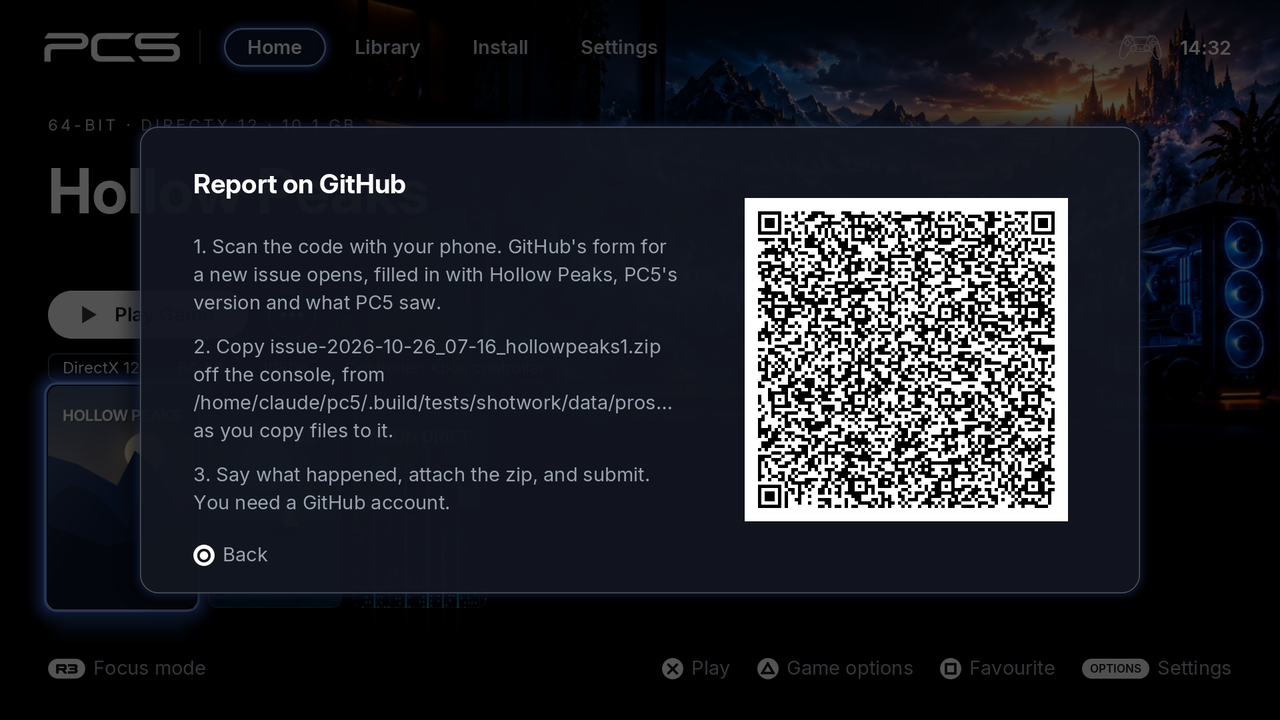 The QR code opens the issue form; the zip to attach is named beside it.
The QR code only opens the form: nothing is sent until you submit it, and the log goes only if you attach it.
When a newer PC5 is out, △ first offers it: the problem may already be fixed in it. Update now updates PC5 (or Back, where PC5 can't update itself), and Report anyway shows the QR code. PC5 asks GitHub for the newest version then, unless it asked in the last hour; when GitHub doesn't answer, the QR code shows straight away.
-
The game froze, or you had to restart the console. Attach that game's newest
log-…(orissue-…) zip: it holds the session up to a few seconds before it stopped. Itsabout.txtsays the log has no end line. Don't play the game again before copying it, as that replaces it. -
Something went wrong but nothing crashed (no music, a wrong picture): attach the game's newest
log-…zip, and say what you saw and when. - You started the game from its home screen tile. Leaving the game goes back to the home screen, so PC5 hasn't opened since. Open PC5 once: it files the log then.
-
An install or uninstall went wrong. PC5 keeps that session's log as
issue-<when>_launcher.zip, once PC5 has been closed and opened again. It doesn't show a message for it.
Copy the zip from /data/prospero-win/logs/ with the tool you use to move files to and from the console (an FTP server payload, for example). Drag it into the issue form's Log field.
PC5 1.6.0 and older kept logs as .log files (with -earlier and -start parts) rather than zips. Attach all of them if that is what you have.
From PC5 1.3.0, when a game crashes its log has a crash report: lines starting with wine: crash report:. They give the module and offset the crash happened at (such as game.exe+0x1a2b3c), the registers, and the code addresses on the stack. From 1.6.1 this is there too when the game's own crash handler catches the crash (the line before says handed to the program's own crash handler). The first lines of each log name the console's firmware and PC5's version.
Sometimes the log doesn't show why a game stops, and the issue's answer asks for a more detailed one, or for the game to be started another way. Logs and debugging says how, with the lines most often asked for.
- Press △ on PC5's message and scan the code (see Report on GitHub from PC5), or go to https://github.com/bornaradusin/PC5/issues/new/choose and choose A game doesn't run (A problem with PC5 for PC5 itself). You need a GitHub account.
- Give it a title that says what goes wrong, for example "Far Cry: closes before showing anything".
- Fill in the form, with the details from What to include. It can't be submitted until the fields it asks for are filled in, the zip in Log among them: drag it there and wait for it to upload.
- Submit.
A game's issue puts it in the game compatibility list, by the name in its Game field: as being looked at while the issue is open, then as working perfectly once the issue is closed as completed, or as unresolved (it doesn't run) once it is closed as not planned. When a question on the issue goes unanswered for two days, it is closed and the game shows as needing testing (it didn't run for you, but another copy or version may); reply on it and it opens again.
Thank you: every report with a log helps more games run.