Releases: brianpetro/obsidian-smart-connections
Release list
4.7.2

Smart Connections Core v4.7
[!NOTE] What's new in
v4.7.2
Updated: Smart Environment
Updated: minimum Obsidian app version to 1.8.7
Added: Connections list display configuration
Related notes show up sooner. Change the anchor in place.
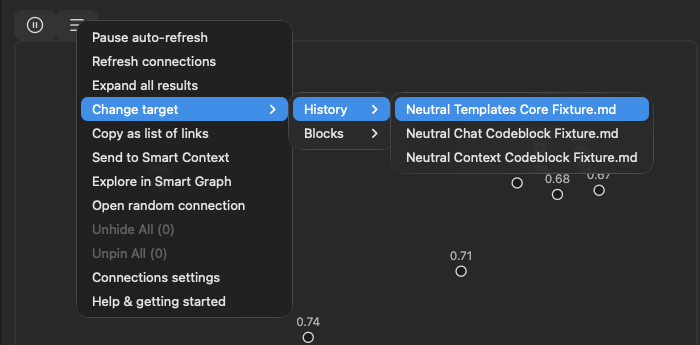
Smart Connections still starts from the note in front of you. v4.7 removes the detour when another source should take over: choose a recent note, focus on one block, or drop a vault file onto Connections and let the list update in place.
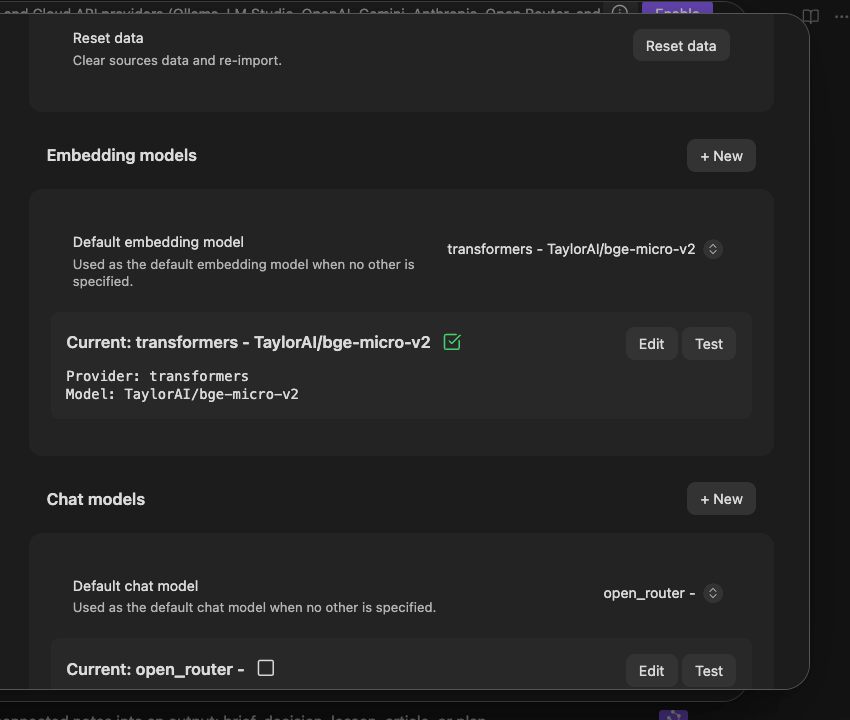
The larger upgrade is underneath the list. Smart Environment v3 gets Connections ready sooner, adds more built-in local embedding models, and lets you switch models without restarting Obsidian or deleting the embeddings you may want to return to.
Update all installed Smart Plugins together, then restart Obsidian. Smart Connections Core v4.7 requires Smart Environment v3.
A stronger semantic engine before the first result
Connections depends on the embedding model that turns your notes into semantic signals. v3 makes that choice less permanent and more useful:
- Start using Connections sooner after opening Obsidian.
- Choose from a broader built-in catalog, including more lightweight and multilingual local models.
- Change the active model without deleting another model's stored embeddings.
- Use the improved Environment Stats and source inspector when a note appears stale, skipped, or unexpectedly absent from results.
Learn more about the release of Smart Environment v3.
Change the target without changing your workspace
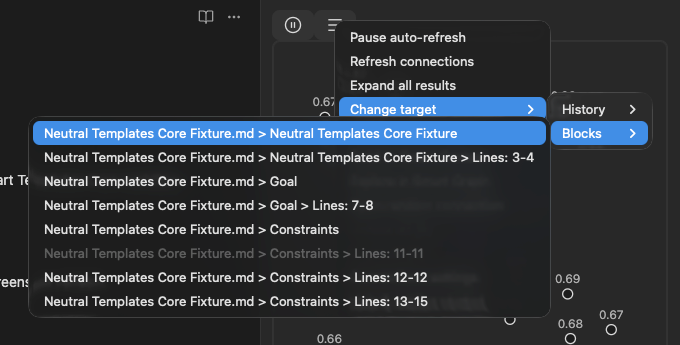
The active note remains the calm default. When it is not the source you want, the target menu now gives you three direct alternatives:
- Pick a recent Connections target.
- Focus on a specific block inside the current note.
- Drop another vault file onto the Connections view.
The related-note list updates around that source without making you navigate away first.
Keep a useful result set moving
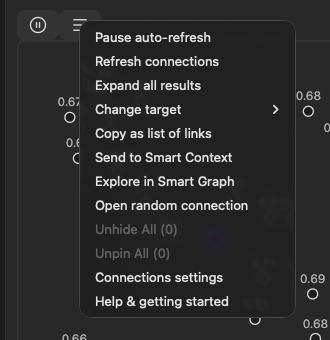
The list menu now follows the same shared action system used across Smart Environment v3. Pause or refresh discovery, open a random connection, copy the list, or continue with the reviewed sources in Context or Graph without rebuilding the set by hand.
Source menus elsewhere in the suite can also open Connections for the item you are already looking at. The workflow begins from the source, not from hunting down the right plugin command.
Put Connections where it helps
Footer Connections now uses a configurable display component instead of a single graph on/off switch. Choose the supported presentation that fits the note surface and screen size. Scores also follow the final displayed ranking score when another ranking step provides one, so the number beside a result better matches the order you see.
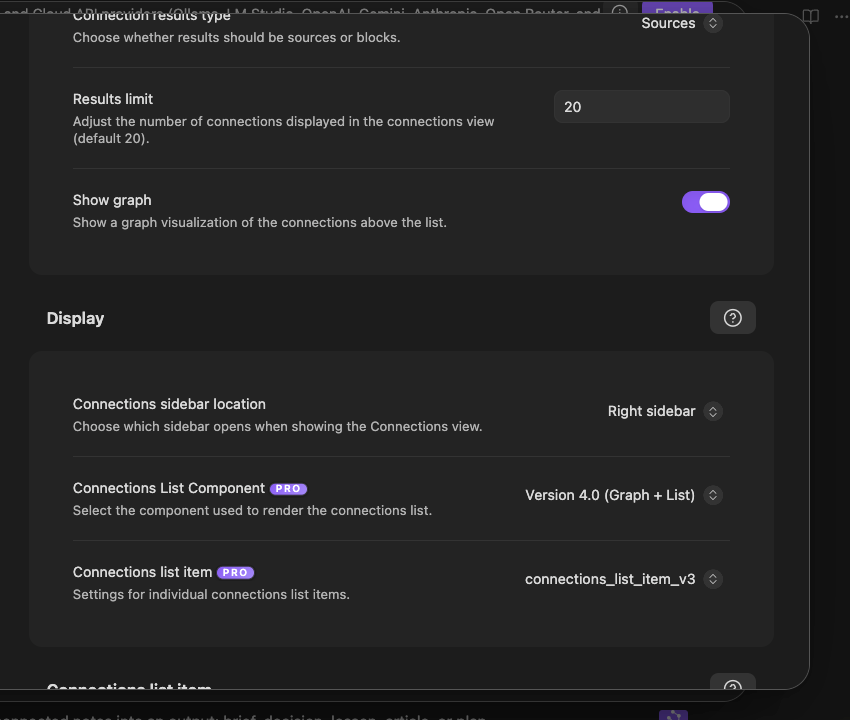
Before / After
| Before | With Smart Connections Core v4.7 |
|---|---|
| Connections could take longer to become ready after startup. | Smart Environment v3 reduces blocking and repeated startup work. |
| Trying another embedding model felt like committing to a rebuild. | Switch models without deleting the previous model's stored embeddings. |
| Retargeting often meant navigating to another note first. | Choose a recent note, a current-note block, or drop a file onto the view. |
| A useful result list could become a dead end. | Continue the reviewed sources through consistent Context and Graph actions. |
| Footer display was controlled by one graph toggle. | Choose the supported Connections component that fits the surface. |
Supporting improvements
- More consistent list, result, command, ribbon, pause, and random-connection actions.
- A shared source action for opening Connections from supported Smart Plugin menus.
- Better score display after optional ranking.
- Improved vector compatibility and performance reporting through Smart Environment v3.
Learn more
- Smart Connections overview
- Smart Connections documentation
- Smart Connections getting started
- Smart Connections FAQ
Updated: 2026-08-06
4.7.1
Smart Connections Core v4.7
Related notes show up sooner. Change the anchor in place.
Smart Connections still starts from the note in front of you. v4.7 removes the detour when another source should take over: choose a recent note, focus on one block, or drop a vault file onto Connections and let the list update in place.
The larger upgrade is underneath the list. Smart Environment v3 gets Connections ready sooner, adds more built-in local embedding models, and lets you switch models without restarting Obsidian or deleting the embeddings you may want to return to.
Update all installed Smart Plugins together, then restart Obsidian. Smart Connections Core v4.7 requires Smart Environment v3.
A stronger semantic engine before the first result
Connections depends on the embedding model that turns your notes into semantic signals. v3 makes that choice less permanent and more useful:
- Start using Connections sooner after opening Obsidian.
- Choose from a broader built-in catalog, including more lightweight and multilingual local models.
- Change the active model without deleting another model's stored embeddings.
- Use the improved Environment Stats and source inspector when a note appears stale, skipped, or unexpectedly absent from results.
Learn more about the release of Smart Environment v3.
Change the target without changing your workspace
The active note remains the calm default. When it is not the source you want, the target menu now gives you three direct alternatives:
- Pick a recent Connections target.
- Focus on a specific block inside the current note.
- Drop another vault file onto the Connections view.
The related-note list updates around that source without making you navigate away first.
Keep a useful result set moving
The list menu now follows the same shared action system used across Smart Environment v3. Pause or refresh discovery, open a random connection, copy the list, or continue with the reviewed sources in Context or Graph without rebuilding the set by hand.
Source menus elsewhere in the suite can also open Connections for the item you are already looking at. The workflow begins from the source, not from hunting down the right plugin command.
Put Connections where it helps
Footer Connections now uses a configurable display component instead of a single graph on/off switch. Choose the supported presentation that fits the note surface and screen size. Scores also follow the final displayed ranking score when another ranking step provides one, so the number beside a result better matches the order you see.
Before / After
| Before | With Smart Connections Core v4.7 |
|---|---|
| Connections could take longer to become ready after startup. | Smart Environment v3 reduces blocking and repeated startup work. |
| Trying another embedding model felt like committing to a rebuild. | Switch models without deleting the previous model's stored embeddings. |
| Retargeting often meant navigating to another note first. | Choose a recent note, a current-note block, or drop a file onto the view. |
| A useful result list could become a dead end. | Continue the reviewed sources through consistent Context and Graph actions. |
| Footer display was controlled by one graph toggle. | Choose the supported Connections component that fits the surface. |
Supporting improvements
- More consistent list, result, command, ribbon, pause, and random-connection actions.
- A shared source action for opening Connections from supported Smart Plugin menus.
- Better score display after optional ranking.
- Improved vector compatibility and performance reporting through Smart Environment v3.
Learn more
- Smart Connections overview
- Smart Connections documentation
- Smart Connections getting started
- Smart Connections FAQ
Additional notes
improved: score handling uses score_display if available
improved: allow configurable component for connections footer
improved: enhance score calculation logic and update is_vec function to support ArrayBuffer views
improved: Connections list menu now handled using Smart Environment menu actions pattern to enable deeper integration and extendability
improved: Connections list item menu now handled using Smart Environment menu actions pattern to enable deeper integration and extendability
Added: control connections anchor/target note from menu actions. Select new target from recent connections history and blocks inside the current note.
Improved: random and pause connections features migrated to actions pattern.
Added: view connections action for source menus.
migrated: ribbon icons to actions architecture
Migrated commands to actions command architecture
Added: drag-and-drop functionality for connections to update connections target from dropped file
Enhance performance logging in get_results method and emit event with elapsed time
Add footer connections list component configuration and remove show_graph setting in favor of component selection in settings
Updated: Smart Environment v3
Updated: 2026-08-04
4.7.0
Smart Connections Core v4.7
Related notes show up sooner. Change the anchor in place.
Smart Connections still starts from the note in front of you. v4.7 removes the detour when another source should take over: choose a recent note, focus on one block, or drop a vault file onto Connections and let the list update in place.
The larger upgrade is underneath the list. Smart Environment v3 gets Connections ready sooner, adds more built-in local embedding models, and lets you switch models without restarting Obsidian or deleting the embeddings you may want to return to.
Update all installed Smart Plugins together, then restart Obsidian. Smart Connections Core v4.7 requires Smart Environment v3.
A stronger semantic engine before the first result
Connections depends on the embedding model that turns your notes into semantic signals. v3 makes that choice less permanent and more useful:
- Start using Connections sooner after opening Obsidian.
- Choose from a broader built-in catalog, including more lightweight and multilingual local models.
- Change the active model without deleting another model's stored embeddings.
- Use the improved Environment Stats and source inspector when a note appears stale, skipped, or unexpectedly absent from results.
Learn more about the release of Smart Environment v3.
Change the target without changing your workspace
The active note remains the calm default. When it is not the source you want, the target menu now gives you three direct alternatives:
- Pick a recent Connections target.
- Focus on a specific block inside the current note.
- Drop another vault file onto the Connections view.
The related-note list updates around that source without making you navigate away first.
Keep a useful result set moving
The list menu now follows the same shared action system used across Smart Environment v3. Pause or refresh discovery, open a random connection, copy the list, or continue with the reviewed sources in Context or Graph without rebuilding the set by hand.
Source menus elsewhere in the suite can also open Connections for the item you are already looking at. The workflow begins from the source, not from hunting down the right plugin command.
Put Connections where it helps
Footer Connections now uses a configurable display component instead of a single graph on/off switch. Choose the supported presentation that fits the note surface and screen size. Scores also follow the final displayed ranking score when another ranking step provides one, so the number beside a result better matches the order you see.
Before / After
| Before | With Smart Connections Core v4.7 |
|---|---|
| Connections could take longer to become ready after startup. | Smart Environment v3 reduces blocking and repeated startup work. |
| Trying another embedding model felt like committing to a rebuild. | Switch models without deleting the previous model's stored embeddings. |
| Retargeting often meant navigating to another note first. | Choose a recent note, a current-note block, or drop a file onto the view. |
| A useful result list could become a dead end. | Continue the reviewed sources through consistent Context and Graph actions. |
| Footer display was controlled by one graph toggle. | Choose the supported Connections component that fits the surface. |
Supporting improvements
- More consistent list, result, command, ribbon, pause, and random-connection actions.
- A shared source action for opening Connections from supported Smart Plugin menus.
- Better score display after optional ranking.
- Improved vector compatibility and performance reporting through Smart Environment v3.
Learn more
- Smart Connections overview
- Smart Connections documentation
- Smart Connections getting started
- Smart Connections FAQ
Additional notes
improved: score handling uses score_display if available
improved: allow configurable component for connections footer
improved: enhance score calculation logic and update is_vec function to support ArrayBuffer views
improved: Connections list menu now handled using Smart Environment menu actions pattern to enable deeper integration and extendability
improved: Connections list item menu now handled using Smart Environment menu actions pattern to enable deeper integration and extendability
Added: control connections anchor/target note from menu actions. Select new target from recent connections history and blocks inside the current note.
Improved: random and pause connections features migrated to actions pattern.
Added: view connections action for source menus.
migrated: ribbon icons to actions architecture
Migrated commands to actions command architecture
Added: drag-and-drop functionality for connections to update connections target from dropped file
Enhance performance logging in get_results method and emit event with elapsed time
Add footer connections list component configuration and remove show_graph setting in favor of component selection in settings
Updated: Smart Environment v3
Updated: 2026-08-04
4.5.3
Smart Connections v4.5
[!NOTE] What's new in
v4.5.3
refactor: update D3 load to use ESM bundle and improve loading logic
refactor: update CSS selectors for improved specificity and remove redundant styles
Connections Footer is now a Core feature!
Footer connections are now included in Smart Connections Core, bringing the most mobile-friendly and no-panel writing surface to every install. Connections Pro continues to add inline discovery, Bases workflows, and advanced ranking control.
- Place your connections list in the footer of every note.
- Toggle footer connections from the command palette (hotkey), ribbon icon, or settings.
Recent highlights
- Connections lists can now open with a graph view.
- Substrate Update.
Updated: 2026-06-04
4.5.2
Smart Connections v4.5
[!NOTE] What's new in
v4.5.2
- Updated Smart Environment to
v2.4.6for handling Obsidian API changes
Connections Footer is now a Core feature!
Footer connections are now included in Smart Connections Core, bringing the most mobile-friendly and no-panel writing surface to every install. Connections Pro continues to add inline discovery, Bases workflows, and advanced ranking control.
- Place your connections list in the footer of every note.
- Toggle footer connections from the command palette (hotkey), ribbon icon, or settings.
Recent highlights
- Connections lists can now open with a graph view.
- Substrate Update.
Updated: 2026-05-30
4.5.0

Smart Connections v4.5
Connections Footer is now a Core feature!
Footer connections are now included in Smart Connections Core, bringing the most mobile-friendly and no-panel writing surface to every install. Connections Pro continues to add inline discovery, Bases workflows, and advanced ranking control.
- Place your connections list in the footer of every note.
- Toggle footer connections from the command palette (hotkey), ribbon icon, or settings.
Recent highlights
- Connections lists can now open with a graph view.
- Substrate Update.
Additional notes
- Fixed: transformers embedding model should fallback to non-GPU v4 usage and subsequently v3 if that still fails
- Fixed: should only calculate connections results once (improves performance)
4.3.0
Smart Connections Core v4.3
Smart Connections Core v4.3 makes discovery easier to see and easier to place in your workspace. This release adds a graph view for connections lists, gives you control over where the Connections view opens, and improves recovery when embedding work was interrupted.
Highlights
See relationships from more than one angle
- Connections lists can now open with a graph view.
- A new setting lets you choose whether that graph appears in connections lists by default.
- This makes it easier to move from ranked results to visual exploration when you want a wider view of your note landscape.
Put Connections where it fits your workflow
- Connections view open location is now configurable.
- Keep related notes where they help most: beside your writing, in a side workspace, or wherever you prefer to review signal.
More dependable daily use
- Block embedding can now resume more predictably after a restart if earlier processing was interrupted.
- The result is a steadier day-to-day Connections experience as your vault keeps changing.
4.1.8
Smart Connections v4
What's new in v4
Smart Connections v4 focuses the core plugin on a simple promise: install, enable, and AI-powered connections just work. Advanced configuration and power-user workflows now live in Pro plugins. Read Introducing Pro Plugins to learn more.
Pause connections
Use the new Connections "pause" button to freeze the connections results. This allows you to move through your vault while keeping the connections to a specific note visible while you work.
Copy connections as list of links
Right-click the connections results to copy all links to clipboard.
Copy all connections content (Context Engineering)
Click the connections view menu button and "Send to Smart Context" (briefcase icon) option. This allows you to quickly copy all content from the connections to clipboard for use as context with any AI chat! The Smart Context view also lets you add or remove items before copying all to the clipboard in one-click!
Pinned connections
In addition to "hiding" connections, you can now "Pin" connections. This ensures the pinned connections are always visible in the connections view. Connections Pro: Hidden and pinned connections are used by new connections algorithms (available in Pro) to improve results!
Events and notifications
Important events are now surfaced in a dedicated notifications modal:
- On desktop, click the Smart Env item in the status bar to open the notifications modal.
- On mobile, a Smart Environment notice appears at the bottom of the Connections view; tap it to review events.
Examples of events you might see:
- Initial indexing complete for your vault
- Sources reimported after model changes
- Warnings when exclusions block indexing on specific folders or files
Objectives of the new Events system:
- make the environment inspectable and understandable
- reduce the number of Obsidian native notifications
Connections Pro
Connections Pro builds on the core plugin and Smart Environment to give power users more control.
Examples of Pro features:
- Inline connections
Small badges in the editor that show how many strong matches a block has, with a pop-over of related blocks and notes. - Footer connections
A persistent panel that updates as you type so high value connections stay visible while you write. - Configurable scoring and ranking
Choose different algorithms for how results are scored and optionally add a rerank stage. - Connections in Bases
Usescore_connectionandlist_connectionsin Obsidian Bases to show similarity columns and related note lists in tables. - Advanced filters and models
Extra Smart Environment controls for embeddings, collections, and include or exclude rules. - Early release experiments
New ideas launch in Early channels first so supporters can shape how they evolve.
Connections Pro is part of the Pro plugins family and is available to active project supporters. It is still built on the same open Smart Environment. Supporting Pro helps fund development of all Smart Plugins and the free core.
patch v4.1.1
- Connections codeblock view should render as expected without errors
patch v4.1.2
- Improved model configuration UX
- Added "Delete" functionality to better manage models
- Enhanced UI for settings and improved styling
- Pro: Updated score algorithm settings to clarify descriptions
patch v4.1.3
- Added link to documentation in settings for easier access
- Fixed highlight "Reset data" after embedding model change
patch v4.1.4
- Added fallback for opening Pro login in case the button doesn't automatically open the browser as expected
patch v4.1.6
- Added: milestones feature with modal and checklist components
- Added: connections view menu option to copy results as links
- Added: multilingual-e5-small embedding model support
- Improved: settings tab with added "learn more" and "help" buttons to settings groups
- Fixed: markdown parser should handle frontmatter correctly (prevent false-positive frontmatter detection)
patch v4.1.7
- Added: Links to docs from milestones
- Added: Include active source item in context created from the connections view
- Fixed: replaced model source for multilingual E5 Small embedding model to ensure quantized variations available
patch v4.1.8
- Added: "Pin" and "Hide" events/milestones
All Smart Plugins:
- Fixed: verified Pro plugins login should work on mobile
- Fixed: settings groups now re-render when a dropdown changes (prevents stale dependent settings)
- Improved: notifications modal includes a "Load more" button (beyond the default 100)
4.1.7
Smart Connections v4
What's new in v4
Smart Connections v4 focuses the core plugin on a simple promise: install, enable, and AI-powered connections just work. Advanced configuration and power-user workflows now live in Pro plugins. Read Introducing Pro Plugins to learn more.
Pause connections
Use the new Connections "pause" button to freeze the connections results. This allows you to move through your vault while keeping the connections to a specific note visible while you work.
Copy connections as list of links
Right-click the connections results to copy all links to clipboard.
Copy all connections content (Context Engineering)
Click the connections view menu button and "Send to Smart Context" (briefcase icon) option. This allows you to quickly copy all content from the connections to clipboard for use as context with any AI chat! The Smart Context view also lets you add or remove items before copying all to the clipboard in one-click!
Pinned connections
In addition to "hiding" connections, you can now "Pin" connections. This ensures the pinned connections are always visible in the connections view. Connections Pro: Hidden and pinned connections are used by new connections algorithms (available in Pro) to improve results!
Events and notifications
Important events are now surfaced in a dedicated notifications modal:
- On desktop, click the Smart Env item in the status bar to open the notifications modal.
- On mobile, a Smart Environment notice appears at the bottom of the Connections view; tap it to review events.
Examples of events you might see:
- Initial indexing complete for your vault
- Sources reimported after model changes
- Warnings when exclusions block indexing on specific folders or files
Objectives of the new Events system:
- make the environment inspectable and understandable
- reduce the number of Obsidian native notifications
Connections Pro
Connections Pro builds on the core plugin and Smart Environment to give power users more control.
Examples of Pro features:
- Inline connections
Small badges in the editor that show how many strong matches a block has, with a pop-over of related blocks and notes. - Footer connections
A persistent panel that updates as you type so high value connections stay visible while you write. - Configurable scoring and ranking
Choose different algorithms for how results are scored and optionally add a rerank stage. - Connections in Bases
Usescore_connectionandlist_connectionsin Obsidian Bases to show similarity columns and related note lists in tables. - Advanced filters and models
Extra Smart Environment controls for embeddings, collections, and include or exclude rules. - Early release experiments
New ideas launch in Early channels first so supporters can shape how they evolve.
Connections Pro is part of the Pro plugins family and is available to active project supporters. It is still built on the same open Smart Environment. Supporting Pro helps fund development of all Smart Plugins and the free core.
patch v4.1.1
- Connections codeblock view should render as expected without errors
patch v4.1.2
- Improved model configuration UX
- Added "Delete" functionality to better manage models
- Enhanced UI for settings and improved styling
- Pro: Updated score algorithm settings to clarify descriptions
patch v4.1.3
- Added link to documentation in settings for easier access
- Fixed highlight "Reset data" after embedding model change
patch v4.1.4
- Added fallback for opening Pro login in case the button doesn't automatically open the browser as expected
patch v4.1.6
- Added: milestones feature with modal and checklist components
- Added: connections view menu option to copy results as links
- Added: multilingual-e5-small embedding model support
- Improved: settings tab with added "learn more" and "help" buttons to settings groups
- Fixed: markdown parser should handle frontmatter correctly (prevent false-positive frontmatter detection)
patch v4.1.7
- Added: Links to docs from milestones
- Added: Include active source item in context created from the connections view
- Fixed: replaced model source for multilingual E5 Small embedding model to ensure quantized variations available
4.1.6
Smart Connections v4
What's new in v4
Smart Connections v4 focuses the core plugin on a simple promise: install, enable, and AI-powered connections just work. Advanced configuration and power-user workflows now live in Pro plugins. Read Introducing Pro Plugins to learn more.
Pause connections
Use the new Connections "pause" button to freeze the connections results. This allows you to move through your vault while keeping the connections to a specific note visible while you work.
Copy connections as list of links
Right-click the connections results to copy all links to clipboard.
Copy all connections content (Context Engineering)
Click the connections view menu button and "Send to Smart Context" (briefcase icon) option. This allows you to quickly copy all content from the connections to clipboard for use as context with any AI chat! The Smart Context view also lets you add or remove items before copying all to the clipboard in one-click!
Pinned connections
In addition to "hiding" connections, you can now "Pin" connections. This ensures the pinned connections are always visible in the connections view. Connections Pro: Hidden and pinned connections are used by new connections algorithms (available in Pro) to improve results!
Events and notifications
Important events are now surfaced in a dedicated notifications modal:
- On desktop, click the Smart Env item in the status bar to open the notifications modal.
- On mobile, a Smart Environment notice appears at the bottom of the Connections view; tap it to review events.
Examples of events you might see:
- Initial indexing complete for your vault
- Sources reimported after model changes
- Warnings when exclusions block indexing on specific folders or files
Objectives of the new Events system:
- make the environment inspectable and understandable
- reduce the number of Obsidian native notifications
Connections Pro
Connections Pro builds on the core plugin and Smart Environment to give power users more control.
Examples of Pro features:
- Inline connections
Small badges in the editor that show how many strong matches a block has, with a pop-over of related blocks and notes. - Footer connections
A persistent panel that updates as you type so high value connections stay visible while you write. - Configurable scoring and ranking
Choose different algorithms for how results are scored and optionally add a rerank stage. - Connections in Bases
Usescore_connectionandlist_connectionsin Obsidian Bases to show similarity columns and related note lists in tables. - Advanced filters and models
Extra Smart Environment controls for embeddings, collections, and include or exclude rules. - Early release experiments
New ideas launch in Early channels first so supporters can shape how they evolve.
Connections Pro is part of the Pro plugins family and is available to active project supporters. It is still built on the same open Smart Environment. Supporting Pro helps fund development of all Smart Plugins and the free core.
patch v4.1.1
- Connections codeblock view should render as expected without errors
patch v4.1.2
- Improved model configuration UX
- Added "Delete" functionality to better manage models
- Enhanced UI for settings and improved styling
- Pro: Updated score algorithm settings to clarify descriptions
patch v4.1.3
- Added link to documentation in settings for easier access
- Fixed highlight "Reset data" after embedding model change
patch v4.1.4
- Added fallback for opening Pro login in case the button doesn't automatically open the browser as expected
patch v4.1.6
- Added: milestones feature with modal and checklist components
- Added: connections view menu option to copy results as links
- Added: multilingual-e5-small embedding model support
- Improved: settings tab with added "learn more" and "help" buttons to settings groups
- Fixed: markdown parser should handle frontmatter correctly (prevent false-positive frontmatter detection)