Releases: broadsidecode/madison
Release list
Madison 0.5.3

Madison 0.5.3
Madison now tells you when Tesseract and Madison are out of step.
- Open the version label at the top right to see Tesseract's status next to the Madison build and GitHub status.
- An amber dot means an update is needed: Mirage has released a Tesseract version this Madison does not support yet, or the installed engine is not supported.
- A blue dot means a newer Tesseract is available and the one you have still works.
- The check reads Mirage's published version pin once when Madison starts. It sends nothing about your project, and an offline check shows as not verified.
Madison 0.5.2
Madison 0.5.2
Madison now works with Tesseract 0.2.0, the version Mirage's official instructions install today.
- CapCut import and in browser editing accept Tesseract 0.2.0 or 0.1.0.
- When both are installed, Madison uses 0.2.0.
- The import report records which engine version was used.
- Both versions were checked against the real engine with synthetic footage: CapCut import, render, and a full edit batch.
- New Windows troubleshooting note: if Tesseract preview or export exits with code 0xC000001D, another app's graphics compiler on PATH is shadowing the renderer. Obsidian is a known cause. Madison already works around it for its own Tesseract calls.
Madison 0.5.1
Madison 0.5.1
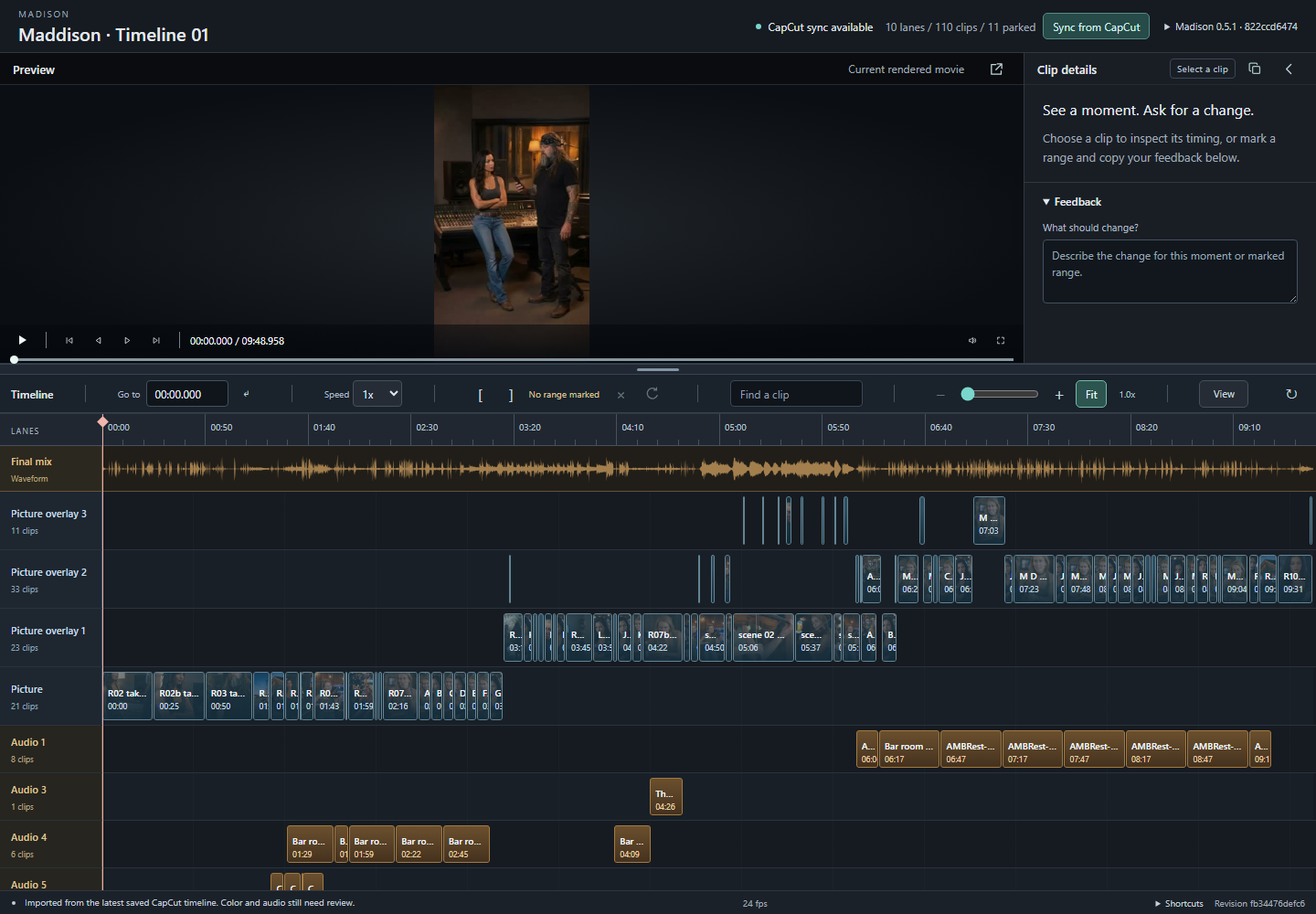
One small copy icon now gathers your review feedback.
- The icon works whether or not a clip is selected.
- It includes your note, marked range, current time and full clip details when available.
- If copying is unavailable, Madison shows selectable text instead.
Madison 0.5.0
Madison 0.5.0
More room to watch and review your cut.
- Playback and cut controls now sit beneath the video.
- Timeline tools share one compact row, and the pop out control sits in the preview corner.
- A small copy icon, clear tooltips and selected button highlights make each action easier to find.
- Clip details can fold away when you want more space for the picture.
CapCut sync remains optional and experimental. Check picture and sound after importing a CapCut edit.
Screenshots

Madison 0.4.0
Madison 0.4.0
Madison now makes it easier to see which review you are watching and whether your browser is current.
What changed
- The viewer shows the Madison version, selected project and available connections.
- Madison warns when the page is showing an older build.
- Your agent can reopen the connected review without starting duplicate copies or interrupting work in progress.
Your agent connects the editor and project during setup. CapCut sync remains optional and experimental; check effects and sound after importing a CapCut edit.
Madison 0.3.1
Madison 0.3.1
CapCut users can now find and review Madison's optional sync before bringing changes into Tesseract.
What changed
- Connect CapCut is visible in Madison and explains how to link a saved project with your local agent.
- Once connected, Sync from CapCut shows what changed before you choose to import.
- Madison flags missing footage and warns when picture or sound may differ.
- Your previous review stays available while the new version is prepared.
CapCut sync is experimental. Effects and audio may need attention, so compare the picture and sound before using the result in a final edit.
Madison 0.2.0
Madison 0.2.0
Madison now includes limited, opt in editing for native Tesseract projects while keeping review only mode as the default.
What is new
- Remove clips, trim clip edges, mute clips, adjust volume, and use undo or redo.
- Save edit drafts locally and apply approved changes into a new versioned
.tsrctproject. Madison preserves the selected original project. - Preview approved source picture as a quick approximation. Final picture, audio, and effects still require a fresh render before delivery.
- Refresh the timeline in place while preserving the playhead, selection, zoom, scroll position, divider position, and unsent notes, including after a page reload.
- Open a custom Document Picture in Picture view with bright controls when the browser supports it, with an honest native fallback when it does not.
Safety boundaries
Editing is off by default and must be enabled explicitly. Madison writes a new project version instead of overwriting the selected project. The local server remains bound to IPv4 loopback, and this package contains no private footage, native production projects, credentials, or generated review bundles.
Tesseract and FFmpeg remain separate installations with their own terms. Madison does not bundle their executables or vendor resources.
Verification
The release passed 69 local Python tests, JavaScript syntax validation, demo validation, a real Tesseract 0.1.0 synthetic edit and readback, browser interaction checks, and governed visual QA. GitHub Actions passed on Python 3.10 and 3.13 across Windows, macOS, and Ubuntu.
One host specific symlink test remains skipped where the operating system does not permit that fixture. No user production project or CapCut copy was changed during verification.
Madison 0.1.1
Madison 0.1.1
Timeline Reviewer is now Madison, a free community review companion for Tesseract.
Start on the repository front page: copy its single setup prompt into a local coding agent. The agent asks about your project, checks your computer, and guides setup using official Tesseract instructions. Technical commands live in a separate manual guide. CapCut import remains optional and experimental.
The viewer has the Madison name and an updated example screenshot. Existing review bundles and Python commands remain compatible. Madison is MIT licensed; Tesseract has separate terms.
The old repository address redirects to broadsidecode/madison. No automatic native project connection or editor writeback has been added; your agent prepares each preview and its matching timeline.
Timeline Reviewer 0.1.0
Free local timeline review for creators and editing agents, released under the MIT license.
Download timeline-reviewer-0.1.0.zip, extract it, and open START-HERE.md for a paste-ready Codex setup prompt, or follow README.md to launch the synthetic demo yourself.
Includes playback, zoom and pan, a resizable preview, frame and cut navigation, range looping, and precise copied feedback. The optional experimental CapCut to Tesseract importer requires a separately installed Tesseract 0.1.0 engine. It is a one way conversion with documented limits, not a promise of full editing fidelity.
The standalone viewer needs Python 3.10 or later and no paid editor, account, API key or runtime Python packages. Personal footage, private projects and vendor executables are not included. Third party tools retain their own licenses.
Local validation: 48 Python tests (47 passed, one environment skip), four browser layouts, five interaction regression groups, and a successful synthetic native Tesseract import with source hashes preserved. See docs/verification.md and this revision's GitHub Actions results for test scope.
GitHub Actions passed all six Windows, macOS and Ubuntu combinations with Python 3.10 and 3.13 for commit 5fa6e19. Native engine rendering is not tested in CI.