Repository navigation
Releases: brokoskokoli/claude_inspect
Release list
0.9.0 – subagents, summaries, replay scripts

Subagents as first-class views
Select a subagent (agent tree or search) and every tab focuses on it and the agents it started: Cost, Timeline, Call graph and Analysis. A header above the tabs links back to the whole session. Analyses are stored per subagent.
Analyze with Claude: describe the work
New options next to the review aspects:
- Summary of the work – a plain-language account of what the agent did: request, approach, steps, decisions, changed files, result.
- Shell script – a bash script that replays the effective commands and file changes, with comments per step, variables for machine-specific paths and TODOs for what can't be automated (secrets are never inserted). Download script / Copy script buttons. For this option the digest includes full commands and file contents.
0.8.0 – lighter, better search
Much lighter in the background
- Memory: ~220 MB instead of ~700 MB with a large history (~1,600 transcripts, 101,000 tool calls): transcripts are scanned in 2 MB chunks, token data is kept compactly, V8 runs with
--optimize-for-size. - CPU (0.7.1): about 1 % of a core when no dashboard tab is visible, ~2–5 % with a visible tab.
Search
- Finds transcript file names and paths too – paste
agent-….jsonl, a session id or a~/.claude/…path. - Hits are grouped per agent as a tree: subagents under their main agent, sessions started via
claude -punder the calling agent. Click the agent to open its transcript, or a hit to jump to it. - Results and scroll position survive going back from a hit; spinner while searching; 15 s budget instead of 6 s.
Session view
- Opens on the Cost tab; tab order Cost, CPU, Transcript, Timeline, Call graph, Tasks, Analysis.
- Spinners for longer actions and loading states.
0.7.1 – ~1 % CPU in the background
- Saving mode when no dashboard tab is visible. A tab in the background disconnects the live stream after 15 s; the server then refreshes the process list every 30 s, measures CPU every 15 s and does everything else every 2 minutes. Coming back to the tab catches up immediately.
- Cheaper live mode: polling every 5 s instead of 3 s; linking of spawned
claudesessions only re-runs when something changed. - Measured with ~1,600 transcripts and several agents running: about 1 % of one core without a visible tab (including
ps), about 5 % with a visible tab – down from 50–70 % in 0.6.
0.7.0 – Analyze with Claude
Analyze with Claude
A new button on every session lets Claude review the whole run – main agent, subagents and spawned claude sessions.
- Pick what to check: task outcome, efficiency & cost, errors & dead ends, privacy & data protection, security & risky actions, agents & delegation, setup improvements – plus your own question, model (Haiku/Sonnet/Opus) and answer language.
- claude-inspect builds a condensed digest (requests, answers, every tool call with status, duration and cost) with computed observations: repeated failures and reads, access to sensitive files, uploads, risky commands. Secrets are masked; View what is sent shows the exact digest.
- Runs your local
claude -pwithout tools, MCP servers, settings or session persistence, on your own login (counts towards your plan usage). The answer streams into the new Analysis tab and is saved in the data directory. --no-analyze(orCLAUDE_INSPECT_NO_ANALYZE=1) hides the feature.
Much less background CPU
With large histories, refreshing the statistics compared every transcript with every known file on each file event – about half a CPU core while agents were working. It is now linear and throttled to every 5 s: roughly 6–7× less CPU in our measurement (~9 % of a core with many agents running).
v0.4.1
The npm package now links to the project website: https://brokoskokoli.github.io/claude_inspect/
No code changes.
Full changelog: v0.4.0...v0.4.1
v0.4.0
CPU usage of agents and their subprocesses
Some agents quietly burn CPU: a test runner in watch mode, a build that never ends, an MCP server stuck in a loop. claude-inspect now measures every Claude Code process together with all of its subprocesses.
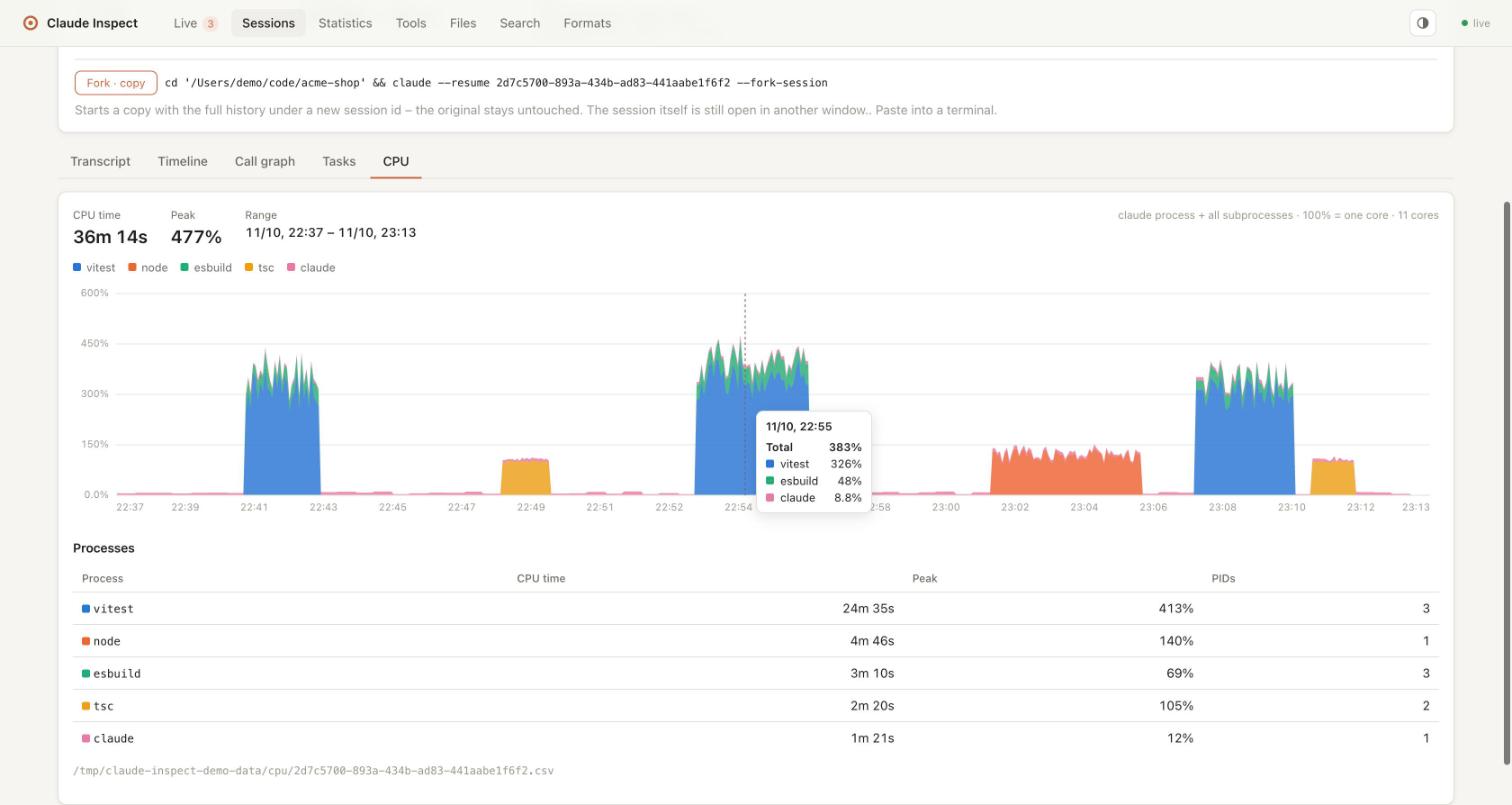
- Dashboard: sparkline and current value on every running card (100% = one core)
- New CPU tab per session: stacked chart by program name (
vitest,tsc,cargo…), CPU time, peak and the processes that used the most CPU. Times when claude-inspect wasn't running are shown as gaps, not as 0%. - Recorded for later: one CSV per session (
ts,pid,ppid,comm,cpu_pct) in the app data directory –~/Library/Application Support/claude-inspect/cpu(macOS),~/.local/share/claude-inspect/cpu(Linux),%LOCALAPPDATA%\claude-inspect\cpu(Windows). Files older than 30 days are deleted. Only program names are stored, never command lines. - On by default,
--no-cpu-log(orCLAUDE_INSPECT_NO_CPU_LOG=1) turns recording off,CLAUDE_INSPECT_DATA_DIRchanges the location.
~/.claude stays read-only: this is the first thing claude-inspect writes, and it goes to its own directory.
Measured every 3 s (10 s on Windows) from the process table: ps on macOS, /proc on Linux, CIM on Windows. Processes that live less than one interval are missed.
Website
claude-inspect now has a project page: https://brokoskokoli.github.io/claude_inspect/
Full changelog: v0.3.0...v0.4.0
v0.2.2
Resume sessions from the dashboard
The session page and the dashboard rows (Inactive, Ended processes, Background jobs) now offer a command to continue a session in your terminal. One click copies it. The command depends on the session's state:
| Session | Command |
|---|---|
| Ended | cd '<dir>' && claude --resume <id> (Resume) |
| Background session/job | claude attach <short-id> (Attach) |
| Still open in another window | … claude --resume <id> --fork-session (Fork, a copy with a new session id) |
The dashboard only copies the commands and never runs them itself. Paths are quoted safely (spaces, ', [ ], $). On Windows you get a PowerShell command (Set-Location -LiteralPath '…'; claude --resume …). A test runs the generated directory change in the real shell (sh / powershell.exe) on every CI platform.
Full changelog: v0.2.1...v0.2.2
v0.2.1
Inactive sessions
A running claude process doesn't always mean an active session. The dashboard now has an Inactive section for processes that are still alive but that nobody is using:
- Left with
/exit: background sessions keep their process running after/exit - Ended or archived on another device (Remote Control)
- No conversation: IDE/SDK hosts (e.g. the VS Code extension, JetBrains ACP) keep
claudeprocesses alive without a transcript
These no longer count as running agents; the Live counter in the navigation excludes them too. A new prompt or new work after /exit (resume) makes a session active again.
Full changelog: v0.2.0...v0.2.1
v0.2.0
Windows and Linux support
- Windows: running sessions and the process tree are detected via PowerShell (
Win32_Process);--openopens the browser - Cross-platform paths: new sessions appear live, subagent session ids and project names work with
\and/; the project-name fallback knows-home-…(Linux) andC--Users-…(Windows) - Process liveness:
procStartis compared as a timestamp (±2 s) when formats differ - Linux service: paths in the systemd unit are quoted (spaces in paths work)
demoshows a clear error on Windows (demo --out <dir>works everywhere)
Breaking
- Requires Node.js ≥ 22 (Node 20 is end-of-life)
Development
- CI on Ubuntu, macOS and Windows × Node 22/24, including a smoke test of the built CLI
- LF line endings enforced via
.gitattributes;npm run test:updateworks on Windows
Full changelog: v0.1.0...v0.2.0