


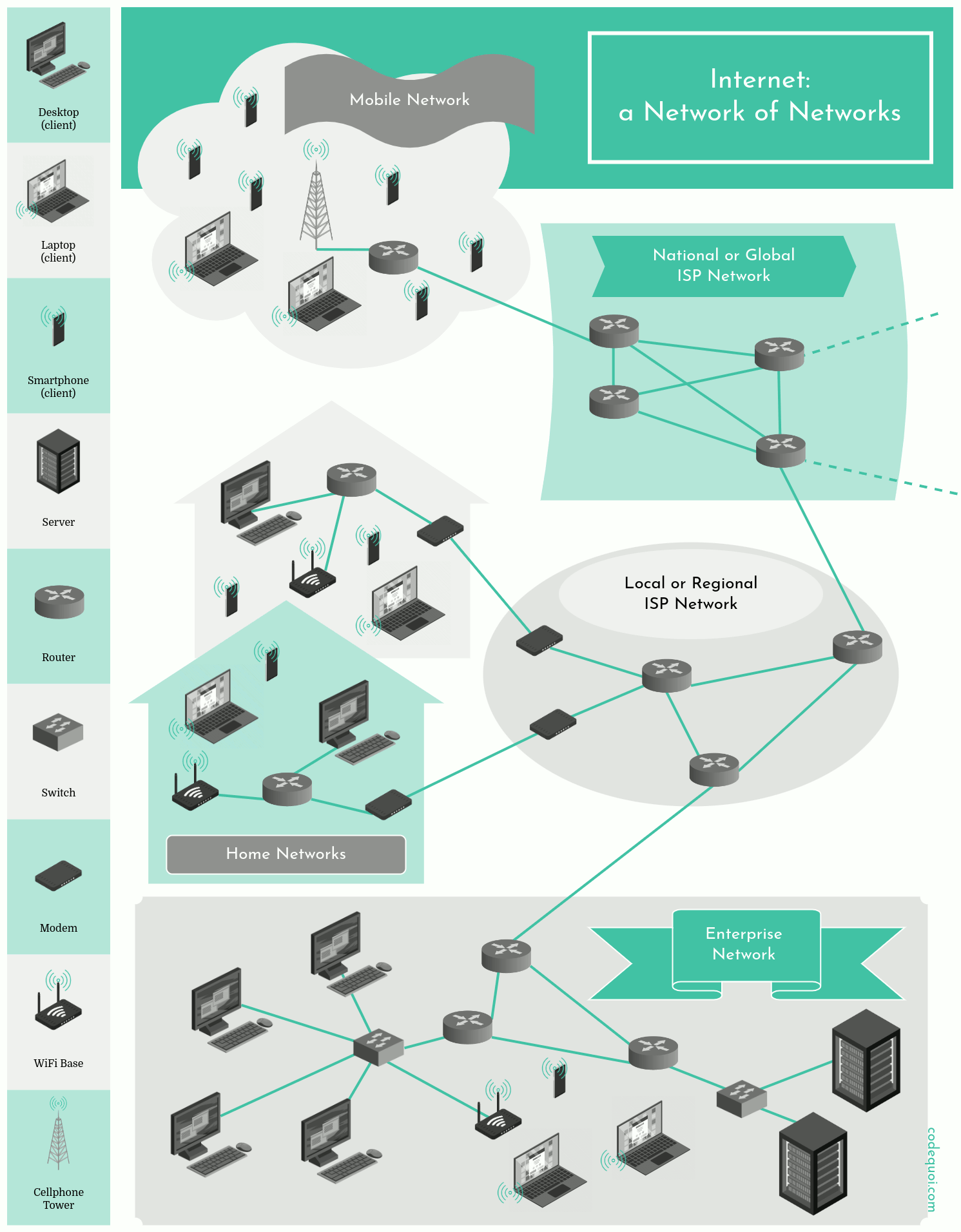
Host
Refers to any device or computer that is connected to the network and has an Internet Protocol (IP) address. We can divide hosts into two categories: clients and servers.
- A client is often a desktop or laptop computer, a smartphone, a video game console, or, with the emergence of the Internet of Things, a smart baby monitor, a seismic or animal habitat surveillance system, a smartwatch, etc.
- A server is a much more powerful machine that stores and distributes web pages, streams videos, transfers email, etc.
A host sends data through a network connection, which can be through an Ethernet cable, Wi-Fi connection, or other network technology. The host uses a communication protocol, such as Transmission Control Protocol/Internet Protocol (TCP/IP), to break down the data into packets and send those packets through the network to the correct recipient. In summary, a host sends data by breaking it down into packets and sending them through the network, where they are routed to the correct recipient.
An IP address has two parts. If you take the example 192.168.123.132 and divide it into these two parts, you get 192.168.123. Network .132 Host or 192.168.123.0 - network address. 0.0.0.132 - host address.
The Physical Components of the Internet
-
Network Cables: Network cables are used to connect devices to each other and to the internet. The most common types of network cables are Ethernet cables, which use twisted pair wires to transmit data at high speeds.
-
Switches:A switch connects multiple devices together in a single network. Unlike a router, the switch does not have any interfaces since it only distributes packets to its local network, and cannot talk directly to a network outside of its own. -
Routers:Just as the switch connects multiple devices on a single network, the router connects multiple networks together. The router has an interface for each network it connects to.
Since the router separates different networks, the range of possible IP addresses on one of its interfaces must not overlap with the range of its other interfaces. An overlap in the IP address range would imply that the interfaces are on the same network.
-
Modems: Modems are devices that connect a home or business network to the internet. They convert digital data from the network into analog signals that can be transmitted over phone or cable lines.
-
Servers: Servers are powerful computers that store and process data and provide services to other devices on the network. They can be used for web hosting, email hosting, file hosting, and many other purposes.
-
Data Centers: Data centers are large facilities that house many servers and other networking equipment. They are used to store, manage, and process large amounts of data and provide services to businesses and organizations.
-
Wireless Access Points: Wireless access points are devices that provide wireless connectivity to devices on a network. They are commonly used in homes, businesses, and public spaces to provide Wi-Fi access.
The Internet Protocol Suite
The Internet Protocol Suite, also known as the TCP/IP protocol suite, is a set of networking protocols used for communication between devices on the Internet. It was developed in the 1970s and consists of several protocols.
-
The Internet Protocol (IP) is the primary protocol of the Internet Protocol Suite. It provides the foundation for network communication and is responsible for routing data packets across the network. IP ensures that each data packet is delivered to its destination and identifies each device on the network through its IP address.
-
The Transmission Control Protocol (TCP) is another important protocol in the Internet Protocol Suite. It is used to ensure reliable delivery of data and to control the flow of data between devices on the network. TCP establishes a communication connection between devices, enabling bidirectional data transmission.
-
The User Datagram Protocol (UDP) is another protocol that is part of the Internet Protocol Suite. It is used for the transmission of data that does not require the reliability provided by TCP. UDP is faster and more efficient than TCP but does not guarantee data delivery or flow control.
-
Other application-layer protocols, such as the File Transfer Protocol (FTP), Simple Mail Transfer Protocol (SMTP), and Internet Message Access Protocol (IMAP), are also part of the Internet Protocol Suite.
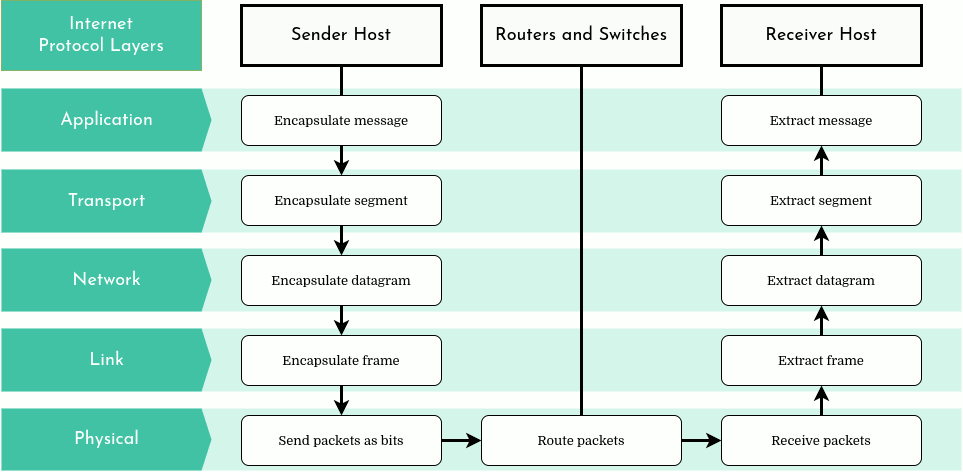
The Layers of the Internet Model
Internet’s architectural model is organized in a stack of protocols composed of 5 distinct layers: the application layer, the transport layer, the network layer, the link layer, and finally the physical layer.
- Application layer: This layer is responsible for providing network services to end-user applications. Examples of protocols in this layer include HTTP, FTP, SMTP, and DNS.
| Application | Protocol(s) |
|---|---|
| Request and transfer Web pages | HTTP, HTTPS |
| File transfer | FTP |
| Email transfer and access | SMTP, IMAP |
| Shell remote access with secure connection | SSH |
| Instant message transfer | IRC, XMPP |
| Clock synchronization to local time | NTP |
| Internet domain name translation into IP address | DNS |
| Streaming audio/video | RMTP, HLS, SRT |
| Peer-to-peer file sharing | BitTorrent, eDonkey |
-
Transport layer: This layer is responsible for providing reliable data transfer between applications running on different hosts. The most common transport layer protocols are TCP and UDP.
-
Network layer: This layer is responsible for providing routing and addressing functions that enable packets to be routed between hosts on different networks. The Internet Protocol (IP) is the primary protocol used in this layer. IP, the “Internet Protocol” by definition, naturally dominates the protocols in the Internet’s network layer. This protocol is unrivaled and all of the hosts that have a network layer must run it if they wish to be connected to the Internet. IP defines the network-layer datagram and the IP addresses that uniquely identify every connected host. There are two major versions of IP: IPv4 and IPv6.
IPv4 (Internet Protocol version 4) is the older version of IP and was the first version to be widely adopted on the Internet. IPv4 uses 32-bit addresses, which allows for a total of around 4.3 billion unique IP addresses. However, with the explosive growth of the Internet, the number of available IPv4 addresses quickly ran out.
To overcome this problem, IPv6 (Internet Protocol version 6) was developed. IPv6 uses 128-bit addresses, which allows for almost an unlimited number of unique IP addresses - more than 340 undecillion addresses, to be more precise. Additionally, IPv6 offers other improvements over IPv4, including better security, scalability, and support for new network features.
-
Link layer: This layer is responsible for providing a way to transmit data over a physical network. It includes protocols such as Ethernet and Wi-Fi.
-
Physical layer: This layer is responsible for the actual transmission of data over the physical medium, such as copper wires, fiber optic cables, or wireless signals.
Subnet Mask
The subnet mask is used by the TCP/IP protocol to determine whether a host is on the local subnet or on a remote network. In TCP/IP, the parts of the IP address that are used as the network and host addresses aren't fixed. Unless you have more information, the network and host addresses above can't be determined. This information is supplied in another 32-bit number called a subnet mask. The subnet mask is 255.255.255.0 in this example. It isn't obvious what this number means unless you know 255 in binary notation equals 11111111. So, the subnet mask is 11111111.11111111.11111111.00000000.
Lining up the IP address and the subnet mask together, the network, and host portions of the address can be separated:
11000000.10101000.01111011.10000100 - IP address (192.168.123.132)
11111111.11111111.11111111.00000000 - Subnet mask (255.255.255.0)
Almost all decimal subnet masks convert to binary numbers that are all ones on the left and all zeros on the right. Some other common subnet masks are:
| Decimal | Binary |
|---|---|
| 255.255.255.192 | 1111111.11111111.1111111.11000000 |
| 255.255.255.224 | 1111111.11111111.1111111.11100000 |
Private IP Address:
192.168.0.0 – 192.168.255.255 (65,536 IP addresses)
172.16.0.0 – 172.31.255.255 (1,048,576 IP addresses)
10.0.0.0 – 10.255.255.255 (16,777,216 IP addresses)
(When a network is connected to the Internet, it cannot use an IP address from the reserved private IP addresses)
Finding the network address
The Interface A1 above has the following properties:
IP address | 104.198.241.125
Mask       | 255.255.255.128
To determine which portion of the IP address is the network address, we need to apply the mask to the IP address. Let's first convert the mask to its binary form:
Mask | 11111111.11111111.11111111.10000000
The bits of a mask that are 1 represent the network address, while the remaining bits of a mask that are 0 represent the host address. Let's now convert the IP address to its binary form:
IP address | 01101000.11000110.11110001.01111101
Mask       | 11111111.11111111.11111111.10000000
We can now apply the mask to the IP address through a bitwise AND to find the network address of the IP:
Network address | 01101000.11000110.11110001.00000000
Which translates to a network address of 104.198.241.0.
Finding the range of host addresses
To determine what host addresses we can use on our network, we have to use the bits of our IP address dedicated to the host address. Let's use our previous IP address and mask:
IP address | 01101000.11000110.11110001.01111101
Mask       | 11111111.11111111.11111111.10000000
The possible range of our host addresses is expressed through the last 7 bits of the mask which are all 0. Therefore, the range of host addresses is:
BINARY  | 0000000 - 1111111
DECIMAL | 0 - 127
To get the range of possible IP addresses for our network, we add the range of host addresses to the network address. Our range of possible IP addresses becomes 104.198.241.0 - 104.198.241.127.
HOWEVER, the extremities of the range are reserved for specific uses and cannot be given to an interface:
104.198.241.0   | Reserved to represent the network address.
104.198.241.127 | Reserved as the broadcast address; used to send packets to all hosts of a network.
Therefore, our real IP range becomes 104.198.241.1 - 104.198.241.126, which could have been found using an IP calculator.
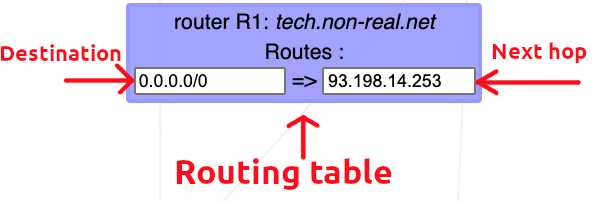
A routing table is a data table stored in a router or a network host that lists the routes to particular network destinations. In NetPractice, the routing table consists of 2 elements:
-
Destination: The destination specifies a network address on which a host is the end target of the packets. The route of
defaultor0.0.0.0/0, is the route that takes effect when no other route is available for an IP destination address. The default route will use the next-hop address to send the packets on their way without giving a specific destination. The default route will match any network. -
Next hop: The next hop refers to the next closest router a packet can go through. It is the IP address of the next router on the packet's way. Every single router maintains its routing table with a next hop address.
Masks table
| Mask | Prefix |
|---|---|
| 255.128.0.0 | /9 |
| 255.192.0.0 | /10 |
| 255.224.0.0 | /11 |
| 255.240.0.0 | /12 |
| 255.248.0.0 | /13 |
| 255.252.0.0 | /14 |
| 255.254.0.0 | /15 |
| 255.255.0.0 | /16 |
| 255.255.128.0 | /17 |
| 255.255.192.0 | /18 |
| 255.255.224.0 | /19 |
| 255.255.240.0 | /20 |
| 255.255.248.0 | /21 |
| 255.255.252.0 | /22 |
| 255.255.254.0 | /23 |
| 255.255.255.0 | /24 |
| 255.255.255.128 | /25 |
| 255.255.255.192 | /26 |
| 255.255.255.224 | /27 |
| 255.255.255.240 | /28 |
| 255.255.255.248 | /29 |
| 255.255.255.252 | /30 |
| 255.255.255.254 | /31 |
Links:
https://www.valuehost.com.br/blog/o-que-e-um-servidor-dns/
https://andreysmith.wordpress.com/2011/01/02/three-way-handshake/
https://kinsta.com/pt/base-de-conhecimento/o-que-e-uma-solicitacao-http/
https://www.avg.com/pt/signal/ipv4-vs-ipv6
https://www.freecodecamp.org/portuguese/news/ficha-informativa-de-sub-redes-mascara-de-sub-rede-24-30-26-27-29/