Conversation


…cker-android repo

|
@LerryAlexander Thanks so much for this PR, this will allow us to use Docker Selenium without having to configure a relay node in Docker. This is something my team is eagerly awaiting. Is there any sort of timeline for moving this forward? cc @budtmo |

Hi @esaari, thank you so much for your feedback on this PR, I'm willing to retake this feature and merge these changes into the master branch, but first I was hoping to have some feedback from @budtmo and maybe tackle the failed checks. |

 budtmo
left a comment
budtmo
left a comment
budtmo
left a comment
There was a problem hiding this comment.
Hi @LerryAlexander ,
sorry for late response because I am still working on the whole restructuring for this project like I did on appium-docker-android to make it more readable and easier to maintain.
I have already commented few things so you can have a look and also you need to fix the failing test first, it seems the toml is missing and you can add it here.
To be honest, I dont use Selenium for long time so I dont know how it works with Selenium 4, but I dont really like installing jar file inside the project. does it need to be inside the same container?
let me know if you need any support from me.
src/app.py
Outdated
| Get the latest selenium server jar url | ||
| """ | ||
| # Command to find jar url | ||
| command = 'curl -sk https://github.com/SeleniumHQ/selenium/releases/ | grep ".jar" | head -n 1 | grep -Eo "/[a-zA-Z0-9./?=_%:-]*"' |
There was a problem hiding this comment.
I dont know why we need to install selenium.jar? is it like client to be able to connect to selenium hub? it need to be in the same container or it can be in different container?
There was a problem hiding this comment.
we always need to install specific version instead of installing the latest.

There was a problem hiding this comment.
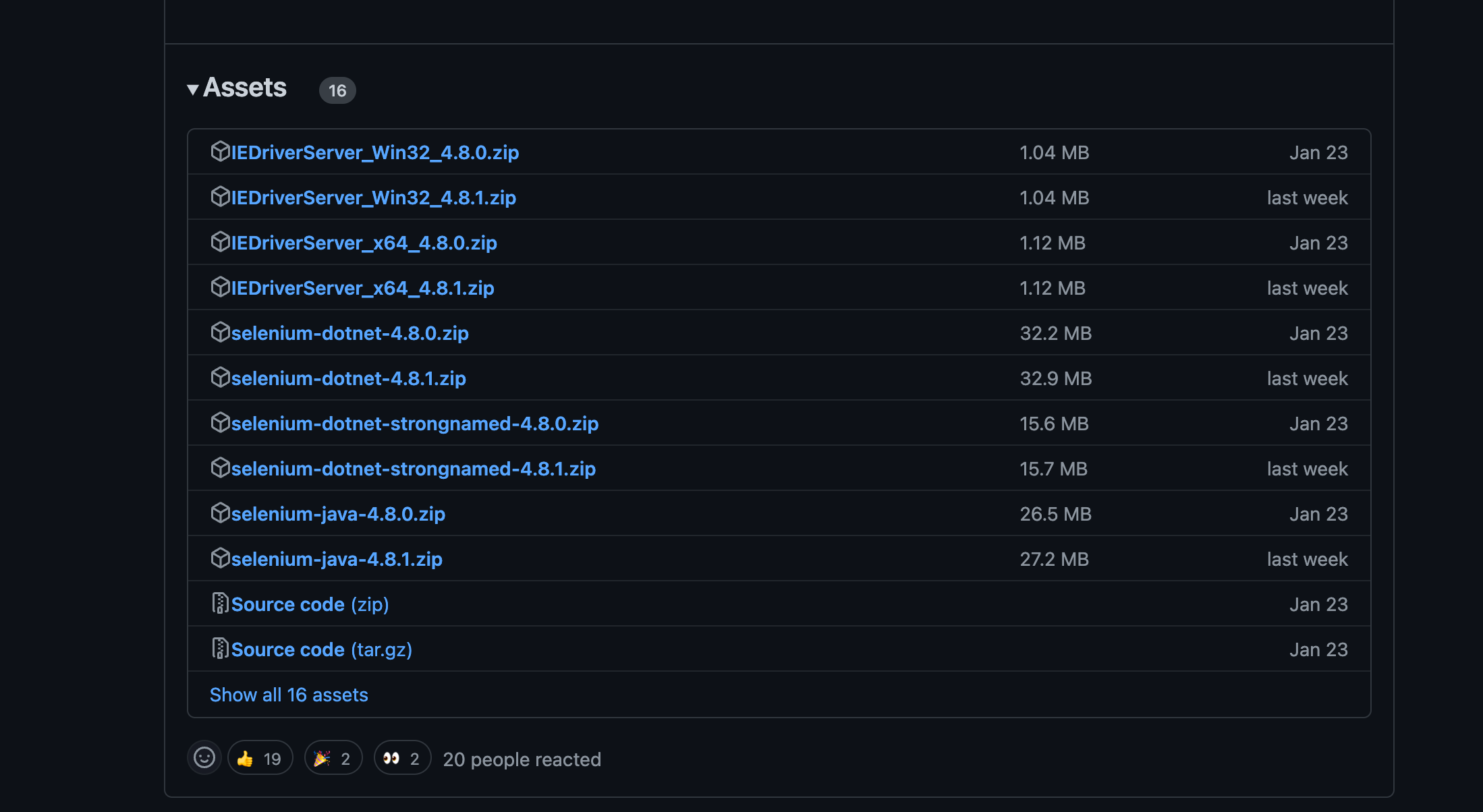
Downloading selenium jar file not work if jar file not in visible part of assets. So as wrote @budtmo need set version
There was a problem hiding this comment.
There was a problem hiding this comment.
I dont know why we need to install selenium.jar? is it like client to be able to connect to selenium hub? it need to be in the same container or it can be in different container?
Yes, in selenium 4 version things changed a bit. We definitely need the jar file to create the connection between the hub and the node as it is specified here at the appium conference - Selenium Grid 4 and Appium together in harmony
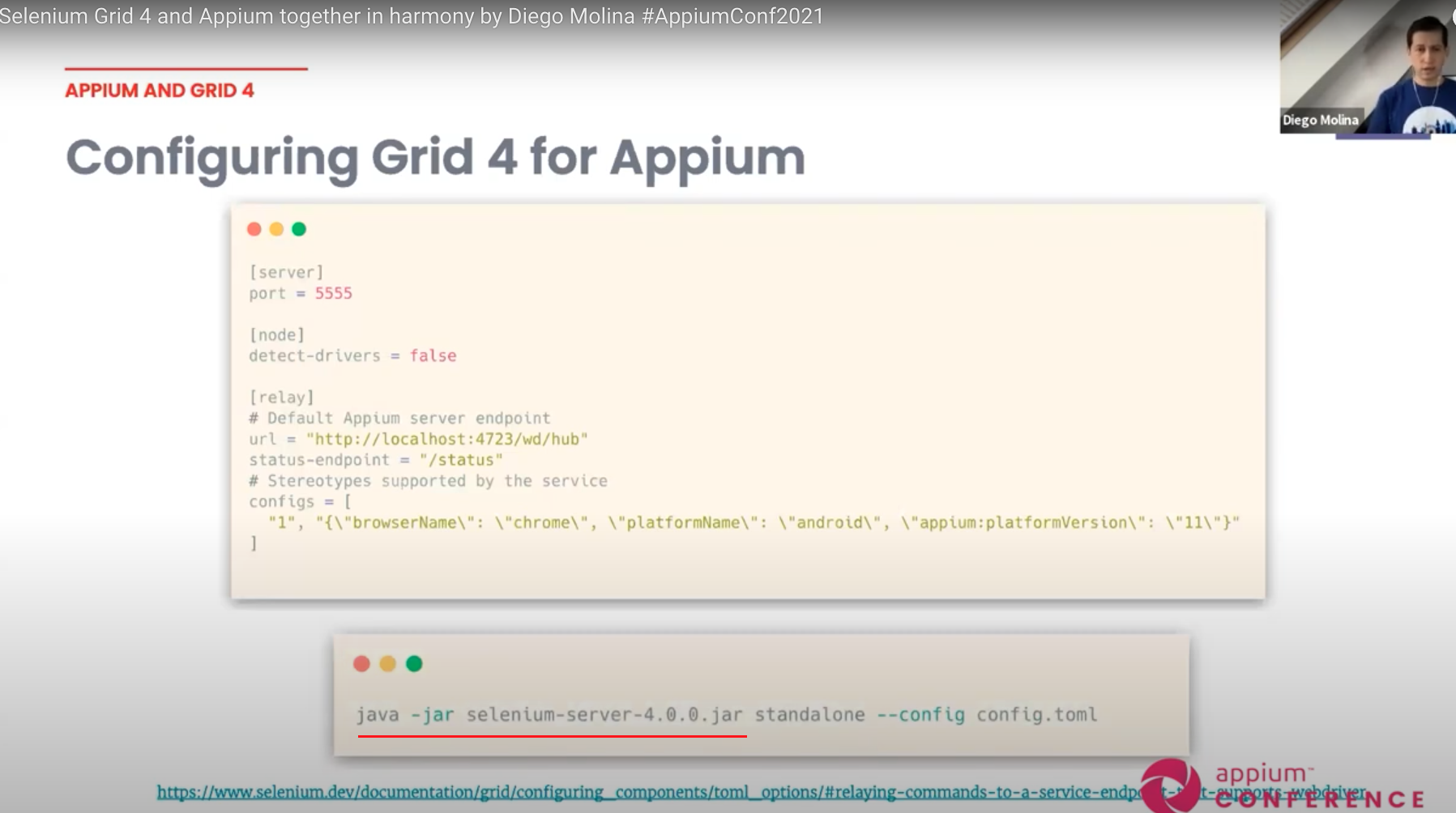
Also, is worth mentioning that I'm using the same approach to create this connection using this code as a reference from the official docker-selenium repository . But I'm open to suggestions or improvements on this, please let me know if it makes sense to you, otherwise, we could try to come up with another solution.

There was a problem hiding this comment.
hahaha.. :D sorry, I meant @LerryAlexander might create a PR to that docker-selenium and it will be reviewed by you @diemol
There was a problem hiding this comment.
Sorry @budtmo I'm lost here. I believe we still need the script proposed in this PR, or maybe I didn’t get you clearly enough. So, when the user is using docker-android image and wants to connect to selenium hub using selenium grid, from the docker-android image I was proposing to use the env variable CONNECT_TO_GRID_4 to run all the script proposed in the PR; so now that script should be moved to docker-selenium repo? Sorry, I'm not getting the logic here, help me to clarify the next steps.
There was a problem hiding this comment.
@LerryAlexander if I understand correctly based on the documentation: to be able to connect to Selenium 4.x, you just need to run selenium.jar with .toml file that contains Appium url and because we just need selenium.jar and .toml file, we can create a small Dockerfile in docker-selenium project. it means, we dont need anything to be done here, or do you mean something else? or maybe I miss something?
There was a problem hiding this comment.
Hello, sorry for the late reply @budtmo. Yes, you are right, but the whole idea of this PR was using the docker-android image to be able to create the selenium grid architecture just like the way you mentioned in your docker-compose file exampe but this time using Selenium 4.x, because right now the current script you have src/app.py works using the old architecture. So, I know that the approach of downloading the .jar file is a requisite to connect no Selenium 4.x, but besides having the toml file, so, for example, we need to get the platformVersion or the browserName from the environment variables provided to the docker-android image to inject in the configs section info as you can see in the toml file below:
[node]
detect-drivers = false

[relay]
# Default Appium/Cloud server endpoint
url = "http://localhost:4723/wd/hub"
status-endpoint = "/status"
# Stereotypes supported by the service. The initial number is "max-sessions", and will allocate
# that many test slots to that particular configuration
configs = [
  "5", "{\"browserName\": \"chrome\", \"platformName\": \"android\", \"appium:platformVersion\": \"11\"}"
]
So, all this connection is happening in android-docker image, it's just that we are updating the image to connect now to Selenium 4.x instead of the old Selenium 3.x architecture, so I don’t see how creating an image in docker-selenium could help us to use this whole approach, do you get my point?
I mean, I can create the docker image in selenium repo that does the thing about downloading the selenium.jar file and the toml configuration, but how can we relate that using the docker android image which set up the emulator inside the container? Maybe I'm missing something, can you explain to me how can we use docker-android with selenium 4.x if we move this whole logic to a Dockerfile in docker-selenium project?
Hi @budtmo , Thank you so much for your comments and feedback, they mostly make a lot of sense to me as well. I'm going to get back to you for any support or questions. I will be working on this in the following days. Thanks in advance! |

…enium-node.sh path location

Codecov Report
📣 This organization is not using Codecov’s GitHub App Integration. We recommend you install it so Codecov can continue to function properly for your repositories. Learn more @@ Coverage Diff @@
## master #338 +/- ##
===========================================
- Coverage 70.39% 55.44% -14.95%
===========================================
Files 2 2
Lines 152 202 +50
===========================================
+ Hits 107 112 +5
- Misses 45 90 +45
Help us with your feedback. Take ten seconds to tell us how you rate us. Have a feature suggestion? Share it here. |

| device_name = os.getenv('DEVICE', 'chrome') | ||
| browser_name = default_web_browser if mobile_web_test else device_name | ||
| create_node_config_selenium_grid_4(browser_name, appium_host, appium_port, plafform_name) | ||
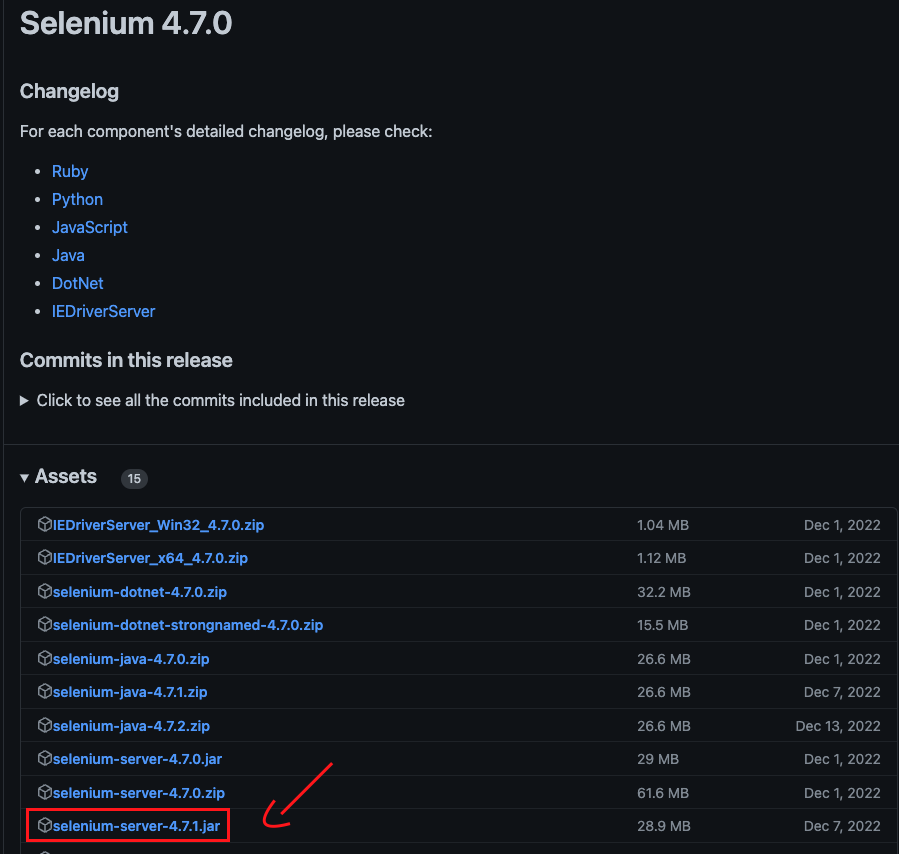
| download_selenium_server_url = 'https://github.com/SeleniumHQ/selenium/releases/download/selenium-4.7.0/selenium-server-4.7.1.jar' |
There was a problem hiding this comment.
@budtmo @SHELA , I set it to version 4.7.1 since is the latest release that has the jar file from these assets at https://github.com/SeleniumHQ/selenium/releases/

There was a problem hiding this comment.
@LerryAlexander I see there's a selenium-server-4.8.1.jar available: https://github.com/SeleniumHQ/selenium/releases/download/selenium-4.8.0/selenium-server-4.8.1.jar
Just need to expand the full Assets list under the latest release to see it: https://github.com/SeleniumHQ/selenium/releases/tag/selenium-4.8.0
There was a problem hiding this comment.
| java ${JAVA_OPTS} -jar /opt/selenium/selenium-server.jar node \ | ||
| --publish-events tcp://"${SE_EVENT_BUS_HOST}":${SE_EVENT_BUS_PUBLISH_PORT} \ | ||
| --subscribe-events tcp://"${SE_EVENT_BUS_HOST}":${SE_EVENT_BUS_SUBSCRIBE_PORT} \ | ||
| --detect-drivers false \ | ||
| --config /opt/bin/config.toml \ | ||
| ${SE_GRID_URL} ${SE_OPTS} |
There was a problem hiding this comment.
@budtmo here is where it's required to use the selenium-server.jar in order to make the connection between the hub and the node
| coverage==4.2 | ||
| mock==2.0.0 | ||
| nose==1.3.7 | ||
| toml |
There was a problem hiding this comment.
Seems that not working. Module not found
Traceback (most recent call last):
  File "/usr/lib/python3.6/runpy.py", line 193, in _run_module_as_main
    "__main__", mod_spec)
  File "/usr/lib/python3.6/runpy.py", line 85, in _run_code
    exec(code, run_globals)
  File "/root/src/app.py", line 9, in <module>
    import toml
ModuleNotFoundError: No module named 'toml'
There was a problem hiding this comment.
@SHELA I don't understand, where did you see this error? Did you run pip install -r requirements.txt first?
There was a problem hiding this comment.
@LerryAlexander inside docker error in log: /var/log/supervisor/docker-android.stderr.log
File "/usr/lib/python3.6/runpy.py", line 193, in _run_module_as_main
"main", mod_spec)
File "/usr/lib/python3.6/runpy.py", line 85, in _run_code
exec(code, run_globals)
File "/root/src/app.py", line 9, in
import toml

|
@LerryAlexander I am just curious about Selenium Hub integrated with Appium. how stable the Selenium 4.0 that are connected to Appium Server (compared with Selenium 3.x)? I have tried with Selenium 3.x long time ago and it is not stable at all and thats why I dont use Selenium Hub anymore and I created my own hub privately to replace it. |
That's a good question @budtmo, I have used selenium 3.x in the past, and works fine but I've seen some instability as well. To be honest, I've used Selenium grid 4.x only for creating this PR, and seems to be more stable, it would be fair to maybe give it a chance to Selenium 4.x |

|
@budtmo I have used Selenium 4 Grid extensively and it's quite a bit better than Selenium 3. One big compelling feature of Selenium Grid 4 is that devtool protocol is supported, so that gives us the ability to do things like throttling, network request interception, etc. Is it possible we could reopen this PR and allow @LerryAlexander to continue his work? I think quite a few people are eagerly anticipating this feature. |
|
have already discussed with @LerryAlexander privately and it is the best way to do this "custom selenium node" in docker-selenium project to get better update and maintenance activity as it include downloading selenium.jar file and the custom node could probably used for other type of node (not just for Appium) in the future. Lerry is a bit busy so it might take time but feel free if you want to help with the implementation in docker-selenium project @esaari |
6 participants


Purpose of changes
Currently,
docker-androiddoesn't support the selenium grid with the newest architecture of Selenium 4, which means the selenium grid architecture has changed too, so in order to be able to use the new grid 4 architecture I'm proposing this PR which contains the following main changes:Files:
src/app.py: added code logic to accept new node connections using the Selenium Grid 4 architecture when the environment variableCONNECT_TO_GRID_4=true.src/run_app.sh: new file added before runningpython -m src.appto install all dependencies for running python withtomlpackage. The new selenium grid architecture now usestomlfile instead ofjsonfile to create node configurations. More info about this heresrc/start-selenium-node.sh: this new file added contains the logic to start a new selenium grid node docker using the selenium 4 architecture. This file is basically taken directly from the SeleniumHQ/docker-selenium repo using the same approach from this file to create and connect new docker nodes to selenium hub. To read more about this code logic and how it works you can take a look at this folderdocker-compose-grid-4.yml: this new docker-compose file is added as a reference or as an example of how to usedocker-androidwith selenium grid using the latest selenium hub architecture and the use of the new environment variables.Environment Variables:
CONNECT_TO_GRID_4: new (optional) environment variable to differentiate grid connections with selenium 4 (new architecture) from selenium 3 or below (old architecture).SE_EVENT_BUS_HOST,SE_EVENT_BUS_PUBLISH_PORT, andSE_EVENT_BUS_SUBSCRIBE_PORTare for registering node docker through the Event Bus defined in Selenium 4. The explanation of this process is here in the official documentation of the SeleniumHQ/docker-selenium repo. Note: Since these variables are always set with the same value, maybe we can just remove them so the user doesn’t have to take care of those values.Types of changes
Put an
xin the boxes that applyHow has this been tested?
These changes were locally tested on a Mac OSx machine.