In here, I will share what I have learned and understood!
For the practice, I'm using PostgreSQL!
Organizing and grouping tables into logical units.
CREATE SCHEMA schema_name (other than the public one).Create table statement with optional table constraint and default value. The next following SQL command creates a table with all data types available in PostgreSQL.
CREATE TABLE table_name (
    id SERIAL PRIMARY KEY,
    name TEXT NOT NULL,
    date DATE,
    time TIME WITH TIME ZONE,
    datetime TIMESTAMP WITH TIME ZONE,
    timestamp TIMESTAMP WITH TIME ZONE,
    boolean BOOLEAN,
    decimal NUMERIC,
    real REAL,
    double DOUBLE PRECISION,
    smallint SMALLINT,
    bigint BIGINT,
    blob BYTEA
);
This creates a table called example_table with the following columns:
id: a serial column that is the primary key for the table
name: a text column that cannot contain a null value
date: a date column
time: a time with time zone column
datetime: a timestamp with time zone column
timestamp: a timestamp with time zone column
boolean: a boolean column
decimal: a numeric column with a decimal precision
real: a real (floating point) column
double: a double precision (floating point) column
smallint: a small integer column
bigint: a big integer column
blob: a bytea column for storing binary data
Note that the time, timestamp, and bytea data types are specific to PostgreSQL.
Here is the list of constraints which are rules enforced on columns to maintain data integrity :
- PRIMARY KEY: Uniquely identifies a record in the table.
- NOT NULL: Column must have a value.
- UNIQUE: Column must have a unique value.
- FOREIGN KEY: Links two tables together.
- CHECK: Ensures that the value in the column satisfies a specific condition.
Index improves the speed of querying through the table's data.
CREATE INDEX idx__name
ON table_name
USING (columns_names)This is an imaginary table
CREATE VIEW view_name AS SELECT QUERYIf your table is already created and you want to bring some modifications, you can modify it.
- Adding columns
Altering table to add new column(s)
ALTER TABLE table_name ADD new_column DataType OptionalTableConstraint DEFAULT default_value; - Adding constraint (foreign key)
ALTER TABLE table_name_1
ADD FOREIGN KEY (id2) REFERENCES table_name_2(id2);- Removing columns
Altering table to remove column(s)
ALTER TABLE table_name DROP column_to_be_deleted; - Renaming the table Altering table name
ALTER TABLE table_name RENAME TO new_table_name; If you no longer need a table, you can remove it.
DROP TABLE table_name;PostgreSQL supports several data types that can be used to store date and time values. Here is a list of some of the commonly used date and time data types in PostgreSQL:
-
timestamp: Stores a date and time value with UTC by default. For example, it can take the value of '2004-10-19 10:23:54' UTC.
-
timestamptz: This is the same as timestamp, but with the time zone included. For example, '2004-10-19 10:23:54+03' this value includes the UTC+3.
-
date: Stores only the date (YYYY/MM/DD) without the time.
-
time: Stores only the time (HH:MM:SS without time zone) without the date.
-
interval: Stores a duration of time, such as the difference between two timestamps. For example, x days HH:MM:SS with time zone.
/** Creates a table called events with columns for :
- an id (which is a serial type and will be automatically assigned a unique value for each row),
- a name (which is a text type and cannot be NULL),
- a start_time and end_time (both of which are timestamp with time zone data types and cannot be NULL),
- and a duration (which is an interval type and cannot be NULL).
**/
CREATE TABLE events (
  id serial PRIMARY KEY,
  name text NOT NULL,
  start_time timestamptz NOT NULL,
  end_time timestamptz NOT NULL,
  duration interval NOT NULL
);INSERT INTO events (name,start_time,end_time,duration)
VALUES ('New Year party', '2023-01-01 00:23:00+03', current_timestamp,current_timestamp-'2023-01-01 00:23:00+03')SELECT duration FROM events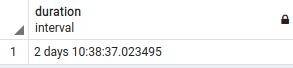
SELECT CURRENT_DATE, CURRENT_TIME, CURRENT_TIMESTAMP, LOCALTIME,LOCALTIMESTAMPFrom this part, I use Netflix datasets to practice.
- Using command line for quering (SELECT)
psql postgresql://user@localhost/netflix -H -c 'select * from netflix_titles limit 2;'This command :
- connects to the database netflix;
- executes the query select * from netflix_titles limit 2, which means select only 2 rows for all the data from netflix_titles table;
- the parameter -H gets the output in HTML format.

- Filling the NULL
For null values, we can fill them with emoji. In here, for example,
psql -U username --dbname netflix -c '\pset border 2' -c '\pset null 🦞️' -c 'select showid, duration_minutes from netflix_titles limit 5;'In single command line, we make access to the database 'netflix', decorate the output with border, assign the emoji for null values, and launch the query.
The output is :

- Database connection
There are two accepted formats for connection strings
psql 'user=username host=hostname port=portnumber dbname=dbname'psql postgresql://user:secret@host:port/dbname