

A lightweight, self-hosted home dashboard for your services.





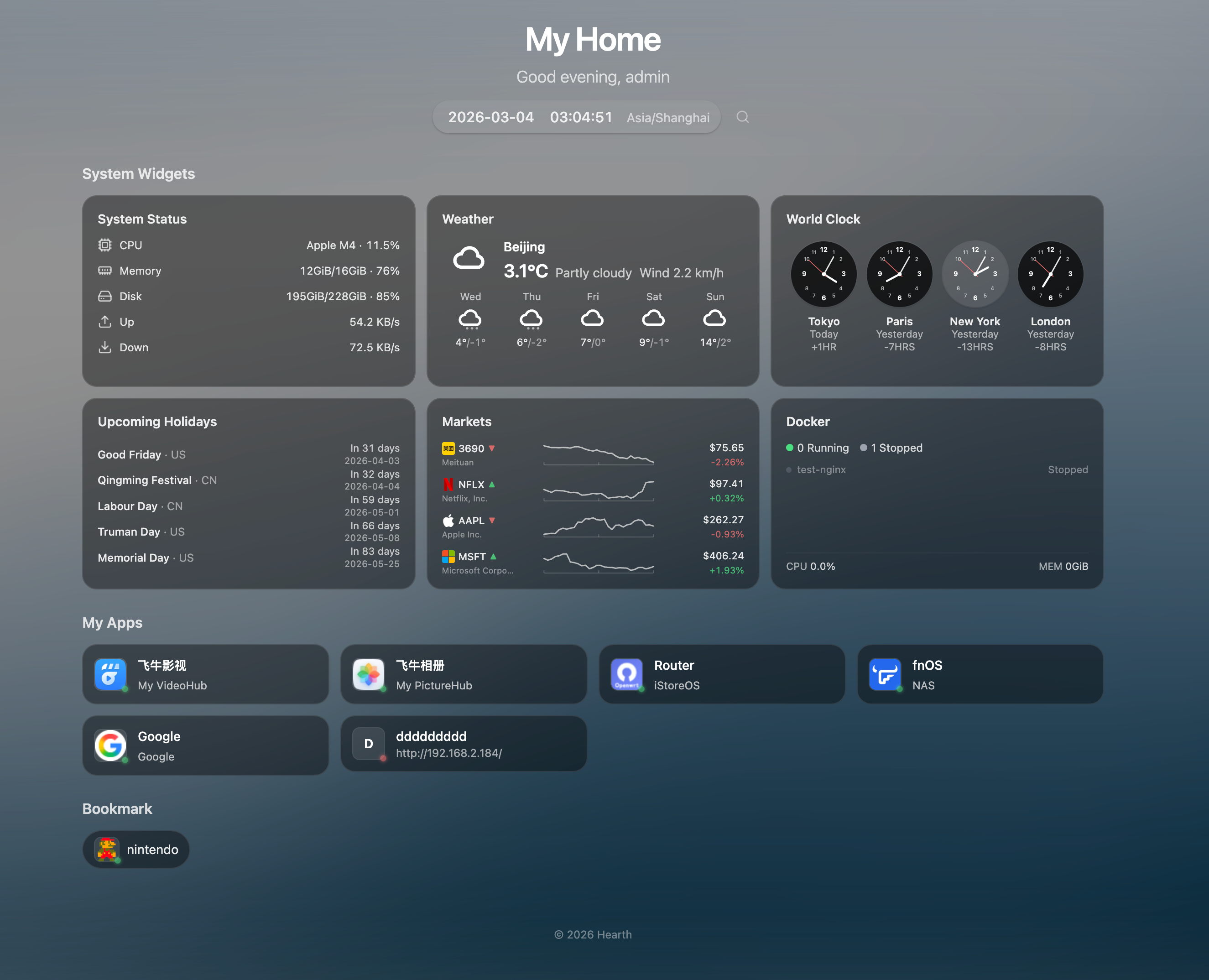
- 🏠 Grouped App Links - Organize your services into custom groups
- 🔖 Bookmarks - Compact pill-style link groups for quick access
- 🔍 Quick Launch -
Cmd/Ctrl+Kto search apps instantly, with pinyin support - 🟢 Service Status - Live health-check indicators (supports HTTPS with self-signed certs)
- 🖱️ Drag & Drop - Reorder groups and items freely
- 🎨 Frosted Glass UI - Borderless glassmorphism card design with backdrop blur
- 🌤️ Weather - Current weather with 7-day forecast (Open-Meteo, no API key needed)
- 📈 Market Ticker - US stocks, HK stocks, and crypto prices with intraday sparkline charts (Yahoo Finance)
- 💱 Currency Exchange - Up to 4 currency pairs with 30-day history sparklines and flag emojis (Frankfurter API)
- 📰 RSS Feed - Aggregate up to 10 RSS/Atom feeds with manual refresh, resizable height
- 🎮 Game Deals - PC (CheapShark/Steam) and iOS (App Store) deals with prices, ratings, and direct store links
- 🕐 World Clock - Up to 4 configurable timezone clocks
- 📊 System Metrics - CPU, memory, disk, and network monitoring with historical charts (7-day retention)
- 🐳 Docker Monitoring - Container status, resource usage, start/stop/restart actions
- 🗓️ Holidays - Upcoming holidays for selected countries
- 📝 Notes - Quick notes and memos
- 👋 Greeting & Daily Quote - Time-based greeting with a daily inspirational quote (ZenQuotes)
- 🗓️ Solar Terms - Optional Chinese 24 solar terms display next to date (toggleable)
- 🎨 Dynamic Backgrounds - Bing daily, random, Unsplash, Picsum, or video backgrounds
- 🌓 Bilingual UI - Chinese and English with full i18n
- 📱 Mobile Friendly - Responsive design for all devices
- ✨ Easter Eggs - 5 hidden particle effects (snow, rain, sakura, firefly, shooting stars)
docker run -d \
  --name hearth \
  -p 8787:8787 \
  -v hearth-data:/data \
  -v /var/run/docker.sock:/var/run/docker.sock \
  --restart unless-stopped \
  cailurus/hearth:latest
Open http://localhost:8787 and login with admin / admin.
The Docker socket mount (
-v /var/run/docker.sock:...) is optional — it enables the Docker monitoring widget. Without it, all other features work normally.
services:
  hearth:
    image: cailurus/hearth:latest
    ports:
      - "8787:8787"
    volumes:
      - hearth-data:/data
      - /var/run/docker.sock:/var/run/docker.sock  # Optional: enables Docker monitoring
    restart: unless-stopped

volumes:
hearth-data:| Item | Details |
|---|---|
| Default Login | admin / admin |
| Rate Limiting | 5 attempts per 15 min, then 5 min lockout |
| Password Reset | docker exec -it hearth /hearth/reset-password -db /data/hearth.db -password NEW |
| Variable | Default | Description |
|---|---|---|
HEARTH_ADDR |
:8787 |
Listen address |
HEARTH_DATA_DIR |
/data |
Data directory |
HEARTH_SESSION_TTL |
168h |
Session expiration |
HEARTH_COOKIE_SECURE |
auto |
Secure cookie flag (auto / true / false) |
HEARTH_DOCKER_SOCKET |
auto-detect | Docker socket path (auto-detects common paths) |
NAS Docker Monitoring Setup (fnOS, Synology, etc.)
NAS Docker UIs typically only allow directory mounts, not individual files. To enable Docker monitoring:
-
Add a directory mount in your NAS Docker settings:
Host Path Container Path /var/run/host-run -
Add an environment variable:
Variable Value HEARTH_DOCKER_SOCKET/host-run/docker.sock
If your NAS restricts access to /var/run, SSH into the NAS and run:
mkdir -p /vol2/1000/ServiceStore/docker-sock
mount --bind /var/run /vol2/1000/ServiceStore/docker-sock
Then mount /vol2/1000/ServiceStore/docker-sock → /host-run instead.
# Prerequisites: Go 1.25+, Node.js 20+

git clone https://github.com/cailurus/Hearth
cd Hearth

# Dev mode (backend + frontend with hot reload)
make dev

# Build production
make build
./dist/hearthAll data (including user credentials, app links, settings) is stored in /data:
data/
├── hearth.db    # SQLite database (users, apps, settings)
├── icons/       # Cached app icons
└── cache/       # Background images
To ensure your data survives container updates, mount a volume or host directory:
Using Docker named volume (recommended):
docker run -d -v hearth-data:/data cailurus/hearth:latestUsing host directory:
docker run -d -v /path/to/my/data:/data cailurus/hearth:latestWhen updating the container, your data remains intact:
docker pull cailurus/hearth:latest
docker stop hearth && docker rm hearth
docker run -d --name hearth -p 8787:8787 \
  -v hearth-data:/data \
  -v /var/run/docker.sock:/var/run/docker.sock \
  cailurus/hearth:latest