This project is a custom-designed Zigbee Coordinator board integrating ESP32, Zigbee RF module (RF-BM-2652P2), and Ethernet with Power over Ethernet (PoE) capabilities. It is optimized for smart home or industrial IoT gateway applications, and provides a compact, PoE-powered solution for reliable Zigbee-to-IP bridging.
- ESP32-WROOM-32UE microcontroller with Wi-Fi and Bluetooth
- Zigbee RF module (CC2652-based) for Zigbee 3.0 coordination
- LAN8720A Ethernet PHY connected to ESP32 via RMII
- PoE power supply using TPS2376DDAR IEEE 802.3af-compliant PD controller
- Fully isolated and filtered power stages for 3.3V and 5V rails
- CH340C USB-UART converter for easy flashing/debugging
- USB Type-C input with ESD protection
- JTAG and serial debug headers
- LEDs for link/activity indication
- Compact design ready for fabrication via JLCPCB


The electrical schematic is divided into the following pages:
- Ethernet & PoE: LAN8720A, RJ45 + magnetics, PoE PD and DC/DC conversion
- Controller: ESP32 core, CH340C UART, USB input, power rails
- Zigbee Module: RF-BM-2652P2, antenna, buttons, debug interfaces
- Designed in EasyEDA
- Compatible with Zigbee2MQTT, Home Assistant, OpenHAB, and other automation platforms
- ESP32 flashable via USB or UART boot mode (IO0 + EN)
- Zigbee module (CC2652P2) flashable via UART bridge with ESP32
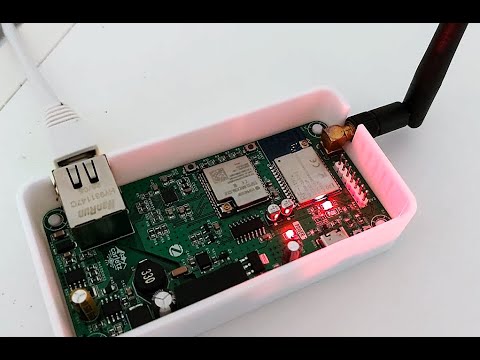
- Flash the ESP32 using a serial tool or over USB with your preferred firmware (e.g., ESPHome, custom UART bridge, etc.). A special thanks to the work of ZigStar crew where I took a lot of inspiration
- Use the ESP32 to create a UART bridge to the CC2652P2 module.
- Access the ESP32 on the configured IP address via TCP/UDP.
- Download the appropriate Zigbee coordinator firmware from (in dev branch folder): Koenkk Z-Stack firmware
- Flash the CC2652P2 using tools like
cc2538-bslor TI's SmartRF Flash Programmer through the ESP32 UART bridge.
- Assemble the PCB using the schematic and a compatible BOM.
- Flash ESP32 and configure the Zigbee module as described above.
- Connect the board via Ethernet or Wi-Fi.
- Integrate with your MQTT broker and Zigbee network.
This project is open hardware, released under the MIT License.