Releases: carroarmato0/NextUI-Itchio-Pak
Release list
v1.0.24

Itch-io v1.0.24
Giving the developers their due
A lot of the Game Boy games on itch.io are not really "free" — they are name-your-own-price. The developer lets you pay nothing, but they are asking for a donation, and until now this app quietly hid that. It showed you a download button and nothing else, so a game someone spent months making looked exactly like a giveaway.
This release fixes that. When a game is free-but-asking, its page now shows the amount the developer suggests, right above the download button:
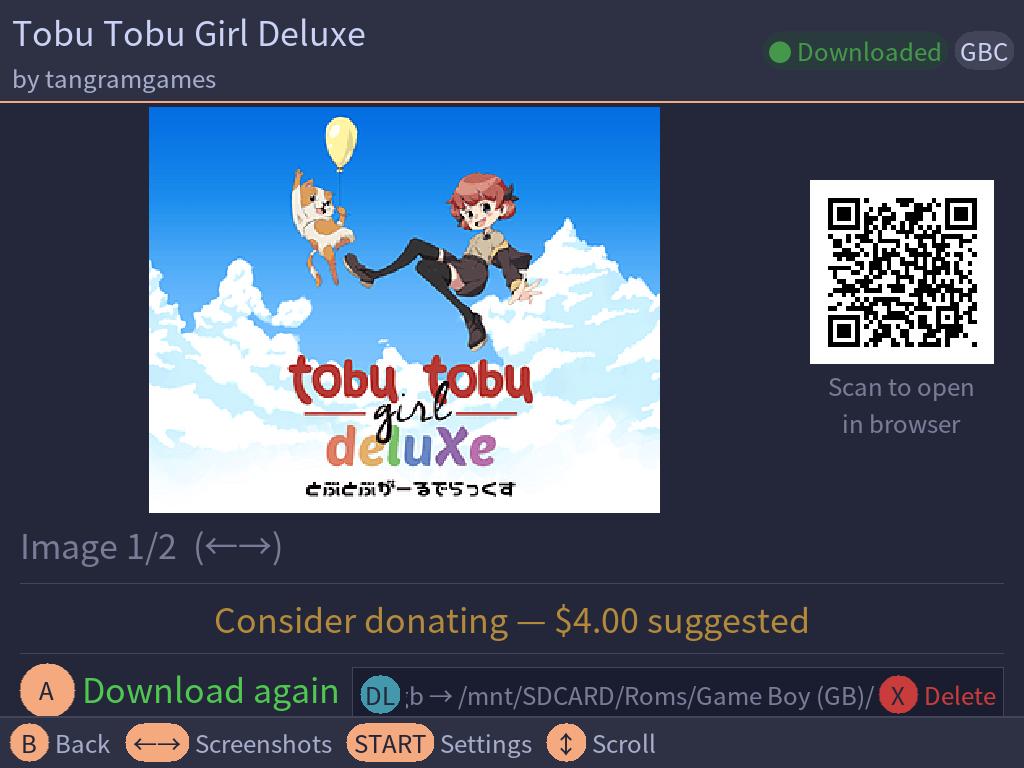
That is all it does. It is a prompt to consider, not a paywall and not a nag: the download still works exactly as before, still costs nothing, and the app can neither take your money nor know whether you gave any. Paying is something you do on itch.io, in your own time, and this is simply the app getting out of the way of the developer's ask instead of hiding it.
Games that are genuinely free show nothing new, and neither do paid games.
Changes
• Name-your-own-price games now show the developer's suggested donation amount on the game page.
• Nothing about downloading changes — these games still download for free.
Which file do I need?
| Your device runs | Download | How to install |
|---|---|---|
| NextUI — with the Pak Store | Itch-io.pak.zip |
Pak Store → Itch-io → press A |
| NextUI — by hand, one device | Itch-io.NextUI.v1.0.24.pak.zip |
Extract into Tools/<platform>/Itch-io.pak/ |
| NextUI — by hand, every device | Itch-io.NextUI.v1.0.24.pakz |
Rename to end in .zip, extract at the SD card root |
| muOS | Itch-io.muOS.v1.0.24.muxapp |
Copy to ARCHIVE/, then Applications → Archive Manager → press A |
The two NextUI .pak.zip files are identical; the unversioned name exists because that is what the Pak Store fetches.
Full changelog: v1.0.23...v1.0.24
v1.0.23
Itch-io v1.0.23
Two new families of handheld can run Itch-io: every device running muOS, and
the Anbernic RG XX line running NextUI. Nothing changes for TrimUI and Miyoo
owners — both were re-tested on hardware for this release.
This is the work that was under test through rc1–rc5.
muOS (MustardOS)
Itch-io now runs on muOS as well as NextUI, from a single .muxapp installed
through Archive Manager. It is a native muOS application, not a NextUI pak
wearing a disguise:
- Downloads go to your existing ROM folders. muOS does not mandate folder
names, so Itch-io looks across both cards for a folder that matches the system
and uses it. It does not create a parallel tree of its own, and it creates
nothing at all until you download something. - Box art is filed under the muOS catalogue, the way muOS expects, rather
than the.media/layout NextUI uses. - Features with no muOS equivalent are hidden, not guessed at. NextUI theming,
MinUI save formats, save/state sync, and the GBA and Pico-8 core pickers do not
appear on muOS. A wrong save path writes files you would never find again, so
these are switched off rather than approximated. - Face buttons follow your muOS setting. muOS lets you swap A/B, and Itch-io
reads that rather than assuming.
Anbernic RG XX (H700)
Itch-io installs and runs on the H700 platform: RG28XX, RG34XX, RG34XX SP, RG SP,
RG35XX Plus, RG35XX H, RG35XX SP, RG35XX Pro, RG40XX H, RG40XX V and RG Cube XX.
It uses the SDL2 that NextUI installs on those devices rather than bundling its
own, as the H700 pak porting guidance asks. This requires a NextUI build that
includes H700 support.
Layouts were reworked for the two screen sizes these handhelds introduce. 720×480
panels (RG34XX, RG34XX SP, RG SP) previously got spacing meant for a screen half
again as tall. The RG Cube XX's square 720×720 panel turned up a real bug along
the way — the page counter was drawn on top of the footer hints, in the same
colour, on every palette — which is fixed.
If you have an RG XX, please report back
Nobody working on Itch-io owns one. Everything H700-specific was worked out
from NextUI's source and from one tester's device dump, not from hardware sitting
on a desk.
The buttons are the part to check. The controls were wrong in an earlier test
build — every button did the job of another one, three places off — because the
app numbered the pad by hand. It now reads the numbering out of the device
itself, which should make it right whichever RG XX you own. That reasoning has
not yet been confirmed on real hardware by anyone, which is the single least
certain thing in this release.
So: does A confirm, does B go back, does X delete, and do the shoulder buttons
change the sort order? If any of that is wrong, please open an issue — and
attach the output of:
cat /proc/bus/input/devices
That file is what settles it; it has done so twice already. Your log at
.userdata/h700/logs/itchio.log is also worth quoting, particularly the
device sku:, input: face buttons and sdl: lines. If sdl: reports version
2.0.12, Itch-io found the stock Anbernic library instead of NextUI's, and that is
a bug worth reporting even if everything seems to work.
Downloads landing in the wrong folder, or box art not appearing, are also worth a
report — those paths are assumed to match other NextUI devices.
Under the hood
- Build targets are now
<firmware>/<device>, declared once, so supporting
another firmware is a small change rather than a hunt through five scripts. - Releases ship per-firmware artifacts with a table on the release page saying
which file to take. - Upgrading over an older install now removes the pre-rename binary, which
otherwise sat there for ever taking up 14 MB.
Which file do I need?
| Your device runs | Download | How to install |
|---|---|---|
| NextUI — with the Pak Store | Itch-io.pak.zip |
Pak Store → Itch-io → press A |
| NextUI — by hand, one device | Itch-io.NextUI.v1.0.23.pak.zip |
Extract into Tools/<platform>/Itch-io.pak/ |
| NextUI — by hand, every device | Itch-io.NextUI.v1.0.23.pakz |
Rename to end in .zip, extract at the SD card root |
| muOS | Itch-io.muOS.v1.0.23.muxapp |
Copy to ARCHIVE/, then Applications → Archive Manager → press A |
The two NextUI .pak.zip files are identical; the unversioned name exists
because that is what the Pak Store fetches.
Full changelog: v1.0.22...v1.0.23
v1.0.23-rc5
This is a test build. It is published for people who want to try muOS
support and report back. It is not offered through the Pak Store, and
NextUI users on a stable release will not be prompted to update to it.Please report anything odd on the issue tracker, saying which firmware and
device you are on.
Itch-io v1.0.23-rc5
• Anbernic RG XX (H700): fixes the buttons. On rc4 every button did the job of another one — B acted as L1, X as Select — because the app numbered the pad's buttons by hand, three places off. It now reads the numbering out of the device itself, so it is right whichever RG XX you have.
• Test build: please report whether A confirms, B goes back, X deletes, and the shoulder buttons change the sort order.
Which file do I need?
| Your device runs | Download | How to install |
|---|---|---|
| NextUI — by hand, one device | Itch-io.NextUI.v1.0.23-rc5.pak.zip |
Extract into Tools/<platform>/Itch-io.pak/ |
| NextUI — by hand, every device | Itch-io.NextUI.v1.0.23-rc5.pakz |
Rename to end in .zip, extract at the SD card root |
| muOS | Itch-io.muOS.v1.0.23-rc5.muxapp |
Copy to ARCHIVE/, then Applications → Archive Manager → press A |
Full changelog: v1.0.23-rc4...v1.0.23-rc5
v1.0.23-rc3
This is a test build. It is published for people who want to try what
is new in it and report back — the notes below say what that is. It is not
offered through the Pak Store, and NextUI users on a stable release will
not be prompted to update to it.Please report anything odd on the issue tracker, saying which firmware and
device you are on.
Itch.io Pak v1.0.23-rc3
A test build. It adds support for Anbernic RG XX handhelds (the H700 family)
running NextUI, alongside the muOS support already being tested in this cycle.
Anbernic RG XX (H700)
The Pak now installs and runs on the H700 platform: RG28XX, RG34XX, RG34XX SP,
RG SP, RG35XX Plus, RG35XX H, RG35XX SP, RG35XX Pro, RG40XX H, RG40XX V and
RG Cube XX. It uses the SDL2 that NextUI installs on those devices rather than
bundling its own, as the H700 pak porting guidance asks.
Layouts were reworked for the two screen sizes these handhelds introduce.
720×480 panels (RG34XX, RG34XX SP, RG SP) previously got spacing meant for a
screen half again as tall. The RG Cube XX's square 720×720 panel turned up a
genuine bug in the process — the page counter was drawn on top of the footer
hints, in the same colour, on every palette — which is fixed.
Installing on H700 — by hand, for now
The Pak Store does not offer test builds, so H700 owners install this one
manually. Two ways; the first is easier and is the one to use unless you have a
reason not to.
Recommended — Itch-io.NextUI.v1.0.23-rc3.pakz
- Download it and rename it so it ends in
.zip. - Extract it at the root of the SD card NextUI boots from.
- Launch it from Tools → Itch-io.
That is the whole job — the archive already contains Tools/h700/Itch-io.pak/,
so nothing needs creating and nothing can land in the wrong place. It also
creates Tools/tg5040/, Tools/tg5050/ and Tools/my355/ folders you have no
use for; delete them or ignore them, they do nothing.
Smaller download — Itch-io.NextUI.v1.0.23-rc3.pak.zip
This one has no folder inside it, so it cannot be extracted at the card root —
doing that scatters itchio and launch.sh loose across the SD card.
- On the card, create the folder
Tools/h700/Itch-io.pak/. - Extract the contents of the zip into it, so you get
Tools/h700/Itch-io.pak/launch.sh— not
Tools/h700/Itch-io.pak/Itch-io.pak/launch.sh. That extra nested folder is
the one mistake worth watching for: NextUI will show the Pak and it will
simply do nothing. - You can delete the
lib/folder inside it afterwards. It holds SDL2 for the
TrimUI and Miyoo handhelds; H700 uses the copy NextUI installs and never
loads those files.
To update later, extract over the top of the previous install either way.
Please read this if you have an H700 device
Nobody working on the Pak owns one. Everything H700-specific here was worked
out from NextUI's source rather than tested on hardware, so this build is a
question as much as a release, and your log is the answer.
The log lives at .userdata/h700/logs/itchio.log on your SD card. Four things
in it are worth quoting in a report:
device sku:— which of the eleven models you have. One platform code
covers all of them, so without this line one report looks like any other.input: face buttons— whether A and B do the right things.
This is the single least certain thing in the build: the arrangement was
deduced by comparing NextUI's button tables across devices, never measured.
If confirm and cancel feel swapped, say so — the log records your first few
face-button presses, which settles it outright.sdl:— which SDL2 got loaded. It should be NextUI's own. If it reports
version 2.0.12, the Pak found the stock Anbernic library instead, and that is
a bug worth reporting even if everything appears to work.storage: root=anddisplay:— where the Pak thinks your SD card
is, and what size it thinks your screen is. A photo helps for anything that
looks cramped or overlapping.
Downloads landing in the wrong folder, or box art not appearing, are also worth
a report — those paths are assumed to match other NextUI devices.
Everything else
Unchanged from rc2 for TrimUI and Miyoo devices, and both were re-tested on
hardware for this build. muOS is unchanged and still under test from rc1/rc2.
Which file do I need?
| Your device runs | Download | How to install |
|---|---|---|
| NextUI — by hand, one device | Itch-io.NextUI.v1.0.23-rc3.pak.zip |
Extract into Tools/<platform>/Itch-io.pak/ |
| NextUI — by hand, every device | Itch-io.NextUI.v1.0.23-rc3.pakz |
Rename to end in .zip, extract at the SD card root |
| muOS | Itch-io.muOS.v1.0.23-rc3.muxapp |
Copy to ARCHIVE/, then Applications → Archive Manager → press A |
Full changelog: v1.0.23-rc2...v1.0.23-rc3
v1.0.23-rc2
This is a test build. It is published for people who want to try muOS
support and report back. It is not offered through the Pak Store, and
NextUI users on a stable release will not be prompted to update to it.Please report anything odd on the issue tracker, saying which firmware and
device you are on.
Itch-io v1.0.23-rc2
• muOS: the Applications icon is lighter and now matches whatever size your theme uses, instead of assuming one.
• Otherwise identical to rc1 — still a test build.
Which file do I need?
| Your device runs | Download | How to install |
|---|---|---|
| NextUI — by hand, one device | Itch-io.NextUI.v1.0.23-rc2.pak.zip |
Extract into Tools/<platform>/Itch-io.pak/ |
| NextUI — by hand, every device | Itch-io.NextUI.v1.0.23-rc2.pakz |
Rename to end in .zip, extract at the SD card root |
| muOS | Itch-io.muOS.v1.0.23-rc2.muxapp |
Copy to ARCHIVE/, then Applications → Archive Manager → press A |
Full changelog: v1.0.23-rc1...v1.0.23-rc2
v1.0.23-rc1
This is a test build. It is published for people who want to try muOS
support and report back. It is not offered through the Pak Store, and
NextUI users on a stable release will not be prompted to update to it.Please report anything odd on the issue tracker, saying which firmware and
device you are on.
Itch-io v1.0.23-rc1
• Adds muOS support — Itch-io now runs on MustardOS as well as NextUI.
• On muOS: downloads land in your existing ROM folders, box art goes to the muOS catalogue, and features with no muOS equivalent are hidden rather than guessed at.
• Test build: please report how it goes on your device.
Which file do I need?
| Your device runs | Download | How to install |
|---|---|---|
| NextUI — by hand, one device | Itch-io.NextUI.v1.0.23-rc1.pak.zip |
Extract into Tools/<platform>/Itch-io.pak/ |
| NextUI — by hand, every device | Itch-io.NextUI.v1.0.23-rc1.pakz |
Rename to end in .zip, extract at the SD card root |
| muOS | Itch-io.muOS.v1.0.23-rc1.muxapp |
Copy to ARCHIVE/, then Applications → Archive Manager → press A |
Full changelog: v1.0.22...v1.0.23-rc1
v1.0.22
Itch.io Pak v1.0.22
• Fix a case where two ROMs inside one archive could be saved under the same name, leaving only one of them.
Full changelog: v1.0.21...v1.0.22
v1.0.21
Itch.io Pak v1.0.21
NextUI theming
Recent NextUI versions changed how colours are stored, which stopped the Pak
reading the theme at all and hid the NextUI Theme setting. That is fixed,
and the theming support has been reworked around it:
- The Pak now uses NextUI's colours for the same things NextUI does — selection
pills, list text, header and footer bars, hints and badges — so it looks like
part of the system rather than a separate app. - All eighteen palettes NextUI ships are supported, including the seven light
ones such as Catppuccin Latte. Panels, modals and text adapt instead of
turning unreadable. - Custom palettes dropped into
Palettes/on the SD card work too. - The Settings row names the palette in use, e.g.
NextUI Theme: On (Catppuccin Macchiato). - Status badges tint to the palette. Update (
[UP]) and error ([!]) badges
deliberately keep their amber and red so they still stand out.
Leave the setting off to keep the Pak's own dark theme.
Downloads
- When a game offers several ROM builds for the same system — an update
alongside an original jam release, say — you now choose which to download
instead of getting all of them. - Fixed multiple downloads for one game overwriting each other. With title-based
filenames every build resolved to the same name, so only the last survived and
it could be the older one.
Also
- Screenshots in the README now show the theming across four palettes.
Full changelog: v1.0.20...v1.0.21
v1.0.20
Itch.io Pak v1.0.20
Fixed
- Games are no longer wrongly marked as removed after the developer publishes a version update. A version bump changes the upload filename upstream (e.g.
Moss Moss 1.3.zip→Moss Moss 1.4.zip); the pak now treats that as a pending update instead of a removal. A game is only marked removed when its Itch.io page returns 404 or offers no downloads at all.
Full changelog: v1.0.19...v1.0.20
v1.0.19
- Add gbstudio tag to find more GB games.
- Fix nested zip archives from being recognized as candidate roms.
- Increase spinner distance to app title
Full Changelog: v1.0.18...v1.0.19