A weekly staff scheduling web app for the Optix Solutions Stage 2 take-home assignment.
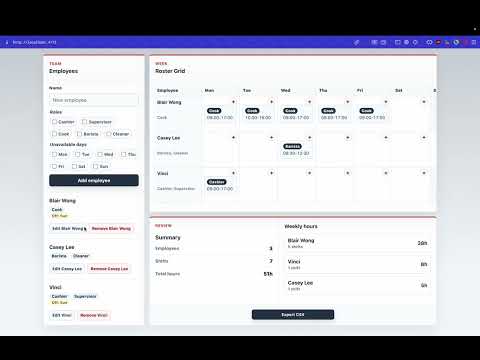
Click the preview image above to watch the YouTube walkthrough.

npm install
npm run dev
The Vite dev server prints the local URL after startup. No backend, database, account setup, or environment variables are required.
- Add, edit, and remove employees.
- Assign employees one or more roles, such as Cashier, Supervisor, Cook, Barista, or Cleaner.
- Mark employee unavailable days, such as "Alex cannot work Mondays".
- Add, edit, remove, and drag-and-drop shifts across employees and weekdays.
- Block invalid assignments before they are saved:
- overlapping shifts for the same employee on the same day
- more than 5 consecutive scheduled days
- unavailable-day assignments
- invalid time ranges and invalid employee-role pairings
- Show weekly roster assignments in a grid by employee and day.
- Show weekly summary totals and per-employee hours.
- Export the roster as CSV with employee, role, day, start, end, and hours columns.
- Use an Optix-branded Light Ops dashboard UI with the official logo and circuit-board background.
npm run dev
npm run build
npm run preview
npm testThe app is built with React and Vite. State is kept in memory with a custom useRoster hook backed by useReducer, because the domain is small and action-based roster updates are easier to test and review than scattered component state.
No third-party scheduling or roster libraries are used. Time parsing, hour calculation, conflict detection, weekly summaries, CSV formatting, and validation rules are implemented in local utility modules.
Employee = {
  id: string,
  name: string,
  roles: string[],
  unavailableDays: number[] // 0 = Monday, 6 = Sunday
}

Shift = {
  id: string,
  employeeId: string,
  role: string,
  day: 0 | 1 | 2 | 3 | 4 | 5 | 6,
  startTime: "HH:MM",
  endTime: "HH:MM"
}
Shifts reference employees by ID so employee edits do not duplicate roster data. A shift stores its assigned role because employees can have multiple roles and each shift still needs one clear duty.
- Time ranges use half-open intervals:
09:00-12:00and12:00-17:00are adjacent, not overlapping. - Overlap checks only compare shifts for the same employee on the same day.
- Exactly 5 consecutive scheduled days is allowed; 6 or 7 consecutive scheduled days is blocked.
- Availability is checked before conflict detection so unavailable-day errors stay specific.
- Drag-and-drop uses the same reducer validation as manual shift add/edit flows.
The final visual direction is a Light Ops Dashboard for Optix Solutions. The official logo and circuit-board background are used for brand fit, while the main workspace remains light and readable for dense scheduling work.
The desktop layout follows the manager workflow:
- Employees panel on the left for setup and edits.
- Roster Grid at the top right as the main scheduling canvas.
- Review panel at the bottom right with Summary on the left, Weekly hours on the right, and Export CSV centered as the final action.
Low-value UI noise was removed during polish, including count pills, the long feature subtitle, the phase-status label, conflict detail text, and conflict counts. Invalid actions are still blocked with inline errors at the point of action.
AI tools were used as implementation and review assistants, not as unchecked output:
- Codex / ChatGPT: planning, implementation, UI refinements, documentation, test verification, GitHub workflow.
- Product Design workflow: Optix-branded Light Ops redesign direction and layout polish.
- Claude Code / mimo-v2.5-pro: earlier implementation support, functionality testing, and documentation review.
- HyperFrames project workflow with local Whisper and FFmpeg: subtitled demo video preparation.
Human review and AI-assisted review were used throughout. Generated suggestions were checked against the assessment brief, the existing codebase, tests, browser behavior, and user testing feedback before being kept.
Automated checks run during the final stages:
npm test
npm run build
Final verified coverage includes utility logic, reducer behavior, employee UI, roster grid interactions, summary/export behavior, availability validation, drag-and-drop validation, and App header rendering.
Manual QA covered:
- add/edit/remove employee
- add/edit/remove shift
- drag-and-drop shift reassignment
- overlapping-shift validation
- more-than-5-consecutive-days validation
- unavailable-day validation
- weekly hours summary
- CSV export
- desktop and mobile layout checks
- Data is in memory only and resets on refresh.
- Same-day shifts only; overnight shifts are intentionally out of scope.
- Availability is day-level only, not time-slot based.
- CSV export focuses on scheduled shifts and does not include availability notes.
- Touch-device drag-and-drop support is not included.
Stage-by-stage documentation lives in docs/. Each phase records thought process, design decisions, AI tools used, verification, known limitations, and GitHub status.