Not just where your space went, but when and why


Install · What changed · What can I delete · Exploring · Library
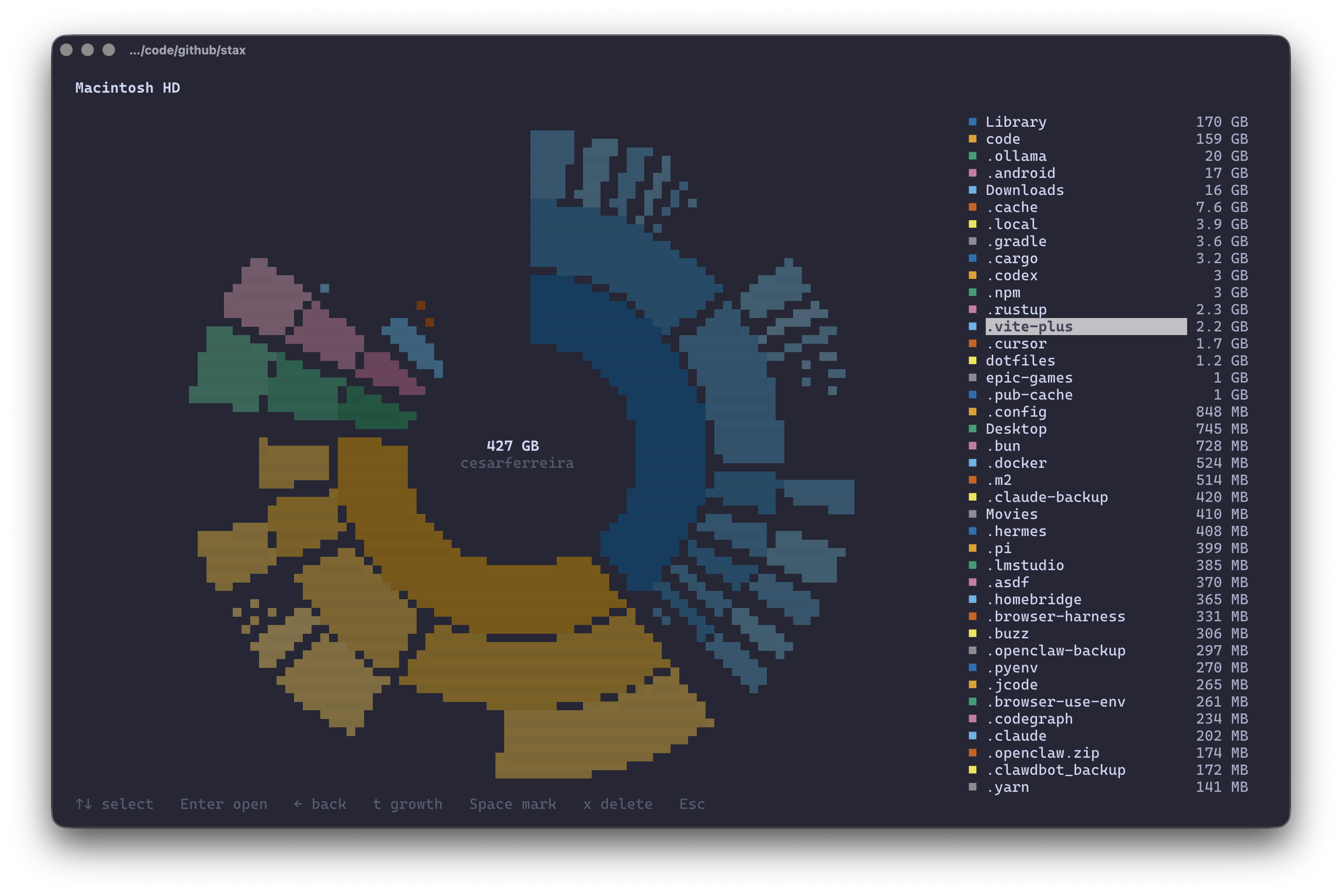
The radial explorer. Every wedge is a directory, sized by what it holds.
du and dust tell you what is large now. df tells you a disk is 82% full.
Neither answers the question you actually have at 2am:
My disk was fine two days ago. What happened?
disko records a snapshot every time it scans, so it can tell you.
$ disko diff --since 7d

 disko — +82 GB added since Monday, 14:32 (7 days)

  +46 GB  ~/Library/Developer/Xcode/DerivedData
  +18 GB  ~/.gradle/caches
  +11 GB  ~/Downloads
   +7 GB  ~/Library/Containers/com.docker.docker/Data  (new)

 322 GB → 404 GB
Not "your home directory grew 82 GB", which you already knew. disko follows the growth down to the directory that actually owns it, and stops when it reaches something worth naming.
Requires Rust 1.85+ and ~/.cargo/bin on your PATH.
cargo install disko-cliVerify:
disko --helpBuild from source — for development or unreleased changes
git clone https://github.com/cesarferreira/disko
cd disko
make install-releaseEvery full scan writes a snapshot to ~/.local/share/disko (a few KB each, 64
kept per directory). Nothing to set up: by the time you think to ask what
happened, the evidence already exists.
disko diff                # since the previous scan
disko diff --since 7d     # since a week ago
disko diff ~/ --since 3mo # a specific directory, a specific window
disko history             # every snapshot, and what moved between them
Inside the TUI, press t and the same data becomes the view: growth glows,
shrinking directories cool to blue, everything that did not move recedes into
the background.
 Macintosh HD                                          404 GB used of 494 GB
 ████████████████████████████████████████████░░░░░░░░  82%

 Current folder: /    404 GB    +82 GB in 7 days

   +46 GB  Users         ████████████████████████████████     257 GB
   +34 GB  Applications  ███████████████████████▋              34 GB
    +4 GB  private       ██▊                                    4 GB
Select anything and press d to see when it grew and what produced it.
disko watch                    # the current directory, every 3s
disko watch ~/ --interval 30s
Growth since the moment you started watching, updated live — for when a build, a download or an agent is filling the disk right now and you want to see which directory is doing it.
disko paints the last snapshot the moment you open it, labelled for what it is, and corrects itself as the fresh scan lands a fraction of a second later:
 Current folder: ~/code    78 GB    as of 2 hours ago · rescanning…

   41 GB  monorepo   ████████████████▉   52.7%
   18 GB  .cache     ███████▋            23.6%
   18 GB  models     ███████▌            23.6%
On a first scan there is nothing to paint from, so the progress screen shows what has actually been counted so far instead of a bare spinner:
  ⠙  113689 items · 62 GB · 2s
     ~/code/.cache/bazel/63bf4…/site-packages/urllib3

  Biggest so far
     40 GB   ~/code/monorepo/.git
     56 MB   ~/code/monorepo/services
Those are finished directories, not running estimates — each number is final for that folder. The list is incomplete, never wrong.
disko deliberately does not cache scans to make them faster. It cannot be done correctly: appending 10 MB to a file changes no directory's mtime, so any cache keyed on directory timestamps silently reports stale sizes, and validating one properly means stat-ing every file — which is the scan. The kernel's dentry cache already does this job well, which is why a repeat scan of 700k entries takes 0.6 seconds.
$ disko clean

 Reclaimable developer storage                 73 GB

  28 GB  Xcode DerivedData        safe to regenerate
         regenerate: rebuild in Xcode · last used 2 days ago
  19 GB  Gradle caches            safe to regenerate
         regenerate: ./gradlew build · last used 6 hours ago · 3 locations
  14 GB  Docker data              review first
         regenerate: docker system prune · last used 3 weeks ago
   7 GB  Android emulator images  review first
         regenerate: recreate the AVD · unused for 4 months
   5 GB  Rust target directories  safe to regenerate
         regenerate: cargo build · last used 1 hour ago · 12 locations
Not "this folder is large" but what produced it, whether removing it is safe, what would bring it back, and when anything last touched it — that last one from real modification times gathered during the scan, not a guess.
disko clean --safe-only          # only things that regenerate themselves
disko clean --idle-for 3mo       # only what nobody has touched in a season
disko clean --delete             # after typing "delete" to confirm
Deletion is opt-in, prompts for a typed confirmation, and re-checks every path
against the category rules immediately before removing it. A target directory
only counts as build output when a Cargo.toml sits beside it.
disko              # pick a disk, then explore it
disko ~            # scan your home directory right away
disko / --top 20   # the 20 largest things on the root filesystem
The default screen answers three questions and nothing else — what is full, what is using the space, where to look next:
 Macintosh HD                                      404 GB used of 494 GB
 ████████████████████████████████████████░░░░░░░░  82%

 Current folder: /    404 GB

   257 GB  Users         ████████████████████▍             63.6%
    84 GB  Library       ██████▋                           20.8%
    34 GB  Applications  ██▊                                8.4%

 Largest items
   71 GB   ~/Library
   48 GB   ~/Downloads
   32 GB   ~/code
Press Enter for a DaisyDisk-style sunburst you can walk into.
| Key | Does |
|---|---|
↑ ↓ |
move the selection |
Enter |
open the radial explorer (and drill in, once there) |
→ ← |
open the selected folder / go back up |
t |
switch between size and growth |
/ |
filter the list as you type |
s |
cycle sort: size, name, item count |
d |
details — device, type, inodes, change, category |
a |
apparent sizes instead of blocks used |
o |
show it in Finder / your file manager |
y c |
copy the selected path to the clipboard |
Space |
mark an entry; the footer totals what you marked |
x |
delete what is marked (or the selection), after confirmation |
r |
rescan |
q |
quit |
Mark things with Space, press x, and disko shows exactly what will go:
 ┌ This cannot be undone ───────────────────────────────────────────┐
 │Permanently delete 2 items, 16 GB                                 │
 │                                                                  │
 │  • ~/Library/Developer/Xcode/DerivedData/    12 GB                │
 │  • ~/.gradle/caches/                          4 GB                │
 │                                                                  │
 │ Type delete to confirm: del▏  Esc to cancel                      │
 └──────────────────────────────────────────────────────────────────┘
Nothing happens until the word is typed in full — Enter on its own is not
enough, and navigation keys cannot reach the list behind the prompt.
The removal itself runs on a background thread with live counters, because clearing 68 GB of build caches means unlinking hundreds of thousands of files and a screen that stops redrawing for a minute is indistinguishable from a crash:
 ┌ Deleting ────────────────────────────────────────────────────┐
 │⠙ Deleting 3 of 12                                            │
 │                                                              │
 │ ~/.stax/worktrees/stax/ready-ci-oneline                      │
 │                                                              │
 │ freed 19 GB  ·  482310 files removed                         │
 │ Esc to stop after the current item                           │
 └──────────────────────────────────────────────────────────────┘
Esc stops it after the file it is on, and reports which items it never
reached. Every path
is re-checked against the filesystem immediately before removal, so disko will
refuse the scan root, anything outside the current scan, a mount point, or
something that has vanished since the scan. Symlinks are unlinked, never
followed into. Totals correct themselves instantly, without a rescan.
disko --read-only removes the ability entirely.
For caches specifically, disko clean --delete is usually the better tool: it
knows what regenerates them.
o hands the selection to the desktop's file manager — Finder on macOS,
Explorer on Windows, xdg-open elsewhere.
disko only ever opens folders, never files. Selecting a file shows it inside
its parent (open -R on macOS, /select on Windows, the containing folder on
Linux). The files disko surfaces are by definition the enormous ones, and
handing a 40 GB video to whatever application claims the extension is not a
thing a disk tool should do by accident.
The header always describes the filesystem (Macintosh HD — 404 GB used of 494 GB). The body always describes the directory you are in (Current folder: /Users/cesar — 257 GB). Conflating those two numbers is the single
most confusing thing a disk tool can do.
Filesystem types, device identifiers, inode counts and pseudo-filesystems are real information — they are just not the answer to "what is filling my disk".
disko --details        # device, type, read-only, inodes
disko --filesystems    # every mount, pseudo-filesystems included
disko --inodes # inode usage instead of bytesPiping switches to text automatically — no flag needed.
disko ~ --plain            # bytes, human size, share, path (tab separated)
disko ~ --json             # the whole tree, structured
disko diff --plain         # signed bytes, human, kind, path
disko clean --json         # categories, safety, regenerate command, last used
disko watch --plain        # one line per interval, forever
Raw bytes come first so cut -f1 and sort -n work.
NFS, SMB, sshfs and blobfuse mounts are not on your disk, and stat-ing them one round trip at a time is brutal — a single directory listing on a blob-storage mount can take five seconds. disko stops at the mount point and says so rather than silently reporting a low number:
$ disko /mnt --plain          # a blobfuse2 mount lives under here
16384   16 KB   57.1%   /mnt/lost+found
4096    4.1 KB  14.3%   /mnt/remote
                                        # 0.009s, vs ~10 minutes walking Azure
Pass --remote to walk them anyway. Naming a network mount as the scan root
still scans it — asking for it is asking for it.
Note that --depth limits what is kept, not what is walked: sizes stay
exact, so it does not make a slow mount fast.
| Flag | Does |
|---|---|
-t, --top <N> |
show the N largest entries, grouping the rest as "Other" |
--depth <N> |
keep only N levels of tree; sizes stay exact either way |
--apparent |
count file lengths (ls) instead of blocks used (du) |
--binary |
GiB/MiB instead of GB/MB |
-x, --one-file-system |
do not cross into other mounts |
--count-hardlinks |
count a hard-linked file once per link |
-a, --all |
include pseudo-filesystems in the disk list |
--remote |
walk network filesystems too (skipped by default) |
--read-only |
disable deleting entirely |
--no-snapshot |
do not record this scan in the history |
Sizes match du byte for byte: --apparent agrees with du -sb, and the
default agrees with du -s --block-size=1.
The engine is split out so the TUI, --json and anything you build sit on the
same implementation.
disko-core      scanning · size aggregation · filesystem metadata · tree model
                snapshots · diffing and growth attribution · category rules
disko-render    radial layout · half-block canvas · braille canvas · bars
disko-cli       commands · TUI · output modes
disko-core returns neutral data and never formats anything for a display:
use std::path::Path;
use disko_core::{scan, ScanOptions, SizeKind, Store};

let tree = scan::scan(
    Path::new("/Users/cesar"),
    &ScanOptions::default(),
    &scan::Progress::default(),
    &scan::Cancel::new(),
)?;

// Compare against last time, then remember this time.
let store = Store::open()?;
if let Some(before) = store.latest(&tree.path) {
    let diff = disko_core::diff::diff(
        &before.tree, &tree, SizeKind::Allocated,
        before.taken_at, disko_core::history::now(), before.floor,
    );
    for change in diff.growth(10) {
        println!("{:>14}  {}", change.delta, change.path.display());
    }
}
store.record(&tree)?;
Scans run on rayon and can be driven from a UI thread:
let (progress, cancel, handle) = scan::scan_in_background(path, ScanOptions::default());
println!("{} items so far", progress.entries());
cancel.cancel();               // returns whatever was counted
let tree = handle.join().unwrap()?;make # check, build, test
make test # nextest + doctests, or cargo test if nextest is not installed
make lint # rustfmt + clippy -D warnings
make install # debug build into ~/.cargo/bin
make release # bump, changelog, tag, publish (LEVEL=patch|minor|major)Every screen is rendered into an off-screen buffer and asserted at real terminal widths, so layout regressions — a column that overflows at 60 columns, a section that eats the list at 12 rows — fail the build rather than the user.
macOS and Linux. Windows compiles but is untested and ships no release binary: allocated sizes, hard-link dedup and the mount table all fall back to approximations there.
MIT © Cesar Ferreira