Releases: chaunceygardiner/weewx-celestial
Release list
Release v7.8

weewx-celestial 7.8
A complete Danish translation of the sample skin ships, contributed by
native speaker Gert Andersen. Drop-in upgrade
from 7.x — install over it, no config changes, no loop-data field
changes; a page in any other language looks exactly as before.
Released alongside weewx-skyfield 1.17 and weewx-loopdata 6.8, which
ship the same Danish for their pages.
What's new
-
Danish ships.
lang/da.confis a complete translation,
contributed by native speaker Gert Andersen, whose shared vocabulary
— body names, moon phases, compass points and all 88 constellation
names — is copied verbatim from weewx-skyfield's Danish, and a test
keeps the extensions in step (as it does for the German, French,
Dutch and Spanish). Because the live loop-data values follow the
language of loopdata's target report, one line switches the whole
page, labels and live values alike:[StdReport] [[CelestialReport]] lang = da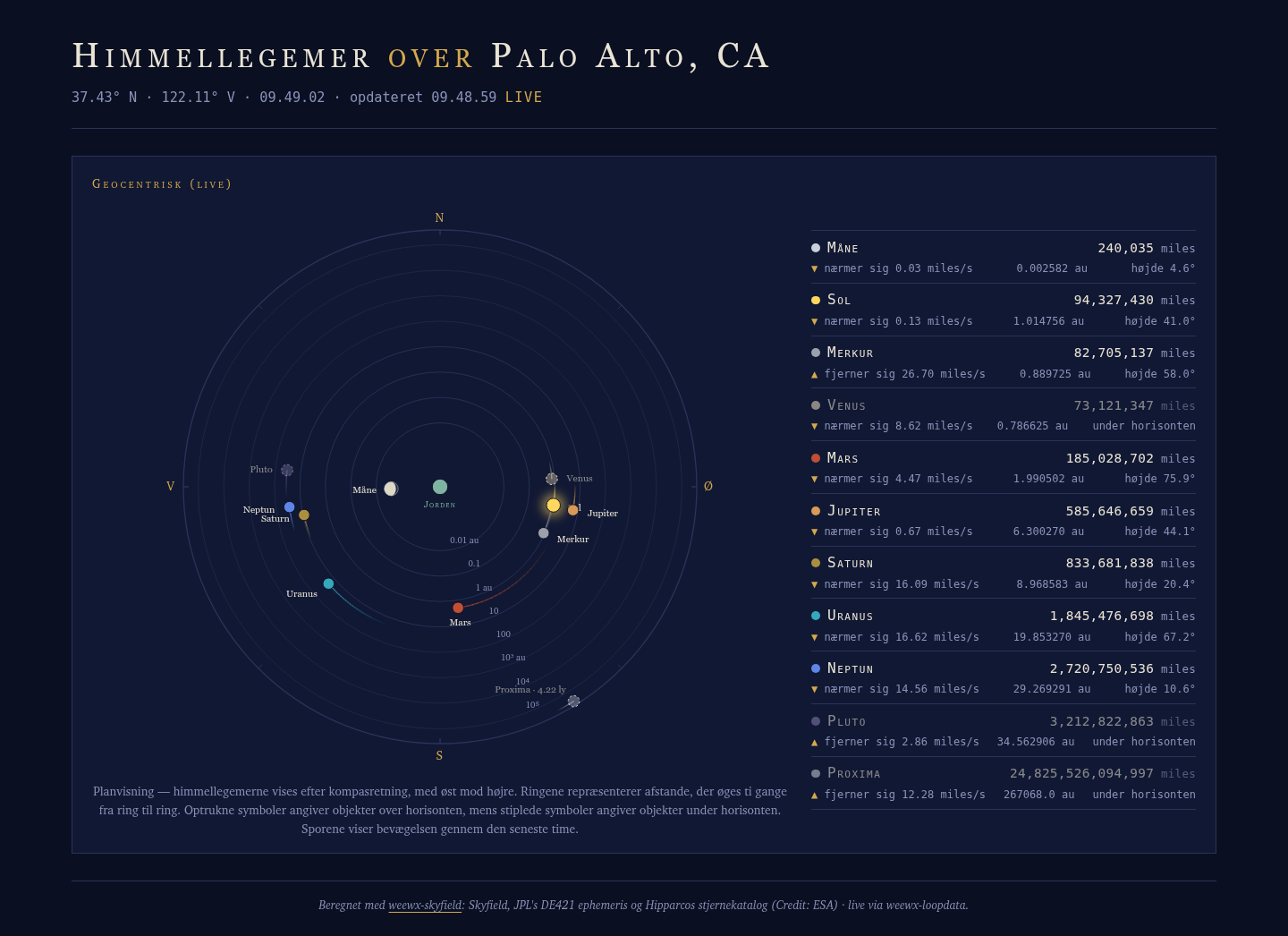
Requirements
- Python 3.9 or later
- WeeWX 5.2 or later
- weewx-loopdata
5.0 or later - weewx-skyfield
strongly recommended (required for Proxima Centauri), or PyEphem
Installing/upgrading
Download weewx-celestial.zip from this release, then install right over
the existing 7.x:
weectl extension install weewx-celestial.zip
Restart WeeWX. No weewx.conf changes are needed when upgrading from 7.x.
(Upgrading from 6.x or earlier follows the README's upgrade instructions —
those paths do need the uninstall step, and from 5.x the migration
utility.)
Release v7.7
weewx-celestial 7.7
A complete Spanish translation of the sample skin ships (Beta, awaiting
native-speaker review — corrections and reviewers very welcome), and the
French translation drops its Beta label. Drop-in upgrade from 7.x —
install over it, no config changes, no loop-data field changes; an
English, German, French or Dutch page looks exactly as before. Released
alongside weewx-skyfield 1.16, which adds Spanish to the Sky page.
What's new
-
Spanish ships (Beta).
lang/es.confis a complete translation
whose shared vocabulary — body names, moon phases, compass points and
all 88 constellation names — is copied verbatim from weewx-skyfield's
Spanish, and a test keeps the extensions in step (as it does for the
German, French and Dutch). Because the live loop-data values follow
the language of loopdata's target report, one line switches the whole
page, labels and live values alike:[StdReport] [[CelestialReport]] lang = esBeta until a native speaker has reviewed it; corrections are very
welcome as issues or pull requests.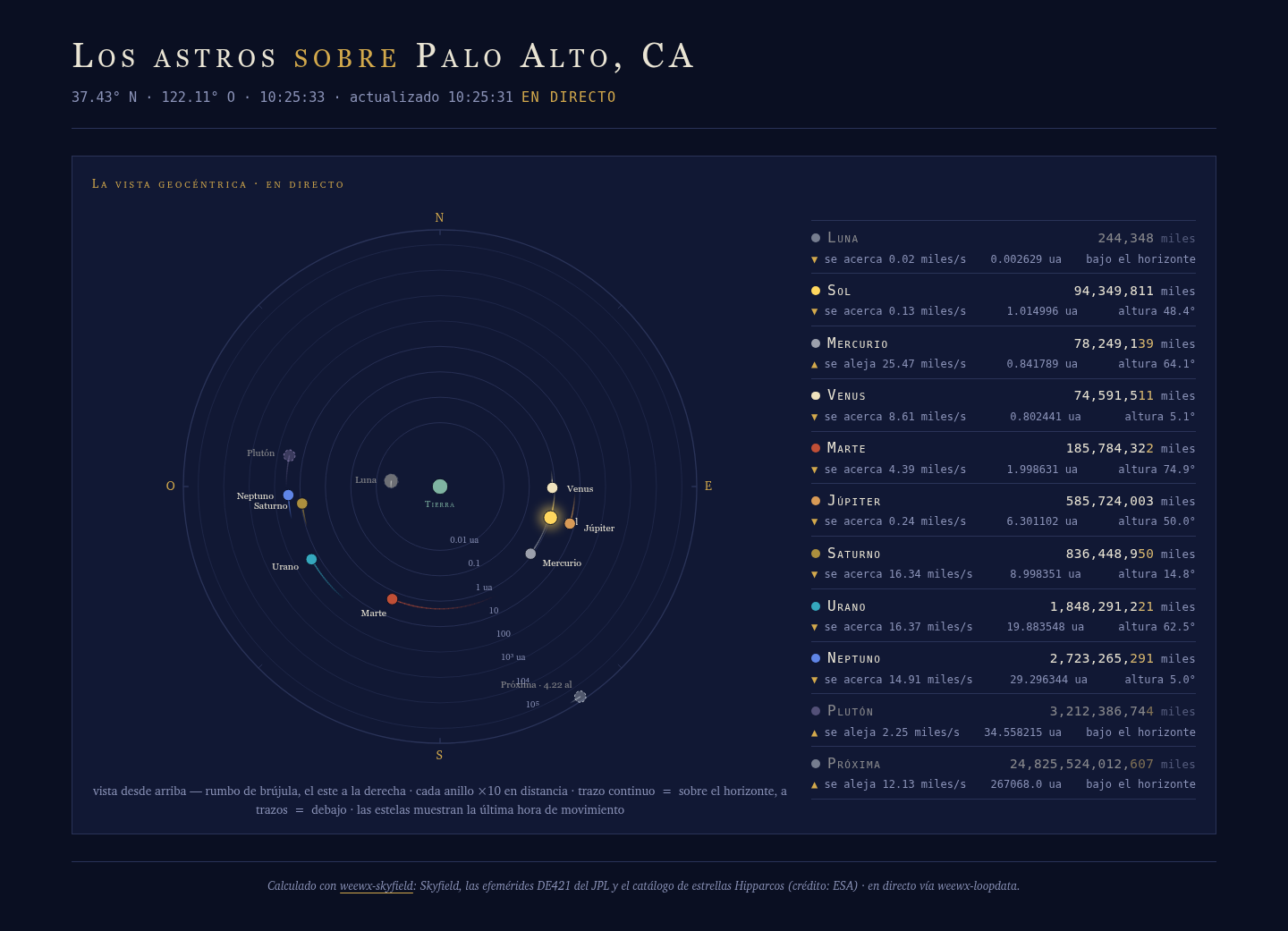
-
French is out of Beta. The native-speaker review the French
translation was waiting for completed with weewx-skyfield 1.15 and
confirmed it as shipped; the labeling here now matches.
Requirements
- Python 3.9 or later
- WeeWX 5.2 or later
- weewx-loopdata
5.0 or later - weewx-skyfield
strongly recommended (required for Proxima Centauri), or PyEphem
Installing/upgrading
Download weewx-celestial.zip from this release, then install right over
the existing 7.x:
weectl extension install weewx-celestial.zip
Restart WeeWX. No weewx.conf changes are needed when upgrading from 7.x.
(Upgrading from 6.x or earlier follows the README's upgrade instructions —
those paths do need the uninstall step, and from 5.x the migration
utility.)
Release v7.6
weewx-celestial 7.6
The sample page's two moon-phase instants — the next full and new moon,
which drive the phase disc's waxing/waning rendering — now travel under
pinned-unit spellings (almanac.next_full_moon.unix_epoch.raw,
almanac.next_new_moon.unix_epoch.raw), completing the pinning that 7.5
began for migrated fields: no [Units] [[Groups]] override on
loopdata's target report can change their meaning. Drop-in upgrade from
7.x — install over it, no config changes: the page falls back to the
pre-7.6 unpinned entries, so an existing fields line keeps working
unchanged.
What's new
- The sample page reads pinned moon instants. 7.5 pinned the units
of migrated fields but left the two keys the sample page itself
reads unpinned. 7.6 finishes the job: the page's javascript prefers
almanac.next_full_moon.unix_epoch.rawand
almanac.next_new_moon.unix_epoch.raw, so the waxing derivation
(full before new) is epoch-seconds math regardless of the target
report's unit settings — and falls back to the old unpinned keys, so
nothing breaks on a fields line migrated earlier. --migrate-loopdata-fieldsupgrades the old spellings. Re-run
it on a previously migrated configuration and the two unpinned moon
entries rewrite in place; running it again is a no-op, as always.
Recommended, not required
Nothing needs to change for this upgrade — the fallback keeps an
existing fields line working indefinitely. But the tidy end state is a
fields line that carries the pinned spellings, so the moon math can
never be disturbed even if the target report's unit groups are someday
overridden. At your next convenient weewx.conf edit, either re-run
the migration utility:
python -m user.celestial --migrate-loopdata-fields --config /home/weewx/weewx.conf --output /tmp/weewx.conf.migrated
(then review and move the migrated file into place, per the README) or
hand-edit the two entries: almanac.next_full_moon.raw →
almanac.next_full_moon.unix_epoch.raw, almanac.next_new_moon.raw →
almanac.next_new_moon.unix_epoch.raw. This is required now only if
your loopdata target report overrides group_time in [Units]
[[Groups]] — an unusual configuration, and the only one in which the
old unpinned entries misbehave.
Requirements
- Python 3.9 or later
- WeeWX 5.2 or later
- weewx-loopdata
5.0 or later - weewx-skyfield
strongly recommended (required for Proxima Centauri), or PyEphem
Installing/upgrading
Download weewx-celestial.zip from this release, then install right over
the existing 7.x:
weectl extension install weewx-celestial.zip
Restart WeeWX. No weewx.conf changes are needed when upgrading from 7.x.
(Upgrading from 6.x or earlier follows the README's upgrade instructions —
those paths do need the uninstall step, and from 5.x the migration
utility.)
7.6 follows 7.5 by hours, so if you're upgrading from 7.4 or earlier,
7.5 is new to you too:
weewx-celestial 7.5
A complete Dutch translation of the sample skin ships (Beta, awaiting
native-speaker review — corrections and reviewers very welcome), and the
migration utility now emits pinned-unit almanac fields. Drop-in upgrade
from 7.x — install over it, no config changes, no loop-data field
changes, and nothing to re-run if you already migrated; an English,
German or French page looks exactly as before. Released alongside
weewx-skyfield 1.15, which adds Dutch to the Sky page, and
weewx-loopdata 6.6, which documents the unit segment the pinned
spellings use.
What's new in 7.5
-
Dutch ships (Beta).
lang/nl.confis a complete translation
whose shared vocabulary — body names, moon phases, compass points and
all 88 constellation names — is copied verbatim from weewx-skyfield's
Dutch, and a test keeps the extensions in step (as it does for the
German and French). Because the live loop-data values follow the
language of loopdata's target report, one line switches the whole
page, labels and live values alike:[StdReport] [[CelestialReport]] lang = nlBeta until a native speaker has reviewed it; corrections are very
welcome as issues or pull requests.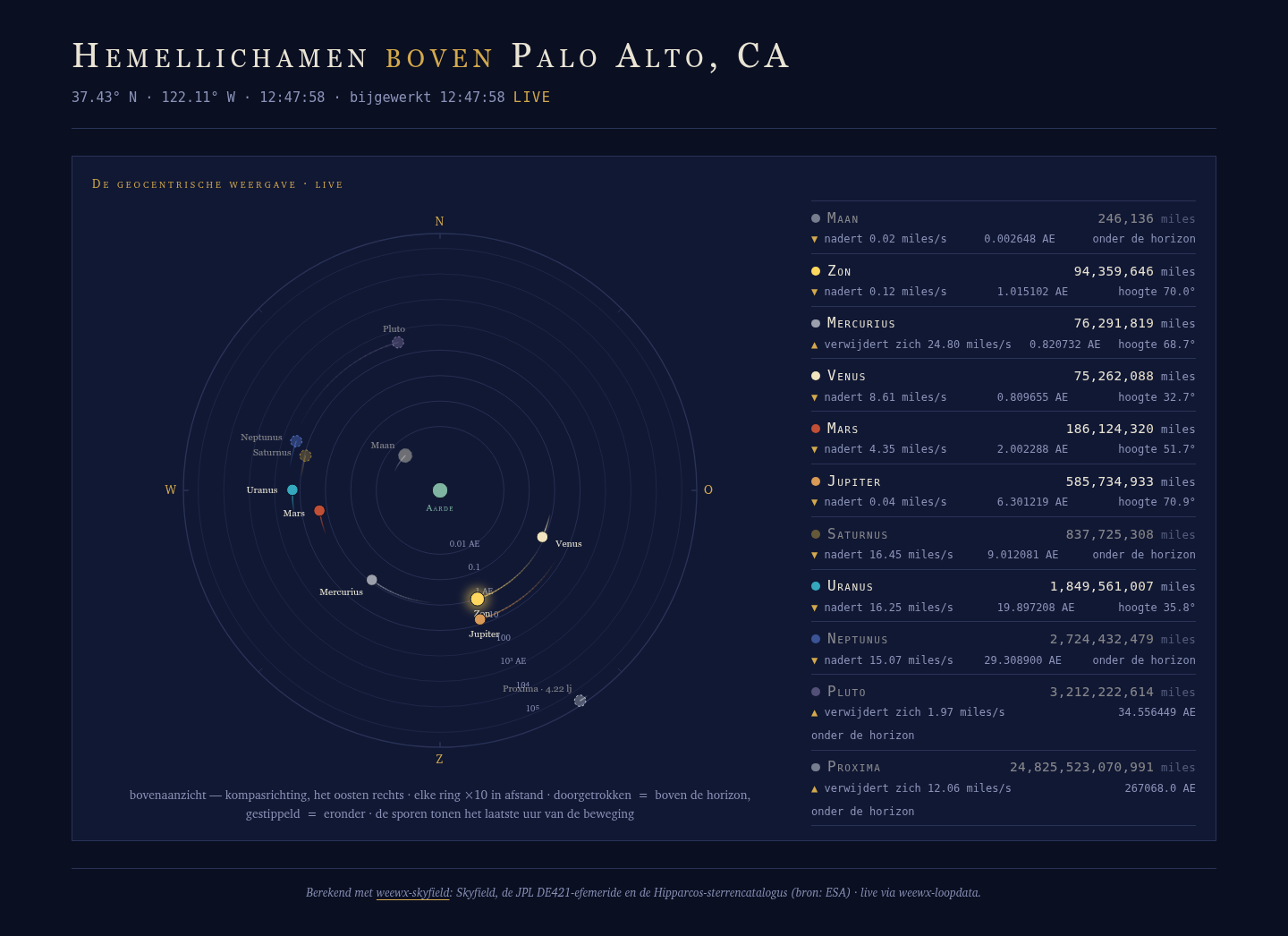
-
--migrate-loopdata-fieldspins units. Raw times and durations
now migrate to pinned-unit almanac entries —
almanac.sunrise.unix_epoch.raw,almanac.sun.visible.second.raw,
and so on — so they keep the old celestial loop fields' fixed
meanings (epoch seconds, seconds of daylight) no matter how
loopdata's target report units are set. An unpinned almanac.raw
follows the target report's converter, so a report carrying[Units]
[[Groups]]overrides (e.g.group_deltatime = hour) would silently
change a migrated field's meaning. The pinned entries evaluate on
every loopdata ≥ 5.0. If you migrated with an earlier version and
your target report has no unit-group overrides, your fields are
correct as they stand; if it does have overrides, adopt the pinned
spellings.
The requirements and install steps for 7.5 are the same as 7.6's above.
Release v7.4
weewx-celestial 7.4
A translation release: a complete French translation of the sample skin
ships (Beta, awaiting native-speaker review — corrections and reviewers
very welcome). Drop-in upgrade from 7.x — install over it, no config
changes, no loop-data field changes; an English or German page looks
exactly as before. Released alongside weewx-skyfield 1.14 and
weewx-loopdata 6.5, which add French to the Sky page and the LoopData
sample report.
What's new
-
French ships (Beta).
lang/fr.confis a complete translation
whose shared vocabulary — body names, moon phases, compass points and
all 88 constellation names — is copied verbatim from weewx-skyfield's
French, and a test keeps the extensions in step (as it does for the
German). Because the live loop-data values follow the language of
loopdata's target report, one line switches the whole page, labels
and live values alike:[StdReport] [[CelestialReport]] lang = frBeta until a native speaker has reviewed it; corrections are very
welcome as issues or pull requests.
Requirements
- Python 3.9 or later
- WeeWX 5.2 or later
- weewx-loopdata
5.0 or later - weewx-skyfield
strongly recommended (required for Proxima Centauri), or PyEphem
Installing/upgrading
Download weewx-celestial.zip from this release, then install right over
the existing 7.x:
weectl extension install weewx-celestial.zip
Restart WeeWX. No weewx.conf changes are needed when upgrading from 7.x.
(Upgrading from 6.x or earlier follows the README's upgrade instructions —
those paths do need the uninstall step, and from 5.x the migration
utility.)
Release v7.3
weewx-celestial 7.3
Emergency fix for 7.2: under a running WeeWX, 7.2's page failed to
generate at all — every report cycle logged cannot find 'Labels' and
the published page silently stayed whatever 7.1 had last written. If
you installed 7.2, install 7.3 right over it and restart WeeWX; no
configuration changes, no loop-data field changes. (7.2's translations
and everything else it announced work as described once the page
generates.)
What's new
- The page generates again. 7.2 read the header's hemisphere
letters (the N/S/E/W beside the station coordinates) from a$Labels
tag that does not exist in WeeWX's template machinery, so Cheetah
aborted the whole template on every cycle. The letters now come from
$station.latitude/$station.longitude, which core WeeWX builds from
the same[Labels] hemispheressetting — still language-aware, so the
German page still showsOfor east. Nothing else changed.
Requirements
- Python 3.9 or later
- WeeWX 5.2 or later
- weewx-loopdata
5.0 or later - weewx-skyfield
strongly recommended (required for Proxima Centauri), or PyEphem
Installing/upgrading
Download weewx-celestial.zip from this release, then install right over
the existing 7.x:
weectl extension install weewx-celestial.zip
Restart WeeWX. No weewx.conf changes are needed when upgrading from 7.x.
(Upgrading from 6.x or earlier follows the README's upgrade instructions —
those paths do need the uninstall step, and from 5.x the migration
utility.)
Release v7.2
weewx-celestial 7.2
This release makes the Celestial page translatable — entirely through
WeeWX's own mechanisms (lang files, [Texts]/$gettext, the [Almanac]
section), the same machinery weewx-skyfield 1.12/1.13 ships — and German
ships with the skin, native-speaker reviewed. Drop-in upgrade from 7.x:
install over it, no config changes, no loop-data field changes; an
untranslated report renders exactly as before (English is the per-string
fallback).
What's new
-
The whole page speaks the report's language — including the live
parts. Static template strings translate the usual$gettextway,
and everything the javascript composes at run time (the LIVE/OFFLINE/
NO DATA badge, "receding"/"approaching" rate lines, altitude and au
cells, dial ring labels, compass cardinals, body names, Proxima's
light-year label) is resolved at report-generation time and fed to the
script json-escaped, so the dial, roster and badge stay in one language
between loop refreshes. Body names come from the report's[Almanac]
section (the same source as$almanac.<body>.label), cardinals from
the report formatter's ordinates, hemisphere letters from[Labels].
The clock and last-update stamp now format per the report'slang
(previously hardcoded en-US). -
German ships with the skin.
lang/de.confis a complete
translation, kept complete by a test. Its vocabulary — body names,
moon phases, hemisphere letters, compass ordinates and all 88
constellation names — is shared verbatim with weewx-skyfield's
de.conf(native-speaker reviewed), and a test keeps the two repos in
step. Select it per report:[StdReport] [[CelestialReport]] lang = deor once for every German-shipping skin under
[StdReport]
[[Defaults]]. -
A reference dictionary for translators.
lang/en.confships every
string the page renders and nothing else (a test keeps it exact in both
directions). Copy it to<code>.conf, translate the values, keep the
{named}placeholders — a partial translation is fine, and a lang file
is a self-contained, no-code contribution. -
Constellations included for loopdata.
de.confcarries
[Almanac][[Constellations]](all 88, keyed by IAU abbreviation),
so constellation fields (almanac.<body>.constellation.label) arrive
in German when this report is weewx-loopdata's target — loop-data
values already follow the target report's language with no other work. -
A user manual. weewx-celestial now has one, like its siblings:
chaunceygardiner.github.io/weewx-celestial
— installation and upgrading (including the migration utility),
configuration, building the Geocentric into your own skin, and
translating.
One visible tweak: the roster's body names now come from the almanac
texts, capitalized — "Moon" where 7.1 showed "moon" (German nouns need
the capital); the small-caps styling is unchanged.
Requirements
- Python 3.9 or later
- WeeWX 5.2 or later
- weewx-loopdata
5.0 or later - weewx-skyfield
strongly recommended (required for Proxima Centauri), or PyEphem
Installing/upgrading
Download weewx-celestial.zip from this release, then install right over
the existing 7.x:
weectl extension install weewx-celestial.zip
Restart WeeWX. No weewx.conf changes are needed when upgrading from 7.x;
the [LoopData] [[Include]] fields line is unchanged. (Upgrading from
6.x or earlier follows the README's upgrade instructions — those paths do
need the uninstall step, and from 5.x the migration utility.) Note that
upgrading replaces the bundled skin (skins/Celestial/, including its
lang/ files) — local additions and overrides survive upgrades best as
[[[Almanac]]]/[[[Texts]]] entries in the report's section of
weewx.conf.
Release v7.1
weewx-celestial 7.1
A small quality release: when the page cannot fetch its loop data, it now
says so on the page instead of sitting silently dead. Drop-in upgrade
from 7.0 — install over it, no uninstall, no config changes.
What's new
- A failed loop-data fetch shows up in the badge. When the poll for
loop_data_filereturns anything but the json — the classic case being
the web server's 404 page, because weewx-loopdata writes outside
HTML_ROOT (say/dev/shm) and nothing on the web server serves that
path — the LIVE badge now readsNO DATA (HTTP 404) — check loop_data_file(orBAD DATA — check loop_data_filefor a response
that isn't json). A network-level failure or timeout showsOFFLINE.
Previously the only trace was a JSON.parse error in the browser console,
and the page just looked dead. A later successful poll rewrites the
badge to LIVE, as always.
Requirements
- Python 3.9 or later, WeeWX 5.2 or later
- weewx-loopdata 5.0
or later (evaluates the almanac fields) - weewx-skyfield
strongly recommended: it computes every position and distance the panel
runs on, and only its almanac serves Proxima Centauri. PyEphem serves
everything but Proxima; with neither, the page generates but the panel
shows an install hint. - Skyfield and NumPy are not required by this extension.
Installing/upgrading
From 7.0: download weewx-celestial.zip from this release, then
weectl extension install weewx-celestial.zip and restart WeeWX — 7.1
ships exactly the same file set as 7.0, so installing over it updates
everything and orphans nothing.
From 6.x or earlier: follow the 7.0 release notes' action-required steps
first (uninstall before installing, fields line, possible data_services
cleanup), using this release's zip.
Release v7.0
weewx-celestial 7.0
A redesign release: the Celestial page is rebuilt around a single live
panel, the Geocentric, and the seven embedded weewx-skyfield sky-chart
panels and almanac-table cards are gone. Those panels duplicated
weewx-skyfield's own Sky page; this page is now purely what only it can
be — the live instrument, where everything on screen moves. Upgrading is
NOT drop-in: uninstall first as always, add two loop-data fields, and — if
a user.celestial.Celestial entry still lingers in data_services from
2.x — remove it, because the stub that tolerated it is gone.
What's new
- The Geocentric. Earth at the center; the sun, moon, all eight
planets and Proxima Centauri placed by compass bearing (plan view, east
to the right, like a radar or wind rose) and by log distance — rings
step ×10 from inside the moon's orbit to Proxima at the rim, so the
emptiness between Pluto and the nearest star is drawn to honest scale.
The moon renders at its true phase with a silver rim (so a new moon
never vanishes), bodies below the horizon dim and go dashed, and every
dot drags an hour-long motion trail. - Distance odometers that actually tick. The roster beside the dial
gives each body a distance readout in your report's units, its raw
astronomical-unit value, its altitude, and its radial rate — and the
page derives each body's true motion from consecutive loop packets,
advancing the readouts every second between refreshes. Mercury can
recede ~28 km every second while Saturn approaches at the same pace;
even Proxima Centauri's odometer ticks (Earth's own orbital motion).
Every readout re-anchors to truth on each loop refresh, and freezes
rather than inventing data if the feed goes stale. - A truthful footer. The credit line is generated for whatever
almanac actually serves the page: the full Skyfield/DE421/Hipparcos
credit only when Proxima is served, a generic extended-almanac credit
for PyEphem, and a built-in-almanac credit otherwise. - A leaner field set. The page reads 37 loop-data fields
(az/alt/earth_distance per body, the moon-phase fields, and
current.dateTime.raw), down from 58. - Removed: the sky dome, solar year, lunation, sun path, orrery,
analemma and rise/set-ribbons panels (see weewx-skyfield's Sky page for
all of them), the sun/moon/distances table cards, the day strip, the
countdown chips, the header moonbox, theCelestialSkyPagesearch-list
shim, and the 6.xCelestialservice stub.
Action required when upgrading
weectl extension uninstall celestial, then install 7.0.- If
user.celestial.Celestialstill appears underdata_servicesin
[Engine] [[Services]]of weewx.conf (a 2.x leftover that 6.x
tolerated with a stub), remove it — with the stub gone, a stale
entry will keep weewxd from starting. - Add
almanac.proxima_centauri.az, almanac.proxima_centauri.altto the
[LoopData] [[Include]] fieldsline (every other 7.0 field is already
in a 6.0 line). The 6.0 entries this skin no longer reads — rise/sets,
twilights, ra/dec, equinox/solstice,almanac.moon_phase,
almanac.moon_index, sun visible-time — can stay for your own pages or
be trimmed; the README has the full 37-entry list.
Upgrading from 5.x or earlier instead: run the bundled
--migrate-loopdata-fieldsutility per the README. - Restart WeeWX. (This also refreshes the deployed
celestial.css—
CopyGenerator re-copiescopy_oncefiles on every report first-run —
and the page version-tags the stylesheet URL so browsers refetch it.)
Requirements
- Python 3.9 or later, WeeWX 5.2 or later
- weewx-loopdata 5.0
or later (evaluates the almanac fields) - weewx-skyfield
strongly recommended: it computes every position and distance the panel
runs on, and only its almanac serves Proxima Centauri. PyEphem serves
everything but Proxima; with neither, the page generates but the panel
shows an install hint. - Skyfield and NumPy are not required by this extension.
Installing/upgrading
Download weewx-celestial.zip from this release, then follow the
action-required steps above (fresh installs: just
weectl extension install weewx-celestial.zip, add the README's fields
line, and restart WeeWX).
Release v6.0.1
weewx-celestial 6.0.1
A markup-only patch release for the bundled Celestial page: the page is now
clean under the current Nu Html Checker (v.Nu), whose living ruleset asks
that every <section> carry a heading. Nothing functional changes — the
live widgets, fields and layout all behave exactly as in 6.0 — and the page
renders pixel-identically. Upgrading from 6.0 is drop-in: no weewx.conf
changes, no new dependencies. If you don't validate your generated HTML
and haven't customized the skin, there is nothing here you need.
What's new
- The Celestial page's card titles are real headings. Each card's
title ("Planets · now", "The sky · report time", ...) was a styled
<p class="eyebrow">; it is now an<h2 class="eyebrow">, so every
card<section>carries the heading the HTML spec wants and the page
outlines cleanly (h1, then h2 per card, no skipped levels). This is
also a small accessibility win: screen readers and outline navigation
now see the cards as sections with names. - No visual change. The
.eyebrowrule gainsfont-weight:400, so
the titles keep their exact non-bold small-caps look. If you maintain a
customizedcelestial.css, addfont-weight:400to your.eyebrow
rule when you pick up this release'sindex.html.tmpl.
Requirements
- Python 3.9 or later, WeeWX 5.2 or later
- weewx-loopdata 5.0
or later (evaluates the almanac fields) - weewx-skyfield
strongly recommended: it computes the almanac values and draws the seven
sky-chart panels. Without it, WeeWX's built-in almanac serves what it
can and the panels show install hints. - Skyfield and NumPy are no longer required by this extension.
Installing/upgrading
Download weewx-celestial.zip from this release, then:
weectl extension install weewx-celestial.zip
Restart WeeWX. Upgrading from 6.0 needs no weewx.conf changes. Upgrading
from 5.x or earlier: follow the action-required procedure in the
6.0 release notes
first (weectl extension uninstall celestial while still on 5.x, then
install).
Release v6.0
weewx-celestial 6.0
A major release that removes this extension's reason-for-being — and keeps
everything you actually see. weewx-celestial no longer computes celestial
values or inserts anything into loop packets: the live page is now driven by
weewx-loopdata 5.0 almanac fields, report almanac tags evaluated by the
weewx-skyfield almanac on every loop record. One engine serves the report
tags and the live values, so they always agree; a new live field is a
weewx.conf fields-line edit, not an extension release. What remains here is
the bundled Celestial report, the $sky_page shim behind its seven sky
charts, and a migration utility. This is not a drop-in upgrade — see
the action-required section — but the migration is mechanical and a bundled
tool does it for you.
What's new
- The loop-field service is gone. Versions through 5.x computed ~60
observations with a bundled Skyfield engine, on the WeeWX engine thread,
and injected them into every LOOP packet. weewx-loopdata 5.0 evaluates
the same values as almanac fields (almanac.sunrise.raw,
almanac(horizon=-6).sun(use_center=1).rise.raw, …) with the same
caching discipline (positions every packet; rise/set once per local day;
events kept until their day passes), off the engine thread. - The sample report is unchanged to look at, rebuilt underneath: every
live cell now reads the almanac keys; waxing is derived on the page (the
moon is waxing when the next full moon precedes the next new moon —
exact, unlike the phase index); distances convert from raw astronomical
units in javascript; Proxima Centauri converts AU to light years. - Installing over the top of 5.x cannot break weewxd.
weectl extension installnever reverses an old version's registrations, so a
leftoveruser.celestial.Celestialindata_serviceswould have crashed
the engine at startup. 6.0 ships a stub service that starts cleanly,
binds nothing, and logs how to finish the cleanup. - The migration utility now targets 6.0:
--migrate-loopdata-fields
rewrites every celestial entry in your[LoopData] [[Include]] fields
line (including pre-3.0 PascalCase names) to its almanac equivalent —
in place, rendition suffixes honored, non-celestial entries untouched,
duplicates dropped, the report's field set appended. Every entry it can
produce is cross-checked against weewx-loopdata's parser in the test
suite. - Smaller and simpler: the Skyfield engine, the bundled DE421 ephemeris
(16 MB, which was also held resident in memory alongside
weewx-skyfield's copy) and star catalog are gone, and the extension no
longer requires the Skyfield or NumPy libraries.
ACTION REQUIRED when upgrading
-
Uninstall the old version first (recommended — it removes the old
service registration and data files while the old install record still
knows about them):weectl extension uninstall celestialIf you install 6.0 over the top instead, weewxd still starts (the stub
logs a warning); finish by hand: removeuser.celestial.Celestialfrom
data_servicesin[Engine] [[Services]], and delete
bin/user/celestial_de421.bspandbin/user/celestial_stars.dat. -
Install weewx-loopdata
5.0+ and weewx-skyfield
if you have not already, then install 6.0:weectl extension install weewx-celestial.zip -
Migrate your fields line — the utility ships with 6.0, so this comes
after the install (run from the directory containing theuser
package —WEEWX_ROOT/bin, or~/weewx-data/binon pip installs):python -m user.celestial --migrate-loopdata-fields --config /home/weewx/weewx.conf --output /tmp/weewx.conf.migrated diff /home/weewx/weewx.conf /tmp/weewx.conf.migrated # review, then move into place(
--in-placeedits weewx.conf directly after a backup;
--print-fields-valueprints the bare line for cut-and-paste.) -
Restart WeeWX. The
[Celestial]weewx.conf section is obsolete and can
be deleted whenever convenient.
If your own pages read the old fields, three things have no 1:1
replacement: distances arrive as raw AU (multiply by 92,955,807 mi/AU or
149,597,870 km/AU), almanac.moon.phase is a raw percent, and
moonWaxing is derived (almanac.next_full_moon.raw < almanac.next_new_moon.raw). The bundled skin shows all three derivations.
Requirements
- Python 3.9 or later, WeeWX 5.2 or later
- weewx-loopdata 5.0
or later (evaluates the almanac fields) - weewx-skyfield
strongly recommended: it computes the almanac values and draws the seven
sky-chart panels. Without it, WeeWX's built-in almanac serves what it
can and the panels show install hints. - Skyfield and NumPy are no longer required by this extension.
Installing/upgrading
Download weewx-celestial.zip from this release, then follow the
action-required steps above. For a fresh install there is nothing to
migrate: just step 2, then add the report's fields line from the README to
[LoopData] [[Include]] and restart.
A customized celestial.css is preserved (it ships copy-once and its
classes are unchanged).