Release v2.0

weewx-skyfield 2.0
The almanac tracks earth satellites — any satellite, added to
weewx.conf by NORAD catalog number, with the ISS and Tiangong
configured out of the box. $almanac.iss.next_visible_pass says when
to step outside and watch the ISS cross your sky — when it appears,
how high it peaks, when it disappears — and the Sky page shows each
satellite's next visible pass, charting the soonest one on its own
dated sky: the whole sky as it will stand at the pass's peak.
And the complete 118,218-star Hipparcos catalog now ships with the
extension, so the dome is a full sky map and every hip_<number> tag
works with nothing to download. Drop-in upgrade from any 1.x — install
over it, no configuration changes needed — with one thing to know: 2.0
is the first release that fetches anything at runtime (satellite
orbital elements, from CelesTrak), and one switch turns that off.
What's new
-
Satellite tags.
[Skyfield] [[Satellites]]inweewx.confmaps
tag names to NORAD catalog numbers (the installer writesiss = 25544
andtiangong = 48274), and each entry serves the almanac's usual
position surface —$almanac.iss.alt/.az/.ra/.dec, their
unit-aware siblings,.distance(slant range),.sunlit— plus the
pass family, first of its kind in WeeWX:
$almanac.iss.next_passand.next_visible_pass, each with
.rise/.culmination/.set,.max_altitude,
.rise_azimuth/.culmination_azimuth/.set_azimuth(compass
ValueHelpers —.ordinal_compassrenders "WSW"),.durationand
.visible. Visible means sunlit while your sky is dark (sun below
−6°) at some moment of the pass, peaking at least 10° up — the
step-outside-and-look recommendation, while plainnext_passis the
unfiltered fact. An in-progress pass isnext_passuntil it sets,
and$almanac(horizon=10).iss.next_passreuses the almanac's
existing horizon argument. The tags work as weewx-loopdata almanac
fields like any others — use loopdata 6.9 or later, released
alongside 2.0: its cache lets a temporarily-unavailable satellite
field recover the moment fresh elements arrive, and a pass field
expires when its pass sets, rolling to the next pass as it happens
instead of at midnight. With loopdata 6.9 and celestial 8.0 beside
it, the pairing looks like this — the weewx-celestial live page,
moved by weewx-loopdata fields, animating weewx-skyfield's dome at
loop cadence: Tiangong's July 15 zenith pass, replayed on the orbital
elements Space-Track archived that day, the marker inverting to a
hollow ring mid-crossing as the station enters Earth's shadow.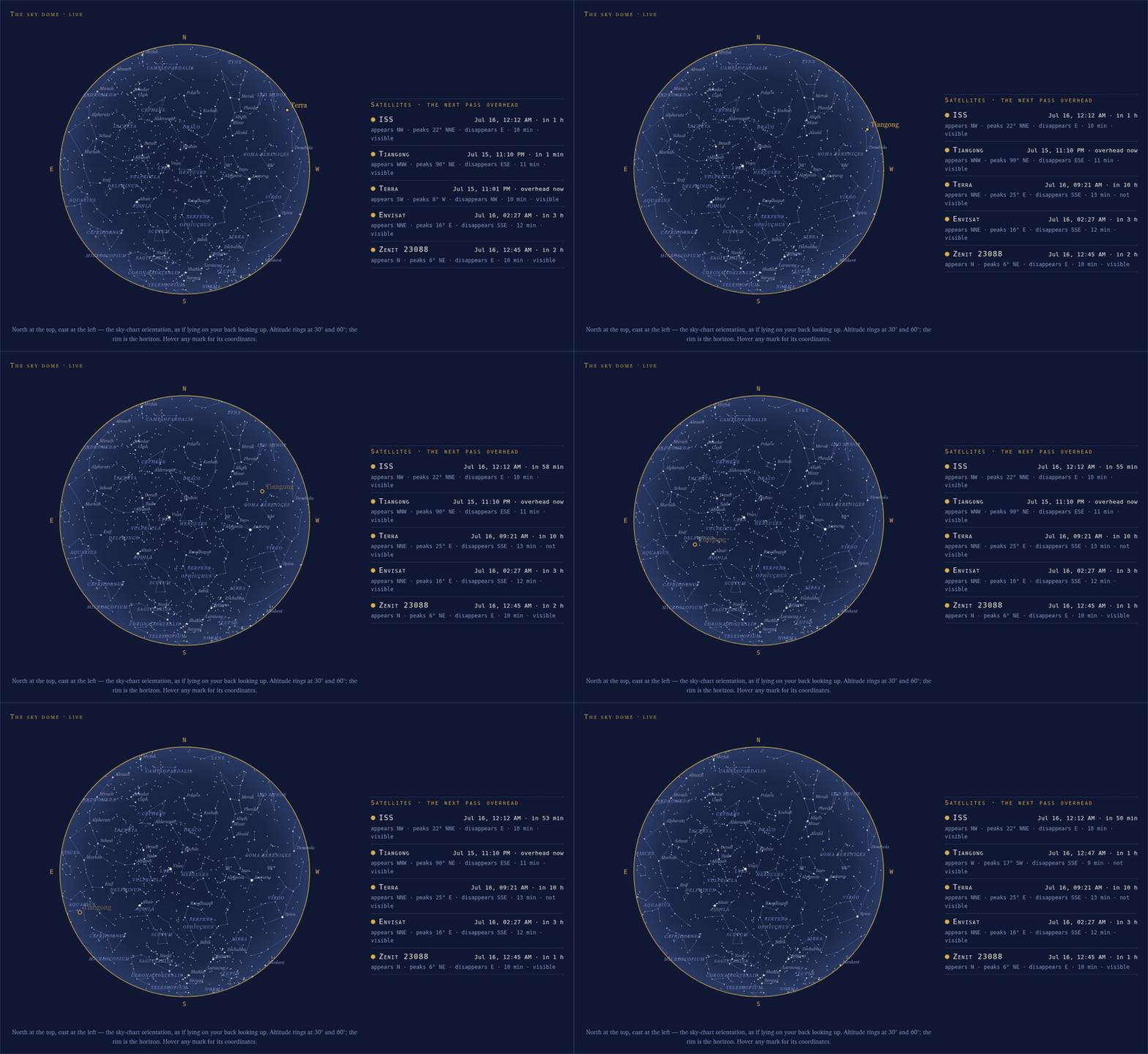
-
The Sky page shows the passes. A Satellites panel — one card per
configured satellite with its next visible pass: a countdown-chip
date rolling into "overhead now", then "appears WSW · peaks 45° SSW ·
disappears NE · 6 min" — and a Next Visible Pass chart: the soonest visible
pass drawn on the whole sky as it will stand at the pass's
culmination, dashed and time-labeled, the satellite's own dot at the
peak, under a dated head line ("ISS · Sun Jun 22 · 03:11 → 03:21 ·
peak 19°"). One chart, one moment — the arc crosses the stars it
will actually cross, the way per-pass sky charts have always been
drawn, and its star field is cut to what a half-dark pass-watching
sky actually shows. The main dome stays strictly the current sky,
with a position dot when a satellite is genuinely overhead at
generation time — solid when the satellite is sunlit, a hollow ring
when it is inside Earth's shadow (present, but not shining), with the
tooltip saying so. The pass chart's peak dot can be that hollow
ring, and often is on a morning pass: the ISS pass above rises in
shadow and exits it just after culminating, so the chart shows it
flaring into view mid-sky. The rows are honest: no visible pass in the coming
week says so, and no usable orbital elements says that instead —
and the pass chart simply disappears when there is no pass to chart.
All translated in the nine bundled languages; a station with no
satellites configured renders the page exactly as before.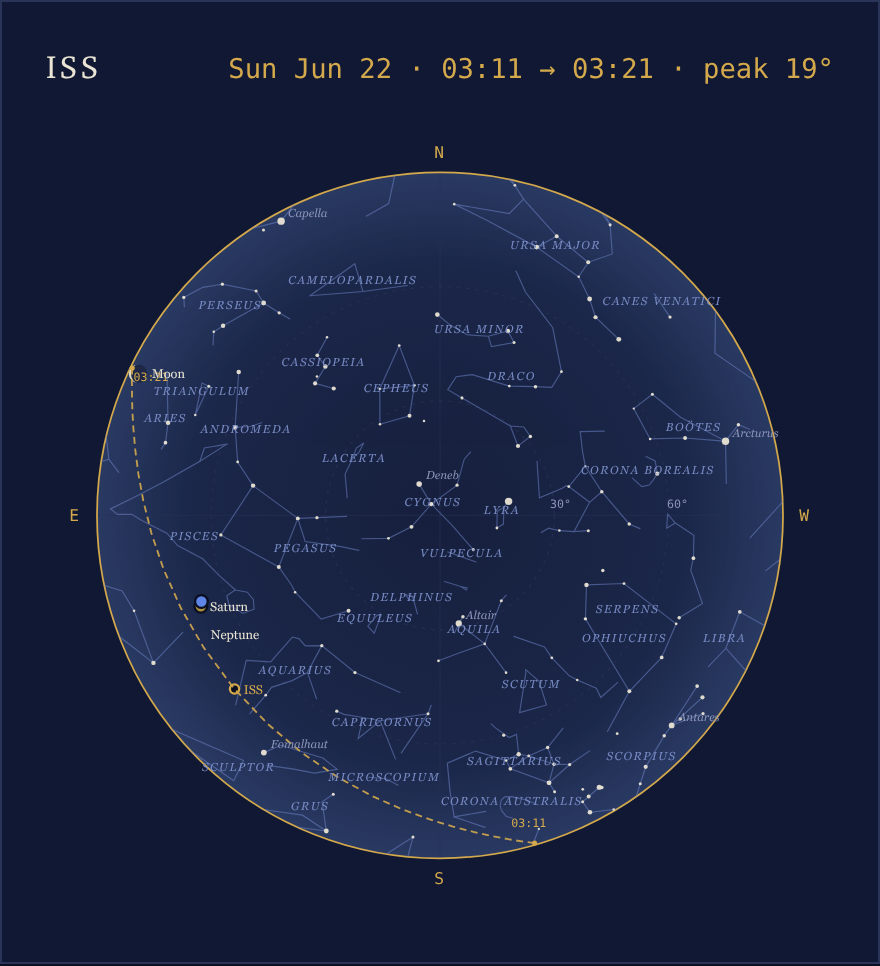
-
Elements kept fresh, honestly. Orbital elements age quickly — a
reboost makes week-old elements minutes wrong — so they cannot ship
in a release. They are fetched from
CelesTrak at install time, at any weewxd
startup that finds them missing or stale — a satellite just added to
weewx.conf is live seconds after the restart — and then about every
three hours, on a worker thread that never blocks reports; a failed
fetch keeps the old file and retries with backoff. Elements whose epoch is more than seven days old are not
used: every tag reads "N/A" rather than reporting confidently wrong
pass times, and the always-live diagnostics
$almanac.iss.elements_epochand.elements_agesay why. -
This is the extension's only network access, and it has a
switch.satellite_downloads = falsein the[Skyfield]section
and nothing is ever fetched — the pre-2.0 behavior;[[Satellites]]
still works if you maintain the element files yourself (the README's
Satellites section has the air-gapped story). With no satellites
configured, likewise, nothing is fetched. -
The complete Hipparcos catalog, bundled. All 118,218 stars ship
aswxskyfield_stars.dat.gz, replacing the ~400-star excerpt: every
$almanac.hip_<number>tag works out of the box — here and on
celestial/loopdata almanac fields — and the dome plots the whole
field. If you had downloadedhip_main.datper the old
instructions, that copy is now redundant and can be deleted. The
release download grows to about 43 MB. -
The dome defaults to the full sky map:
star_mag_limit2.6 → 5.0
(roughly 800 stars) andstar_label_mag1.1 → 2.5. The old values,
set in the[[SkyfieldReport]]section, restore the sparser pre-2.0
look.The dome at the new defaults — the pre-dawn sky of June 23, 04:04 PDT,
with the ISS crossing sunlit near the zenith, its solid dot riding the
full star field: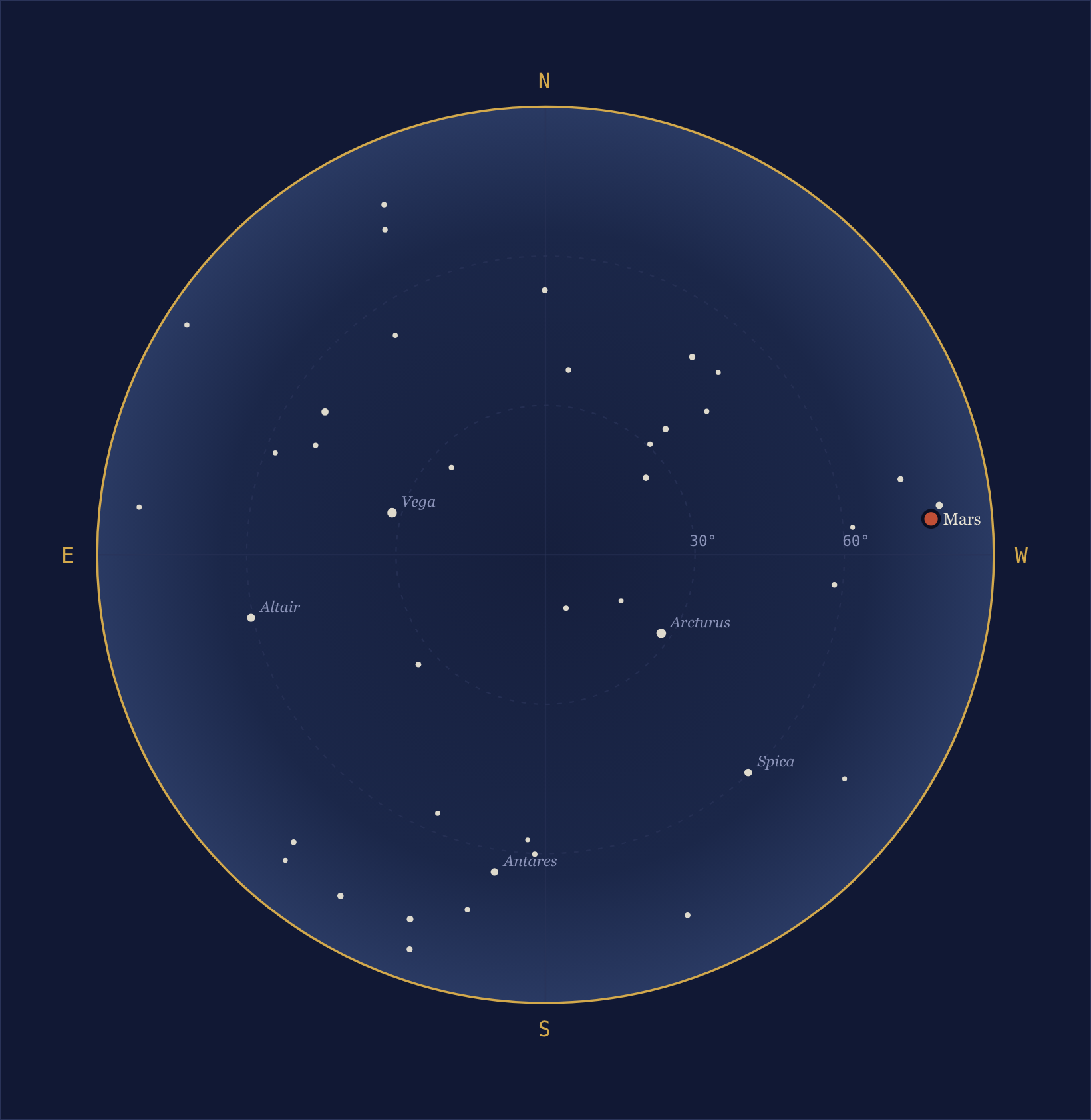
-
The
[Skyfield]starsoption is gone: with the catalog always
present, stars are simply always available. A leftoverstars = ...
line is ignored with a log warning that says so; nothing else
changes. -
Tooltips now answer taps. Every mark's tooltip is a native SVG
<title>, which browsers show only on hover — and a touch screen has
no hover, so on an iPad every tooltip was simply dead. A small
dependency-free script,sky.js, now shows the same text in a
floating chip when a mark is tapped, snapping to the nearest mark
within 24 px (the dome's fainter stars are 1–3 px dots, blunter than
any finger); a tap on empty sky dismisses it, and mouse users keep
the hover tooltips unchanged — a click now also pins the chip. The
captions say "Hover or tap" in all nine languages. -
Embedding skins:
satellites_html(with thehas_satellites()
guard) andpass_chart_html(empty string when passless — wrap it in
a guard; SVG ids distinct from the dome's) join the panel family;
skins that copy individual CSS rules need the new.satlabrule (the
satellite name label) and the.passhead/.passname/.passwhen
rules (the pass chart's dated head line). Tap tooltips come along by
copyingsky.jsand the new.skytiprule and loading the script
with<script src="sky.js" defer>— the panels' markup is unchanged. -
Italian, Norwegian and Swedish translations (Beta, awaiting their
native-speaker reviews) join the German, French, Danish, Dutch and
Spanish — nine languages bundled.lang = it,no(Bokmål), or
svin the[[SkyfieldReport]]section turns one on: the whole page
— prose, panels, the new satellite strings, body names, moon phases,
compass points, date formats and all 88 constellation names.
Corrections are welcome, and a native speaker's review graduates a
Beta, as the Danish showed.
Requirements
- WeeWX 5.2 or later
- Python 3.9 or later
- Skyfield 1.47 or later, and NumPy
- The download is about 43 MB: the DE421 ephemeris (16 MB), the
complete Hipparcos catalog (15 MB gzipped) and the documentation's
screenshots (15 MB) account for nearly all of it. - For live-updating pages (optional): weewx-loopdata 6.9 or later and
weewx-celestial 8.0 or later, released alongside 2.0.
Installing/upgrading
Download weewx-skyfield.zip
and install with weectl, then restart WeeWX:
sudo -- bash -c ". /home/weewx/weewx-venv/bin/activate; weectl extension install weewx-skyfield.zip -y"
Upgrading from any 1.x is a drop-in: install over the old version; no
configuration changes are needed. The installer adds the
satellite_downloads and [[Satellites]] entries to [Skyfield] and
fetches the first elements; on an isolated network, set
satellite_downloads = false (satellite tags then read "N/A" unless
you supply element files yourself — see the README).