
Geometrical optics for FreeCAD.
Performs simple raytracing through your FreeCAD objects.


cd ~/.FreeCAD/Mod/
git clone https://github.com/chbergmann/OpticsWorkbench.git
When you restart FreeCAD, "Optics Workbench" workbench should now show up in the workbench dropdown list.
- Create some FreeCAD design objects. For 2D simulation Sketches will do the job.
- Select one or more of your design objects and then create Optical Mirror to let your objects act as mirrors
- Select one or more of your design objects and then create Optical Absorber to let your objects act as black walls for the light rays
- Select one or more of your design objects and then create Optical Lenses to let your objects act as lenses. Lenses should be closed shapes. Select a material in the Lens properties or provide a refraction index.
- Add some source of light (Ray, Beam).

A single ray for raytracing
Parameters:
- Power: On or Off
- Spherical: False=Beam in one direction, True=Radial or spherical rays
- BeamNrColumns: Number of rays in a beam per row
- BeamNrRows: Number of rays in a beam per column
- BeamDistance: Distance between two beams
- HideFirstPart: Hide the first part of every ray that comes from the source and goes to the first point of reflection/refraction/nirvana
- MaxRayLength: Maximum length of a ray
- MaxNrReflections: Maximum number of reflections. This prevents endless loops if the ray is inside a mirror box.

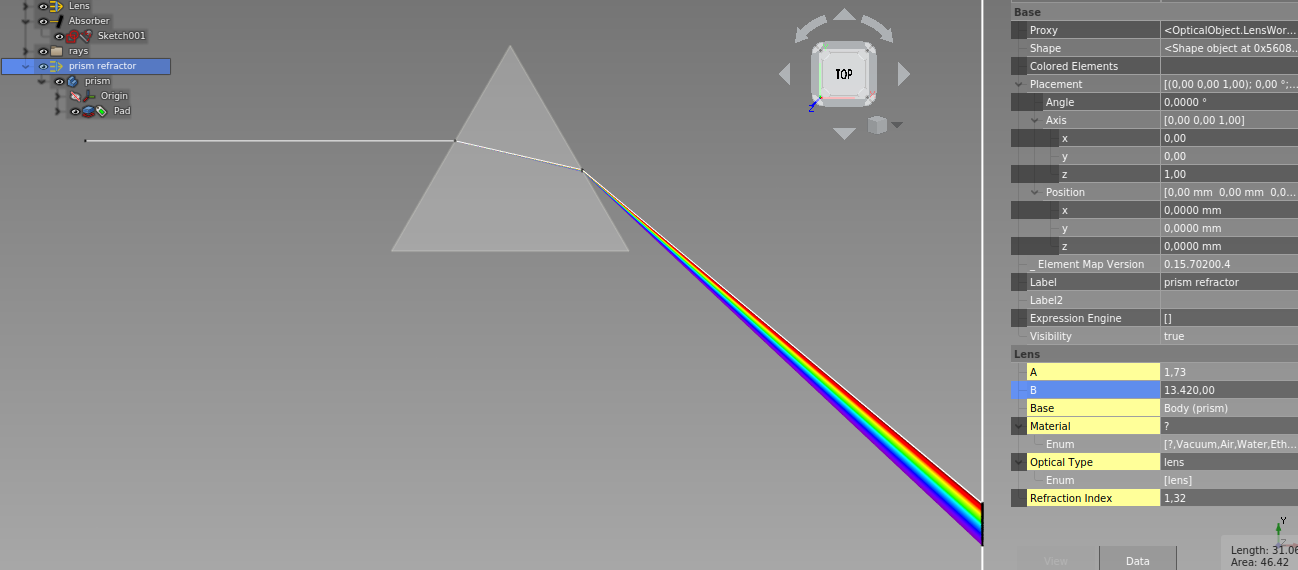
A bunch of rays with different wavelengths of visible light.
The rays overlap. If they hit a lens, they will be dispersed. See the Example - Dispersion.

A row of multiple rays for raytracing
Parameters: see Ray. BeamNrColumns must be > 1 to get a beam

Rays coming from one point going to all directions in a 2D plane
Parameters: see Ray. BeamNrColumns must be > 1 and BeamNrRows=1 and Spherical=True to get a radial beam

Rays coming from one point going to all directions
Parameters: see Ray. BeamNrColumns and BeamNrRows must be > 1 Spherical=True to get a spherical beam

The FreeCAD objects in parameter Base will act as mirrors
Select some FreeCAD objects, then create Optical Mirror
After a ray or beam has been added, a parameter 'Hits From Ray/Beam...' will appear. This is a counter of how many reflections you have from each ray. Do not modify this value.

The FreeCAD objects in parameter Base will swallow the rays of light
Select some FreeCAD objects, then create Optical Absorber
After a ray or beam has been added, a parameter 'Hits From Ray/Beam...' will appear. This is a counter of how many rays have hit this absorber. Do not modify this value.

The FreeCAD objects in parameter Base will act as lenses
Select some FreeCAD objects, then create Optical Lens
The Refration Index has to be provided. The parameter Material contains a list with pre defined refraction indexes.
After a ray or beam has been added, a parameter 'Hits From Ray/Beam...' will appear. This is a counter of how many refractions you have from each ray. Do not modify this value.

Switches off all Rays and Beams

Switches on and recalculates all Rays and Beams
generates the screenshot above

see issues on Github
Please offer feedback or connect with the developer via the dedicated FreeCAD forum thread.
GNU Lesser General Public License v3.0 (LICENSE)