Repository navigation
Releases: clarkdonaldtfgbw5081-del/current-note-chat
Release list
1.2.1 - Screen and File QA

Screen and File QA 1.2.1
Cross-conversation recall now selects only relevant, completed earlier answers and never treats the question being asked as a past memory. Past hit counts boost related matches but cannot introduce unrelated ones. Recalled text is carried as untrusted prompt data, and connection checks send only their synthetic diagnostic input. Detailed explanations, worked examples and optional learner background also work when no learner level has been selected.
The memory remains local until selected snippets are sent with an ordinary question to your configured AI provider. Earlier knowledge notes and saved conversations are unchanged.
Screen and File QA 1.2.0
Every question now carries your past learning with it — locally.
- Before each ordinary screen/file question, the plugin recalls up to three related snippets from your knowledge notes and earlier questions across all conversations and adds them as labeled background; the attached file or screenshot remains the authoritative source.
- Recalled entries that contribute to a successful answer are reinforced (bounded hit counts in plugin data) and rank higher later — memories strengthen instead of being overwritten.
- Fully local: no service, no extra provider requests, no new dependencies. Recalled snippets are sent to your provider as part of the question prompt; toggle "Cross-conversation memory recall" in settings (on by default). Feynman learning, note revision and classification are unchanged.
Screen and File QA 1.1.0
A 30-second learner profile makes every ordinary answer fit you — and go deeper.
- On first panel open, a short wizard asks for your level (beginner / intermediate / advanced), your preferred answer style, and optional background notes. Ordinary screen and file Q&A then tailors wording and depth to that profile; the direct answer still comes first.
- Choose "explain the principle": after the direct answer, the reasoning is laid out step by step, so the real mechanism is clear without follow-up questions.
- Choose "worked examples": answers end with 2-3 examples of increasing difficulty on the same knowledge point, each with a brief solution. Examples beyond the source are clearly marked; factual answers remain source-grounded.
- Everything stays editable in settings → Learner profile. Skipping the wizard (or leaving the level unset) keeps the previous concise behavior. Feynman learning and note revision are unaffected. Profile content is sent to the AI provider with each question.
Screen and File QA 1.0.2
Knowledge notes now include the exact text of the archived question before the AI summary. Distinct follow-up questions remain visible even when their summaries are identical. Feynman archives label their prompt as a learning topic. Existing archived notes are preserved; this change applies to new archive entries.
Screen and File QA 1.0.1
Explain question write-back skips instead of failing silently.
- When Append questions to the asked note skips a write, a notice now states the reason: the asked file is not Markdown, or no Markdown note was open when asking a screen question. Open the target Markdown note (screen Q&A) or ask about a Markdown file (file Q&A) to record the question.
Screen and File QA 1.0.0 — First release / 首发版
Turn questions into readable notes and structured learning practice in desktop Obsidian.
- Screen and file Q&A: preview the selected display before sending, or ask about Markdown, PDF, DOC/DOCX and text files. Stream responses, stop requests and retry a specific question.
- Continuous questions: queue up to five ordinary follow-ups while an answer streams. Stop or provider failure pauses remaining sends until explicit resume. Queues are held in memory and cleared on unload; Feynman assessment waits for the current stage.
- Automatic notes: keep each conversation in one Markdown note. Write questions, optional answers and conversation links beside their source; save screenshot questions as PNG vault attachments. Protect handwritten content and exclude AI Q&A/knowledge folders from source appends.
- Topic archiving: find matching notes only inside the configured knowledge directory, retain provenance links and send uncertain content to Inbox. Recovery journals protect knowledge writes; consolidation changes are reviewed before application.
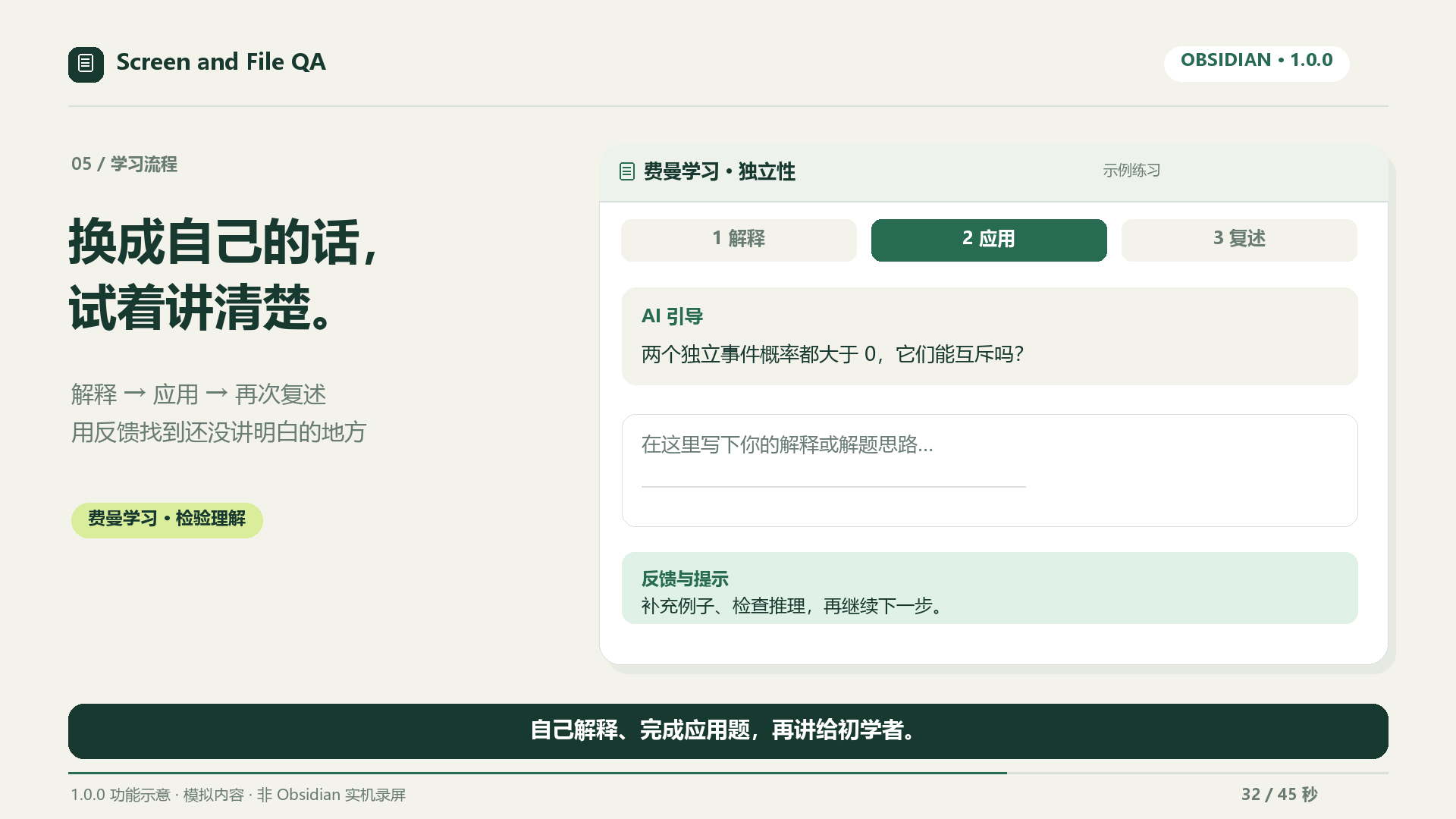
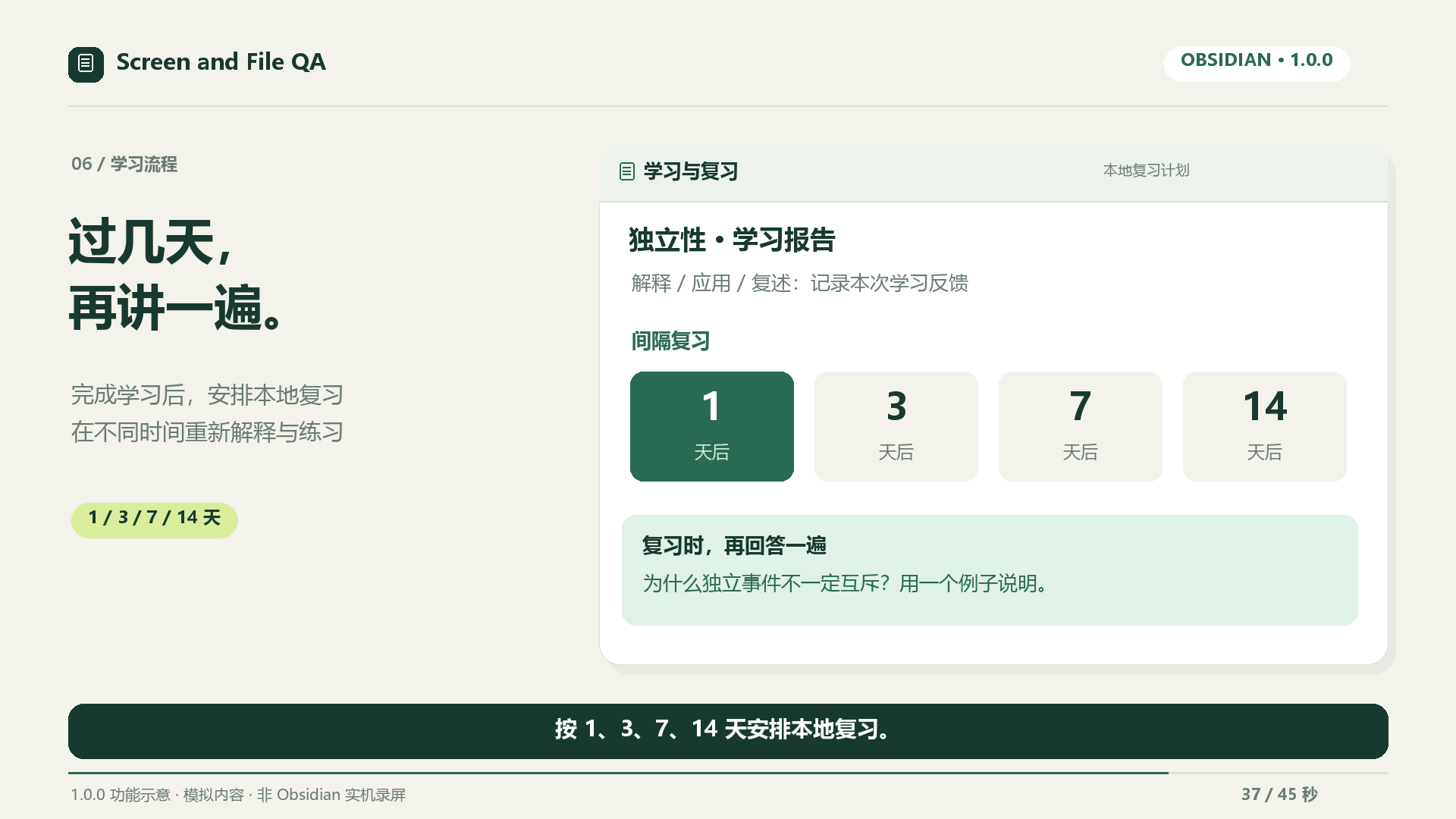
- Feynman learning: explain in your own words, solve an application and teach it back. Record feedback and local 1/3/7/14-day reviews.
- Reviewed revisions and settings: preview Markdown edits, preserve intervening changes, and configure saving, source writes, classification and providers independently.
中文图文上手指南 · English quick start
安装与视频
需要桌面 Obsidian 1.13.0+。社区插件发布名称为 Screen and File QA。手动安装时复制 main.js、manifest.json、styles.css;plugin ZIP 是安装包,source ZIP 是源码。
首发宣传片为 45 秒、1080p、16:9、30 fps、中文字幕、无音轨。使用模拟内容和功能示意,非 Obsidian 实机录屏。
插件免费开源;AI 服务自行配置,可能收费。答案、知识分类和学习评估需要核对。截图、笔记和对话可能随仓库同步或备份。
Validation and limits
138 automated regressions, lint, production build, release validation and PDF extraction with only the three installation files are checked locally. The release workflow verifies Windows/macOS/Linux before publication.
Source appends retain 200 recent question IDs; this differs from the recoverable knowledge-archive journal and does not guarantee crash-proof or unbounded deduplication. Real-provider response quality, native themes, recording permissions and multi-device conflicts still require manual verification.
See the first-release flow audit and remaining optimization work.
1.2.0 - Screen and File QA
Screen and File QA 1.2.0
Every question now carries your past learning with it — locally.
- Before each ordinary screen/file question, the plugin recalls up to three related snippets from your knowledge notes and earlier questions across all conversations and adds them as labeled background; the attached file or screenshot remains the authoritative source.
- Recalled entries that contribute to a successful answer are reinforced (bounded hit counts in plugin data) and rank higher later — memories strengthen instead of being overwritten.
- Fully local: no service, no extra provider requests, no new dependencies. Recalled snippets are sent to your provider as part of the question prompt; toggle "Cross-conversation memory recall" in settings (on by default). Feynman learning, note revision and classification are unchanged.
Screen and File QA 1.1.0
A 30-second learner profile makes every ordinary answer fit you — and go deeper.
- On first panel open, a short wizard asks for your level (beginner / intermediate / advanced), your preferred answer style, and optional background notes. Ordinary screen and file Q&A then tailors wording and depth to that profile; the direct answer still comes first.
- Choose "explain the principle": after the direct answer, the reasoning is laid out step by step, so the real mechanism is clear without follow-up questions.
- Choose "worked examples": answers end with 2-3 examples of increasing difficulty on the same knowledge point, each with a brief solution. Examples beyond the source are clearly marked; factual answers remain source-grounded.
- Everything stays editable in settings → Learner profile. Skipping the wizard (or leaving the level unset) keeps the previous concise behavior. Feynman learning and note revision are unaffected. Profile content is sent to the AI provider with each question.
Screen and File QA 1.0.2
Knowledge notes now include the exact text of the archived question before the AI summary. Distinct follow-up questions remain visible even when their summaries are identical. Feynman archives label their prompt as a learning topic. Existing archived notes are preserved; this change applies to new archive entries.
Screen and File QA 1.0.1
Explain question write-back skips instead of failing silently.
- When Append questions to the asked note skips a write, a notice now states the reason: the asked file is not Markdown, or no Markdown note was open when asking a screen question. Open the target Markdown note (screen Q&A) or ask about a Markdown file (file Q&A) to record the question.
Screen and File QA 1.0.0 — First release / 首发版
Turn questions into readable notes and structured learning practice in desktop Obsidian.
- Screen and file Q&A: preview the selected display before sending, or ask about Markdown, PDF, DOC/DOCX and text files. Stream responses, stop requests and retry a specific question.
- Continuous questions: queue up to five ordinary follow-ups while an answer streams. Stop or provider failure pauses remaining sends until explicit resume. Queues are held in memory and cleared on unload; Feynman assessment waits for the current stage.
- Automatic notes: keep each conversation in one Markdown note. Write questions, optional answers and conversation links beside their source; save screenshot questions as PNG vault attachments. Protect handwritten content and exclude AI Q&A/knowledge folders from source appends.
- Topic archiving: find matching notes only inside the configured knowledge directory, retain provenance links and send uncertain content to Inbox. Recovery journals protect knowledge writes; consolidation changes are reviewed before application.
- Feynman learning: explain in your own words, solve an application and teach it back. Record feedback and local 1/3/7/14-day reviews.
- Reviewed revisions and settings: preview Markdown edits, preserve intervening changes, and configure saving, source writes, classification and providers independently.
中文图文上手指南 · English quick start
安装与视频
需要桌面 Obsidian 1.13.0+。社区插件发布名称为 Screen and File QA。手动安装时复制 main.js、manifest.json、styles.css;plugin ZIP 是安装包,source ZIP 是源码。
首发宣传片为 45 秒、1080p、16:9、30 fps、中文字幕、无音轨。使用模拟内容和功能示意,非 Obsidian 实机录屏。
插件免费开源;AI 服务自行配置,可能收费。答案、知识分类和学习评估需要核对。截图、笔记和对话可能随仓库同步或备份。
Validation and limits
138 automated regressions, lint, production build, release validation and PDF extraction with only the three installation files are checked locally. The release workflow verifies Windows/macOS/Linux before publication.
Source appends retain 200 recent question IDs; this differs from the recoverable knowledge-archive journal and does not guarantee crash-proof or unbounded deduplication. Real-provider response quality, native themes, recording permissions and multi-device conflicts still require manual verification.
See the first-release flow audit and remaining optimization work.
1.1.0 - Screen and File QA
Screen and File QA 1.1.0
A 30-second learner profile makes every ordinary answer fit you — and go deeper.
- On first panel open, a short wizard asks for your level (beginner / intermediate / advanced), your preferred answer style, and optional background notes. Ordinary screen and file Q&A then tailors wording and depth to that profile; the direct answer still comes first.
- Choose "explain the principle": after the direct answer, the reasoning is laid out step by step, so the real mechanism is clear without follow-up questions.
- Choose "worked examples": answers end with 2-3 examples of increasing difficulty on the same knowledge point, each with a brief solution. Examples beyond the source are clearly marked; factual answers remain source-grounded.
- Everything stays editable in settings → Learner profile. Skipping the wizard (or leaving the level unset) keeps the previous concise behavior. Feynman learning and note revision are unaffected. Profile content is sent to the AI provider with each question.
Screen and File QA 1.0.2
Knowledge notes now include the exact text of the archived question before the AI summary. Distinct follow-up questions remain visible even when their summaries are identical. Feynman archives label their prompt as a learning topic. Existing archived notes are preserved; this change applies to new archive entries.
Screen and File QA 1.0.1
Explain question write-back skips instead of failing silently.
- When Append questions to the asked note skips a write, a notice now states the reason: the asked file is not Markdown, or no Markdown note was open when asking a screen question. Open the target Markdown note (screen Q&A) or ask about a Markdown file (file Q&A) to record the question.
Screen and File QA 1.0.0 — First release / 首发版
Turn questions into readable notes and structured learning practice in desktop Obsidian.
- Screen and file Q&A: preview the selected display before sending, or ask about Markdown, PDF, DOC/DOCX and text files. Stream responses, stop requests and retry a specific question.
- Continuous questions: queue up to five ordinary follow-ups while an answer streams. Stop or provider failure pauses remaining sends until explicit resume. Queues are held in memory and cleared on unload; Feynman assessment waits for the current stage.
- Automatic notes: keep each conversation in one Markdown note. Write questions, optional answers and conversation links beside their source; save screenshot questions as PNG vault attachments. Protect handwritten content and exclude AI Q&A/knowledge folders from source appends.
- Topic archiving: find matching notes only inside the configured knowledge directory, retain provenance links and send uncertain content to Inbox. Recovery journals protect knowledge writes; consolidation changes are reviewed before application.
- Feynman learning: explain in your own words, solve an application and teach it back. Record feedback and local 1/3/7/14-day reviews.
- Reviewed revisions and settings: preview Markdown edits, preserve intervening changes, and configure saving, source writes, classification and providers independently.
中文图文上手指南 · English quick start
安装与视频
需要桌面 Obsidian 1.13.0+。社区插件发布名称为 Screen and File QA。手动安装时复制 main.js、manifest.json、styles.css;plugin ZIP 是安装包,source ZIP 是源码。
首发宣传片为 45 秒、1080p、16:9、30 fps、中文字幕、无音轨。使用模拟内容和功能示意,非 Obsidian 实机录屏。
插件免费开源;AI 服务自行配置,可能收费。答案、知识分类和学习评估需要核对。截图、笔记和对话可能随仓库同步或备份。
Validation and limits
138 automated regressions, lint, production build, release validation and PDF extraction with only the three installation files are checked locally. The release workflow verifies Windows/macOS/Linux before publication.
Source appends retain 200 recent question IDs; this differs from the recoverable knowledge-archive journal and does not guarantee crash-proof or unbounded deduplication. Real-provider response quality, native themes, recording permissions and multi-device conflicts still require manual verification.
See the first-release flow audit and remaining optimization work.
1.0.2 - Screen and File QA
Screen and File QA 1.0.2
Knowledge notes now include the exact text of the archived question before the AI summary. Distinct follow-up questions remain visible even when their summaries are identical. Feynman archives label their prompt as a learning topic. Existing archived notes are preserved; this change applies to new archive entries.
Screen and File QA 1.0.1
Explain question write-back skips instead of failing silently.
- When Append questions to the asked note skips a write, a notice now states the reason: the asked file is not Markdown, or no Markdown note was open when asking a screen question. Open the target Markdown note (screen Q&A) or ask about a Markdown file (file Q&A) to record the question.
Screen and File QA 1.0.0 — First release / 首发版
Turn questions into readable notes and structured learning practice in desktop Obsidian.
- Screen and file Q&A: preview the selected display before sending, or ask about Markdown, PDF, DOC/DOCX and text files. Stream responses, stop requests and retry a specific question.
- Continuous questions: queue up to five ordinary follow-ups while an answer streams. Stop or provider failure pauses remaining sends until explicit resume. Queues are held in memory and cleared on unload; Feynman assessment waits for the current stage.
- Automatic notes: keep each conversation in one Markdown note. Write questions, optional answers and conversation links beside their source; save screenshot questions as PNG vault attachments. Protect handwritten content and exclude AI Q&A/knowledge folders from source appends.
- Topic archiving: find matching notes only inside the configured knowledge directory, retain provenance links and send uncertain content to Inbox. Recovery journals protect knowledge writes; consolidation changes are reviewed before application.
- Feynman learning: explain in your own words, solve an application and teach it back. Record feedback and local 1/3/7/14-day reviews.
- Reviewed revisions and settings: preview Markdown edits, preserve intervening changes, and configure saving, source writes, classification and providers independently.
中文图文上手指南 · English quick start
安装与视频
需要桌面 Obsidian 1.13.0+。社区插件发布名称为 Screen and File QA。手动安装时复制 main.js、manifest.json、styles.css;plugin ZIP 是安装包,source ZIP 是源码。
首发宣传片为 45 秒、1080p、16:9、30 fps、中文字幕、无音轨。使用模拟内容和功能示意,非 Obsidian 实机录屏。
插件免费开源;AI 服务自行配置,可能收费。答案、知识分类和学习评估需要核对。截图、笔记和对话可能随仓库同步或备份。
Validation and limits
138 automated regressions, lint, production build, release validation and PDF extraction with only the three installation files are checked locally. The release workflow verifies Windows/macOS/Linux before publication.
Source appends retain 200 recent question IDs; this differs from the recoverable knowledge-archive journal and does not guarantee crash-proof or unbounded deduplication. Real-provider response quality, native themes, recording permissions and multi-device conflicts still require manual verification.
See the first-release flow audit and remaining optimization work.
1.0.1 - Screen and File QA
Screen and File QA 1.0.1
Explain question write-back skips instead of failing silently.
- When Append questions to the asked note skips a write, a notice now states the reason: the asked file is not Markdown, or no Markdown note was open when asking a screen question. Open the target Markdown note (screen Q&A) or ask about a Markdown file (file Q&A) to record the question.
Screen and File QA 1.0.0 — First release / 首发版
Turn questions into readable notes and structured learning practice in desktop Obsidian.
- Screen and file Q&A: preview the selected display before sending, or ask about Markdown, PDF, DOC/DOCX and text files. Stream responses, stop requests and retry a specific question.
- Continuous questions: queue up to five ordinary follow-ups while an answer streams. Stop or provider failure pauses remaining sends until explicit resume. Queues are held in memory and cleared on unload; Feynman assessment waits for the current stage.
- Automatic notes: keep each conversation in one Markdown note. Write questions, optional answers and conversation links beside their source; save screenshot questions as PNG vault attachments. Protect handwritten content and exclude AI Q&A/knowledge folders from source appends.
- Topic archiving: find matching notes only inside the configured knowledge directory, retain provenance links and send uncertain content to Inbox. Recovery journals protect knowledge writes; consolidation changes are reviewed before application.
- Feynman learning: explain in your own words, solve an application and teach it back. Record feedback and local 1/3/7/14-day reviews.
- Reviewed revisions and settings: preview Markdown edits, preserve intervening changes, and configure saving, source writes, classification and providers independently.
中文图文上手指南 · English quick start
安装与视频
需要桌面 Obsidian 1.13.0+。社区插件发布名称为 Screen and File QA。手动安装时复制 main.js、manifest.json、styles.css;plugin ZIP 是安装包,source ZIP 是源码。
首发宣传片为 45 秒、1080p、16:9、30 fps、中文字幕、无音轨。使用模拟内容和功能示意,非 Obsidian 实机录屏。
插件免费开源;AI 服务自行配置,可能收费。答案、知识分类和学习评估需要核对。截图、笔记和对话可能随仓库同步或备份。
Validation and limits
136 automated regressions, lint, production build, release validation and PDF extraction with only the three installation files are checked locally. The release workflow verifies Windows/macOS/Linux before publication.
Source appends retain 200 recent question IDs; this differs from the recoverable knowledge-archive journal and does not guarantee crash-proof or unbounded deduplication. Real-provider response quality, native themes, recording permissions and multi-device conflicts still require manual verification.
See the first-release flow audit and remaining optimization work.
1.0.0 - Screen and File QA
Screen and File QA 1.0.0 — First release / 首发版
Turn questions into readable notes and structured learning practice in desktop Obsidian.
- Screen and file Q&A: preview the selected display before sending, or ask about Markdown, PDF, DOC/DOCX and text files. Stream responses, stop requests and retry a specific question.
- Continuous questions: queue up to five ordinary follow-ups while an answer streams. Stop or provider failure pauses remaining sends until explicit resume. Queues are held in memory and cleared on unload; Feynman assessment waits for the current stage.
- Automatic notes: keep each conversation in one Markdown note. Write questions, optional answers and conversation links beside their source; save screenshot questions as PNG vault attachments. Protect handwritten content and exclude AI Q&A/knowledge folders from source appends.
- Topic archiving: find matching notes only inside the configured knowledge directory, retain provenance links and send uncertain content to Inbox. Recovery journals protect knowledge writes; consolidation changes are reviewed before application.
- Feynman learning: explain in your own words, solve an application and teach it back. Record feedback and local 1/3/7/14-day reviews.
- Reviewed revisions and settings: preview Markdown edits, preserve intervening changes, and configure saving, source writes, classification and providers independently.
安装与视频
需要桌面 Obsidian 1.13.0+。社区插件发布名称为 Screen and File QA。手动安装时复制 main.js、manifest.json、styles.css;plugin ZIP 是安装包,source ZIP 是源码。
首发宣传片为 45 秒、1080p、16:9、30 fps、中文字幕、无音轨。使用模拟内容和功能示意,非 Obsidian 实机录屏。
插件免费开源;AI 服务自行配置,可能收费。答案、知识分类和学习评估需要核对。截图、笔记和对话可能随仓库同步或备份。
Validation and limits
136 automated regressions, lint, production build, release validation and PDF extraction with only the three installation files are checked locally. The release workflow verifies Windows/macOS/Linux before publication.
Source appends retain 200 recent question IDs; this differs from the recoverable knowledge-archive journal and does not guarantee crash-proof or unbounded deduplication. Real-provider response quality, native themes, recording permissions and multi-device conflicts still require manual verification.
See the first-release flow audit and remaining optimization work.
45-second video / 45 秒宣传片
Watch or download MP4 / 观看或下载宣传片 · Cover / 封面 · Chinese subtitles / 中文字幕

1920 × 1080 · 16:9 · 30 fps · Chinese captions · no audio. The video uses locally rendered feature illustrations based on 1.0.0 behavior and simulated content, not native Obsidian recordings. AI providers may charge for requests.
图文了解 / Illustrated walkthrough
以下六张画面来自 1.0.0 首发功能示意,使用模拟内容,非 Obsidian 实机截图。实际界面跟随主题。These are rendered feature illustrations with fictional content, not native screenshots.
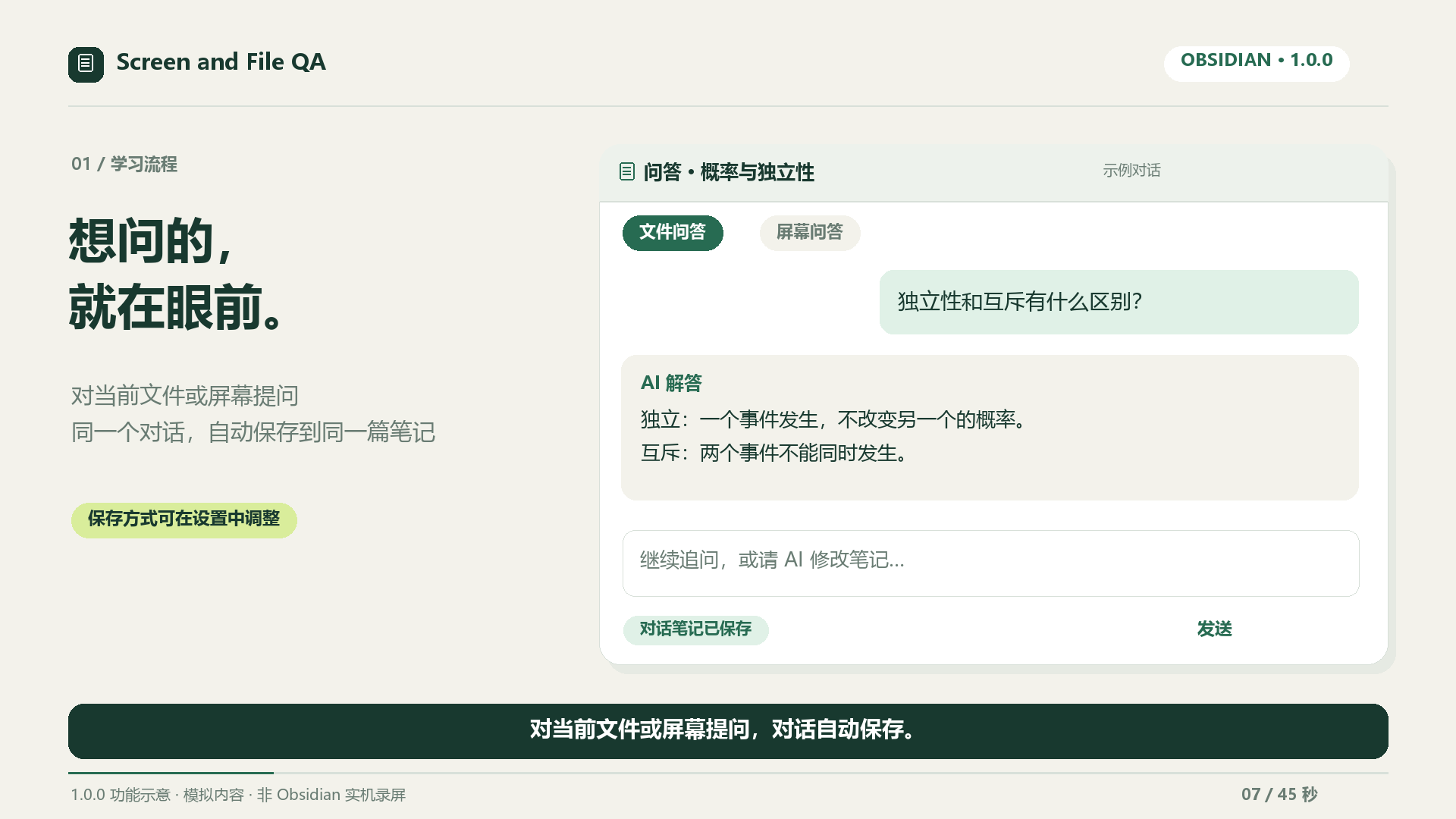
1. 屏幕或文件提问 / Ask about a screen or file
选择资料来源,输入问题。屏幕问答默认预览后再发送;同一个对话自动保存到同一篇笔记。
Choose a source and ask a question. Review screen captures before sending; each conversation updates one note by default.
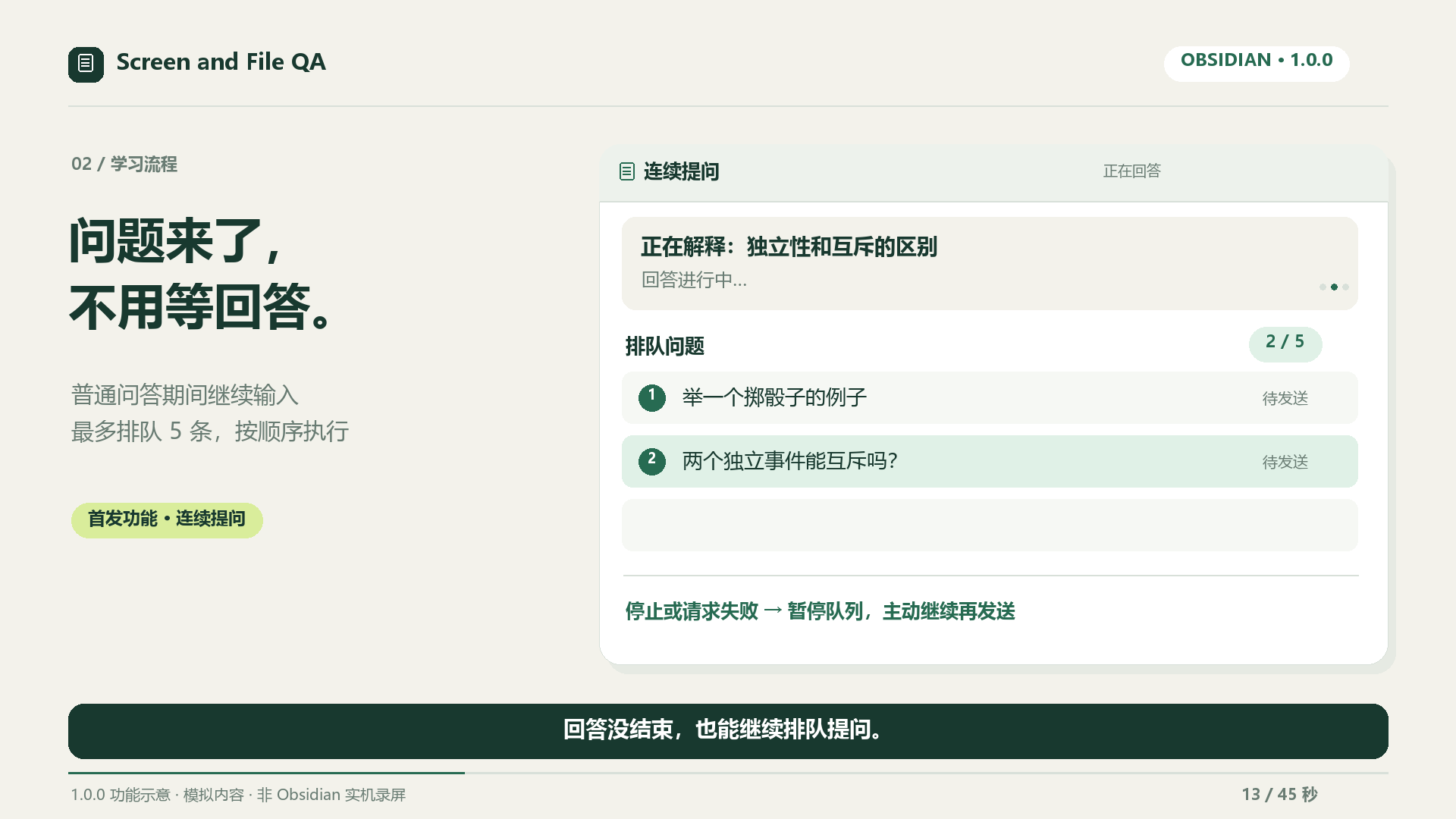
2. 连续提问 / Queue follow-ups
回答生成时继续输入,按 Enter 排队,最多五条。停止或请求失败后暂停,主动继续才发送。
Queue up to five follow-ups while an answer streams. Stop or provider errors pause pending sends until explicit resume.
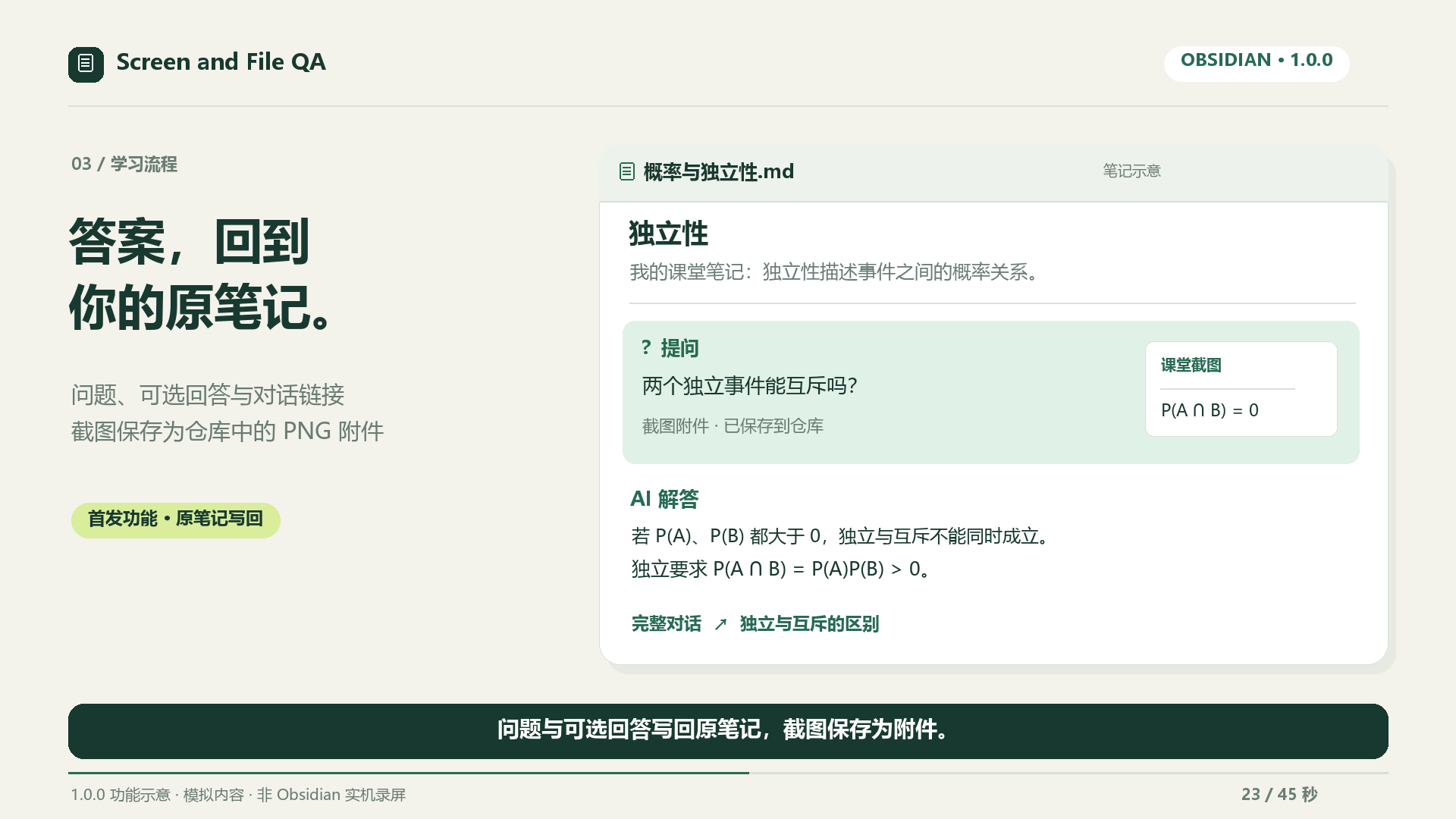
3. 留在原笔记 / Keep answers beside their source
问题、可选回答与完整对话链接写回被提问的 Markdown 笔记,截图保存为 PNG 附件。写回与对话自动保存可以分别设置。
Append questions, optional answers and transcript links to the asked note. Screenshots become vault PNG attachments; source writes and transcript saving have independent settings.
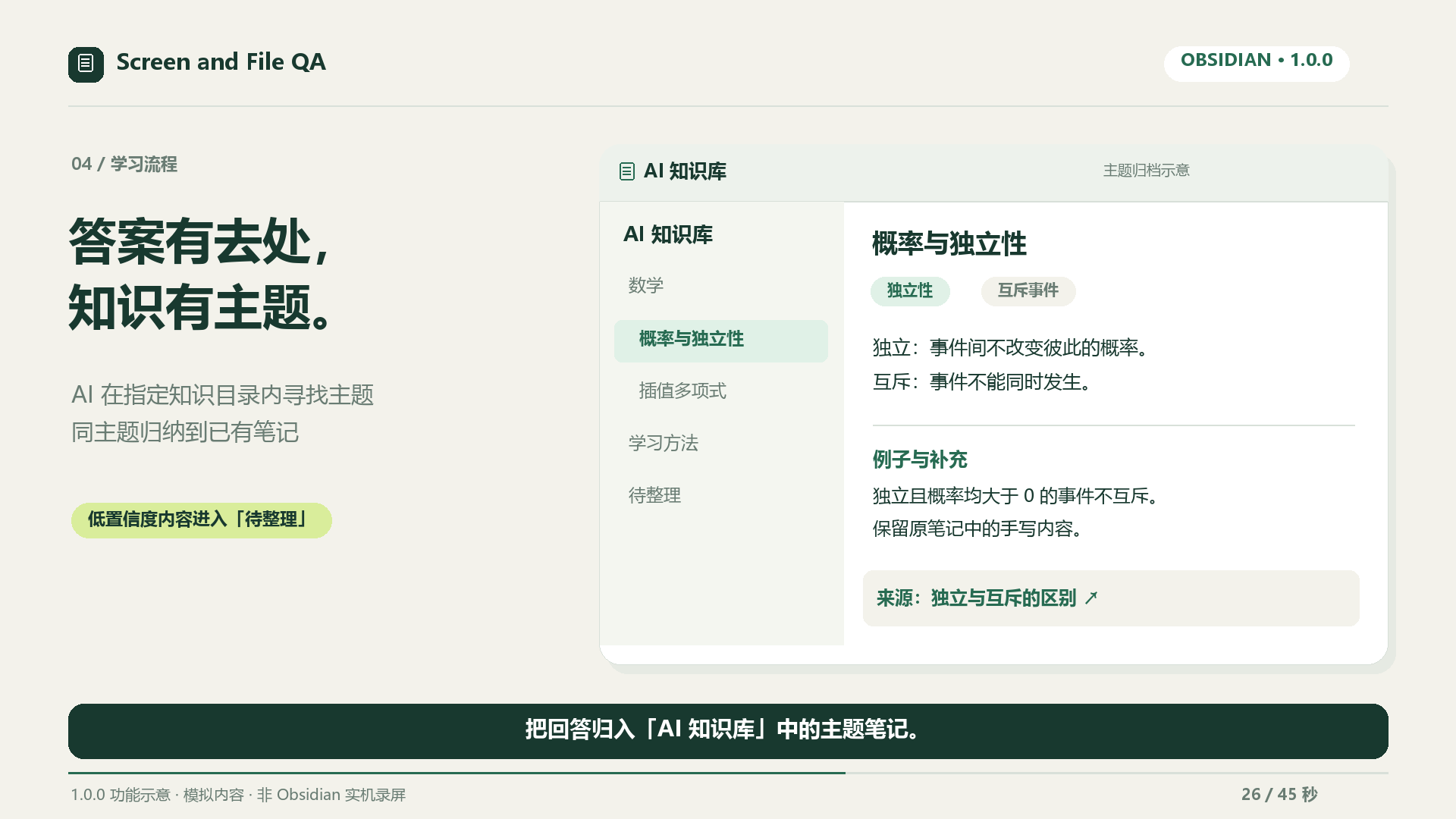
4. 主题归档 / Organize topic notes
只在设置的知识目录内寻找主题,保留原对话与手写内容,不确定的结果进入待整理。分类可能增加 AI 请求。
Route answers within the configured knowledge directory, keep source conversations and handwritten content, and send uncertain matches to Inbox. Classification may add an AI request.
5. 费曼学习 / Practise understanding
自己的话解释 → 应用题 → 面向初学者复述。反馈帮助找缺口,小提示不算通过;AI 判断需要核对。
Explain → apply → teach back. Use feedback to find gaps; hints do not pass stages. Check the AI's assessment.
6. 间隔复习 / Review later
完成学习后按 1、3、7、14 天安排本地复习,到期后主动开始练习;不会自动发送收费请求。
Track local 1/3/7/14-day reviews and choose when to practise. Plans never automatically send paid requests.
完整中文上手指南 · English quick start · 八张功能说明图 / Eight illustrations