Repository navigation
Releases: clglavan/kubehealth
Release list
KubeHealth v0.4.0

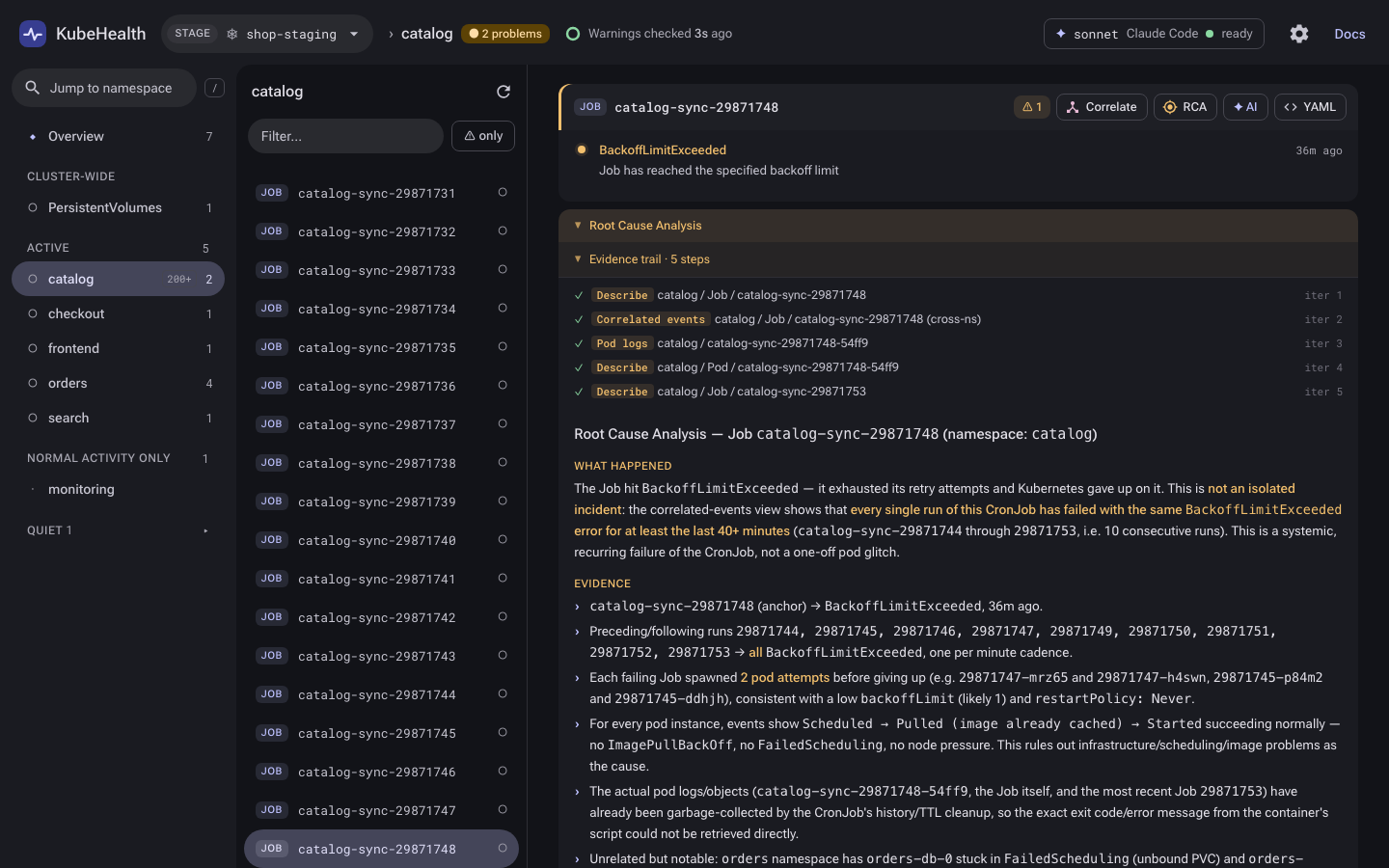
KubeHealth can now hand its AI work to Claude Code: flip one switch and the overview note, the ✦ AI analyses and root cause analysis run through your local claude -p, with Claude calling KubeHealth's own read-only tools.
What's new
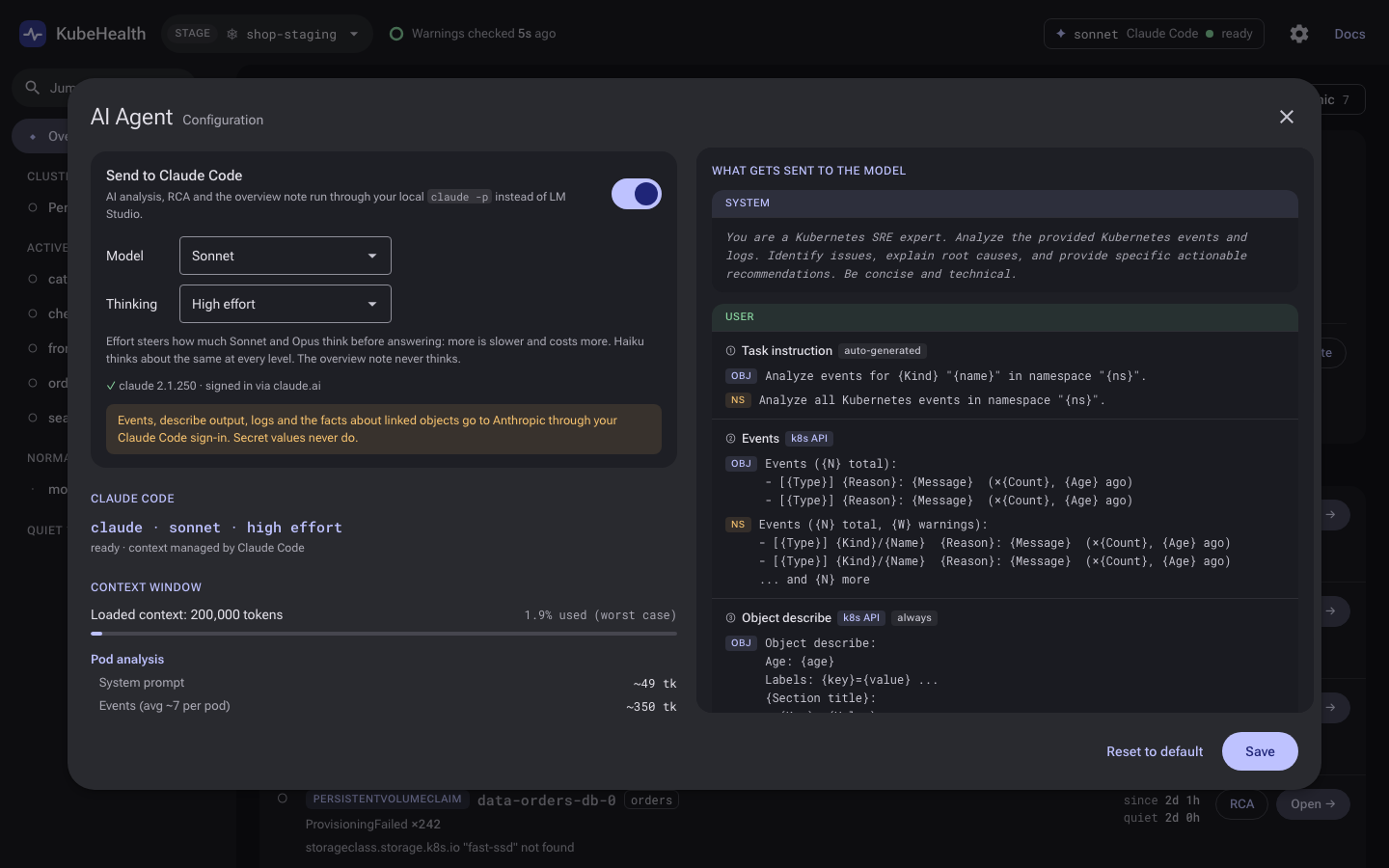
Send to Claude Code
- A switch in the ✦ AI Agent dialog (click the model chip in the header) sends the note, AI analyses and RCA to the local
claudeCLI instead of LM Studio or the embedded model. Pick Haiku, Sonnet or Opus, and how much it thinks: off, or low to max effort. - RCA runs as one Claude Code session that calls KubeHealth's four read-only tools (pod logs, describe, events, correlated events) through an MCP endpoint on localhost. Every call is a step of the evidence trail, and Max iterations still caps it.
- Locked down: KubeHealth's system prompt, no built-in tools, none of your settings, MCP servers, plugins, skills or slash commands, no saved sessions. The prompt goes in on stdin. It uses your own Claude Code sign-in.
- The dialog shows the CLI's version and sign-in, and what leaves your machine: events, describe output, logs and linked-object facts. Secret values never do.
- The choice is remembered across restarts.
AI_BACKEND=claude-codesets it at startup.
Answers read better
- AI answers render headings, rules, and numbered steps that keep their numbers around nested bullets.
Upgrading
- Nothing changes until you flip the switch: LM Studio and the embedded model work as before.
- Needs Claude Code installed and signed in (
claude auth login). KubeHealth looks forclaudeon PATH and in~/.local/bin. - With the switch on, the overview note is one Claude call each time the top problem changes (it runs without thinking). Analyses and RCA run when you ask for them.
Details in docs/reference.md. Checksums are in checksums-v0.4.0.txt.
KubeHealth v0.3.0
KubeHealth now gets good answers out of small local models: it hands the model the evidence that decides most faults, follows the objects that evidence names, asks plain questions, and comes with a benchmark that replays real incidents through KubeHealth itself. The embedded build ships magos-k8s-0.6b v19.
What's new
Better evidence for the model
- ✦ AI analysis on a workload now includes the warnings of the objects it owns and the logs of its newest failing Pod. It used to see only the workload's own events, which rarely say what is wrong.
describeshows what decides most faults: selectors, tolerations, node selectors, probes, env and volume references, mounts, security context, init containers, Service endpoints, PVC / PV / Node / HPA / Ingress details and the conditions of custom resources. It never shows Secret or ConfigMap values.- A failing init container's state and logs are part of the evidence.
Link-following
- Before asking the model, KubeHealth reads the objects the evidence clearly names: the claim a Pending Pod waits on and its StorageClass, the Service a log line can't reach and the Pods behind it, a missing ConfigMap or Secret key (names only), the nodes of a scheduling failure, image pull secrets. A short block about them goes into the AI analysis and RCA prompts, within a fixed share of the context.
- On by default. Turn it off in ✦ settings ("Follow what the evidence names") or with
AI_LINK_FOLLOW=false.
Plain questions
- AI analysis and RCA ask a plain question — what is wrong, the evidence, the fix, how sure — and show the answer as the model writes it. No required headings, no rewrite requests.
- The model's reasoning stays out of the answer; the panel shows "Thinking…" while it reasons. The overview note is asked without thinking, so it is always an answer.
Fits small contexts
- The first RCA and analysis prompts take at most 60% of the loaded context; evidence is trimmed oldest-first when it doesn't fit, and the prompt says what was trimmed.
- A better token estimate (digits and punctuation cost more than letters), so log-heavy prompts no longer overflow.
- llama-server's "exceeds the available context size" error is recognised, and the context size is read from llama-server as well as LM Studio.
kubehealth bench
record,run,scoreandinspect: a benchmark for the model behind the AI features, run through KubeHealth's own prompts, evidence and tools on frozen incidents — no cluster needed, identical prompts on every run.- 54 recorded incidents: 40 faults (15 where the cause sits in another object than the symptom) and 14 healthy objects. See
bench/README.md.
Embedded build
kubehealth-embed(Apple Silicon) bundles magos-k8s-0.6b v19, trained for these prompts and tools. On the benchmark it finds the right root cause 88% of the time, and with link-following finds a cause hidden in another object 78% of the time. Details on the model card.
YAML panel
- YAML opens the object's live YAML in a panel that slides in from the left, coloured, foldable, with
status,managedFieldsand other noise hidden until you ask. - The fields the object's warnings and container state blame (an image that won't pull, the memory limit an OOM kill hit, a missing ConfigMap or Secret, a StorageClass that doesn't exist…) are highlighted with the reason, listed on top and scrolled to.
- References open column by column to the right: Pod → PVC → StorageClass. Secret values never reach the page; each key can be revealed on its own.
A new look
- Material 3 throughout: a dark tonal scheme, pill buttons and filter chips, icons on the object actions, proper dialogs for Settings, AI Agent and Docs.
- Roboto Flex and Roboto Mono are bundled in the binary, so the UI looks the same offline.
Upgrading
- ✦ AI analysis answers no longer come in Summary / Issues / Actions sections. Nothing to change unless you parsed them.
- Link-following reads a few more objects (claims, StorageClasses, Services and their EndpointSlices, Nodes, ConfigMap and Secret key names) with the same kubeconfig. Without permission to read one, that piece of evidence is left out (an image pull secret is marked "could not be read").
Checksums are in checksums-v0.3.0.txt.
KubeHealth v0.2.0
KubeHealth now starts from a ranked list of what's broken, keeps the namespace list on screen, switches clusters in place, and comes in an embedded build with a bundled model.
A 2-minute walkthrough is attached below (demo.mp4), and plays inline in the README.
What's new
Triage overview
- One row per failing workload, not one per event. Pods, Jobs and ReplicaSets are grouped under their Deployment, CronJob, StatefulSet, DaemonSet or operator resource. Names give a first guess, and
ownerReferencesconfirm it in the background (at most two GETs a second). - Problems are ranked into New (under 2 h), Ongoing (2–24 h) and Chronic (over a day). Rows go idle after 15 minutes without a new occurrence.
- Patterns merge one cause seen in several namespaces: problems that started within 10 s of each other, the same workload failing the same way, or a shared infrastructure reason in three or more namespaces.
- A brief above the list says where to start, what's new, what looks linked and what's old. It is computed from the problem list, so it works with AI turned off. The model adds a note on the top problem from its events, its container state and up to 30 log lines.
Three-pane navigation
- The namespace rail is always on screen. Pick a namespace to see its objects and a live status: workloads ready, CronJobs failing, pods by phase, volume claims, and what needs attention. Pick an object to see its ownership chain and timeline.
- Moving around doesn't reload the page, and the URL follows, so links, Back and Forward work.
- Cluster-wide objects (Nodes, PersistentVolumes) get their own entry.
Clusters
- Every kubeconfig context is listed, grouped by environment, and switched in place. Only the active cluster is polled; clusters you switch away from are kept in memory.
- Each cluster gets an environment tag read from its name. Production gets a red stripe on every page.
- A tab keeps talking to the cluster it was opened on.
AI
- Embedded build (
kubehealth-embed): magos-k8s-0.6b andllama-serverinside one binary. AI needs no other setup. - RCA on a workload now starts from its Pods' warnings and its newest failing Pod's logs, not just the workload's own events.
- A container-state line (restarts, how the last run ended, exit-code signal, memory limit) goes to the model, so OOM kills are visible even when the logs say nothing.
- Analysis and RCA run at a low temperature. Results render lists and code blocks.
Also
- A redesigned Docs diagram tracing each feature through the system.
demo/: two kind clusters with realistic failures, for trying KubeHealth without a real cluster.kubehealth -version.
Downloads
| File | For |
|---|---|
kubehealth_v0.2.0_darwin_arm64.tar.gz |
macOS, Apple Silicon |
kubehealth_v0.2.0_darwin_amd64.tar.gz |
macOS, Intel |
kubehealth_v0.2.0_linux_amd64.tar.gz |
Linux, x86-64 |
kubehealth_v0.2.0_linux_arm64.tar.gz |
Linux, ARM64 |
kubehealth_v0.2.0_windows_amd64.zip |
Windows, x86-64 |
kubehealth-embed_v0.2.0_darwin_arm64.tar.gz |
macOS, Apple Silicon, with the bundled model (~700 MB) |
The regular build uses LM Studio or Ollama for AI, or runs without it. Checksums are in checksums-v0.2.0.txt. The embedded build bundles llama.cpp's llama-server (MIT) and the magos-k8s-0.6b weights from HuggingFace.
The macOS binaries aren't notarized. After extracting, run xattr -d com.apple.quarantine kubehealth (or kubehealth-embed).
Good to know
- KubeHealth only reads from the cluster. It needs
list/geton events and on the workload kinds it resolves owners for. - The bundled 0.6B model is small. Its notes and RCAs are suggestions from the evidence it was shown, and can be wrong; check them before acting. For better RCA, point the regular build at a larger model in LM Studio.
v0.1 — Initial release
KubeHealth v0.1
A lightweight Kubernetes event dashboard with a web UI.
Features
- Namespace overview with warning/normal event counts
- Ownership chain detection (Deployment → ReplicaSet → Pod, CronJob → Job → Pod, etc.) using naming conventions — zero extra API calls
- Cascade failure detection
- Sidebar + detail panel layout with search and warnings-only filter
- Inline object describe view (Pod, Deployment, ReplicaSet, StatefulSet, DaemonSet, Job, CronJob, Service)
- Graceful 404 handling for deleted objects
- Rate-limit-safe fetching (single background worker, one namespace every 2s)
- Animated loading screen with live progress counter
Usage
./kubehealth                          # watch all namespaces
./kubehealth -namespaces default,prod # watch specific namespaces
./kubehealth -port 9090               # custom port (default: 8080)
./kubehealth -kubeconfig /path/to/cfg # custom kubeconfig
Downloads
| Platform | Binary |
|---|---|
| Linux x86_64 | kubehealth-linux-amd64 |
| Linux ARM64 | kubehealth-linux-arm64 |
| macOS x86_64 | kubehealth-darwin-amd64 |
| macOS Apple Silicon | kubehealth-darwin-arm64 |
| Windows x86_64 | kubehealth-windows-amd64.exe |