Meshes
A mesh defines the surface shape of an object, by defining a set of vertices that contain information about the location and visual specification at each point on the surface.
In Cocos3D, a mesh is represented by an instance the CC3Mesh class. Within your 3D scene, each mesh node holds a single mesh and a single material, forming a 1:1 relationship between a mesh and the material that covers it.
Since the content of a mesh can be quite voluminous, and is generally static in nature, a single CC3Mesh instance can (and should) be shared between a number of CC3MeshNode instances, to conserve memory. When you copy a CC3MeshNode instance, the CC3Mesh instance that it holds is not copied, but a reference to the single CC3Mesh is shared between the original and new mesh nodes. You can use this technique to create an army of zombie characters without creating additional copies of all the mesh vertex content that defines a single zombie character. Each mesh node within each zombie can be moved, colored, and textured individually, while only one copy of the underlying mesh vertex content is shared between all of those mesh nodes.
####Vertex Content
For each vertex, a mesh can support several types of content, which define the following aspects of the mesh surface in the vicinity of that vertex:
- Location (vertex location).
- Surface normal.
- Surface tangent.
- Surface bitangent (aka binormal)
- Surface color.
- Texture coordinates for multiple textures.
- Skeletal animation bone weights.
- Skeletal animation bone matrix indices.
Each of these vertex aspects is maintained in a separate vertex array, represented in Cocos3D by an instance of CC3VertexArray, and each vertex array is accessible via a separate property on the CC3Mesh instance. Each CC3VertexArray instance maintains the content for that aspect for all vertices in the mesh.
For example, a mesh that contains basic location and surface normal content for each vertex will hold two CC3VertexArray instances, one in the vertexLocations property, and one in the vertexNormals property.
This is true even if the vertex content is interleaved, meaning that all content for a single vertex is held together in memory. In this case, all CC3VertexArray instances within a CC3Mesh will point to the same memory space, with each maintaining a separate byte offset, to indicate where in the interleaved content for that specific aspect (eg - location or surface normal) is to be found within a vertex.
Each vertex array held in these properties is of a different subclass of CC3VertexArray, specialized for the type of content managed by the vertex array.
For best rendering performance, it is recommended that you interleave your mesh vertex content, so that all content for a particular vertex is held together in memory.
#####Accessing Vertex Content
You can access content for individual vertices through the corresponding CC3VertexArray, or through convenience accessor methods on both the CC3Mesh and CC3MeshNode classes. These methods form a family of methods, whose signature follows the pattern vertex...At: for retrieving the value of the vertex component, and setVertex...:at: for setting the value of the vertex component.
For example, you can retrieve the value of the surface normal at a particular vertex by using the vertexNormalAt: method, and you can change that value using the setVertexNormal:at: method. There are similar methods on CC3Mesh and CC3MeshNode for accessing each of the vertex content components listed above.
The vertexCount and vertexIndexCount properties on CC3Mesh and CC3MeshNode provide a count of the number of vertices and vertex indices in the mesh.
Using these methods, and a few others, you can actually [build up a mesh from scratch programmatically] (Adding-Scene-Content#ScratchMeshes).
In addition to accessing individual vertices within the mesh, you can also access individual faces of the mesh. A face is a single triangle of three vertices (or a line of two vertices in a line mesh), and forms the basic drawing primitive of a mesh.
You can retrieve the number of faces in the mesh using the faceCount property of CC3Mesh and CC3MeshNode, and then you can use the family of face...At: methods to retrieve information about individual faces. For example, the faceAt: method will return a structure containing the locations of the three vertices in the face, the faceCenterAt:, faceNormalAt:, and facePlaneAt: methods will return the center, normal, and plane of the face.
You can also modify the entire mesh using the moveMeshOriginTo: and moveMeshOriginToCenterOfGeometry methods to shift all of the the mesh vertices relative to the origin of the mesh. These methods are useful if you have a mesh that was created in a 3D editor, and you want to move the pivot point (around which the mesh will be located and rotated), in order to simplify how it is manipulated in your code.
####Skeletal Animation
Skeletal animation, also known as bone-rigging, or vertex skinning, is the technique of manipulating a mesh within the vertex shader by passing a collection of matrices and weights to the shader. The vertex shader then uses these weights and matrices to move the vertices from their initial default (or rest) location to a different location. This is performed in an organized manner, so that the appearance is of the mesh surface being deformed or flexed.
The source of the deformation weights and matrices is a skeleton of bones. The mesh surface is designed to be an effective skin around the bones, and as the bones are moved, the skin is deformed and moves along with them. This technique is very often used to animate soft, flexible models, such as animated characters or fabrics. These models are often referred to a soft-body models.
In Cocos3D, the bones are represented by nodes, of the type CC3Bone. Like any set of nodes, instances of CC3Bone can be built up into a node assembly, to form a skeletal structure of bone nodes.
Covering the bones are one or more meshes, each held in an instance of CC3SkinMeshNode, which is a subclass of CC3MeshNode specialized for use in skeletal animation. Each CC3SkinMeshNode holds one or more CC3SkinSection instances that tie the bones to sections of the mesh.
Since the bone nodes do not contain a mesh themselves, they are invisible. You can manipulate the character by moving and rotating the bone nodes that make up the skeleton. By manipulating the bone nodes in the skeleton, the mesh will be deformed to match the motion of the bones.
The skeleton of bone nodes, along with and the skin mesh nodes, are collected into a node assembly under a single CC3SoftBodyNode instance. This node represents the entire soft-body model, and moving this CC3SoftBodyNode instance moves the entire model, including skeleton and skin.
Since a soft-body model (such as a character) is usually quite complex, with many bones and skin sections, the soft-body model is almost always created and animated in a 3D editor, and then exported to a POD model. It is very difficult to create a soft-body model from scratch programmatically.
To illustrate the soft-body structure just discussed, the following is a snapshot of a soft-body mallet, from the mallet.pod file, used in the CC3DemoMashUp demo app in the Cocos3D distribution:
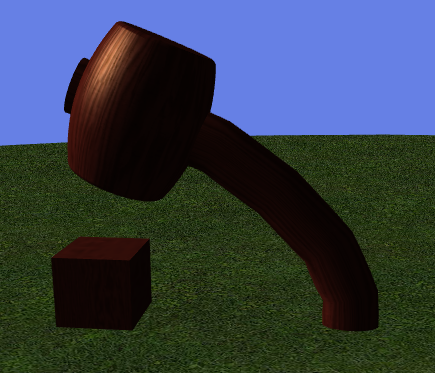
A mallet model as loaded from a POD file in the CC3DemoMashUp demo app.
As loaded into Cocos3D, the following is a partial listing of the contents of the mallet.pod file:
CC3PODResourceNode 'mallet.pod':33
  CC3SoftBodyNode 'mallet.pod-SoftBody':45
    CC3PODSkinMeshNode 'Ellipse01':36 with 1 skin sections (POD index: 2)
    CC3PODBone 'Bone01':39 (POD index: 5)
      CC3PODBone 'Bone02':40 (POD index: 6)
        CC3PODBone 'Bone03':41 (POD index: 7)
          CC3PODBone 'Bone04':42 (POD index: 8)
            CC3PODBone 'Bone05':43 (POD index: 9)
              CC3PODBone 'Bone06':44 (POD index: 10)
This listing shows a single skinned mesh node, and a single skeleton of bones. The skinned mesh node and the skeleton are collected together under the CC3SoftBodyNode, which represents the entire mallet model. Although not shown in this listing, the animation contained in the POD file swings the bone nodes back and forth to swing the mallet back and forth in a flexible, cartoon-like, manner, as depicted in mid-swing in the picture above. The entire mallet model can be moved, rotated, or scaled, by moving, rotating, or scaling the CC3SoftBodyNode instance.
You can generate a listing like that shown above for any CC3Node instance and its descendants by retrieving the value of the structureDescription property of the top node in the assembly. The listing above does not include the entire node assembly structure under the CC3PODResourceNode as loaded from the mallet.pod file. It omits a number of nodes that are outside the soft-body node.
Since the weights and matrices must be passed to the shader to animate the skin mesh, the complexity of any character is limited by the number of bones that can be passed to the shader in a single draw call. Since each matrix consumes 16 floating point values, this limit is usually quite small, in the neighbourhood of 10 bones.
However, if the bone nodes are only transformed rigidly, meaning that they can be moved and rotated, but not scaled, a full matrix for each bone is not required by the shader, and you can increase the number of bones that can be included in a single draw call significantly by ensuring that the skeleton only transforms rigidly.
You can do this by invoking the ensureRigidSkeleton method on the CC3SoftBodyNode. This method sets the scale property of all bones in the character to (1,1,1), and disables any further animation of the scale property in the bone nodes, to ensure the skeleton will only transform rigidly. After the ensureRigidSkeleton method has been invoked, the [shader matcher] (Shaders#Matching) will subsequently select a vertex shader that makes use of this restriction to improve performance.
The ensureRigidSkeleton method only restricts the scaling of the bone nodes. After invoking this method, you can still scale the soft-body character as a whole (make your character bigger or smaller), by setting the scale or uniformScale property of the CC3SoftBodyNode instance.
####Vertex Buffers
Since mesh content is mostly static in nature, performance can be improved by uploading mesh content into graphic memory buffers directly accessible by the GPU. These specialized buffers are known as vertex buffers.
In Cocos3D, you can upload mesh content to vertex buffers by invoking the createGLBuffers method on any node (CC3Node or subclass). This method will upload the mesh content from all descendant nodes into vertex buffers accessible by the GPU. You can even invoke this method on the entire scene (your custom CC3Scene subclass) to have all mesh content in the scene uploaded into GPU memory.
Once you have uploaded the mesh to the GPU, there are now two copies of the mesh content in memory, one in the GPU's memory space, and one in the main app memory space. Once uploaded to the GPU, the mesh in app memory is no longer used to render that mesh, and you can remove the mesh from main memory using the releaseRedundantContent method. Typically, you will invoke this method on the same node on which you invoked the createGLBuffers method (often in back-to-back lines of code).
There are cases where you might want to retain some or all of the mesh in the app memory space, for example, if you need to make changes to the mesh content itself.
The simplest way to retain a mesh in app memory is to avoid invoking the releaseRedundantContent method. However, since it is often the case that you want to release most, but not all, meshes in your scene, you can also indicate which mesh content you want to retain prior to invoking the releaseRedundantContent method. You do this by invoking one of the family of retainVertex... methods on any mesh node (or node assembly) for which you want to retain mesh content in main app memory.
The ability to select which mesh content you want to retain in app memory is quite flexible. You can use the retainVertexContent to retain the entire mesh. Or, if the mesh content is not interleaved, you can also invoke more specific methods such as retainVertexLocations or retainVertexNormals, to retain only some of the mesh content. If mesh content is interleaved (shares the same memory space), you can only choose to either retain or release all content within that mesh (retainVertexContent).
After invoking these retainVertex... methods, you can then invoke the releaseRedundantContent method to release all other mesh content.
For mesh content that you modify in main app memory, you can upload this changed mesh content by invoking the updateGLBuffers method on the CC3Mesh or CC3MeshNode instance.
In the case where you do not want to upload some of the mesh content to GPU memory for some reason, you can invoke one of the family of doNotBufferVertex... methods prior to invoking the createGLBuffers method. This ensures the vertex content identified in the doNotBufferVertex... method will not be uploaded to vertex buffers, and will remain in app memory.