Technical Documentation
We define our technical guidelines, information, and decisions here.
- Java Script Style Guide
- Java Script Best Practices
- JavaScript Common Mistakes
- JavaScript Performance
- We use BEM for meaningful tags. This video is also very helpful.
- Use
kebab-casefor HTML tag ids. Example:main-container,user-profile. - Use self-explaining codes: meaningful class, function, and variable names.
- Only use comments to describe the reason behind your code. Not the obvious.
- Only letters, numbers & dashes.
-
kebab-case. Example:assets,pages,about-us,main.css,icon-team.ico,about-us.html. - More Info
Structure of the website.
-
custom-elements.json: Information of custom HTML tags (we defined in thecomponentsfolder) to be shown/detected by thevisual studio codeeditor. -
index.html: Website's start page. -
README.md: Project information. - Other folders are explained in the next sections.
root
├── assets
├── components
├── pages
├── scripts
├── styles
├── custom-elements.json
├── index.html
└── README.mdShared art files
assets
├── fonts
├── icons
└── imagesReusable parts of the website as web components.
You can duplicate the template folder as a starting point to create your component.
components
├── template
├── component1
├── component2
└── ...Structure of a component folder.
-
component.js: The core of our component. Connects the HTML, CSS, and JS together and define it as a custom HTML tag. -
styles.css: Styles of this component. Only applied to this component. -
template.html: HTML structure of this component. -
test: Put your tests here. For example, thepage.htmlcontains<my-component>tag in a page to test it.
my-component
├── src
│   ├── component.js
│   ├── styles.css
│   └── template.html
└── tests
└── page.html Root pages of the website with their unique URLs.
You can duplicate the template folder as a starting point to create your component.
pages
├─── template
├─── page1
├─── page2
└─── ...Structure of a page folder.
-
index.html: Page's HTML structure. -
script.js: Page's Javascript codes. (Optional) -
styles.css: Page's styles. (Optional)
my-page
├── index.html
├── script.js
└── styles.cssShared scripts on the website.
-
components.js: Utility codes to help define components of the website.
scripts
├── components.js
└── ...Shared styles on the website.
-
global.css: Shared styles for the entire website. -
rest.css: Resets the style to the default values. It's also included in theglobal.css.
scripts
├── global.css
├── reset.css
└── ...Frameworks, tools, and technologies we use for our project:
- Pure HTML, CSS, and JavaScript.
- Git and GitHub for version control.
-
Learn Git Flow
- Similar to Conventional Commits, we write our commit messages like so:
- Add/Change something:
feat: message. Example:feat: add footer to the landing page - Fix something:
fix: message. Example:fix: fix authentication issue in the sign-in function
- Add/Change something:
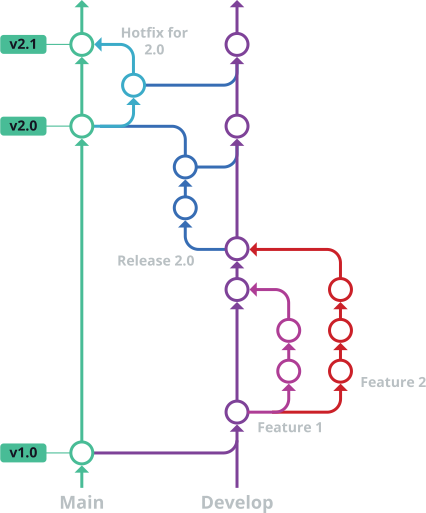
Test cases and tools... will be completed
How to build and deploy our website... For now, we build and deploy manually. In the future, we can learn and use GitHub's CI/CD for automatic processes.
For versioning of our products, we use Semantic Versioning.
In simple terms, our product versions will be MAJOR.MINOR.PATCH like 0.1.0 or 1.4.2.
-
MAJORversion when you make incompatible API changes. -
MINORversion when you add functionality in a backward compatible manner. -
PATCHversion when you make backward compatible bug fixes.