Technical Documentation
We define our technical guidelines, information, and decisions here.
- Java Script Style Guide
- Java Script Best Practices
- JavaScript Common Mistakes
- JavaScript Performance
- We use BEM for meaningful tags. This video is also very helpful.
- Use self-explaining codes: meaningful class, function, and variable names.
- Only use comments to describe the reason behind your code. Not the obvious.
- All lowercase.
- No spaces.
- Only letters, numbers & dashes: Use dashes (-) to separate words.
- Folder Examples:
assets,pages,about-us,icon-team.ico, `` - Folder Examples:
main.css,icon-team.ico,about-us.html,logo-main.png - More Info
\Root
│   components.js
│   global.css
│   index.html
│
├───assets
│   ├───fonts
│   ├───icons
│   └───images
├───components
│   ├───aboutus
│   │       componenty.html
│   │       componentz.html
│   │
│   ├───auth
│   │   ├───singin
│   │   │       componenty.html
│   │   │       componentz.html
│   │   │
│   │   └───singup
│   │           componenty.html
│   │           componentz.html
│   │
│   ├───contactus
│   │       componenty.html
│   │       componentz.html
│   │
│   └───shared-ui
│           layout.html
│
├───pages
│   ├───aboutus
│   │       components.js
│   │       index.html
│   │
│   ├───auth
│   │   ├───singin
│   │   │       components.js
│   │   │       index.html
│   │   │
│   │   └───singup
│   │           components.js
│   │           index.html
│   │
│   └───contactus
│           components.js
│           index.html
│
├───scripts
│   ├───aboutus
│   │       component1.js
│   │       component2.js
│   │
│   ├───auth
│   │   ├───signin
│   │   │       component1.js
│   │   │       component2.js
│   │   │
│   │   └───signup
│   │           component1.js
│   │           component2.js
│   │
│   ├───contactus
│   │       component1.js
│   │       component2.js
│   │
│   └───functions
│           sharedscripts.js
│
└───styles
    ├───aboutus
    │       component1.css
    │       component2.css
    │
    ├───animations
    ├───auth
    │   ├───signin
    │   │       component1.css
    │   │       component2.css
    │   │
    │   └───signup
    │           component1.css
    │           component2.css
    │
    └───contactus
            component1.css
component2.cssThe assets folder includes icons, images, and fonts folders
The components folder contains folders, each folder contains the components of each page, and the name of the folder is determined according to the page.
-The shared-ui folder contains components that are shared between 2 or more pages
The scripts folder contains folders, each folder contains the scripts of each page , and the name of the folder is determined according to the page
The functions folder contains scripts that we can use in different pages
The styles folder is like the structure of components and scripts folders, with the difference that the styles for each page are inside them, and the other difference is related to the animations folder, where we defined the animations.
golbal.css We put the styles related to the whole project here
is landing page
Loads landingpage components
Frameworks, tools, and technologies we use for our project:
- Pure HTML, CSS, and JavaScript.
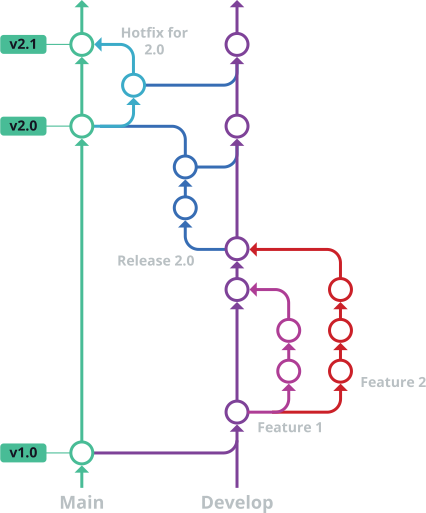
- Git and GitHub for version control.
-
Learn Git Flow
- Similar to Conventional Commits, we write our commit messages like so:
- Add/Change something:
feat: message. Example:feat: add footer to the landing page - Fix something:
fix: message. Example:fix: fix authentication issue in the sign-in function
- Add/Change something:
Test cases and tools... will be completed
How to build and deploy our website... For now, we build and deploy manually. In the future, we can learn and use GitHub's CI/CD for automatic processes.
For versioning of our products, we use Semantic Versioning.
In simple terms, our product versions will be MAJOR.MINOR.PATCH like 0.1.0 or 1.4.2.
-
MAJORversion when you make incompatible API changes. -
MINORversion when you add functionality in a backward compatible manner. -
PATCHversion when you make backward compatible bug fixes.