


CoreShogi is a library that aims to implement the complex rules of Shogi (Japanese Chess), focusing on providing core logic to validate moves, detect checkmates, and represent game states programmatically. CoreShogi has been introduced to enhance and streamline these functionalities, incorporating optimized algorithms for rule validation and state management.
CoreShogi does not provide any artificial intelligence but it provides search or query functionalities for checkmate.
Status: Under Development
- Now, Swift 5 ready
It would be controversial for sure, I tried using Japanese for class names, variable names, and others. It is part of my experiment to see if coding with non English name would work or not, or impact of maintaining the code. For example, all type of pieces is expressed as follows using Japanese. It would be natural and easier to read code or Shogi player programmers.
enum 駒型 : Int8 {
	case 歩, 香, 桂, 銀, 金, 角, 飛, 王
	// ...
}
Since there are no Capitalization in Japanese, Swift complains using the same name for type and variables.
enum Koma { ... }
var koma = Koma(...) // OK: no problem!

enum 駒 { ... }
var 駒 = 駒(...) // Error: variable name cannot be same as type name
So suffix 型 to be added for Japanese type names.
enum 駒型 { ... }
var 駒 = 駒型(...) // OK: no problem!
Here is the list of common classes or types.
| Name | Type | Description |
|---|---|---|
| 筋型 | enum | Column (right to left) |
| 段型 | enum | Row |
| 位置型 | enum | Position (row and column) |
| 駒型 | enum | Type of piece (no front/back) |
| 駒面型 | enum | Type of piece (cares front/back) |
| 持駒型 | struct | Captured pieces |
| 先手後手型 | enum | Which player |
| 升型 | enum | State of board position (which players which piece, or empty?) |
| 指手型 | enum | Describe the one movement |
| 局面型 | class | Snapshot of the state of game-board |
| 持駒表型 | dictionary | Keeps number of captured pieces |
Here are some example of describe the location of the board. The column order is from right to left, same as Shogi official. Although columns and rows is 1 based index, actual rawValue is 0 based index.
let col = 筋.4  // Zenkaku (全角)
let row = 段.七  // Zenkaku (全角)
let position1 = 位置.5五  // Zenkaku (全角)
let position2 = 位置(筋: col, 段: row)I am not sure how to describe 先手, 後手 in English. Black and White may be OK for Go (碁), but not for Shogi. It does not describe the detail of individual, just describe which player.
enum 先手後手型 {
	case 先手, 後手
}駒型 and 駒面型 describe the pieces. 駒型 does not have state of front or back, on the other hand 駒面型 cares about the state of front and back, or promoted or not.
let fu = 駒型.歩
let to = 駒面型.と
For the formatting purpose, promoted pieces of 香, 桂, 銀 are expressed as 杏, 圭, 全 rather than 成香, 成桂, 成銀. They are not official way to describe those, but commonly used for computer scene.
enum 駒面型 {
	case 歩, 香, 桂, 銀, 金, 角, 飛, 王
	case と, 杏, 圭, 全, 馬, 竜
}持駒型 describe the state of captured pieces. It knows which 駒型 is captured and its number. By the way, even though promoted pieces are captured, they cannot be used as state of promoted so are managed as 駒型.
You find number of captured 駒 as follows.
let 先手持駒: 持駒型 = ...
let 銀の持ち駒数 = 先手持駒[.銀] ?? 0局面型 describes the snapshot of a game-board. And each cell is described as 升型.
Here is a example of how to describe the initial state of game board expressed by string.
let 局面 = 局面型(string:
			"▽持駒:なし\r" +
			"|▽香|▽桂|▽銀|▽金|▽王|▽金|▽銀|▽桂|▽香|\r" +
			"|  |▽飛|  |  |  |  |  |▽角|  |\r" +
			"|▽歩|▽歩|▽歩|▽歩|▽歩|▽歩|▽歩|▽歩|▽歩|\r" +
			"|  |  |  |  |  |  |  |  |  |\r" +
			"|  |  |  |  |  |  |  |  |  |\r" +
			"|  |  |  |  |  |  |  |  |  |\r" +
			"|▲歩|▲歩|▲歩|▲歩|▲歩|▲歩|▲歩|▲歩|▲歩|\r" +
			"|  |▲角|  |  |  |  |  |▲飛|  |\r" +
			"|▲香|▲桂|▲銀|▲金|▲王|▲金|▲銀|▲桂|▲香|\r" +
			"▲持駒:なし\r",
		手番: .先手)
This can be constructed by utility function
let 初期局面 = 対局型(手合: .平手).局面
You may find certain type of cells, for example you can find a position of your 玉 piece, or all positions of your opponent's 桂 or 歩.
let 初期局面: 局面型  = 対局型(手合: .平手).局面
初期局面.探索(升群: [.先玉]) // 先手の玉を探索: [.5九]
初期局面.探索(升群: [.後歩]) // 後手の歩を探索: [.9三, .8三, .7三, .6三, .5三, .4三, .3三, .2三, .1三]You can get the all captured pieces in the form of dictionary.
let 局面: 局面型 = ...
局面.先手持駒 // eg: [.銀: 1, .歩: 2]
局面.後手持駒 // eg: [.飛: 1, .角: 1, .香: 1]You can find all possible positions that a piece specified by position. If you specify the position where no piece are placed, then it returns nothing. You may specify a boolean options that positions can include places where your pieces are placed. This option is useful to find when a piece are backed up by other pieces.
func 指定位置の駒が移動可能な位置列(指定位置: 位置型, 移動先が自駒の場合も含む: Bool) -> [位置型]You can find the all possible pieces that can be moved to specified position. For example, you may use this to find check (王手) moves.
局面.全移動可能位置列(手番: .先手, 移動先が自駒の場合も含む: false)
局面.全移動可能位置列(手番: .後手, 移動先が自駒の場合も含む: true)func 可能指手列(位置列: [位置型] = 位置型.allCases) -> [指手型]You can find all possible moves such as moving a piece or placing a piece. Other moves may technically foul. It returns array of 指手型 that can be execute to compute the next game board state.
let 指手列 = ある局面.可能指手列()there are 3 types of 指手型, movement (動), placement (打), end (終).
You may compute the next game-board state from 指手型. So you can make a random move by picking up from the result of 可能指手列(), if you like.
	var 現局面: = ...
	let 指手列 = 現局面.可能指手列()
	if let 指手 = 指手列.randomElement() {
		if let 次局面 = 局面.実行(指手: 指手) {
			...
		}
	}
func 探索(升群: Set<升型>) -> [位置型]You may compute the next state of board by this function. Here is the how to find all possible move and pick a random move and execute it.
	var 現局面: = ...
	let 指手列 = 現局面.可能指手列()
	if let 指手 = 指手列.randomElement() {
		if let 次局面 = 局面.実行(指手: 指手) {
			...
		}
}let 位置列 = 局面.指定位置に移動可能な駒の位置列(手番: .先手, 指定位置: .5一)func 駒が移動可能な位置列(手番: 先手後手型) -> [(元: 位置型, 先: 位置型)]let 指手列 = 局面.王手探索()Check whether the player on this turn run into check mate situation.
if 局面.詰判定 {
	// check mate
}Although, CoreShogi does not provide any user interface, it can be interact with text or string representation. So you may print any game-board state to console, and that text represenation can me used to construct a game-board state.
let ある局面: 局面型 = ...
print("\(ある局面)")
let string = ある局面.string
let 手番 = ある局面.手番
let 再現局面 = 局面(string, 手番: 手番)
後手持駒:桂 |▽香|▲龍| | | | | | |▽香| | | |▲金| |▲龍| | | | | |▽歩|▲全| | |▽金| |▽歩|▽桂|▽歩| | |▽歩| | |▽王| |▽銀| | | | | | |▲金|▲角| | | | | | | |▽香|▲歩|▲歩|▲銀|▲桂| | | |▲歩|▲歩| | | |▲歩|▲銀| |▲歩| | | | |▲金| | | |▲歩| | |▲香| | |▲玉| | | |▽馬| | 先手持駒:桂,歩7
A move can be described with 指手型. 指手型 three cases. 動 describes a movement of a piece from one place to the other. 打 describes a placement of captured piece on the game-board at a specific position. 終 describes the situation where the game cannot continue, such as check-mate.
enum 指手型 {
	case 動(先後: 先後型, 移動前の位置: 位置型, 移動後の位置: 位置型, 移動後の駒面: 駒面型)
	case 打(先後: 先後型, 位置:位置型, 駒:駒型)
	case 終(終局理由: 終局理由型, 勝者: 先後型?)
}
You may construct hand written 指手型, but it has to be legitimate valid move. Invalid 指手型 will be rejected by 局面型's 指手を実行() method.
var 局面 = 局面(string: 手合割型.平手初期盤面, 手番: .先手)
局面 = 局面.指手を実行(指手型.動(先後: .先手, 移動前の位置: .7七, 移動後の位置: .7六, 移動後の駒面: .歩))
局面 = 局面.指手を実行(指手型.動(先後: .後手, 移動前の位置: .3三, 移動後の位置: .3四, 移動後の駒面: .歩))
For professional player, this 投了 state may be sufficient, but for amateur, 王 may be captured by careless mistake. Therefore, extra end state should be added later on.
- Iterate all positions in
局面型
let 局面: 局面型 = ...
for 位置 in 局面 {
	let マス = 局面[位置]
	let 駒面 = マス.駒面
}- Find opponent player
let 局面: 局面型 = ...
let 手番の敵方 = 局面.手番.敵方- Is 先手's 王 is on the same line of 後手's 角? (English!!)
let 局面: 局面型 = ...
let 後手の角の位置 = ...
for (vx, vy) in 駒面.角.移動可能なベクトル {
	var (x, y) = (後手の角の位置.筋 + vx, 後手の角の位置.段 + vy)
	while let x = x, let y = y {
		if let マス = 局面[x, y] where マス.駒面 == .王 && マス.先後 == .先手 {
			// King is on the line
		}
		(x, y) = (x + vx, y + vy)
	}
}In ShoogibanKit, textual expression for position can be used, and also, positions also can be printed on debug console in textual expression. If you simply use Menlo, or Hiragino, it would not be a good experiences for programmers after all.
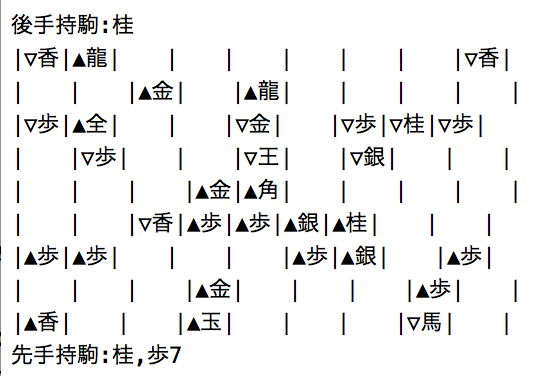
I recommend Source Han Code JP font from Adobe. It is free to use. By using this font, Shogi's textual expression will be look like in source code and in debugger log.

You can get the font from following URLs and try. https://github.com/adobe-fonts/source-han-code-jp
- Test for Check mate
- 打ち歩詰め and other special cases
- 千日手 and other rules
- 局面 compaction to save and load
- UnitTest - removed because it crashes (not sure may be Xcode issue)
- may be some more
- Xcode Version 16
- Apple Swift version 5.x
Please give me your feedback to kaz.yoshikawa@gmail.com.