Skip to content

[CLI-109] Add 'ccloud ps1' helper for configuring PS1 prompt#197

Merged
Cody A. Ray (codyaray) merged 23 commits into
masterfrom
ps1
Jun 21, 2019
Merged

[CLI-109] Add 'ccloud ps1' helper for configuring PS1 prompt#197
Cody A. Ray (codyaray) merged 23 commits into
masterfrom
ps1

Conversation

@codyaray
Copy link
Copy Markdown
Contributor

@codyaray Cody A. Ray (codyaray) commented Jun 5, 2019

Inspired by https://github.com/djl/vcprompt that a customer mentioned in their zendesk ticket.

https://confluentinc.atlassian.net/browse/CLI-109

Default usage:

$ ./dist/ccloud/darwin_amd64/ccloud help prompt 2>&1 | grep PS1=
  $ export PS1='\u@\h:\W $(ccloud prompt)\n\$ '
  $ export PS1='%n@%m:%~ $(ccloud prompt)$ '

Cody-Rays-MBP15:cli cody$ export PS1='\u@\h:\W $(./dist/ccloud/darwin_amd64/ccloud prompt)\n\$ '
cody@Cody-Rays-MBP15:cli (☪ |Staging:superfaster)
$ 

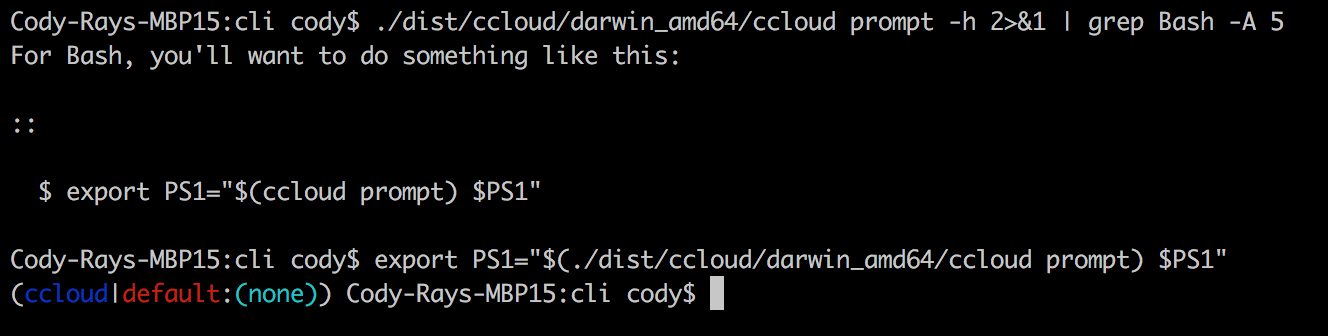
Bash prompt:
Screen Shot 2019-06-13 at 11 34 40 AM

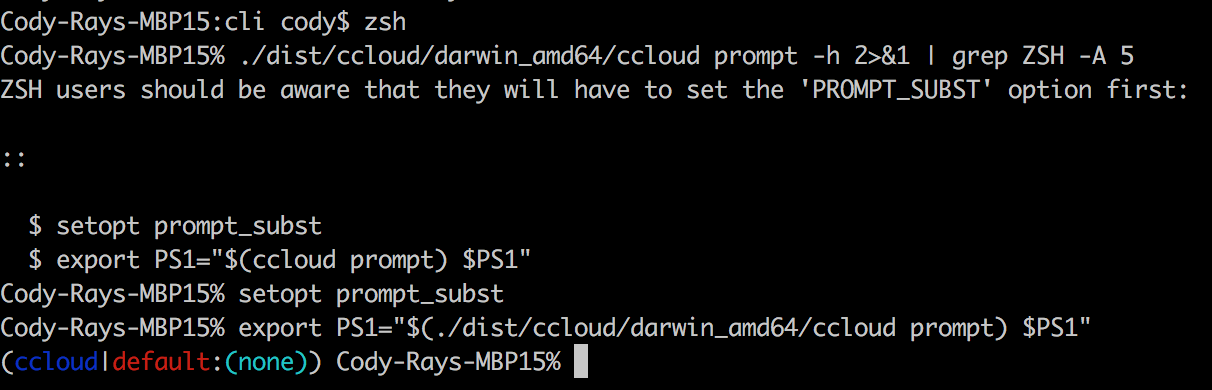
Zsh prompt:
Screen Shot 2019-06-13 at 11 33 57 AM

Subawesome bash prompt (Goland terminal):
Screen Shot 2019-06-13 at 11 35 05 AM

We can change our environment and see Confluent change to Staging in the prompt:

cody@Cody-Rays-MBP15:cli (Confluent superfaster)
$ ./dist/ccloud/darwin_amd64/ccloud environment list
     Id    |   Name
+----------+-----------+
    t710   | Confluent
    a-5284 | second
  * a-6249 | Staging
cody@Cody-Rays-MBP15:cli (☪ |Staging:superfaster)
$ ./dist/ccloud/darwin_amd64/ccloud environment use t710
Now using t710 as the default (active) environment.
cody@Cody-Rays-MBP15:cli (☪ |Confluent:superfaster)
$

(Note: this reveals a potential bug- the kafka cluster isn't updated when we switch envs)

We can change our kafka cluster and superfaster changes to prestag in the prompt:

cody@Cody-Rays-MBP15:cli (☪ |Confluent:superfaster)
$ ./dist/ccloud/darwin_amd64/ccloud kafka cluster list
      Id      |      Name       | Provider |  Region   | Durability | Status
+-------------+-----------------+----------+-----------+------------+--------+
    lkc-o39vj | prestag         | aws      | us-west-2 | LOW        | UP
    lkc-5wzm2 | cc-cluster-spec | aws      | us-west-2 | LOW        | UP
    lkc-1jjm3 | superfaster     | aws      | us-west-2 | LOW        | UP
cody@Cody-Rays-MBP15:cli (☪ |Confluent:superfaster)
$ ./dist/ccloud/darwin_amd64/ccloud kafka cluster use lkc-o39vj
cody@Cody-Rays-MBP15:cli (☪ |Confluent:prestag)
$

You can also customize the prompt with format args:

$ export PS1='\u@\h:\W $(dist/ccloud/darwin_amd64/ccloud prompt -f "ccloud env=%E (%e) cluster=%K (%k) user=%u apikey=%a")\n\$ '
cody@Cody-Rays-MBP15:cli ccloud env=Confluent (t710) cluster=prestag (lkc-o39vj) user=cody@confluent.io apikey=(none)
$

Or use an env var for more sophisticated prompts with colors -- env var avoids quote/escape hell

$ CCLOUD_PROMPT_FMT='{{color "blue" "ccloud"}} env={{color "green" "%E (%e)" | colorattr "bold" }} cluster={{color "red" "%K (%k)"}} user=%u apikey=%a'
$ export PS1='\u@\h:\W $(./dist/ccloud/darwin_amd64/ccloud prompt -f "$CCLOUD_PROMPT_FMT")\n\$ '
cody@Cody-Rays-MBP15:cli ccloud env=Confluent (t710) cluster=prestag (lkc-o39vj) user=cody@confluent.io apikey=(none)
$

Screen Shot 2019-06-13 at 1 54 01 PM

Open Questions

  1. should we call this command ccloud ps1 or ccloud prompt-string or something else? renamed to ccloud prompt
  2. do we like having colors like this? (red=prod, yellow=stag, green=dev)
  3. are we comfortable with "inferring" the environment like this?
  4. is this order of "inferring" the environment from context, then environment, then kafka cluster name, correct?

PR has been updated to only have static user-defined colors for now

Long Help

$ ./dist/ccloud/darwin_amd64/ccloud help prompt
Use this command to add ccloud information in your terminal prompt.

For Bash, you'll want to do something like this:

::

  $ export PS1='\u@\h:\W $(ccloud prompt)\n\$ '

ZSH users should be aware that they will have to set the 'PROMPT_SUBST' option first:

::

  $ setopt prompt_subst
  $ export PS1='%n@%m:%~ $(ccloud prompt)$ '

You can customize the prompt by calling passing a '--format' flag, such as '-f "%X|%E:%K"'.
If you want to create a more sophisticated prompt (such as using the built-in color functions),
it'll be easiest for you if you use an environment variable rather than try to escape the quotes.

::

  $ export CCLOUD_PROMPT_FMT='({{color "blue" "%X"}}|{{color "red" "%E"}}:{{color "cyan" "%K"}})'
  $ export PS1='\u@\h:\W $(ccloud prompt -f "$CCLOUD_PROMPT_FMT")\n\$ '

To make this permanent, you must add it to your bash or zsh profile.

Formats
~~~~~~~

'ccloud prompt' comes with a number of formatting tokens. What follows is a list of all tokens:

* '%C'

  The name of the current context in use. E.g., "dev-app1", "stag-dc1", "prod"

* '%e'

  The ID of the current environment in use. E.g., "a-4567"

* '%E'

  The name of the current environment in use. E.g., "default", "prod-team1"

* '%k'

  The ID of the current Kafka cluster in use. E.g., "lkc-abc123"

* '%K'

  The name of the current Kafka cluster in use. E.g., "prod-us-west-2-iot"

* '%a'

  The current Kafka API key in use. E.g., "ABCDEF1234567890"

* '%u'

  The current user or credentials in use. E.g., "joe@montana.com"

Colors
~~~~~~

There are special functions used for controlling colors.

* {{color "<color>" "some text"}}
* {{fgcolor "<color>" "some text"}}
* {{bgcolor "color>" "some text"}}
* {{colorattr "<attr>" "some text"}}

Available colors: black, red, green, yellow, blue, magenta, cyan, white
Available attributes: bold, underline, invert (swaps the fg/bg colors)

Examples:

* {{color "red" "some text" | colorattr "bold" | bgcolor "blue"}}
* {{color "red"}} some text here {{resetcolor}}

Notes:

* 'color' is just an alias of 'fgcolor'
* calling 'resetcolor' will reset all color attributes, not just the most recently set

You can disable color output by passing the flag '--no-color'.

Usage:
  ccloud prompt [flags]

Flags:
  -f, --format string    The format string to use. See the help for details. (default "({{color \"blue\" \"%X\"}}|{{color \"red\" \"%E\"}}:{{color \"cyan\" \"%K\"}})")
  -g, --no-color         Do not include ANSI color codes in the output.
  -t, --timeout string   The maximum execution time in milliseconds. (default "200ms")
  -h, --help             help for prompt

Global Flags:
  -v, --verbose count   Increase verbosity (-v for warn, -vv for info, -vvv for debug, -vvvv for trace).

@codyaray Cody A. Ray (codyaray) requested a review from a team as a code owner June 5, 2019 18:37
@codecov
Copy link
Copy Markdown

codecov Bot commented Jun 5, 2019

Codecov Report

❗ No coverage uploaded for pull request base (master@4dbda09). Click here to learn what that means.
The diff coverage is 0%.

Impacted file tree graph

@@            Coverage Diff            @@
##             master     #197   +/-   ##
=========================================
  Coverage          ?   41.72%           
=========================================
  Files             ?       44           
  Lines             ?     3319           
  Branches          ?        0           
=========================================
  Hits              ?     1385           
  Misses            ?     1757           
  Partials          ?      177
Impacted Files Coverage Δ
internal/cmd/command.go 0% <0%> (ø)
internal/pkg/config/config.go 32.94% <0%> (ø)

Continue to review full report at Codecov.

Legend - Click here to learn more
Δ = absolute <relative> (impact), ø = not affected, ? = missing data
Powered by Codecov. Last update 4dbda09...98c1f1b. Read the comment docs.

@DABH
Copy link
Copy Markdown
Contributor

David Hyde (DABH) commented Jun 8, 2019

  1. dev/stag/prod are meaningful to us but what about customers? customers might not have their clusters labeled in such a fashion. I see that we are guessing based on this heuristic; would it be better to allow customers to set different colors themselves for different envs? I really am not familiar enough to judge if that's possible, but I'd imagine it's probably tricky to allow that, so maybe there's nothing better we can do for now.

  2. the other thing I'm thinking about is the changes we're proposing right now regarding contexts and authentication etc. If we switch to "proper" context management how would that impact this code? maybe the answer is not much / at all. I do see we have a context formatter already (cool). Will that work right now?
    2b. what about on-prem where contexts do not exist / don't have same meaning right now (I guess you could do the url of the mds you're logged into?)? is there a useful thing we can do that's cloud+onprem friendly or is this really only going to benefit ccloud for now?

Comment thread test/fixtures/output/help.golden Outdated
kafka Manage Apache Kafka.
login Login to Confluent Cloud.
logout Logout of Confluent Cloud.
ps1 Print a prompt-string suitable for the PS1 prompt.
Copy link
Copy Markdown
Contributor

Choose a reason for hiding this comment

The reason will be displayed to describe this comment to others. Learn more.

If I don't know what a PS1 prompt is by name (but know what it looks like when I use one) it would be helpful if these comments explained a bit more what it is so I know that I'd want to use it.

Copy link
Copy Markdown
Contributor Author

@codyaray Cody A. Ray (codyaray) Jun 12, 2019

Choose a reason for hiding this comment

The reason will be displayed to describe this comment to others. Learn more.

Suggestions on a suitable short description?

Also, I was actually wondering if ps1 was even a good name for this command. We could just call it prompt... but I wasn't if we'd ever want that for something else (like how you enter mysql shell or ksql or https://github.com/c-bata/kube-prompt... but I guess technically you're now in a shell not a prompt).

Comps:

Comment thread internal/pkg/ps1/ps1.go Outdated
func inferColorBasedOnEnvName(name string) func(a ...interface{}) string {
name = strings.ToLower(name)
if strings.Contains(name, "prod") || strings.Contains(name, "prd") {
return red
Copy link
Copy Markdown
Contributor

Choose a reason for hiding this comment

The reason will be displayed to describe this comment to others. Learn more.

do colors have to be specified in code or can they be specified with tokens on the command line / prompt?

maybe a general purpose solution here would be to have a map of names->colors in a (the) config file, though reading a file to display the shell prompt sounds like such an inefficient thing 😅

Copy link
Copy Markdown
Contributor Author

@codyaray Cody A. Ray (codyaray) Jun 12, 2019

Choose a reason for hiding this comment

The reason will be displayed to describe this comment to others. Learn more.

ha, I definitely wondered about this too. There's just so many ways you might want to customize colors.

Take the premise that you'd have a map of names -> colors. But names of what? e.g., context name, account name, kafka cluster name? (We're currently just searching through all three for a match for the magic common env names of prod/prd, stag/stg, or dev.) So this is like a multidimensional config/would need a more complex ruleset to make it truly declarative.

And a different dimension -- We could read the config from a config file, pass it as an arg, pass it as an ENV VAR, etc

My current thoughts (without diving all the way in here) is that customers could "recolor" this however they want through some clever workarounds. Kind of like how this random repo usage works. For example, to colorize the output based on the context name alone:

[[ "$(confluent ps1 -g -f '%c') =~ "prod" ]] && color=red || color=blue
PS1='%{$fg[$color]%}$(confluent ps1 -g)%{$reset_color%}'

(this won't actually work as its a bad mix of zsh and bash-isms but it gets the idea across; you'd just use ansi color codes in bash instead.. Speaking of, i wonder if these color codes introduced in this PR work in zsh)

EDIT: this wouldn't work as-is, you'd have to wrap it in a function to dynamically update the colors as your context changes. Maybe something like

func confluent_ps1() {
    [[ "$(confluent ps1 -g -f '%c') =~ "prod" ]] && color=red || color=blue
    return '%{$fg[$color]%}$(confluent ps1 -g)%{$reset_color%}'
}
PS1='$(confluent_ps1)'

Copy link
Copy Markdown
Contributor Author

Choose a reason for hiding this comment

The reason will be displayed to describe this comment to others. Learn more.

In any case, I think we can definitely do this as a follow-up / when a customer requests it. :)

Copy link
Copy Markdown
Contributor Author

Choose a reason for hiding this comment

The reason will be displayed to describe this comment to others. Learn more.

Ok, fine, I switched from dynamic colors based on env to user-defined colors but they can't be dynamic yet.

Also added a symbol to identify this prompt output as coming from Confluent. We're limited to unicode, so I found the closest one to the Confluent logo (which is ☪️). This was more for fun than anything, no idea if product will approve. :)

Default Output Examples

This is the current default output format in various terminals.

Normal bash terminal:

Screen Shot 2019-06-13 at 11 34 40 AM

Normal zsh terminal:
Screen Shot 2019-06-13 at 11 33 57 AM

Subawesome bash terminal (inside GoLand):

Screen Shot 2019-06-13 at 11 35 05 AM

Configuration

This is the default config string:

({{color "blue" "%X"}}|{{color "red" "%E"}}:{{color "cyan" "%K"}})

Here's the docs for configuring colors:

There are special functions used for controlling colors.

  • {{color "" "some text"}}
  • {{fgcolor "" "some text"}}
  • {{bgcolor "color>" "some text"}}
  • {{colorattr "" "some text"}}

Available colors: black, red, green, yellow, blue, magenta, cyan, white
Available attributes: bold, underline, invert (swaps the fg/bg colors)

Examples:

  • {{color "red" "some text" | colorattr "bold" | bgcolor "blue"}}
  • {{color "red"}} some text here {{resetcolor}}

Notes:

  • 'color' is just an alias of 'fgcolor'
  • calling 'resetcolor' will reset all color attributes, not just the most recently set

You can disable color output by passing the flag '--no-color'.

Copy link
Copy Markdown
Contributor Author

@codyaray Cody A. Ray (codyaray) Jun 21, 2019

Choose a reason for hiding this comment

The reason will be displayed to describe this comment to others. Learn more.

Ok, I removed the symbol. I'll just use it in my own terminal. :)

Here's the default setup.

  • For ccloud CLI - (ccloud|{EnvName}:{KafkaClusterName})
  • For confluent CLI - (confluent|{KafkaClusterName})

As you can see, if there is no Env or Kafka cluster used, then it shows (none)

Screen Shot 2019-06-21 at 11 51 38 AM

Comment thread internal/pkg/ps1/ps1.go Outdated
Comment thread internal/pkg/cmd/config.go
Comment thread internal/cmd/ps1/command.go Outdated
Copy link
Copy Markdown
Contributor

@DABH David Hyde (DABH) left a comment

Choose a reason for hiding this comment

The reason will be displayed to describe this comment to others. Learn more.

Looks pretty good, left a few comments/questions

Copy link
Copy Markdown
Contributor

@DABH David Hyde (DABH) left a comment

Choose a reason for hiding this comment

The reason will be displayed to describe this comment to others. Learn more.

LGTM now, very cool feature!

@codyaray
Copy link
Copy Markdown
Contributor Author

Changed format in help/usage message. This is what I expect most people will copy/paste.

  • Both bash and zsh should prepend CLI prompt to existing PS1 (instead of replacing entirely)
  • This will make the default copy/paste interoperate with other PS1 additions (like git-prompt) better
  • Also, don't add a newline at the end/before the actual prompt; the user can do that directly in their PS1 string if they wish to do so.

Bash:

Screen Shot 2019-06-21 at 12 31 17 PM

Zsh:

Screen Shot 2019-06-21 at 12 34 59 PM

@codyaray Cody A. Ray (codyaray) merged commit 55d55cc into master Jun 21, 2019
Brian Strauch (brianstrauch) pushed a commit that referenced this pull request May 31, 2023
(cherry picked from commit 25136d6ec60736d59f717a41428561f52ffa8c66)
airlock-confluentinc Bot pushed a commit that referenced this pull request May 29, 2026
…nterval, add Delay

Addresses Channing review #11/#13/#14 on PR #197 (companion generator
PR) by tightening the wait API and the Flink statement reference
adoption.

* pkg/wait: rename Options.Tick / PhaseOptions.Tick to PollInterval to
  match terraform-provider-confluent's StateChangeConf vocabulary. Add
  Delay (initial sleep before the first Fetch) mirroring
  StateChangeConf.Delay — gives the API a moment to materialize the
  resource after a POST, reducing eventually-consistent 404s on the
  first poll. New tests TestPoll_DelayPostponesFirstFetch and
  TestPoll_DelayRespectsCtxCancellation cover the contract.

* Flink statement create (cloud + on-prem): drop the clierrors alias
  on pkg/errors and use direct == compare against wait.ErrFailed /
  wait.ErrTimeout. The wait sentinels are package-level vars returned
  directly from Poll (never wrapped), so == is correct and avoids
  importing stdlib errors alongside the CLI errors package — which
  matches the rest of the codebase's import convention.

* Timeout error now includes the latest observed phase:
  "wait timed out: statement \"x\" is still in phase \"PENDING\""
  rather than the bare "wait timed out". Updated
  create-wait-timeout.golden accordingly.

Co-Authored-By: Claude Opus 4.7 (1M context) <noreply@anthropic.com>
Sign up for free to join this conversation on GitHub. Already have an account? Sign in to comment

Labels

None yet

Projects

None yet

Development

Successfully merging this pull request may close these issues.

2 participants