Describe the bug
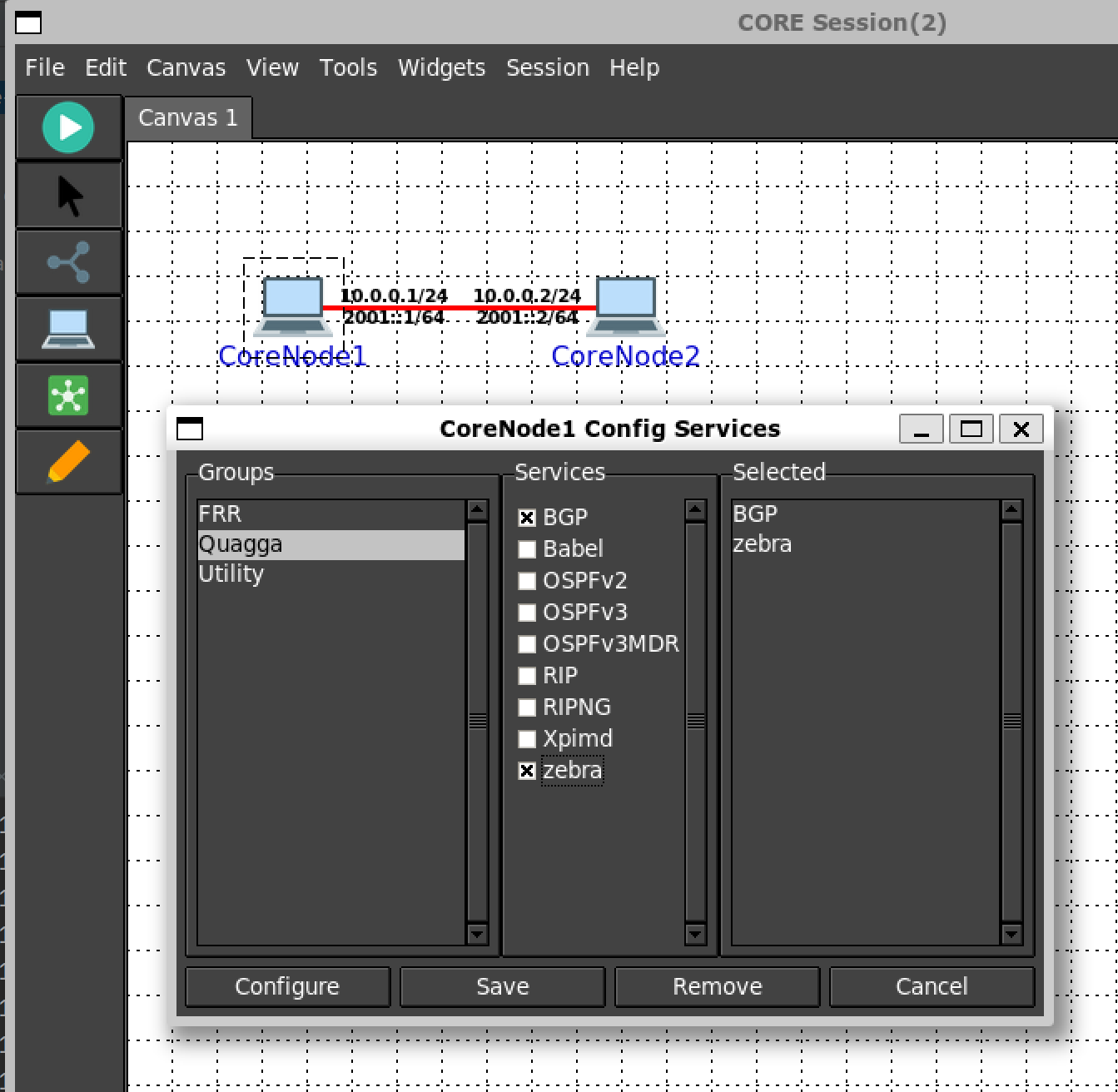
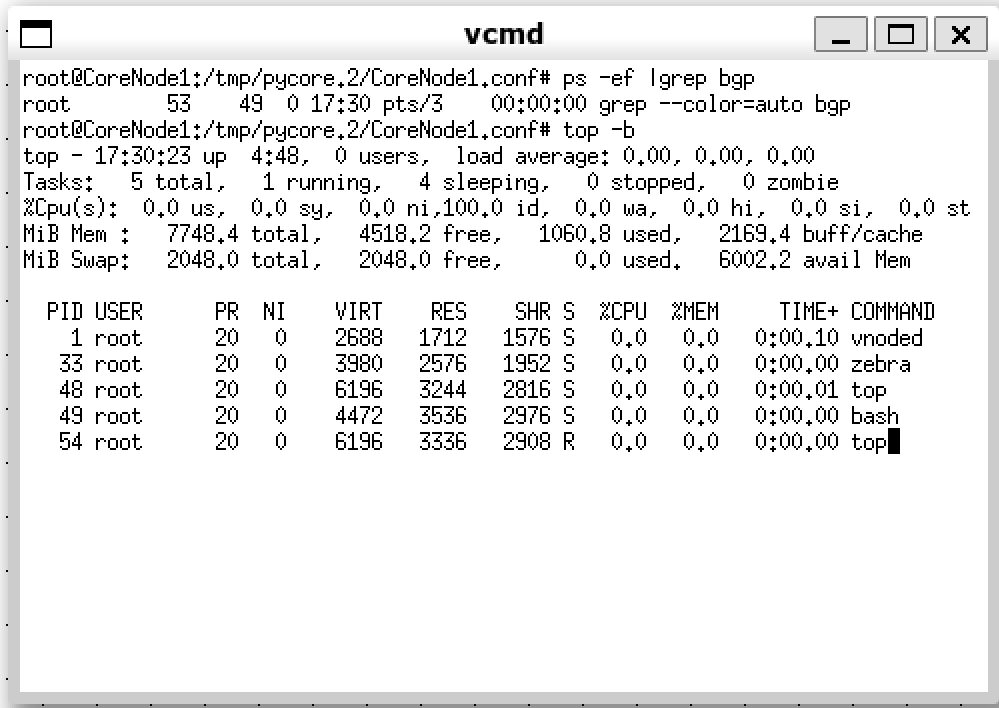
When I start the session, it does not start up "bgpd" if I select "BGP" and "zebra" by using the dialog of "Config Services" on CoreNode1.
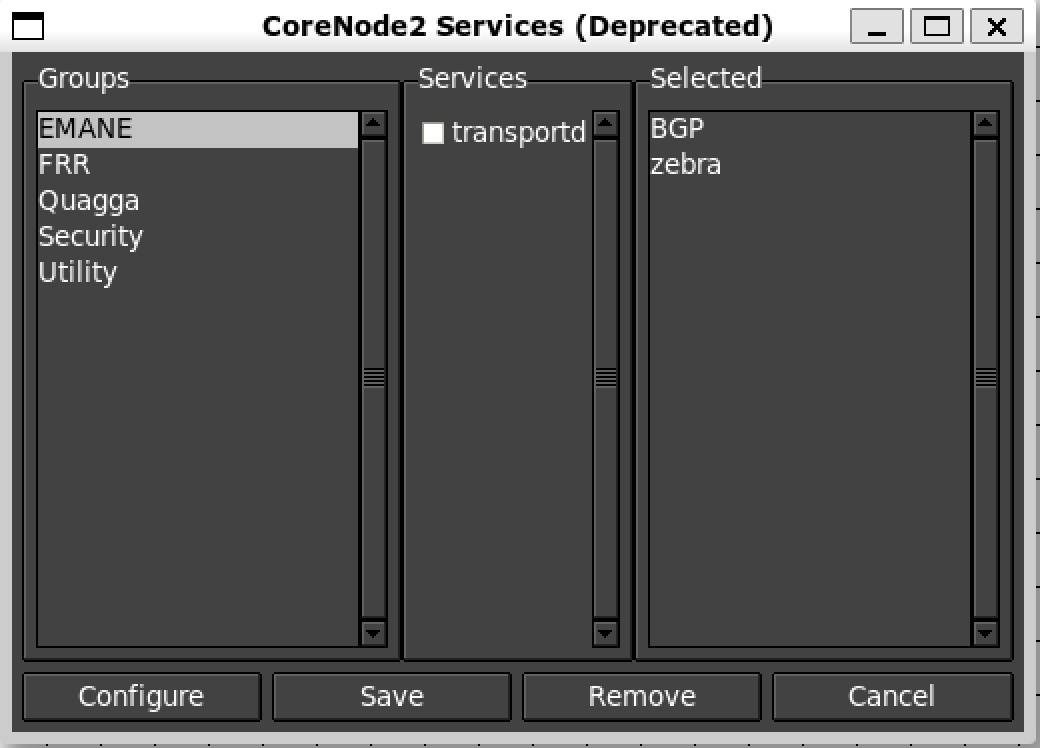
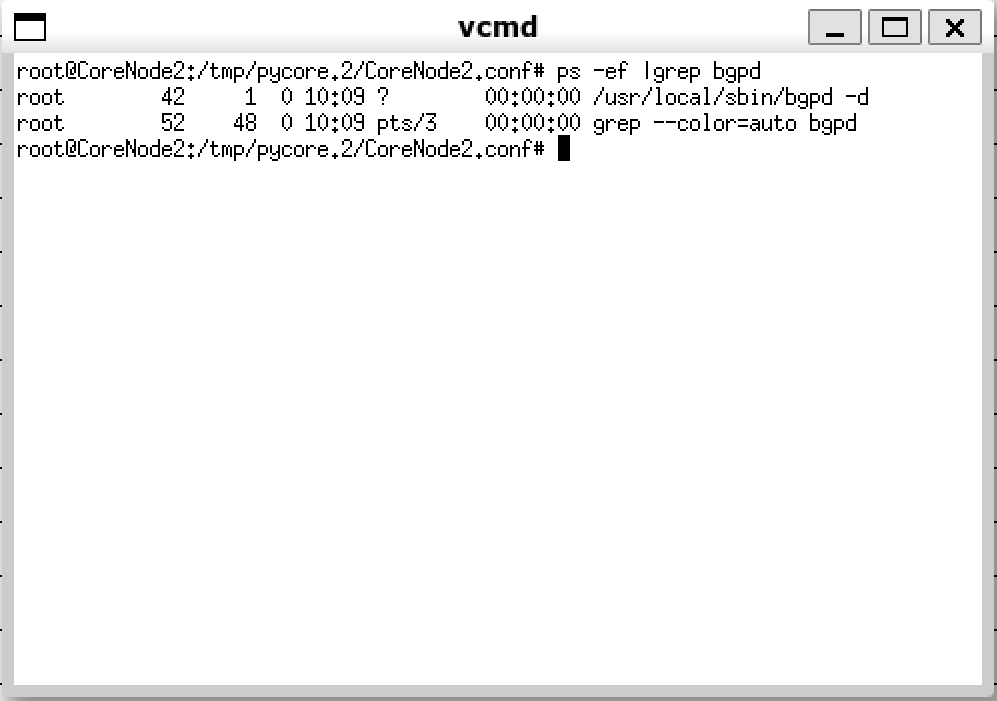
But it can start up "bgpd" if I select "BGP" and "zebra" by using the dialog of "Services (Deprecated)" on CoreNode2.
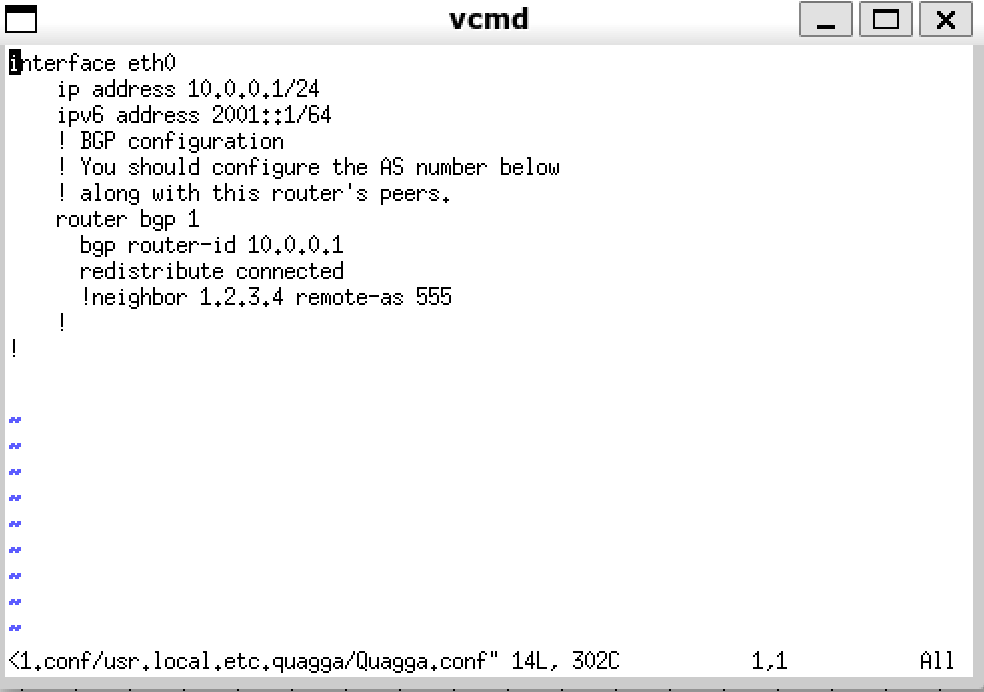
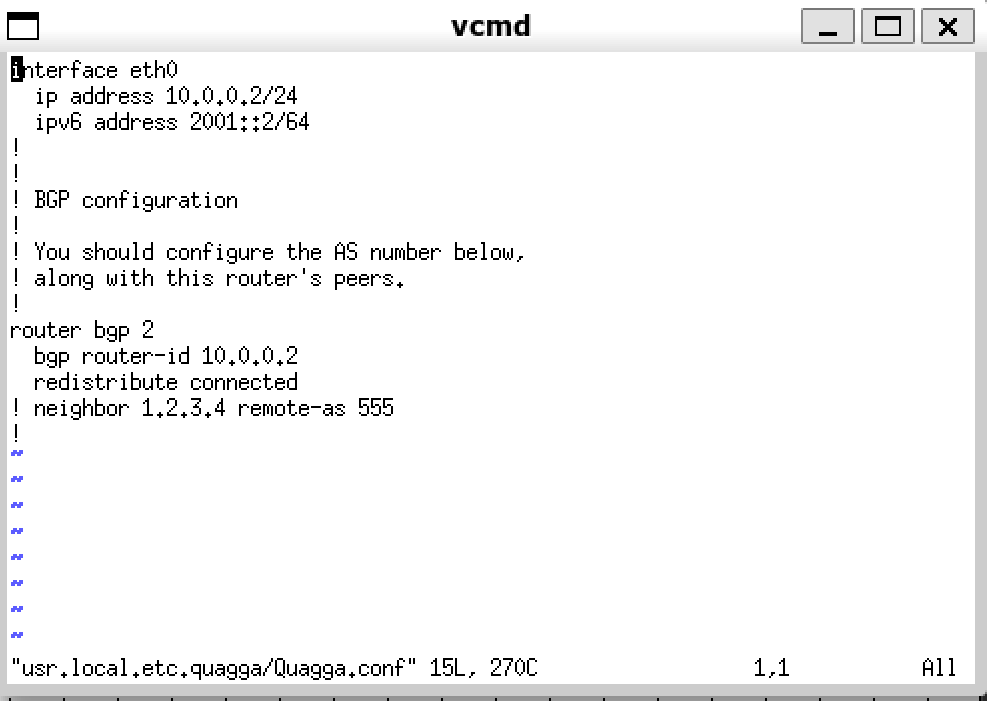
The reason is they generate a tiny different Quagga.conf data.
Quaqqa.conf of CoreNode1 is incorrect, router bgp 1 should be out side of interface eth0.
CoreNode1:
CoreNode2:
To Reproduce
Steps to reproduce the behavior:
core-cli xml -f peertopeer.xml
<?xml version='1.0' encoding='UTF-8'?>
<scenario name="/tmp/tmpm_golc56">
<networks/>
<devices>
<device id="1" name="CoreNode1" icon="" canvas="0" type="PC" class="" image="">
<position x="100.0" y="100.0" lat="47.57826125326112" lon="-122.13096911642927" alt="2.0"/>
<configservices>
<service name="BGP"/>
<service name="zebra"/>
</configservices>
</device>
<device id="2" name="CoreNode2" icon="" canvas="0" type="PC" class="" image="">
<position x="300.0" y="100.0" lat="47.57826125326112" lon="-122.12827417057692" alt="2.0"/>
<services>
<service name="BGP"/>
<service name="zebra"/>
</services>
</device>
</devices>
<links>
<link node1="1" node2="2">
<iface1 id="0" name="eth0" mac="00:16:3e:ff:0d:e6" ip4="10.0.0.1" ip4_mask="24" ip6="2001::1" ip6_mask="64"/>
<iface2 id="0" name="eth0" mac="00:16:3e:07:bd:f2" ip4="10.0.0.2" ip4_mask="24" ip6="2001::2" ip6_mask="64"/>
<options delay="0" bandwidth="0" loss="0.0" dup="0" jitter="0" unidirectional="0" buffer="0"/>
</link>
</links>
<configservice_configurations>
<service name="BGP" node="1"/>
<service name="zebra" node="1"/>
</configservice_configurations>
<session_origin lat="47.57917022705078" lon="-122.13231658935547" alt="2.0" scale="150.0"/>
<session_options>
<configuration name="controlnet" value=""/>
<configuration name="controlnet0" value=""/>
<configuration name="controlnet1" value=""/>
<configuration name="controlnet2" value=""/>
<configuration name="controlnet3" value=""/>
<configuration name="controlnet_updown_script" value=""/>
<configuration name="enablerj45" value="1"/>
<configuration name="preservedir" value="0"/>
<configuration name="enablesdt" value="0"/>
<configuration name="sdturl" value="tcp://127.0.0.1:50000/"/>
<configuration name="ovs" value="0"/>
<configuration name="platform_id_start" value="1"/>
<configuration name="nem_id_start" value="1"/>
<configuration name="link_enabled" value="1"/>
<configuration name="loss_threshold" value="30"/>
<configuration name="link_interval" value="1"/>
<configuration name="link_timeout" value="4"/>
<configuration name="mtu" value="0"/>
</session_options>
<session_metadata>
<configuration name="canvas" value="{"gridlines": true, "canvases": [{"id": 1, "wallpaper": null, "wallpaper_style": 1, "fit_image": false, "dimensions": [1000, 750]}]}"/>
<configuration name="hidden" value="[]"/>
<configuration name="shapes" value="[]"/>
<configuration name="edges" value="[]"/>
</session_metadata>
<default_services>
<node type="mdr">
<service name="zebra"/>
<service name="OSPFv3MDR"/>
<service name="IPForward"/>
</node>
<node type="PC">
<service name="DefaultRoute"/>
</node>
<node type="prouter"/>
<node type="router">
<service name="zebra"/>
<service name="OSPFv2"/>
<service name="OSPFv3"/>
<service name="IPForward"/>
</node>
<node type="host">
<service name="DefaultRoute"/>
<service name="SSH"/>
</node>
</default_services>
</scenario>CoreNode1 have select "BGP" and "zebra" with "Config Services" and CoreNode2 have select "BGP" and "zebra" with "Services (Deprecated)".
- start the session
- double-click on the CoreNode1, and check the processes
grep -ef |grep bgp
Expected behavior
The process of "bgpd" can start up after the start of the session.
Screenshots
using "Config Services"
using "Services (Deprecated)"
Desktop (please complete the following information):
- OS: ubuntu:20.04
- CORE Version 8.2.0
Additional context
No.

Describe the bug
When I start the session, it does not start up "bgpd" if I select "BGP" and "zebra" by using the dialog of "Config Services" on CoreNode1.
But it can start up "bgpd" if I select "BGP" and "zebra" by using the dialog of "Services (Deprecated)" on CoreNode2.
The reason is they generate a tiny different Quagga.conf data.
Quaqqa.conf of CoreNode1 is incorrect, router bgp 1 should be out side of interface eth0.
CoreNode1:
CoreNode2:
To Reproduce
Steps to reproduce the behavior:
core-cli xml -f peertopeer.xmlCoreNode1 have select "BGP" and "zebra" with "Config Services" and CoreNode2 have select "BGP" and "zebra" with "Services (Deprecated)".
grep -ef |grep bgpExpected behavior
The process of "bgpd" can start up after the start of the session.
Screenshots
using "Config Services"
using "Services (Deprecated)"
Desktop (please complete the following information):
Additional context
No.