Repository navigation
Releases: corund207/Reticly
Release list
Reticly 1.3.0

CrosshairY is now Reticly
Same app, new name. Your crosshairs, profiles and settings move over automatically the first time you run Reticly. Share codes you already have still import.
What's new
- Auto-update: Reticly checks GitHub about once a day, shows the release notes, verifies the download's SHA-256 and swaps itself in place. From now on you won't need to download new versions by hand.
- Spray pattern editor: drag, add and remove bullets on a grid, test the spray at its real fire rate, add your own guns and games, or fix a built-in pattern (and reset it any time).
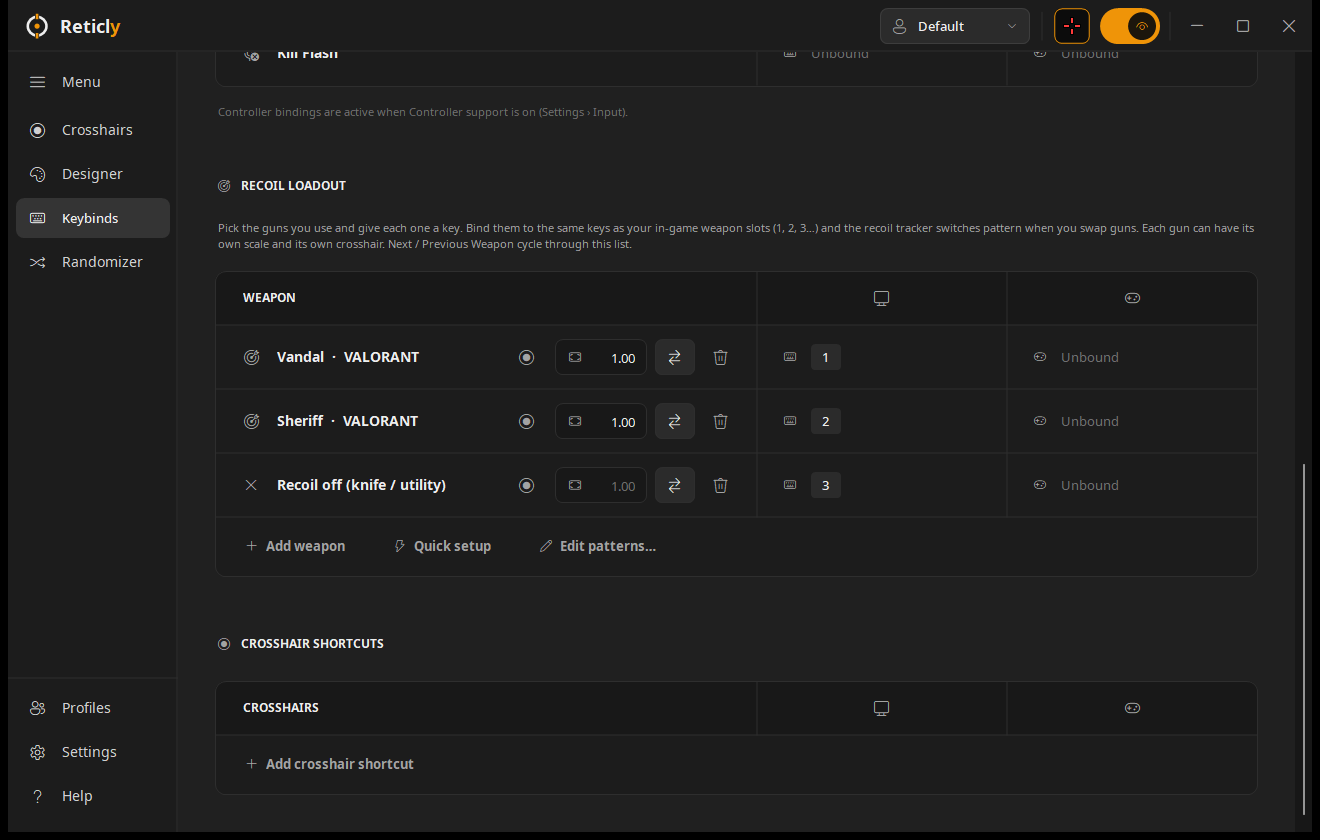
- Recoil loadout upgrades: each weapon slot can have its own scale and its own crosshair.
- Hit markers: a hit marker or kill flash (X, ring or brackets) on your own keys, or on every shot. Settings › Hit Markers.
- Community gallery: Discover › Community gallery shows shared designs; Share yours submits one.
- First-run tour, a fuller tray menu (switch weapons, check for updates) and full backups (replace or merge) plus single-profile export.
- Languages: Español, Deutsch, Français and Português (Brasil).
- New website: https://reticly.vercel.app
Download
Download Reticly.exe below and run it. There's no installer.
The exe isn't code-signed: Windows shows "Windows protected your PC". Click More info › Run anyway once. PCs with Smart App Control on block unsigned apps entirely; build from source with .\build.ps1 in that case.
SHA-256 F25B636A49C70B3DBFE0570D1189C190236149A29F68890CD3374E22A45D7820
CrosshairY 1.2.0
What's new
42 new recoil crosshairs
Browse › Recoil Tracking now has 46 designs, and every one works with the weapon picker, the Designer, Next / Previous Weapon and your recoil loadout keys.
- Plus (top arm climbs): Recoil Plus Dot, Hairline, Tiny, Big, Chunky, Bloom, Heat, Flash, Stretch
- T, bars and rails: Tactical T, Horizon, Goalposts, Onetap Mini, Rangefinder Recoil
- Dots: Micro Dot, Comet Trail, Heat Dot, Swell Dot, Diamond, Ring Tracker, Scope Recoil, Neon Tracker, Ghost Origin
- Frames: Box Tracker, Rounded Box, Circle Frame, Corner Lock, Drifting Brackets
- Chevrons and arrows: Double Chevron, Chevron Heat, Arrow Tracker
- Pull guides and mirrored pairs: Pull Guide, Spray + Pull, Wings, Twin Dots
- Animated: Breathing Recoil, Spinner Recoil, RGB Recoil, Aim Focus Recoil, Fade Frame, Kick Ring, Text Brackets
Tracker styles
- Any layer can be a tracker — lines, dots, boxes, circles, triangles and text.
- Trail delay — follow the spray a few shots behind (comet trails, echo chevrons).
- Direction — follow the spray, pull guide (moves opposite, the way to drag your mouse) or mirror sideways.
- Effects — heat ramps (green → red), swelling and stretching trackers, color flash on the first shot. Ramps peak by the 10th bullet.
- Every tracker keeps its scale, trail delay, direction and effects when you switch weapons.
- The Designer's Recoil Pattern section now appears for every layer type, with new Direction and Trail delay controls.
Download
Download CrosshairY.exe below and run it — no installer needed. Settings, library, profiles and recoil loadouts carry over.
The executable isn't code-signed yet: SmartScreen may show "Windows protected your PC" (choose More info › Run anyway), and PCs with Smart App Control on may block it — build from source with .\build.ps1 in that case.
SHA-256 7834A8F26339B2FCF3FB9C0DA12391B3B42359183BBE25A0558393D738ED4BE7
CrosshairY 1.1.0
What's new
Recoil loadout
Switch recoil patterns in game with the same keys you use to swap weapons.
- Keybinds › Recoil loadout — pick the guns you use and give each one a key or controller button. Pressing it switches the active recoil crosshair to that gun's pattern, and the weapon name flashes under the crosshair.
- Recoil off slot — stops the tracker while you hold your knife or utility; any weapon key turns it back on.
- Quick setup — one-click loadouts for VALORANT, CS2, Rust and Apex Legends, bound to 1 / 2 / 3.
- Next / Previous Weapon now cycle through your loadout when one is set (otherwise through every gun in the game, as before).
- Loadouts belong to the profile, so per-game profiles each keep their own.
Developer
CROSSHAIRY_DATAenvironment variable overrides the data folder.--snapcreates its output folder and accepts<page>:endto capture the bottom of a page.
Download
Download CrosshairY.exe below and run it — no installer needed. Your settings, library and profiles carry over from 1.0.0.
The executable isn't code-signed yet: SmartScreen may show "Windows protected your PC" (choose More info › Run anyway), and PCs with Smart App Control on may block it — build from source with .\build.ps1 in that case.
SHA-256 FCF941EF8C074BA3EECFA900809748FABE8432BC0245FA9E9DFEE3B45B7E362D
CrosshairY 1.0.0
The first release of CrosshairY — a native Windows crosshair overlay with a layered designer, recoil tracking and crosshair code import.
Download
Download CrosshairY.exe below and run it. No installer and nothing else to install — it uses the .NET Framework 4.8 that ships with Windows 10 and 11.
Highlights
- Overlay — transparent, click-through, always on top, drawn on the exact center pixel. Static crosshairs use no CPU.
- Import codes — Crosshair X share codes and links, VALORANT profile codes, CS2/CS:GO codes, CrosshairY codes and JSON.
- Designer — layers, tool dock, pixel canvas with drag-to-move, inspector, undo/redo and live on-screen preview.
- Animations — fire / aim / autoplay triggers, press or hold, reset / reverse / pause on release, stages and easing.
- Recoil tracking — 91 weapons across VALORANT, CS2, Rust and Apex Legends, a weapon picker on every recoil crosshair, per-weapon accurate first shots, and Next / Previous Weapon keybinds.
- Library & profiles — 50+ built-in designs, categories and favorites; per-game profiles that switch automatically.
- Keybinds — keyboard, mouse and controller; hide / show / swap while aiming.
- Display — monitor choice, offsets and saved positions, size and opacity, only-show-in-game, hide from recordings, Fullscreen Assist and Force Borderless.
Good to know
- Windows may warn you on first launch. The executable isn't code-signed yet, so SmartScreen can show "Windows protected your PC" — choose More info › Run anyway. On PCs with Smart App Control turned on, Windows may block unsigned apps entirely; in that case build from source (
.\build.ps1) or wait for a signed release. - The default toggle key is Shift + Alt + Z. Closing the window keeps CrosshairY in the tray.
- Recoil patterns are approximations; adjust Scale, fire rate and accurate shots per crosshair.
- Overlays can't draw over true exclusive fullscreen — use borderless, or Settings › Display › Force Borderless Fullscreen.
SHA-256 21744E0CA258DDBE620761038568D41F942CF6CB02FE68BAD8B27CA9AD87F50D