Repository navigation
Releases: craebby/FamQuest
Release list
FamQuest 1.3.0

Recipes for the meal plan, and the shopping list as an app for the shop.
New
- Recipes. Dishes in the meal plan can now have a recipe (Meals → Recipes, no PIN needed):
- paste recipes as text ("1. Name", optionally "Ingredients" and "Method"), with a preview before
saving; several recipes at once - open a recipe on the display or in the kitchen view to cook along: ingredients, large numbered
steps, scale the servings up or down - rate each dish with one to five stars for the whole family; edit or delete a recipe
- change a planned dish for a single day only ("with tofu instead of chicken") without touching the
recipe
- paste recipes as text ("1. Name", optionally "Ingredients" and "Method"), with a preview before
- Fill the week. One button fills the empty days of a week from the recipe collection:
well-rated dishes come up more often, no dish repeats within seven days (as long as the collection is big enough); re-roll single days. - Ingredients onto the shopping list, per recipe or for the whole week. Amounts become the note,
identical ingredients are combined, pantry staples (salt, oil …) start unticked. - Shopping list as an app. Open
/shoppingon a phone and tap "Install as app" (iPhone: Share →
Add to Home Screen). The app at/shopshows only the shopping list and keeps working without a
connection: ticking off, adding and removing items wait in a queue ("Offline · 3 changes waiting")
and are sent once you're back online, even after restarting the app. - Calendar: your own all-day "school holidays" events no longer show up twice next to the
holiday line.
Roadmap
"Make it your own" moves to 1.4, the rest of "On the go" (parents' functions on the phone) to 1.5.
Updating
git fetch --tags && git checkout v1.3.0
docker compose up -d --build
The database migrations (recipes, servings, per-day variants) run automatically on start; making a
backup first is
recommended. The installable app needs HTTPS. New installs: see the
README.
Deutsch
Rezepte für den Essensplan und die Einkaufsliste als App für den Laden.
Neu:
- Rezepte. Gerichte im Essensplan können jetzt ein Rezept haben (Essen → Rezepte, ohne PIN):
- Rezepte als Text einfügen („1. Name“, optional „Zutaten“ und „Zubereitung“), mit Vorschau vor dem
Speichern; mehrere auf einmal - Rezept am Display oder in der Küchenansicht zum Mitkochen öffnen: Zutaten, große nummerierte
Schritte, Portionen umrechnen - jedes Gericht mit ein bis fünf Sternen für die ganze Familie bewerten; Rezept bearbeiten oder
löschen - ein geplantes Gericht nur für einen Tag abwandeln („mit Tofu statt Hähnchen“), ohne das Rezept zu
ändern
- Rezepte als Text einfügen („1. Name“, optional „Zutaten“ und „Zubereitung“), mit Vorschau vor dem
- Woche füllen. Ein Knopf füllt die leeren Tage einer Woche aus der Rezeptsammlung: gut bewertete
Gerichte kommen öfter, kein Gericht wiederholt sich innerhalb von sieben Tagen (solange die Sammlung reicht); einzelne Tage neu würfeln. - Zutaten auf die Einkaufsliste, je Rezept oder für die ganze Woche. Mengen werden zum Hinweis,
gleiche Zutaten zusammengefasst, Vorräte (Salz, Öl …) sind erst nicht angehakt. - Einkaufsliste als App. Am Handy
/shoppingöffnen und „Als App installieren“ tippen (iPhone:
Teilen → Zum Home-Bildschirm). Die App unter/shopzeigt nur die Einkaufsliste und funktioniert
auch ohne Netz: Abhaken, Eintragen und Entfernen warten in einer Warteschlange („Offline · 3
Änderungen warten“) und werden mit Netz gesendet, auch nach einem Neustart der App. - Kalender: Eigene ganztägige Ferien-Termine erscheinen nicht mehr doppelt neben der Ferien-Zeile.
Roadmap: „Anpassen“ wird 1.4, der Rest von „Unterwegs“ (Eltern-Funktionen am Handy) 1.5.
Update:
git fetch --tags && git checkout v1.3.0
docker compose up -d --build
Die Datenbank-Migrationen (Rezepte, Portionen, Varianten je Tag) laufen beim Start automatisch;
vorher ein Backup
zu machen ist empfohlen. Die installierbare App braucht HTTPS. Neu installieren: siehe
README.
FamQuest 1.2.1
A bugfix release for 1.2.
Fixed
- Kitchen view: dialogs no longer slip off the screen on a tablet. On a real 8-inch tablet the
"What's missing?" dialog of the shopping list sat half outside the screen, and afterwards the whole
kitchen view was shifted. Mobile browsers treated the page as more than twice as wide and tall as
the screen. The page is now exactly as large as the screen again.
Updating
git fetch --tags && git checkout v1.2.1
docker compose up -d --build
No database changes. New installs: see the README.
Deutsch
Bugfix-Release für 1.2.
Behoben: In der Küchenansicht saß am echten 8-Zoll-Tablet der Dialog „Was fehlt?“ der
Einkaufsliste halb außerhalb des Bildschirms, danach war die ganze Ansicht verschoben. Mobile Browser
rechneten die Seite mehr als doppelt so breit und hoch wie den Bildschirm. Jetzt ist sie wieder genau
so groß wie der Bildschirm.
Aktualisieren: git fetch --tags && git checkout v1.2.1, danach docker compose up -d --build.
Keine Änderungen an der Datenbank. Neuinstallation: siehe
deutsche README.
FamQuest 1.2.0
A small tablet in the kitchen gets its own view.
New
- Kitchen view. For a small tablet (meant for 8 inches in landscape) there is a trimmed-down view
at the address/kitchen, without the navigation bar:- first page: today (twice as wide) and the next four days with events and meals; tap a meal to
enter or change it, tap an event for its details - swipe left for the children's current routine, the household ("To do" and the cleaning plan) and
the shopping list; four icons at the top jump straight to a page - header with date, weather and clock; after two minutes without a touch the first page is back
- night mode: the night window of the picture frame applies, a tap wakes the view
- if the session expires, signing in takes you back to the kitchen view
- set the address as the start page on the tablet; Settings → This device in the parents' area
has an "Open kitchen view" button
- first page: today (twice as wide) and the next four days with events and meals; tap a meal to
- Meal plan: photo right at the planned dish. Tap a planned dish and choose "Photo for …" at the
bottom to give it your own picture. The pencil in the suggestions still works.
Roadmap
"Make it your own" moves to 1.3 (now including more icons to choose from), "On the go" (installable
app) to 1.4.
Updating
git fetch --tags && git checkout v1.2.0
docker compose up -d --build
No database changes. New installs: see the README.
Deutsch
Ein kleines Tablet in der Küche bekommt eine eigene Ansicht.
Neu:
- Küchenansicht. Für ein kleines Tablet (gedacht für 8 Zoll im Querformat) gibt es unter der
Adresse/kitcheneine abgespeckte Ansicht ohne Navigationsleiste:- erste Seite: heute (doppelt so breit) und die nächsten vier Tage mit Terminen und Essen; ein Tipp
aufs Essen trägt ein oder ändert es, ein Tipp auf einen Termin zeigt die Details - ein Wisch nach links führt zur aktuellen Routine der Kinder, zum Haushalt („Zu erledigen“ und
Putzplan) und zur Einkaufsliste; vier Symbole oben springen direkt zur Seite - Kopfzeile mit Datum, Wetter und Uhr; nach zwei Minuten ohne Berührung steht wieder die erste
Seite da - Nachtmodus: Es gilt das Nachtfenster des Bilderrahmens, ein Tipp weckt die Ansicht
- läuft die Anmeldung ab, führt das Anmelden zurück in die Küchenansicht
- die Adresse am Tablet als Startseite festlegen; im Elternbereich führt unter
Einstellungen → Dieses Gerät der Knopf „Küchenansicht öffnen“ dorthin
- erste Seite: heute (doppelt so breit) und die nächsten vier Tage mit Terminen und Essen; ein Tipp
- Essensplan: Foto direkt beim geplanten Gericht. Ein geplantes Gericht antippen und unten
„Foto für …“ wählen. Der Stift in den Vorschlägen funktioniert weiterhin.
Roadmap: „Anpassen“ rückt auf 1.3 (jetzt auch mit mehr Symbolen zur Auswahl), „Unterwegs“
(installierbare App) auf 1.4.
Aktualisieren: git fetch --tags && git checkout v1.2.0, danach docker compose up -d --build.
Keine Änderungen an der Datenbank. Neuinstallation: siehe
deutsche README.
FamQuest 1.1.1
A bugfix release for 1.1.
Fixed
- "To do" entries can be changed. Until now an entry could only be ticked off or removed. The
pencil on an open entry lets you change its text and icon right in the row; no parents' PIN needed. - "Today": the "Household" and "Shopping" tiles stay small. With many entries they grew tall and
pushed the week with its events down. "Household" now shows the two most urgent entries, "Shopping"
four items in two rows; the rest is counted as "+3 more". "Add" is a "+" in the header of the
shopping tile. - "Today": finished housework leaves the tile. Chores and to-do entries done today no longer stay
crossed out in the "Household" tile. Take a tap back with "Undo" in the "Who did it?" bar or in the
"Household" view.
Updating
git fetch --tags && git checkout v1.1.1
docker compose up -d --build
No database changes. New installs: see the README.
Deutsch
Bugfix-Release für 1.1.
Behoben:
- Einträge in „Zu erledigen“ lassen sich ändern. Bisher ging nur Abhaken oder Streichen. Der
Stift an einem offenen Eintrag macht Text und Symbol direkt in der Zeile änderbar, ohne Eltern-PIN. - „Heute“: Die Kacheln „Haushalt“ und „Einkauf“ bleiben klein. Mit vielen Einträgen wurden sie
hoch und schoben die Woche mit den Terminen nach unten. „Haushalt“ zeigt jetzt die zwei
dringendsten Einträge, „Einkauf“ vier Artikel in zwei Zeilen; der Rest steht als „+3 weitere“
dabei. „Eintragen“ ist ein „+“ in der Kopfzeile der Einkauf-Kachel. - „Heute“: Erledigtes verschwindet aus der Haushalt-Kachel. Heute Erledigtes bleibt dort nicht
mehr durchgestrichen stehen. Zurücknehmen geht über „Rückgängig“ in der Leiste „Wer war's?“ oder
in der Ansicht „Haushalt“.
Aktualisieren: git fetch --tags && git checkout v1.1.1, danach docker compose up -d --build.
Keine Änderungen an der Datenbank. Neuinstallation: siehe
deutsche README.
FamQuest 1.1.0
FamQuest 1.1 adds the household: a cleaning plan with a traffic light and a shared "To do" list. It replaces the adults' tasks, which nobody ticked off in everyday life. The children's routines, points and rewards stay as they are.
Before you update: the migration deletes tasks that are assigned to adults only (including their completions) and removes adults from tasks they share with children. Adults' routines are deleted as well. Point bookings stay. This cannot be undone, so make a backup first.
New
- Cleaning plan: housework belongs to the household, not to one person. Every chore lives in a room you name yourself ("Upstairs bathroom", "Garden") and has its own interval instead of a date, from days to years. A traffic light shows what is due: green, yellow, red. One tap marks a chore done, without the parents' PIN.
- Setup assistant: a few questions about your home (flat or house, bathrooms, garden, pets, robot vacuum and more) turn into a suggestion for rooms, chores and intervals. Only the essentials are pre-ticked; you can run it again later without changing what is already there.
- "To do": a shared list for one-off things without a person or a date, such as "Get chicken feed". Type it in, tick it off, done. If something turns out to be recurring, "comes back" turns it into a chore in the cleaning plan (parents' PIN).
- "Who did it?": after ticking something off you can tap an avatar. This feeds the fair-sharing bar, which now counts the cleaning plan and "To do" over the last 30 days.
- Last done: set by hand when a chore was last done, so it does not start from zero (windows cleaned ten weeks ago, due every six months).
- On "Today" and under "Tasks": a "Household" tile on the start page and a "Household" column next to the children show what is open or due, each with one tap to tick it off.
- Logo: FamQuest has an official logo, shown on sign-in and first-run setup and used as the home-screen icon.
Changed
- Tasks can only be assigned to children now. The household task templates for adults moved into the setup assistant.
- Roadmap: the household is 1.1; "make it your own" moves to 1.2 and the installable app to 1.3.
Updating
# back up first, see the note above
git fetch --tags && git checkout v1.1.0
docker compose up -d --build
The database gets four new tables; the migrations run automatically on start. New installs: see the README.
Deutsch
FamQuest 1.1 bringt den Haushalt: einen Putzplan mit Ampel und die gemeinsame Liste „Zu erledigen“. Er löst die Aufgaben der Erwachsenen ab, die im Alltag niemand abgehakt hat. Routinen, Punkte und Belohnungen der Kinder bleiben, wie sie sind.
Vor dem Update: Die Migration löscht Aufgaben, die nur Erwachsenen zugeordnet sind (samt Erledigungen), und entfernt Erwachsene aus Aufgaben, die sie mit Kindern teilen. Routinen von Erwachsenen werden ebenfalls gelöscht. Punktebuchungen bleiben. Das lässt sich nicht zurücknehmen, macht also vorher ein Backup.
Neu:
- Putzplan: Hausarbeit gehört dem Haushalt, nicht einer Person. Jede Aufgabe liegt in einem frei benannten Raum („Bad oben“, „Garten“) und hat einen eigenen Abstand statt eines Termins, von Tagen bis Jahren. Die Ampel zeigt, was dran ist. Ein Tipp erledigt, ohne Eltern-PIN.
- Einrichtungs-Assistent: Ein paar Fragen zum Zuhause ergeben einen Vorschlag für Räume, Aufgaben und Abstände. Angehakt ist nur das Mindeste; der Assistent lässt sich später erneut starten, ohne Vorhandenes zu ändern.
- „Zu erledigen“: gemeinsame Liste für Einmaliges ohne Person und Termin, z. B. „Hühnerfutter holen“. Eintippen, abhaken, fertig. Fällt etwas doch regelmäßig an, macht „kommt wieder“ daraus eine Aufgabe im Putzplan (Eltern-PIN).
- „Wer war's?“: Nach dem Abhaken lässt sich ein Avatar antippen. Daraus entsteht die faire Verteilung, die jetzt Putzplan und „Zu erledigen“ der letzten 30 Tage zählt.
- Zuletzt erledigt: von Hand festlegen, wann eine Aufgabe zuletzt gemacht wurde, damit sie nicht bei null anfängt.
- Auf „Heute“ und unter „Aufgaben“: Die Kachel „Haushalt“ und eine Spalte „Haushalt“ neben den Kindern zeigen, was offen oder dran ist, jeweils zum Abhaken.
- Logo: FamQuest hat ein offizielles Logo, zu sehen bei Anmeldung und Ersteinrichtung und als Icon auf dem Startbildschirm.
Geändert: Aufgaben lassen sich nur noch Kindern zuordnen; die Haushaltsvorlagen für Erwachsene sind im Einrichtungs-Assistenten aufgegangen. In der Roadmap ist der Haushalt jetzt 1.1, „Anpassen“ rückt auf 1.2 und die installierbare App auf 1.3.
Aktualisieren: erst Backup (siehe oben), dann git fetch --tags && git checkout v1.1.0 und docker compose up -d --build. Die Datenbank bekommt vier neue Tabellen, die Migrationen laufen beim Start automatisch. Neuinstallation: siehe deutsche README.
FamQuest 1.0.2
Polish for the "Today" start page after testing on the real display.
Changed
- More compact week columns, same font size: the avatar sits next to the time instead of in its
own row, times read "16:30–18:30" (no trailing "Uhr" in German), all-day events take one line,
and events that are already over today shrink to a faded line with time and title. - Meals always visible: on the wall display "Today" fits the screen exactly. The meals stay at
the bottom of every day; on a busy day only that day's events scroll, with a fade and a small
arrow showing there's more.
New
- Week from today or Monday to Sunday: the gear on "Today" (parents' PIN) now lets you choose
whether the week rolls from today (default, unchanged) or runs Monday to Sunday like a weekly
planner, with past days faded. Applies to the whole family. The week view under "Tasks" stays
rolling.
Updating
git fetch --tags && git checkout v1.0.2
docker compose up -d --build
The database gets one new column; the migration runs automatically on start. New installs: see the
README.
Deutsch
Feinschliff der Startseite „Heute“ nach dem Test am echten Display.
Geändert: Kompaktere Kalenderspalten bei gleicher Schriftgröße (Avatar neben der Uhrzeit,
„16:30–18:30“ ohne „Uhr“, ganztägige Termine einzeilig, heute schon vorbei gegangene Termine als
blasse Zeile). Das Essen bleibt am Wanddisplay immer unten sichtbar; an vollen Tagen scrollen nur
die Termine des Tages, Ausblendung und Pfeil zeigen, dass es weitergeht.
Neu: Im Zahnrad auf „Heute“ (Eltern-PIN) wählt ihr, ob die Woche ab heute läuft (Standard, wie
bisher) oder von Montag bis Sonntag wie ein Wochenplan, vergangene Tage blass. Gilt für die ganze
Familie; die Wochenansicht unter „Aufgaben“ bleibt rollend.
Aktualisieren: git fetch --tags && git checkout v1.0.2, danach docker compose up -d --build.
Die Datenbank bekommt eine neue Spalte, die Migration läuft beim Start automatisch. Neuinstallation:
siehe deutsche README.
FamQuest 1.0.1
A bugfix release for 1.0.
Fixed
- Typing no longer gets interrupted in dialogs. When entering a dish on the meal plan, the text
field could lose focus mid-word, typically right when the dish icon updated. It happened whenever
the page behind the dialog refreshed (e.g. the clock or new data on "Today"). The same fix applies
to the shopping list, the icon picker and the other dialogs.
Updating
git fetch --tags && git checkout v1.0.1
docker compose up -d --build
No database changes. New installs: see the README.
Deutsch
Bugfix-Release für 1.0.
Behoben: Beim Eintragen eines Gerichts im Essensplan verlor das Textfeld mitten im Tippen den
Fokus, meist genau dann, wenn sich das Symbol änderte. Auslöser war, dass die Seite hinter dem
Dialog neu gezeichnet wurde (z. B. durch die Uhr oder neue Daten auf „Heute“). Das gilt ebenso für
die Einkaufsliste, die Symbolauswahl und die übrigen Dialoge.
Aktualisieren: git fetch --tags && git checkout v1.0.1, danach docker compose up -d --build.
Keine Änderungen an der Datenbank. Neuinstallation: siehe
deutsche README.
FamQuest 1.0.0
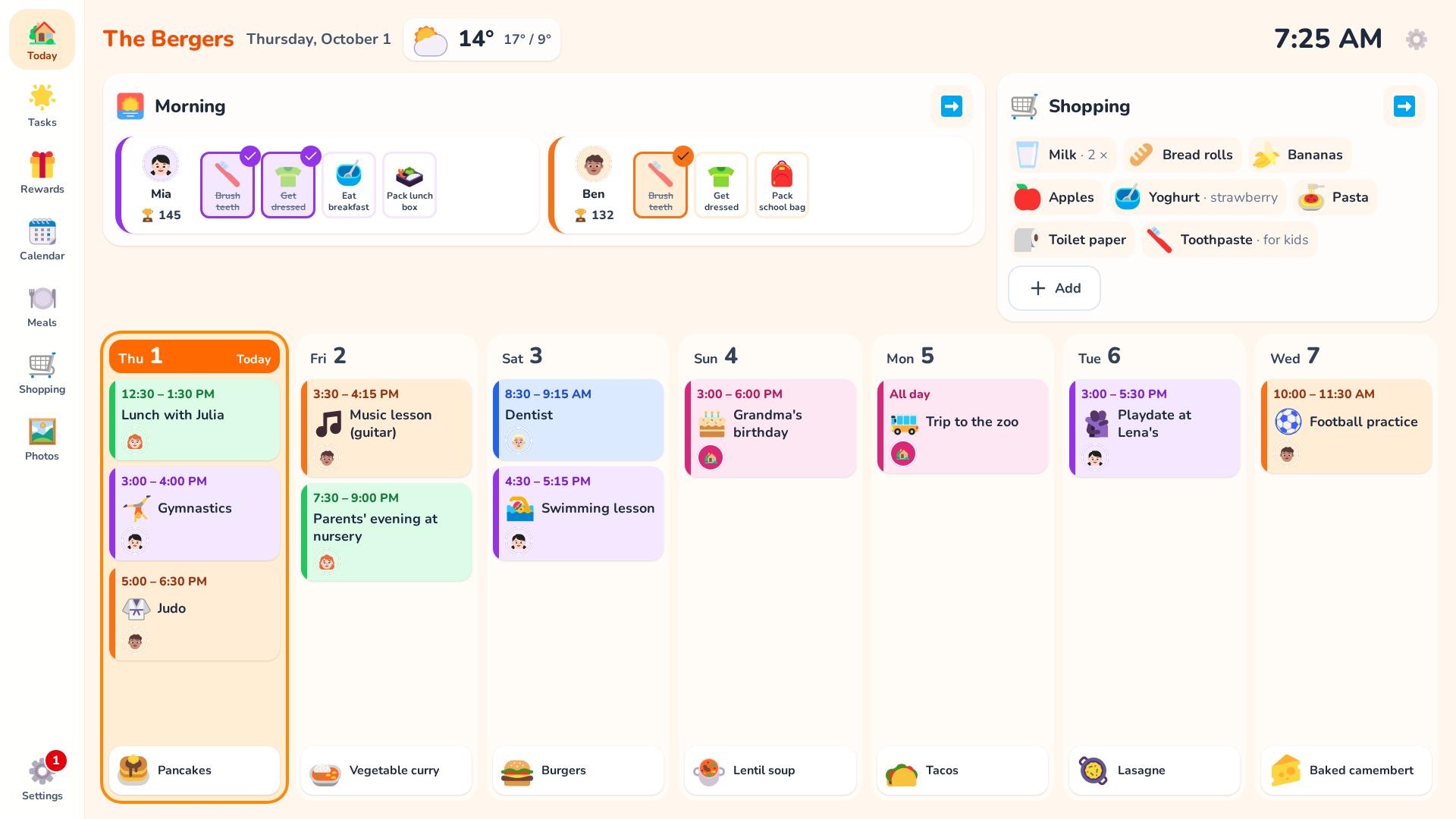
The first stable version of FamQuest: a self-hosted family app for a touchscreen on the fridge.
Routines → tasks → done → points → rewards, plus calendar, meal plan and shopping list, in
English and German.
What's in 1.0
- Tasks and routines: one column per person, one tap to complete. Routines per child and time of
day (e.g. a lighter weekend evening), numbered and optional steps, flexible tasks ("about every
3 days"), "One for all" tasks for adults - Points and rewards: points as ledger entries, daily progress, rewards per child redeemed on the
display, parent checks for selected tasks, fair sharing between adults - "Today" as a week dashboard: clock, weather (Open-Meteo, no API key), the children's current
routine, the shopping list and the next seven days with events and meals; sections can be switched
on and off - Google Calendar (read-only): week view in each person's colour, symbols for children's events
so they recognise them without reading - Picture frame: uploaded photos full screen when idle or from an icon, overlays (clock, weather,
next event, open tasks), night mode - Meal plan: type the week's dishes right on the display, suggestions with icons, your own photos
- Shopping list: add what's missing on the display or a phone, suggestions with icons, amount or
note, tick it off in the shop - Parents' area protected by a PIN, profile photos with cropping, one colour per person
- Runs entirely in Docker (app + PostgreSQL), no cloud services, no external CDNs
Install
git clone --branch v1.0.0 https://github.com/craebby/FamQuest.git
cd FamQuest
cp .env.example .env
sed -i "s|^POSTGRES_PASSWORD=.*|POSTGRES_PASSWORD=$(openssl rand -hex 24)|" .env
docker compose up -d --build
Then open http://<host>:8080. Details, backup/restore and reverse proxy setup are in the
README.
Updating from an earlier state: git fetch --tags && git checkout v1.0.0, then
docker compose up -d --build. Database migrations run automatically.
What's next
Polish from everyday use comes as 1.0.x. Planned: 1.1 "make it your own" (editable templates,
age-based suggestions, teen style) and 1.2 "on the go" (installable phone app, shopping list
offline in the shop). See the roadmap.
Deutsch
Die erste stabile Version von FamQuest: eine selbst gehostete Familien-App für ein Touch-Display am
Kühlschrank. Routinen → Aufgaben → Erledigung → Punkte → Belohnungen, dazu Kalender, Essensplan
und Einkaufsliste, auf Deutsch und Englisch.
Enthalten: Aufgaben und Routinen mit einer Spalte pro Person, Punkte und Belohnungen, Kontrolle
durch die Eltern, faire Verteilung unter Erwachsenen; „Heute“ als Wochen-Dashboard mit Wetter;
Google Kalender (nur lesend) mit Symbolen für Kindertermine; Bilderrahmen mit Nachtmodus;
Essensplan und Einkaufsliste direkt am Display oder Handy; Elternbereich mit PIN. Alles läuft in
Docker, ohne Cloud-Dienste.
Installation: wie oben, Anleitung, Backup und Reverse Proxy in der
deutschen README. Bestehende
Installationen: git fetch --tags && git checkout v1.0.0, danach docker compose up -d --build;
die Migrationen laufen automatisch.
Wie es weitergeht: Feinschliff aus dem Alltag als 1.0.x, danach 1.1 „Anpassen“ und 1.2
„Unterwegs“ (installierbare App fürs Handy, Einkaufsliste auch ohne Netz).