v0.2.0


New
-
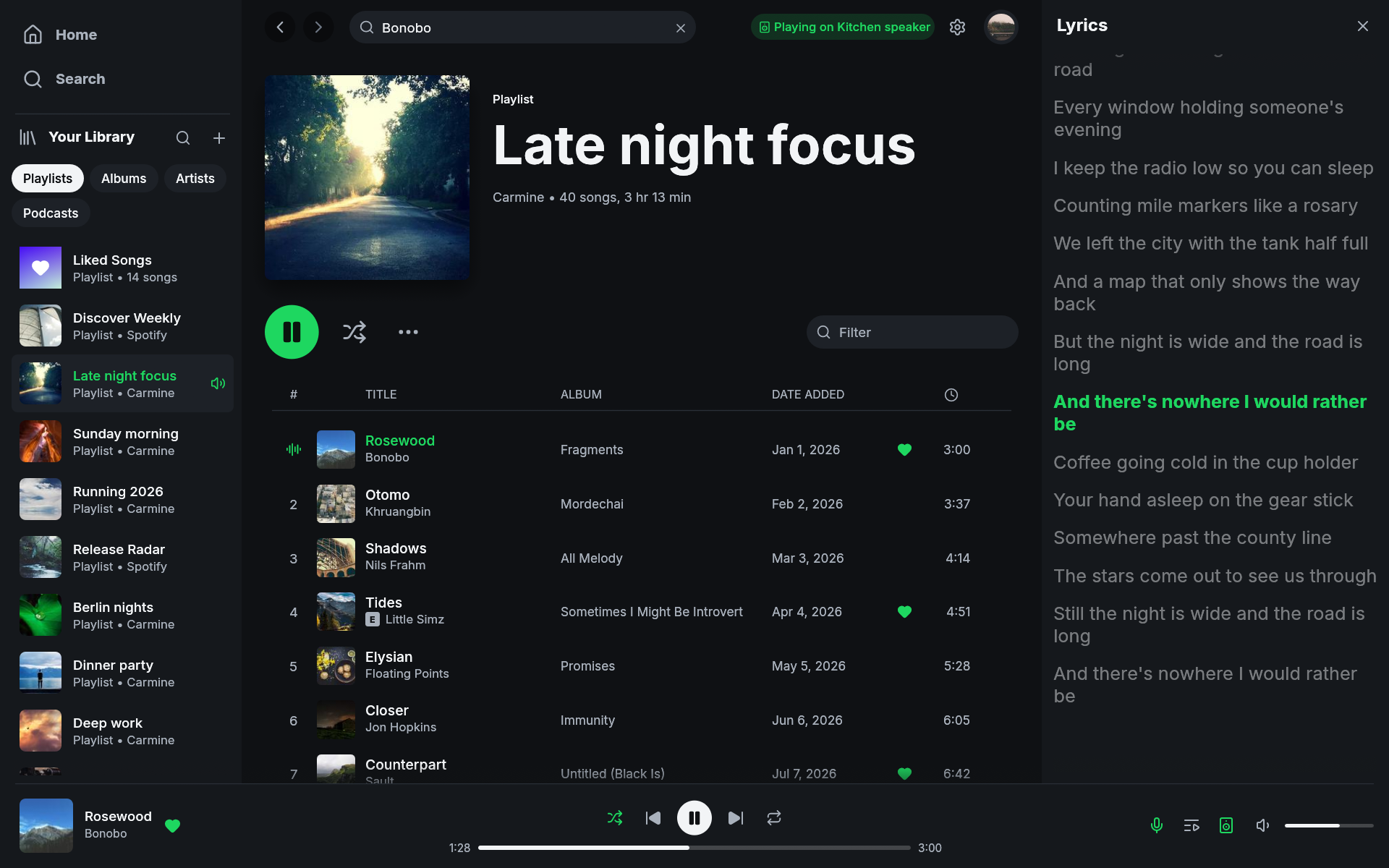
Lyrics. The microphone button in the player bar, or
L, opens the lyrics of the playing track next to the page. Timed lyrics highlight the current line and the panel scrolls with the song. Click a line to seek there. Lyrics come from LRCLIB and work for local and remote playback. (#12) -
Titles in other scripts. Chinese, Japanese, Korean, Arabic, Hebrew, Thai, Indic, and other scripts render. The app uses fonts installed on the system. Windows and macOS have them. On Linux install the Noto family for the script, for example
noto-fonts-cjkon Arch orfonts-noto-cjkon Debian and Ubuntu. (#4, #28)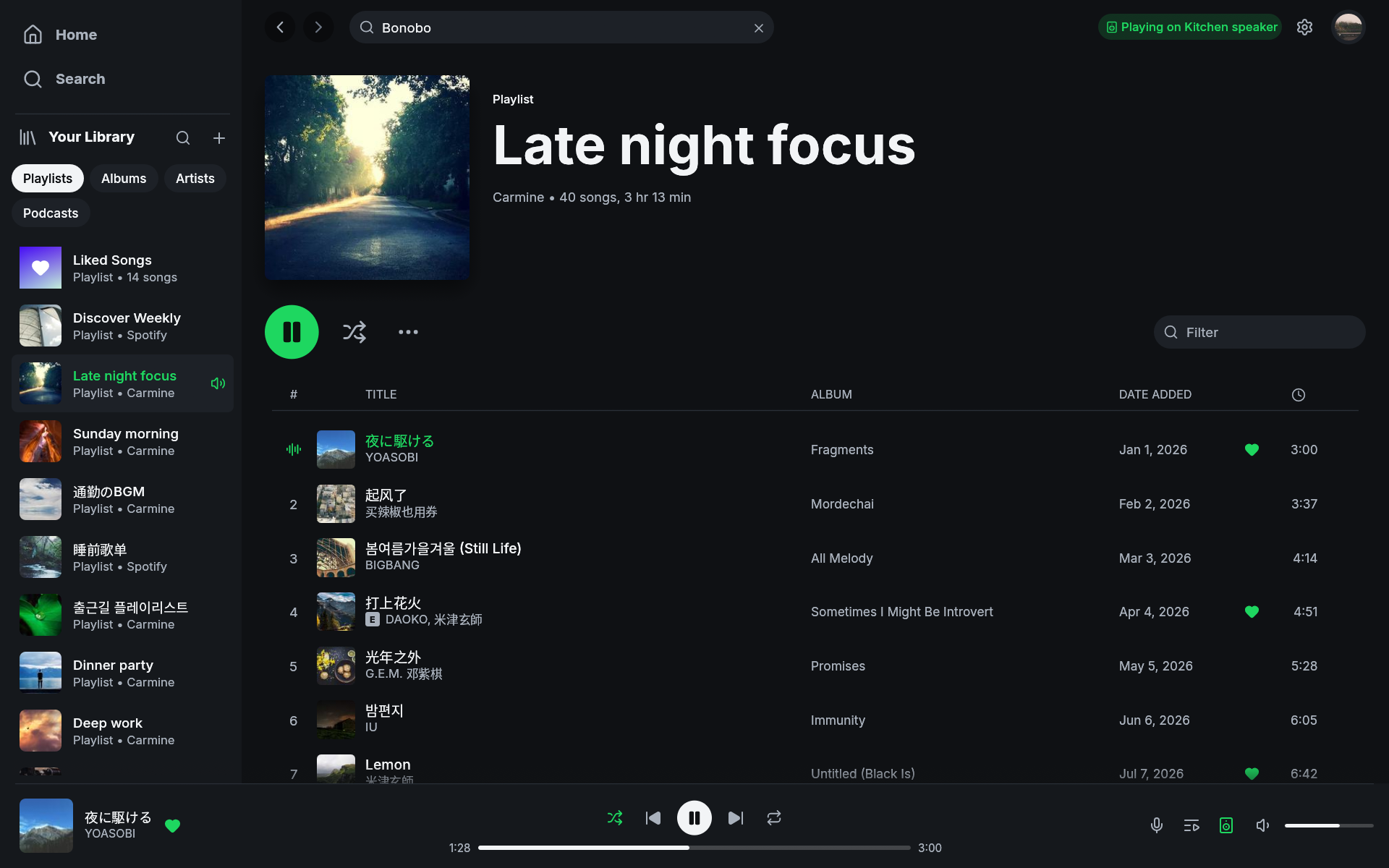
-
Tray icon on Windows and macOS. Closing the window keeps the music playing. The tray menu has show/hide, play/pause, next, previous, and quit. On macOS the app leaves the Dock while hidden; the status item brings it back. (#5, #11)
-
Media keys on Windows and macOS. Play/pause, next, previous, and seek from the keyboard, headsets, and the system's now-playing panel. (#14)
-
Windows installer.
fastpotify-v0.2.0-x86_64-pc-windows-msvc-setup.exe, and an ARM64 one. No administrator rights. Adds a Start menu entry. Installing a newer version replaces the old one. The exe now has an icon. The zip is still available. -
macOS. Menu bar with Edit, Playback, View, Window, and Help menus. Cmd+C and Cmd+V work in the search field. Home is Cmd+Shift+H and the queue is Cmd+U, because macOS reserves Cmd+H and Cmd+Shift+Q. The bundle is signed ad hoc, so it launches on Apple Silicon. Homebrew:
brew install --cask crmne/tap/fastpotify. (#1) -
Update check. A badge in the top bar when a newer version is on GitHub. Checked once a day. Can be turned off in Settings.
-
Your own Spotify app. Settings has a "Make it even faster" field for a Client ID, and a Switch button that signs in with it without restarting. Guide: Make It Even Faster. A personal app can only open playlists you own; that is a Spotify rule for Development Mode apps since February 2026.
-
Log files.
fastpotify.logfor the last run andpanic.logif the app crashes, both in the state directory. The bug report form asks for them. -
Nix development shell:
nix develop.
Fixed
- Windows: the app exited on start when no audio output device was present. It now shows a message and waits for a device. (#9)
- Free accounts: the app exited a few seconds after sign-in once local playback was set up. It now says local playback needs Premium. Everyone has to sign in again once after updating, because this check needs one more Spotify permission. (#7)
- Volume changes apply immediately. Spotify gets the final value on release. The curve changed: 50% is now -16 dB, it was -30 dB. The volume set in the app is saved. (#2, #19)
- Trackpad scrolling stays on one axis. (#13)
- Non-square cover art is cropped instead of stretched.
- The audio device is opened when playback starts, not when the app starts.
Thanks
@chagel (fonts), @dappermint (macOS bundle, menu, shortcuts, volume), @mikenoired (cover art), @jing2uo (FlatPark package).
Full changelog: v0.1.3...v0.2.0


