

Fastpotify turns into Winamp. 0.4.1 is 0.4.0 plus a first day of fixes, and these notes carry the whole story: the mini player with classic skin support, right-to-left text, compact views, a tougher audio output, and a long list of fixes. Thanks to everyone who tried the five release candidates and reported back. The macOS build is not notarized yet, so the first-open steps on the download page apply; clear the quarantine flag with xattr -dr on macOS 26.
New in 0.4.1
- Each credited artist is its own link, in the track tables and the player bar, instead of one link that always opened the first; a comma inside a name stays a name. Thanks @mikenoired. (#100)
- The Date added column says how long ago for the first thirty days, the way Spotify does, and keeps the calendar date beyond that. Thanks @mikenoired. (#102)
- The mini player's playlist follows a double-click at once instead of waiting for the queue to be fetched again. By @crmne.
- The scroll wheel moves one step a notch on Windows, which multiplies a notch into its line setting and made the volume jump fifteen percent. By @crmne; thanks @scrxp for the report. (#103)
- Japanese and every other script the skin's font lacks scroll through the marquee in the pixel face the playlist already uses, instead of a row of question marks. By @crmne; thanks @gitHatmos for the report. (#104)
- The card shelves show their scrollbar when the pointer is over them, so a mouse can move them. By @crmne; thanks @TheDutchSmoke for the report. (#101)
- The equalizer's AUTO button lays the bands flat, instead of sitting dead. By @crmne.
New in 0.4.0
-
The Winamp mini player by @crmne. Ctrl+M (Cmd+Shift+M on macOS), the shrink button beside the settings gear, or Settings turns Fastpotify into a small player that wears classic Winamp 2 skins: drop a
.wszon the window, or pick one in Settings. It ships with a skin of its own in the app's colours. The display has the spectrum analyser, with Winamp's own algorithm on its own sixty-hertz clock, and the oscilloscope in the skin's colours; the playlist window hangs under the player and scrolls, resizes, and rolls up; the equalizer has Winamp's presets, frequencies, and band widths, a preamp from -12 to +12 dB, balance, and mono; all three windows have their shade mode, and the menus wear the skin's colours and stay inside the window. The window is drawn at whole pixels, 1x to 4x, can stay on top, and skins that are not rectangles keep their shape.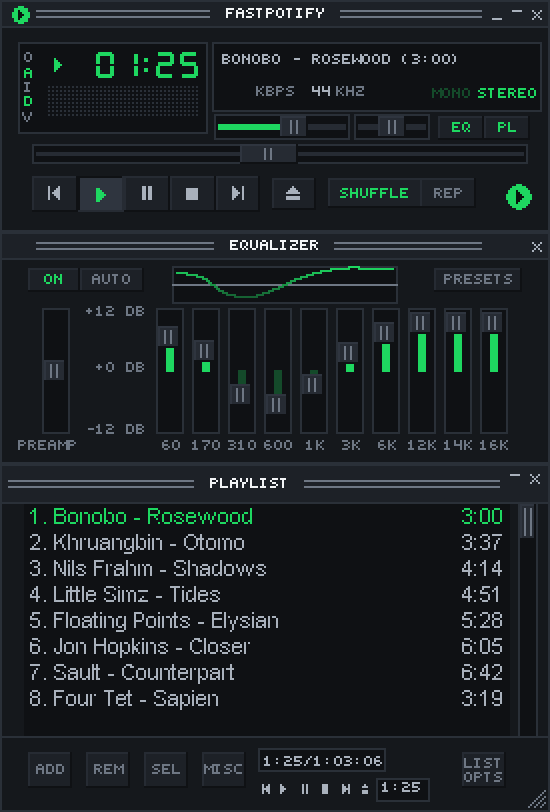
-
Right-to-left text reads the right way. Arabic and Hebrew titles, lyrics, descriptions, the search field, podcasts, and the sidebar are in reading order, wrapped lines included. Thanks @zHeuzy2 for the fix (#51) and @Alimedhat000 for the report and the checking. (#37)
-
A tougher audio output by @crmne. The music is converted to the output's rate in one continuous piece when a device will not take 44.1 kHz, so no more crackle on Windows' 48 kHz default; the Windows audio engine holds a tenth of a second of sound instead of ten milliseconds, and the thread that decodes runs a step above normal priority, so even a busy, low-end PC plays clean. Thanks @manhchuduc for chasing it down on one. (#88)
-
The output follows the system's default device by @crmne, while music plays on this computer, on Windows and macOS: plug in headphones, connect a speaker, or pick another device in the sound settings and playback moves there. Linux already had this from PipeWire. Thanks @ThrowTop for the request. (#64)
-
Playback picks up where it stopped after a reconnect by @crmne. When the session to Spotify drops mid-song, the song comes back at the same spot on the new session, playing or paused as it was, instead of leaving silence. (#25)
-
Autoplay carries on after a song or a list by @crmne. A single song played on this computer now plays as a context of its own, so Spotify's similar songs follow it without a gap; a plain list, such as search results, continues with the station seeded by its last song. Thanks @lilMarkoo for the report. (#87)
-
Emoji and symbols draw instead of boxes. A monochrome Noto Emoji ships with the app, in the interface and the mini player's marquee, and the system's symbol fonts are borrowed for the rest. Thanks @AndrewMason7. (#97)
-
Compact views, as Spotify has them: a names-only library sidebar and one-line track rows without covers, both under Appearance in Settings. Thanks @kveld9. (#78, #82)
-
The macOS window runs to the top edge, the title bar strip is gone, and the traffic lights float over the sidebar, the way Spotify and Music look. Thanks @koels. (#59)
-
macOS keeps its Dock icon after Cmd+W, and clicking it brings the window back. Thanks @marijnbent. (#67)
-
Shuffle starts at a random song from anywhere: from the sidebar, a card, or a menu, not only from an open playlist. Thanks @oyuh. (#85)
-
The mouse's back and forward buttons go back and forward through the pages, by @crmne. Thanks @D3SOX for the request. (#86)
-
The wheel over the volume slider turns it five percent a notch, in the big window, the mini player, and the equalizer's shade bar, by @crmne. Thanks @penguin221 for the request. (#90)
-
Long playlists scroll lighter: a table's sorted and filtered view is kept between frames instead of being sorted again on every scroll and hover. Thanks @kveld9. (#57)
-
Ctrl+W, Cmd+W on macOS, closes the window, the big one or the mini player, the way the close button does. By @crmne.
-
A Free account is told once, right after signing in, that Spotify only lets Premium accounts play through another app. By @crmne. (#69)
-
A Flatpak bundle by @crmne of the Linux build,
fastpotify-v0.4.0-x86_64.flatpak, for every distribution with Flatpak:flatpak install --userthe file. A Flathub listing follows. On Arch, the AUR packages arefastpotify-bin(the released build),fastpotify(the release built from source), andfastpotify-git.
Fixed
- Browser sign-in no longer leaves a defunct
fastpotify-backprocess behind on Linux. Thanks @kveld9 for the fix and @amedeo for the report. (#74, #77) - Cards with a two-line subtitle no longer paint the second line past the card's edge. Thanks @hewel. (#70)
- Local playback no longer pins Spotify's access point to port 443, which some networks refuse. Thanks @hewel. (#71)
- "Made for you" no longer picks up the auto-generated mixes of an artist who happens to be called "Discover Weekly" or "Release Radar". By @crmne; thanks @shaded00 for the report. (#89)
- Typing
?in a text field no longer opens the shortcuts dialog. Thanks @mikenoired. (#66) - Playlist descriptions show
/instead of/. Thanks @mikenoired. (#65) - The "Update to ..." notice, the docs link, and the skin museum link open the browser. By @crmne.
- The macOS instructions clear the quarantine flag from the whole bundle, which macOS 26 needs before the app will start. Thanks @conscientiousness for working that out. (#68)
Thanks
@koels, @kveld9, @oyuh, @zHeuzy2, @hewel, @marijnbent, @mikenoired, @Alimedhat000, @ThrowTop, @McMac, @conscientiousness, @luinbytes, @danielbuhman, @amedeo, @badaccuracy, @charliealgernon, @Troytmoneys, @moaeiou, @lilMarkoo, @D3SOX, @shaded00, @manhchuduc, @penguin221, @AndrewMason7, @vidhanio, @PoxiiTV, @scrxp, @TheDutchSmoke, and @gitHatmos.
Full changelog: v0.3.0...v0.4.1


