Releases: crmne/spotifast
Release list
Spotifast 0.8.0

0.8.0 introduces custom themes and automatic Omarchy theme updates. It is also the first release under the new name, Spotifast, at spotifast.rocks. Your existing native-package settings and sign-ins carry over. Flatpak users switch to the new application ID as described below.
New
- Flatpak installs as Spotifast. The bundle now uses
rocks.spotifast.Spotifast. Install it separately from the old ID, copy settings and history if wanted, and sign in again. The repackaged bundle contains the original 0.8.0 executable. Switching instructions. By @crmne. - Make the app match your desktop. Choose Light, Dark, Follow system, or a local JSON palette. On Omarchy, packaged installs set up the theme hook at first launch and follow theme changes automatically. Open the themes folder from Settings to add your own palettes. Themes change colors while preserving the familiar layout and fonts. By @jdubba1 and @crmne. (#392)
- Install updates from inside the app. Download an update, then choose when to restart and install it. A failed installation restores the previous copy. By @coah80 and @crmne. (#383, #79)
- macOS downloads are signed and notarized by Apple. Both Apple Silicon and Intel are included in the same download. By @crmne.
- Middle-click to autoscroll on Windows. Move the pointer to scroll the current list; click or press Escape to stop. No setting is needed. By @zHeuzy2 and @crmne. (#112, #96)
- Refresh a playlist from its three-dot menu. Reload its details and songs without leaving the page. By @AQS-DS and @crmne. (#397)
- Find settings by typing their names. Settings search matches the visible controls. By @KartikeyaKotkar and @crmne. (#372)
- Double-click a Library item to play it. Play an album or playlist straight from the sidebar. By @skorokithakis. (#391)
- Drag all your selected songs together. Copy a selection into a playlist, drop into the open playlist, and scroll near list edges while dragging. By @sanketttt26 and @crmne. (#290)
- Keep the Library in your preferred order. Sort choices persist, and Liked Songs can move with other Library items. By @crmne.
- Control playback from the Windows taskbar preview. Play, pause and skip without bringing the window forward. By @Shipi1.
- Search can use your personal Spotify app. The sign-in flow explains when a personal app is useful for Premium listeners. By @joshkat and @crmne. (#388)
- Choose which recommendation shelves appear on Home. JSON settings can hide Made for you and Recommended for you independently. By @jdubba1 and @crmne. (#393, #134)
Fixed
- Shared-app playlists load through the playback session, with account-specific caches and complete song ordering. By @chagel and @crmne. (#271)
- Playlist Play starts at the first available song with shuffle off. Sorted and filtered views keep their visible order, and the requested song appears immediately. By @crmne.
- Repeated songs stay in the queue when adding a selection. Each selected occurrence is preserved. By @kevin9327. (#444)
- Recent plays keep the right songs and ordering. Repeated short-song listens remain separate, each row starts its own song, and loading older history leaves newer Library plays at the top. By @kevin9327 and @crmne. (#421, #422, #445)
- Long playlists and albums keep a full-length scrollbar. Jump to distant songs, with placeholders and Retry when a page cannot load. By @alexng353 and @crmne. (#384)
- Queue and Lyrics retain their full height beside the toolbar. Search and update controls fit the available page width. By @luiscuellar31 and @crmne. (#386, #378)
- Keyboard shortcuts respect text editing and modifiers. Arrow keys move the caret in focused fields, Queue shortcuts no longer quit the app, and the playing-album shortcut opens the album. By @kevin9327 and @crmne. (#415, #416)
- Mixed-script and right-to-left titles fit more reliably. Fallback fonts align with Inter, long RTL titles end within their text area, and Yi artist names can use installed fonts. By @kveld9, @kevin9327 and @crmne. (#345, #340, #439)
- Maximized windows restore correctly, and Windows checks mini-player positions against available monitors. By @luiscuellar31 and @crmne. (#396, #351)
- Flatpak keeps settings and sign-ins after fully quitting. By @GusMartins499. (#370)
- Spotify grants use the native credential store, with sign-in attempts isolated from older callbacks. By @crmne.
- Playback tries other addresses when a connection stalls. Connection attempts have bounded timeouts. By @crmne. (#413)
- Large playlist cache writes use less temporary memory, and bounded page caches preserve pending edits. By @Cleboost and @crmne. (#328, #320)
- EPs are shown separately from singles, submenu icons align consistently, and malformed album dates or nested unpacked skins are handled correctly. By @luiscuellar31, @kveld9, @kevin9327 and @crmne. (#356, #295, #341, #337)
- Linux packages declare the GUI libraries they need. DEB and RPM installation is checked on both architectures; Gentoo instructions are also available. By @aljazceru, @NikoMalik and @crmne. (#399, #389)
Thanks
@jdubba1, @coah80, @zHeuzy2, @AQS-DS, @KartikeyaKotkar, @skorokithakis, @sanketttt26, @Shipi1, @joshkat, @chagel, @kevin9327, @alexng353, @luiscuellar31, @kveld9, @GusMartins499, @Cleboost, @aljazceru, @NikoMalik, and everyone who reported and helped test these changes, including @juanre7.
Full changelog: v0.7.1...v0.8.0
Contributors


Assets 32
- 1.93 KB
2026-09-14T16:10:05Z - 14.5 MB
2026-09-14T14:33:55Z - 15.2 MB
2026-09-14T14:33:55Z - 3.84 KB
2026-09-14T14:43:03Z - 17.1 MB
2026-09-14T14:23:24Z - 20.7 MB
2026-09-14T14:23:24Z - 28.1 MB
2026-09-14T14:23:24Z - 51.1 MB
2026-09-14T14:23:24Z - 16.2 MB
2026-09-14T14:23:24Z - 19.2 MB
2026-09-14T14:23:24Z -
2026-09-14T14:00:59Z -
2026-09-14T14:00:59Z - Loading
v0.7.1
0.7.1 fixes playback authorization, queue behavior, and Spotify Connect discovery, and makes adding songs to playlists easier. The macOS build is not notarized yet. Follow the first-open steps on the download page.
For Nix, use the repository’s current main flake. The v0.7.1 tag contains an outdated dependency hash; its packaging correction is on main.
New
- Find a playlist by typing when adding songs. The playlist menu filters as you type and supports keyboard selection, including when adding several songs. By @crmne; thanks @nojaf. (#355)
- The queue shows where the playing song came from, with a link back to its album or playlist. By @roadev; thanks @Leviob. (#354, #173)
- Play and Pause fade smoothly with the default audio backend. By @Shipi1. (#292)
Fixed
- Playback authorization requests the permissions it needs and passes the verified account through to the player. By @nos1609 and @crmne; thanks @watermarkhu. (#352, #123)
- Clearing the queue preserves the playlist's song list. By @MaxFreedomPollard. (#344)
- Shuffle Play respects the songs you filtered and sorted. By @kveld9. (#313, #312)
- Changing shuffle no longer lets an older queue response undo the new order. By @xItzHypeR and @crmne. (#296)
- Songs on Home and Search have working context menus. By @alexng353. (#360, #357)
- Windows and macOS media controls receive album artwork. By @revolutionxk. (#289)
- The device picker scrolls through long lists and shows discovered devices by name. By @crmne; thanks @erseco, @steff75, and @ewosborne. (#358, #366, #137)
- Flatpak can keep playing after its window closes, with a tray registration that works within its sandbox. By @crmne; thanks @alex-magter and @steff75. (#363)
- “Add to queue” describes where a song will go. The menu no longer says “Play next” when appending behind songs already queued. By @crmne; thanks @jorisw. (#365)
Thanks
@roadev, @Shipi1, @nos1609, @MaxFreedomPollard, @kveld9, @xItzHypeR, @alexng353, @revolutionxk, @nojaf, @Leviob, @watermarkhu, @erseco, @steff75, @ewosborne, @alex-magter, and @jorisw.
Full changelog: v0.7.0...v0.7.1
Contributors


Assets 12
v0.7.0
0.7.0 adds keyboard and screen-reader access to the main controls, manual update checks, and a round of scrolling, window, font, and performance fixes. The macOS build is not notarized yet. Follow the first-open steps on the download page.
New
- Main-window controls have screen-reader names and keyboard actions. Tab through playback controls, library and song rows, menus, sliders, and settings. By @crmne; thanks @mutebalflani-ui. Hands-on NVDA verification on Windows is still needed. (#262)
- Check for updates whenever you want from Settings, or the application menu on macOS. Automatic checks can be turned off. By @crmne.
- Press B to like or unlike the playing song. By @crmne.
- The Nix package includes a macOS app bundle. By @ankarhem. (#276)
Fixed
- Shift and the mouse wheel scroll horizontal shelves, including Made for you and Recently played, without moving the page. By @crmne; thanks @alexng353. (#318)
- The Winamp mini player keeps its position and shade mode when switching back from the main window. Position restoration was verified on X11; Wayland placement remains controlled by the compositor. By @crmne; thanks @skorokithakis. (#326)
- The main window returns to an available monitor after its previous display is disconnected. By @c0sui. (#317)
- Removing a song from Liked Songs no longer crashes. By @SrVariable. (#305, #307)
- Skipping to another song no longer makes a click. By @crmne; thanks @Shipi1. (#288)
- A stalled Spotify connection moves on to the next endpoint after a bounded connection attempt. By @crmne.
- Large libraries, tables, and queues do less work while browsing. Artwork caches and the spectrum analyser also use memory more efficiently. By @Cleboost. (#319, #321, #322, #323, #324)
- macOS uses the system’s preferred fonts for each script, and Windows chooses regional character forms from the display language. By @OnCloud125252 and @kevin9327. The separate macOS mixed-script baseline issue remains open. (#334, #314, #327)
- More Winamp skins load and display text correctly. Text files with a byte order mark are accepted, full-width punctuation uses the skin's bitmap font, and malformed Unicode color values no longer crash. By @kevin9327. (#330, #332, #315)
- Malformed percent escapes in playlist folder names no longer crash. By @kevin9327. (#338)
- Lyrics searches preserve Unicode titles when removing featuring credits. By @kevin9327. (#339)
- Left-clicking the Windows tray icon no longer opens its context menu. By @TnZzZHlp. (#309, #310)
Thanks
@ankarhem, @seuros, @Shipi1, @SrVariable, @TnZzZHlp, @kevin9327, @c0sui, @Cleboost, @OnCloud125252, @mutebalflani-ui, @alexng353, @skorokithakis, and @future10se.
Full changelog: v0.6.0...v0.7.0
Contributors


Assets 12
v0.6.0
0.6.0 teaches Fastpotify to open Spotify links, makes playlist edits immediate, and brings a fresh round of platform and playback fixes. The macOS build is not notarized yet. Follow the first-open steps on the download page.
New
- Spotify links open in Fastpotify by @crmne. A song, album, artist, playlist, or podcast shared from another app opens in the running window, or starts Fastpotify when it is closed.
- The playing song can be dragged into a playlist by @crmne. Drop the cover or title from the player bar onto an editable playlist in the sidebar.
- Playlists shared by invitation take songs too by @crmne, when Spotify says the listener may edit them.
Fixed
- Playlist edits stay on screen while Spotify catches up. Adding, removing, and reordering songs update immediately, keep the cached playlist, and no longer reload the library. By @crmne; thanks @LittleDeng1. (#269)
- Adding a duplicate asks first and names the song. By @crmne; thanks @Ashur-D. (#115)
- Large playlists resume from cached progress instead of downloading from the beginning again. By @crmne; thanks @miltieIV2. (#259)
- Playlist folders remain visible across restarts and while local playback is temporarily unavailable. By @crmne; thanks @jorisw. (#175)
- Playing and Liked Songs markers stay put while Spotify catches up, including when Spotify uses a market-specific ID for the same recording. By @crmne.
- The Windows build no longer needs a separately installed Visual C++ runtime. By @crmne; thanks @AlvaroB15. (#263)
- The Winamp mini player's Always on top setting works immediately, including on X11. By @achton. (#232)
- The main window keeps its size and position after returning from Winamp. By @kveld9; thanks @Bluezerg44. (#136, #260)
- Library search is ready for typing as soon as it opens. By @kveld9; thanks @jorisw. (#178, #261)
- Interface Zoom reads minus, percentage, plus. By @sanketttt26; thanks @stellarpartners. (#227, #256)
- Local playback starts again when a reconnected Spotify session comes back inactive. By @crmne; thanks @marijnbent, @conscientiousness, and @bakzkndd. (#25)
- The AUR source package declares CMake and Clang as build dependencies. By @crmne; thanks @BarbUk. (#226)
- Severely rate-limited shared requests point to the personal Spotify app setup. By @crmne.
Thanks
@BraydenPB, @achton, @sanketttt26, @kveld9, @LittleDeng1, @Ashur-D, @miltieIV2, @jorisw, @AlvaroB15, @Bluezerg44, @stellarpartners, @marijnbent, @conscientiousness, @bakzkndd, and @BarbUk.
Full changelog: v0.5.0...v0.6.0
Contributors


Assets 11
v0.5.0
0.5.0 adds MilkDrop, a better queue, playback history, and multi-select. The macOS build is not notarized yet. Follow the first-open steps on the download page.
New
-
MilkDrop by @crmne. Run it in its own window, make it fullscreen, and switch between thousands of presets. It is not included in the Windows on ARM build.
fastpotify-0.5.0-milkdrop.mp4
-
A better queue by @crmne. It updates immediately, survives restarts, and can be cleared or saved as a playlist. Song radio now opens with its queue visible. Thanks @shaded00. (#93)
-
Recent now includes Spotify history and songs played in Fastpotify. By @zHeuzy2 and @crmne. Thanks @penguin221. (#106, #113)
-
Multi-select by @crmne. Ctrl-click or Cmd-click selects songs. Shift-click selects a range. Thanks @penguin221. (#105)
-
Fastpotify remembers the last song and position. By @koels. (#98)
Fixed
- Artwork no longer makes the window flash. By @crmne; thanks @Ianuarius. (#129)
- Browser sign-in works when Windows cannot find
powershell.exe. By @crmne; thanks @Nippey. (#107) - The macOS first-open command works on macOS 27. By @crmne; thanks @jorisw. (#126)
- The Winamp mini player comes back out of the Dock instead of freezing the app. By @iDiegoNL and @crmne; thanks @saipreetham99. (#141, #167)
- Now Playing artwork loads from Fastpotify's disk cache instead of making another network request. By @iDiegoNL and @crmne. (#117)
- Playing a plain track clears stale playlist and album context from the sidebar. By @goerll and @crmne. (#121)
- Spotify audio-key refusals stop with a clear error instead of skipping through the queue. By @crmne, based on an upstream librespot fix by Kristoffer Haugland; thanks @RyuuseiAkira. (#139)
- Chinese, Japanese, and Korean fallback fonts follow the reader's region. By @chagel and @crmne. (#169)
- The Nix package builds again. By @mixedCase and @crmne. (#116)
- Source installation instructions now cover Fedora and use a locked Cargo install. By @chinifabio and @crmne. (#138)
Thanks
@koels, @zHeuzy2, @braydenpb72, @penguin221, @shaded00, @Nippey, @jorisw, @Ianuarius, @iDiegoNL, @goerll, @chinifabio, @chagel, @mixedCase, @RyuuseiAkira, and @saipreetham99.
Full changelog: v0.4.1...v0.5.0
Contributors


Assets 11
v0.5.0-rc2
 crmne
Carmine Paolino
crmne
Carmine Paolino
0.5.0-rc2 adds MilkDrop, a better queue, playback history, and multi-select. The macOS build is not notarized yet. Follow the first-open steps on the download page.
New
-
MilkDrop by @crmne. Run it in its own window, make it fullscreen, and switch between thousands of presets. It is not included in the Windows on ARM build.
fastpotify-milkdrop-demo.mp4
-
A better queue by @crmne. It updates immediately, survives restarts, and can be cleared or saved as a playlist. Song radio now opens with its queue visible. Thanks @shaded00. (#93)
-
Recent now includes Spotify history and songs played in Fastpotify. By @zHeuzy2 and @crmne. Thanks @penguin221. (#106, #113)
-
Multi-select by @crmne. Ctrl-click or Cmd-click selects songs. Shift-click selects a range. Thanks @penguin221. (#105)
-
Fastpotify remembers the last song and position. By @koels. (#98)
Fixed
- Artwork no longer makes the window flash. By @crmne; thanks @Ianuarius. (#129)
- Browser sign-in works when Windows cannot find
powershell.exe. By @crmne; thanks @Nippey. (#107) - The macOS first-open command works on macOS 27. By @crmne; thanks @jorisw. (#126)
Thanks
@koels, @zHeuzy2, @braydenpb72, @penguin221, @shaded00, @Nippey, @jorisw, and @Ianuarius.
Full changelog: v0.4.1...v0.5.0-rc2
Contributors
Assets 11
v0.5.0-rc1
crmne
Carmine Paolino
0.5.0-rc1 adds MilkDrop, a better queue, playback history, and multi-select. The macOS build is not notarized yet. Follow the first-open steps on the download page.
Known issues
This release introduces audio stuttering on macOS. Please use 0.5.0-rc2 instead.
New
-
MilkDrop by @crmne. Run it in its own window, make it fullscreen, and switch between thousands of presets. It is not included in the Windows on ARM build.
fastpotify-milkdrop-demo.mp4
-
A better queue by @crmne. It updates immediately, survives restarts, and can be cleared or saved as a playlist. Song radio now opens with its queue visible. Thanks @shaded00. (#93)
-
Recent now includes Spotify history and songs played in Fastpotify. By @zHeuzy2 and @crmne. Thanks @penguin221. (#106, #113)
-
Multi-select by @crmne. Ctrl-click or Cmd-click selects songs. Shift-click selects a range. Thanks @penguin221. (#105)
-
Fastpotify remembers the last song and position. By @koels. (#98)
Fixed
- Artwork no longer makes the window flash. By @crmne; thanks @Ianuarius. (#129)
- Browser sign-in works when Windows cannot find
powershell.exe. By @crmne; thanks @Nippey. (#107) - The macOS first-open command works on macOS 27. By @crmne; thanks @jorisw. (#126)
Thanks
@koels, @zHeuzy2, @braydenpb72, @penguin221, @shaded00, @Nippey, @jorisw, and @Ianuarius.
Full changelog: v0.4.1...v0.5.0-rc1
Contributors
Assets 11
v0.4.1
Fastpotify turns into Winamp. 0.4.1 is 0.4.0 plus a first day of fixes, and these notes carry the whole story: the mini player with classic skin support, right-to-left text, compact views, a tougher audio output, and a long list of fixes. Thanks to everyone who tried the five release candidates and reported back. The macOS build is not notarized yet, so the first-open steps on the download page apply; clear the quarantine flag with xattr -dr on macOS 26.
New in 0.4.1
- Each credited artist is its own link, in the track tables and the player bar, instead of one link that always opened the first; a comma inside a name stays a name. Thanks @mikenoired. (#100)
- The Date added column says how long ago for the first thirty days, the way Spotify does, and keeps the calendar date beyond that. Thanks @mikenoired. (#102)
- The mini player's playlist follows a double-click at once instead of waiting for the queue to be fetched again. By @crmne.
- The scroll wheel moves one step a notch on Windows, which multiplies a notch into its line setting and made the volume jump fifteen percent. By @crmne; thanks @scrxp for the report. (#103)
- Japanese and every other script the skin's font lacks scroll through the marquee in the pixel face the playlist already uses, instead of a row of question marks. By @crmne; thanks @gitHatmos for the report. (#104)
- The card shelves show their scrollbar when the pointer is over them, so a mouse can move them. By @crmne; thanks @TheDutchSmoke for the report. (#101)
- The equalizer's AUTO button lays the bands flat, instead of sitting dead. By @crmne.
New in 0.4.0
-
The Winamp mini player by @crmne. Ctrl+M (Cmd+Shift+M on macOS), the shrink button beside the settings gear, or Settings turns Fastpotify into a small player that wears classic Winamp 2 skins: drop a
.wszon the window, or pick one in Settings. It ships with a skin of its own in the app's colours. The display has the spectrum analyser, with Winamp's own algorithm on its own sixty-hertz clock, and the oscilloscope in the skin's colours; the playlist window hangs under the player and scrolls, resizes, and rolls up; the equalizer has Winamp's presets, frequencies, and band widths, a preamp from -12 to +12 dB, balance, and mono; all three windows have their shade mode, and the menus wear the skin's colours and stay inside the window. The window is drawn at whole pixels, 1x to 4x, can stay on top, and skins that are not rectangles keep their shape.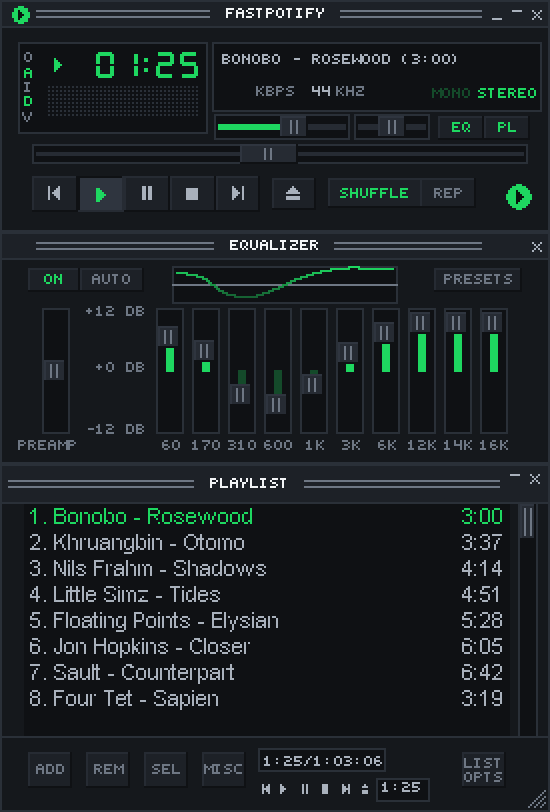
-
Right-to-left text reads the right way. Arabic and Hebrew titles, lyrics, descriptions, the search field, podcasts, and the sidebar are in reading order, wrapped lines included. Thanks @zHeuzy2 for the fix (#51) and @Alimedhat000 for the report and the checking. (#37)
-
A tougher audio output by @crmne. The music is converted to the output's rate in one continuous piece when a device will not take 44.1 kHz, so no more crackle on Windows' 48 kHz default; the Windows audio engine holds a tenth of a second of sound instead of ten milliseconds, and the thread that decodes runs a step above normal priority, so even a busy, low-end PC plays clean. Thanks @manhchuduc for chasing it down on one. (#88)
-
The output follows the system's default device by @crmne, while music plays on this computer, on Windows and macOS: plug in headphones, connect a speaker, or pick another device in the sound settings and playback moves there. Linux already had this from PipeWire. Thanks @ThrowTop for the request. (#64)
-
Playback picks up where it stopped after a reconnect by @crmne. When the session to Spotify drops mid-song, the song comes back at the same spot on the new session, playing or paused as it was, instead of leaving silence. (#25)
-
Autoplay carries on after a song or a list by @crmne. A single song played on this computer now plays as a context of its own, so Spotify's similar songs follow it without a gap; a plain list, such as search results, continues with the station seeded by its last song. Thanks @lilMarkoo for the report. (#87)
-
Emoji and symbols draw instead of boxes. A monochrome Noto Emoji ships with the app, in the interface and the mini player's marquee, and the system's symbol fonts are borrowed for the rest. Thanks @AndrewMason7. (#97)
-
Compact views, as Spotify has them: a names-only library sidebar and one-line track rows without covers, both under Appearance in Settings. Thanks @kveld9. (#78, #82)
-
The macOS window runs to the top edge, the title bar strip is gone, and the traffic lights float over the sidebar, the way Spotify and Music look. Thanks @koels. (#59)
-
macOS keeps its Dock icon after Cmd+W, and clicking it brings the window back. Thanks @marijnbent. (#67)
-
Shuffle starts at a random song from anywhere: from the sidebar, a card, or a menu, not only from an open playlist. Thanks @oyuh. (#85)
-
The mouse's back and forward buttons go back and forward through the pages, by @crmne. Thanks @D3SOX for the request. (#86)
-
The wheel over the volume slider turns it five percent a notch, in the big window, the mini player, and the equalizer's shade bar, by @crmne. Thanks @penguin221 for the request. (#90)
-
Long playlists scroll lighter: a table's sorted and filtered view is kept between frames instead of being sorted again on every scroll and hover. Thanks @kveld9. (#57)
-
Ctrl+W, Cmd+W on macOS, closes the window, the big one or the mini player, the way the close button does. By @crmne.
-
A Free account is told once, right after signing in, that Spotify only lets Premium accounts play through another app. By @crmne. (#69)
-
A Flatpak bundle by @crmne of the Linux build,
fastpotify-v0.4.0-x86_64.flatpak, for every distribution with Flatpak:flatpak install --userthe file. A Flathub listing follows. On Arch, the AUR packages arefastpotify-bin(the released build),fastpotify(the release built from source), andfastpotify-git.
Fixed
- Browser sign-in no longer leaves a defunct
fastpotify-backprocess behind on Linux. Thanks @kveld9 for the fix and @amedeo for the report. (#74, #77) - Cards with a two-line subtitle no longer paint the second line past the card's edge. Thanks @hewel. (#70)
- Local playback no longer pins Spotify's access point to port 443, which some networks refuse. Thanks @hewel. (#71)
- "Made for you" no longer picks up the auto-generated mixes of an artist who happens to be called "Discover Weekly" or "Release Radar". By @crmne; thanks @shaded00 for the report. (#89)
- Typing
?in a text field no longer opens the shortcuts dialog. Thanks @mikenoired. (#66) - Playlist descriptions show
/instead of/. Thanks @mikenoired. (#65) - The "Update to ..." notice, the docs link, and the skin museum link open the browser. By @crmne.
- The macOS instructions clear the quarantine flag from the whole bundle, which macOS 26 needs before the app will start. Thanks @conscientiousness for working that out. (#68)
Thanks
@koels, @kveld9, @oyuh, @zHeuzy2, @hewel, @marijnbent, @mikenoired, @Alimedhat000, @ThrowTop, @McMac, @conscientiousness, @luinbytes, @danielbuhman, @amedeo, @badaccuracy, @charliealgernon, @Troytmoneys, @moaeiou, @lilMarkoo, @D3SOX, @shaded00, @manhchuduc, @penguin221, @AndrewMason7, @vidhanio, @PoxiiTV, @scrxp, @TheDutchSmoke, and @gitHatmos.
Full changelog: v0.3.0...v0.4.1
Contributors


Assets 11
v0.4.0
Fastpotify turns into Winamp. Five release candidates and a lot of testing later, 0.4.0 brings the mini player with classic skin support, right-to-left text, compact views, a tougher audio output, and a long list of fixes. Thanks to everyone who tried the candidates and reported back. The macOS build is not notarized yet, so the first-open steps on the download page apply; clear the quarantine flag with xattr -dr on macOS 26.
New
-
The Winamp mini player by @crmne. Ctrl+M (Cmd+Shift+M on macOS), the shrink button beside the settings gear, or Settings turns Fastpotify into a small player that wears classic Winamp 2 skins: drop a
.wszon the window, or pick one in Settings. It ships with a skin of its own in the app's colours. The display has the spectrum analyser, with Winamp's own algorithm on its own sixty-hertz clock, and the oscilloscope in the skin's colours; the playlist window hangs under the player and scrolls, resizes, and rolls up; the equalizer has Winamp's presets, frequencies, and band widths, a preamp from -12 to +12 dB, balance, and mono; all three windows have their shade mode, and the menus wear the skin's colours and stay inside the window. The window is drawn at whole pixels, 1x to 4x, can stay on top, and skins that are not rectangles keep their shape.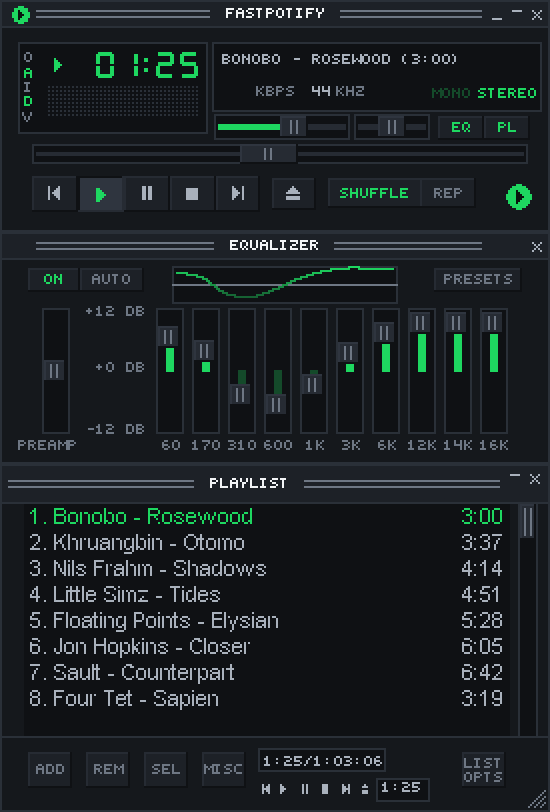
-
Right-to-left text reads the right way. Arabic and Hebrew titles, lyrics, descriptions, the search field, podcasts, and the sidebar are in reading order, wrapped lines included. Thanks @zHeuzy2 for the fix (#51) and @Alimedhat000 for the report and the checking. (#37)
-
A tougher audio output by @crmne. The music is converted to the output's rate in one continuous piece when a device will not take 44.1 kHz, so no more crackle on Windows' 48 kHz default; the Windows audio engine holds a tenth of a second of sound instead of ten milliseconds, and the thread that decodes runs a step above normal priority, so even a busy, low-end PC plays clean. Thanks @manhchuduc for chasing it down on one. (#88)
-
The output follows the system's default device by @crmne, while music plays on this computer, on Windows and macOS: plug in headphones, connect a speaker, or pick another device in the sound settings and playback moves there. Linux already had this from PipeWire. Thanks @ThrowTop for the request. (#64)
-
Playback picks up where it stopped after a reconnect by @crmne. When the session to Spotify drops mid-song, the song comes back at the same spot on the new session, playing or paused as it was, instead of leaving silence. (#25)
-
Autoplay carries on after a song or a list by @crmne. A single song played on this computer now plays as a context of its own, so Spotify's similar songs follow it without a gap; a plain list, such as search results, continues with the station seeded by its last song. Thanks @lilMarkoo for the report. (#87)
-
Emoji and symbols draw instead of boxes. A monochrome Noto Emoji ships with the app, in the interface and the mini player's marquee, and the system's symbol fonts are borrowed for the rest. Thanks @AndrewMason7. (#97)
-
Compact views, as Spotify has them: a names-only library sidebar and one-line track rows without covers, both under Appearance in Settings. Thanks @kveld9. (#78, #82)
-
The macOS window runs to the top edge, the title bar strip is gone, and the traffic lights float over the sidebar, the way Spotify and Music look. Thanks @koels. (#59)
-
macOS keeps its Dock icon after Cmd+W, and clicking it brings the window back. Thanks @marijnbent. (#67)
-
Shuffle starts at a random song from anywhere: from the sidebar, a card, or a menu, not only from an open playlist. Thanks @oyuh. (#85)
-
The mouse's back and forward buttons go back and forward through the pages, by @crmne. Thanks @D3SOX for the request. (#86)
-
The wheel over the volume slider turns it five percent a notch, in the big window, the mini player, and the equalizer's shade bar, by @crmne. Thanks @penguin221 for the request. (#90)
-
Long playlists scroll lighter: a table's sorted and filtered view is kept between frames instead of being sorted again on every scroll and hover. Thanks @kveld9. (#57)
-
Ctrl+W, Cmd+W on macOS, closes the window, the big one or the mini player, the way the close button does. By @crmne.
-
A Free account is told once, right after signing in, that Spotify only lets Premium accounts play through another app. By @crmne. (#69)
-
A Flatpak bundle by @crmne of the Linux build,
fastpotify-v0.4.0-x86_64.flatpak, for every distribution with Flatpak:flatpak install --userthe file. A Flathub listing follows. On Arch, the AUR packages arefastpotify-bin(the released build),fastpotify(the release built from source), andfastpotify-git.
Fixed
- Browser sign-in no longer leaves a defunct
fastpotify-backprocess behind on Linux. Thanks @kveld9 for the fix and @amedeo for the report. (#74, #77) - Cards with a two-line subtitle no longer paint the second line past the card's edge. Thanks @hewel. (#70)
- Local playback no longer pins Spotify's access point to port 443, which some networks refuse. Thanks @hewel. (#71)
- "Made for you" no longer picks up the auto-generated mixes of an artist who happens to be called "Discover Weekly" or "Release Radar". By @crmne; thanks @shaded00 for the report. (#89)
- Typing
?in a text field no longer opens the shortcuts dialog. Thanks @mikenoired. (#66) - Playlist descriptions show
/instead of/. Thanks @mikenoired. (#65) - The "Update to ..." notice, the docs link, and the skin museum link open the browser. By @crmne.
- The macOS instructions clear the quarantine flag from the whole bundle, which macOS 26 needs before the app will start. Thanks @conscientiousness for working that out. (#68)
Thanks
@koels, @kveld9, @oyuh, @zHeuzy2, @hewel, @marijnbent, @mikenoired, @Alimedhat000, @ThrowTop, @McMac, @conscientiousness, @luinbytes, @danielbuhman, @amedeo, @badaccuracy, @charliealgernon, @Troytmoneys, @moaeiou, @lilMarkoo, @D3SOX, @shaded00, @manhchuduc, @penguin221, @AndrewMason7, @vidhanio, and @PoxiiTV.
Full changelog: v0.3.0...v0.4.0
Contributors
Assets 11
v0.4.0-rc5
The fifth release candidate for 0.4.0, cut for Windows on a busy, low-end PC, where rc4's output still stuttered under load. The macOS build is still not notarized, so the first-open steps on the download page apply; clear the quarantine flag with xattr -dr on macOS 26.
New since rc4
- Windows: room for a busy PC. The Windows audio engine held ten milliseconds of sound, which a loaded PC misses now and then, each miss a click; the stream now asks for a tenth of a second. The thread that decodes the music runs a step above normal priority, so a browser in the foreground cannot starve it. Please try this on a slow machine with something heavy in the foreground. (#88)
- The mini player's analyser moves on its own clock, sixty times a second as Winamp's did, instead of once per painted frame, so the bars no longer fall faster while the mouse moves over the window.
- The paused time display blinks properly on skins without
nums_ex.bmp, such as the classic 2.91 skin, instead of showing the skin's own pixels under the digits.
New since rc3
- Windows: no more crackle from the output. Windows shares a device at the rate in its sound settings, 48 kHz on most PCs, and the music was converted to it chunk by chunk, with a small step in the waveform at every chunk: heard as static and short stutters. It is now converted in one continuous piece, and the check for a changed default output runs off the thread that feeds the music. The log says what rate the output runs at. (#88)
- The mini player's menus stay inside the window. The presets, the options, and the playlist's menus scroll instead of running off the screen at 1x and 2x, and they wear the skin's playlist colours instead of the app's.
- The wheel over the volume slider turns it five percent a notch, in the big window, the mini player, and the equalizer's shade bar. (#90)
- The equalizer's bands have Winamp's frequencies and widths. Each slider now shapes its own band instead of piling up with its neighbours at the top, the presets are Winamp's exact values, and the preamp runs from -12 to +12 dB as Winamp's did.
- The built-in skin's playlist shade bar no longer shows a row of boxes.
New since rc2
- Autoplay carries on after a song or a list. With autoplay on, a single song played on this computer stopped when it ended. It now plays as a context of its own, so Spotify's similar songs follow it without a gap; a plain list, such as search results, continues with the station seeded by its last song. (#87)
- The mouse's back and forward buttons go back and forward through the pages. (#86)
- Made for you no longer picks up the auto-generated mixes of an artist who happens to be called "Discover Weekly" or "Release Radar". (#89)
New since rc1
- A Flatpak bundle of the Linux build,
fastpotify-v0.4.0-rc5-x86_64.flatpak, for every distribution with Flatpak:flatpak install --userthe file. It runs in a sandbox with sound, the network, the tray, and media keys. A Flathub listing follows. - The macOS window runs to the top edge, the title bar strip is gone, and the traffic lights float over the sidebar, the way Spotify and Music look. Dragging the empty part of the top bar moves the window. Thanks @koels. (#59)
- Compact views, as Spotify has them: a names-only library sidebar and one-line track rows without covers, both under Appearance in Settings. Thanks @kveld9. (#78, #82)
- Shuffle starts at a random song from anywhere: from the sidebar, a card, or a menu, not only from an open playlist. Thanks @oyuh. (#85)
- Long playlists scroll lighter: a table's sorted and filtered view is kept between frames instead of being sorted again on every scroll and hover. Thanks @kveld9. (#57)
- Ctrl+W, Cmd+W on macOS, closes the window, the big one or the mini player, the way the close button does.
- Links open: the "Update to ..." notice in the top bar, the docs link, and the skin museum link now open the browser.
- On Arch, the AUR packages are
fastpotify-bin(the released build),fastpotify(the release built from source), andfastpotify-git.
New in 0.4.0
-
The Winamp mini player by @crmne. Ctrl+M (Cmd+Shift+M on macOS), the shrink button beside the settings gear, or Settings turns Fastpotify into a small player that wears classic Winamp 2 skins: drop a
.wszon the window, or pick one in Settings. It ships with a skin of its own in the app's colours. The display has the spectrum analyser and the oscilloscope in the skin's colours, the playlist window hangs under the player (it scrolls, resizes, and rolls up), the equalizer comes with Winamp's presets, balance and mono, and all three windows have their shade mode. The window is drawn at whole pixels, 1x to 4x, can stay on top, and skins that are not rectangles keep their shape.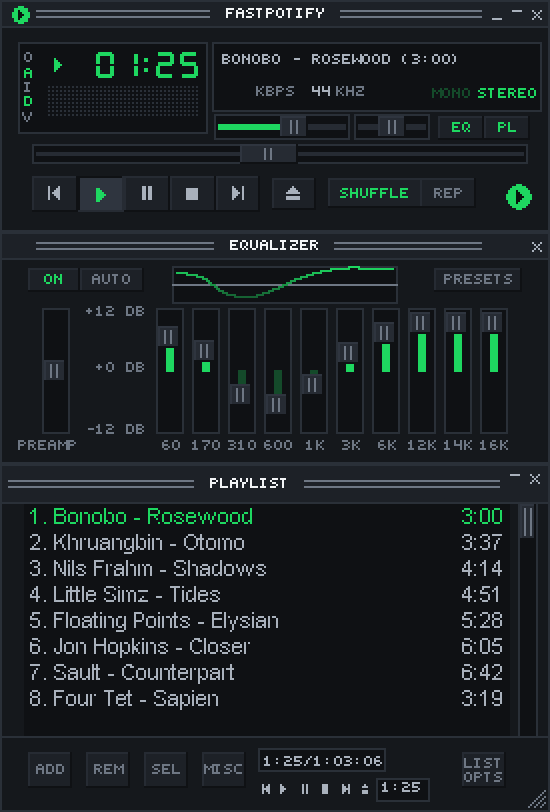
-
Right-to-left text reads the right way. Arabic and Hebrew titles, lyrics, descriptions, the search field, podcasts, and the sidebar are in reading order, wrapped lines included. Thanks @zHeuzy2 for the fix (#51) and @Alimedhat000 for the report and the checking (#37).
-
macOS keeps its Dock icon after Cmd+W, and clicking it, or the app's name in a launcher, brings the window back. Thanks @marijnbent. (#67)
-
The output follows the system's default device while music plays on this computer, on Windows and macOS: plug in headphones, connect a speaker, or pick another device in the sound settings and playback moves there. Linux already had this from PipeWire. (#64)
-
Playback picks up where it stopped after a reconnect by @crmne. When the session to Spotify drops mid-song, the song comes back at the same spot on the new session, playing or paused as it was, instead of leaving silence. (#25)
-
A Free account is told once that Spotify only lets Premium accounts play through another app, on this computer or on any other device, rather than getting a toast on every press. (#69)
Fixed
- Browser sign-in no longer leaves a defunct
fastpotify-backprocess behind on Linux. Thanks @kveld9. (#74, #77) - Cards with a two-line subtitle no longer paint the second line past the card's edge. Thanks @hewel. (#70)
- Local playback no longer pins Spotify's access point to port 443, which some networks refuse; the resolver's own order applies. Thanks @hewel. (#71)
- Typing
?in a text field no longer opens the shortcuts dialog. Thanks @mikenoired. (#66) - Playlist descriptions show
/instead of/. Thanks @mikenoired. (#65) - The macOS instructions clear the quarantine flag from the whole bundle, which macOS 26 needs before the app will start. Thanks @conscientiousness. (#68)
Thanks
@koels, @kveld9, @oyuh, @zHeuzy2, @hewel, @marijnbent, @mikenoired, @Alimedhat000, @ThrowTop, @McMac, @conscientiousness, @luinbytes, @danielbuhman, @amedeo, @badaccuracy, @charliealgernon, @Troytmoneys, @moaeiou, @lilMarkoo, @D3SOX, @shaded00, @manhchuduc, and @penguin221.
Full changelog: v0.3.0...v0.4.0-rc5