Releases: crmne/zapfast
Release list
ZapFast 0.14.0: Polls, themes, and a quieter desktop

0.14.0 brings polls, encrypted local archives, and themes that follow your desktop. It also reduces unnecessary background work and fixes everyday annoyances on Windows, macOS, and Linux.
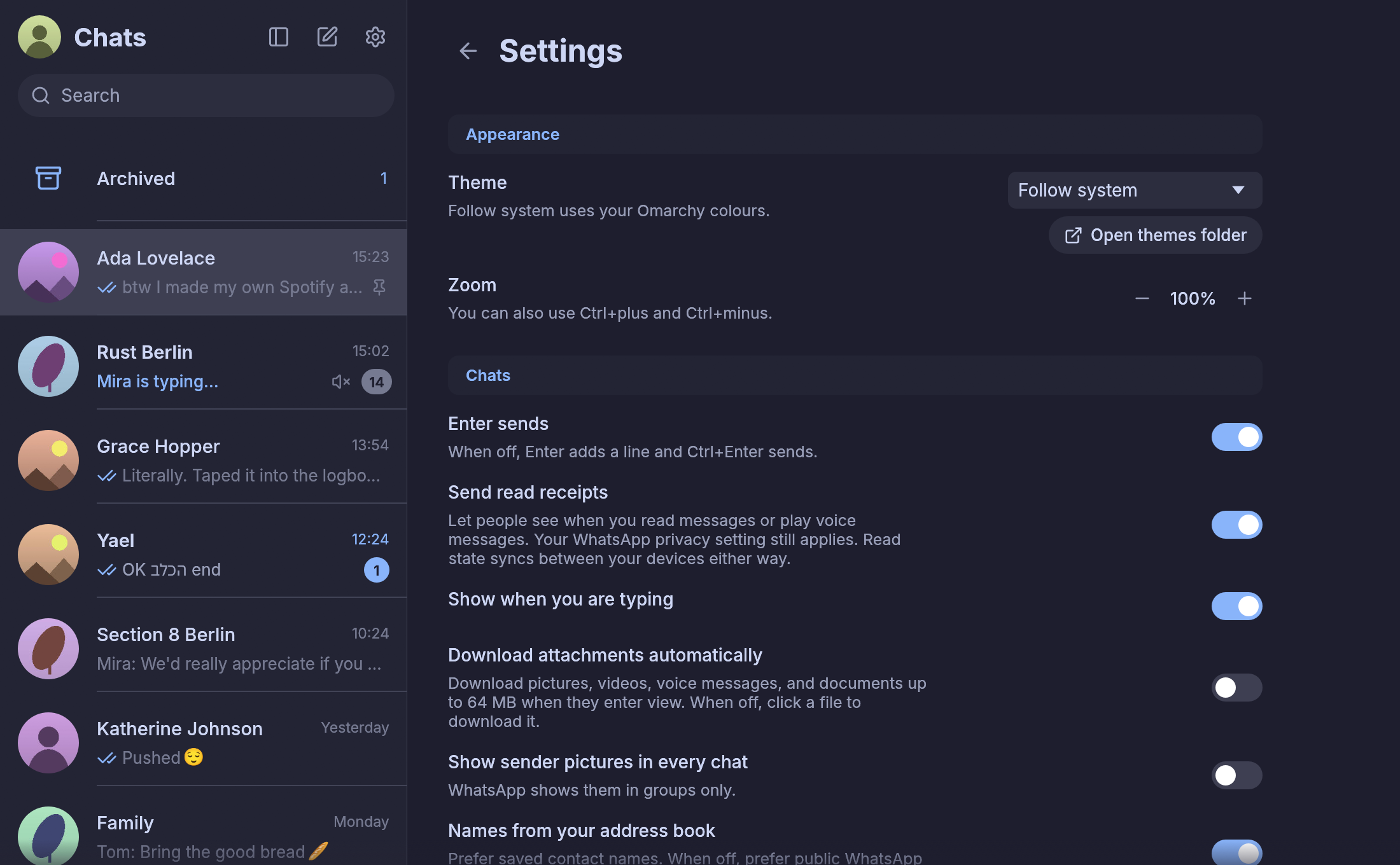
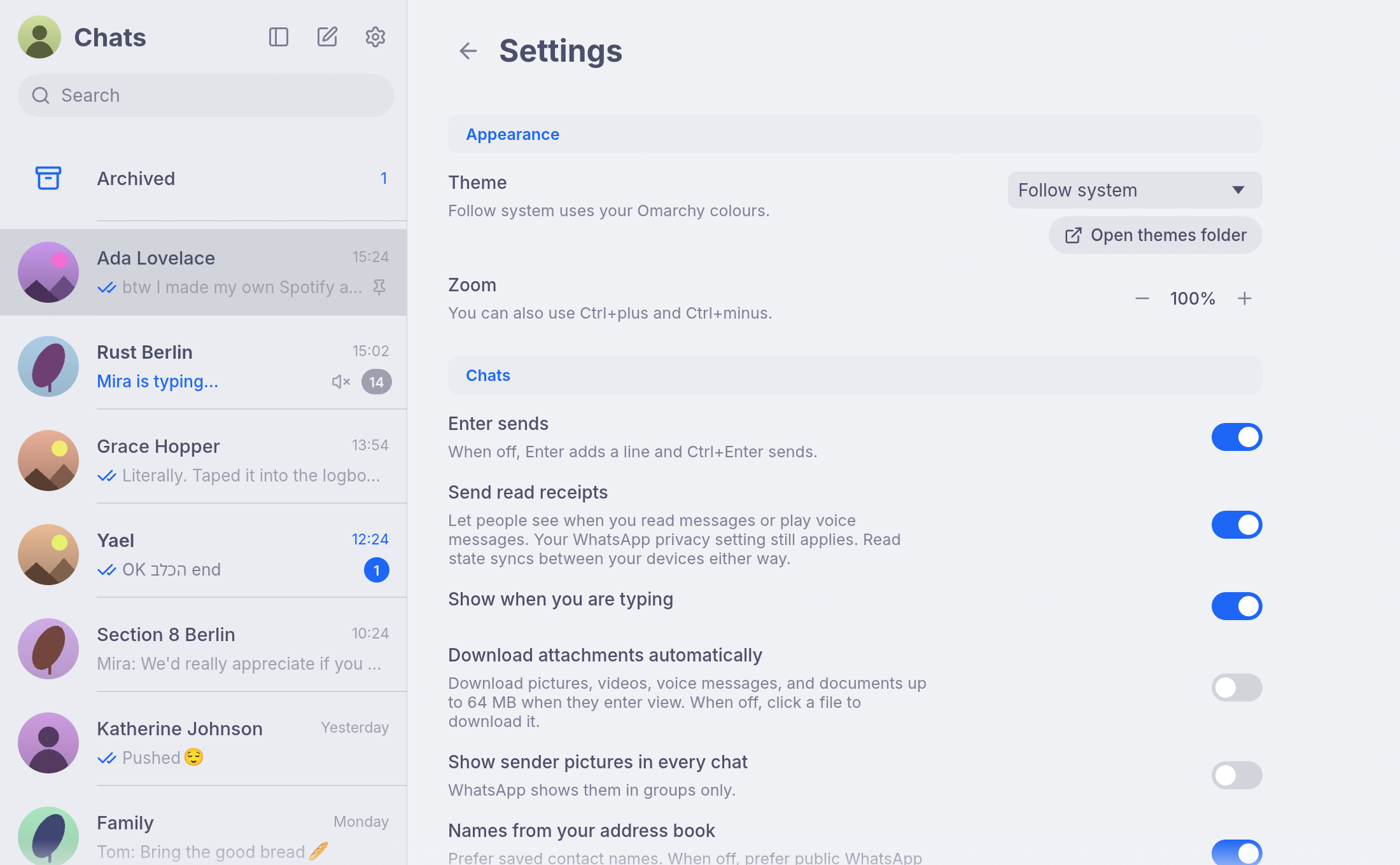
Make ZapFast feel at home on Omarchy. Choose Follow system and let the app use your desktop palette, including when you change themes. These offline demo previews show the same settings in dark and light Omarchy palettes.
screenrecording-2026-09-16_15-38-36.mp4
| Catppuccin | Catppuccin Latte |
|---|---|
 |
 |
New
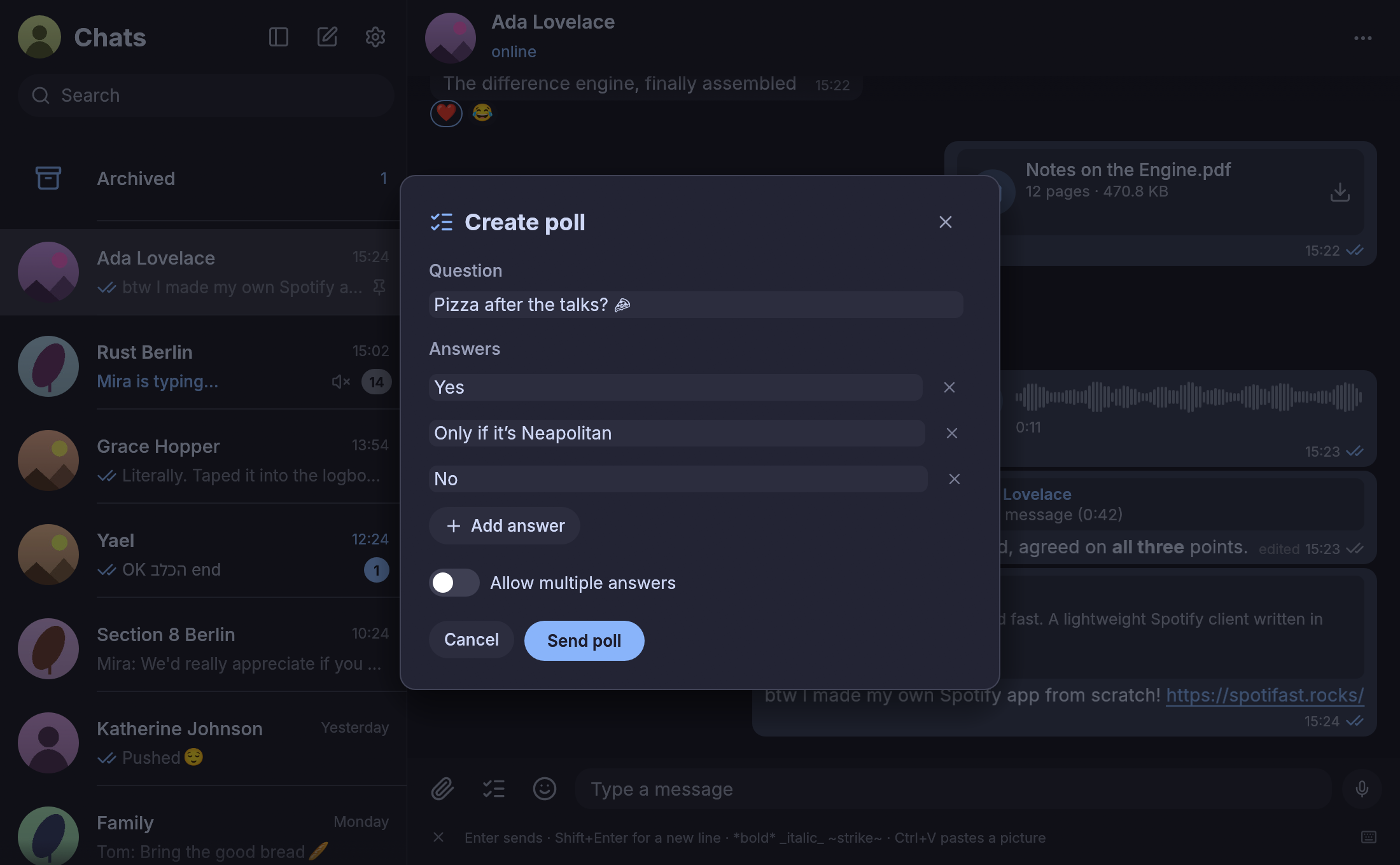
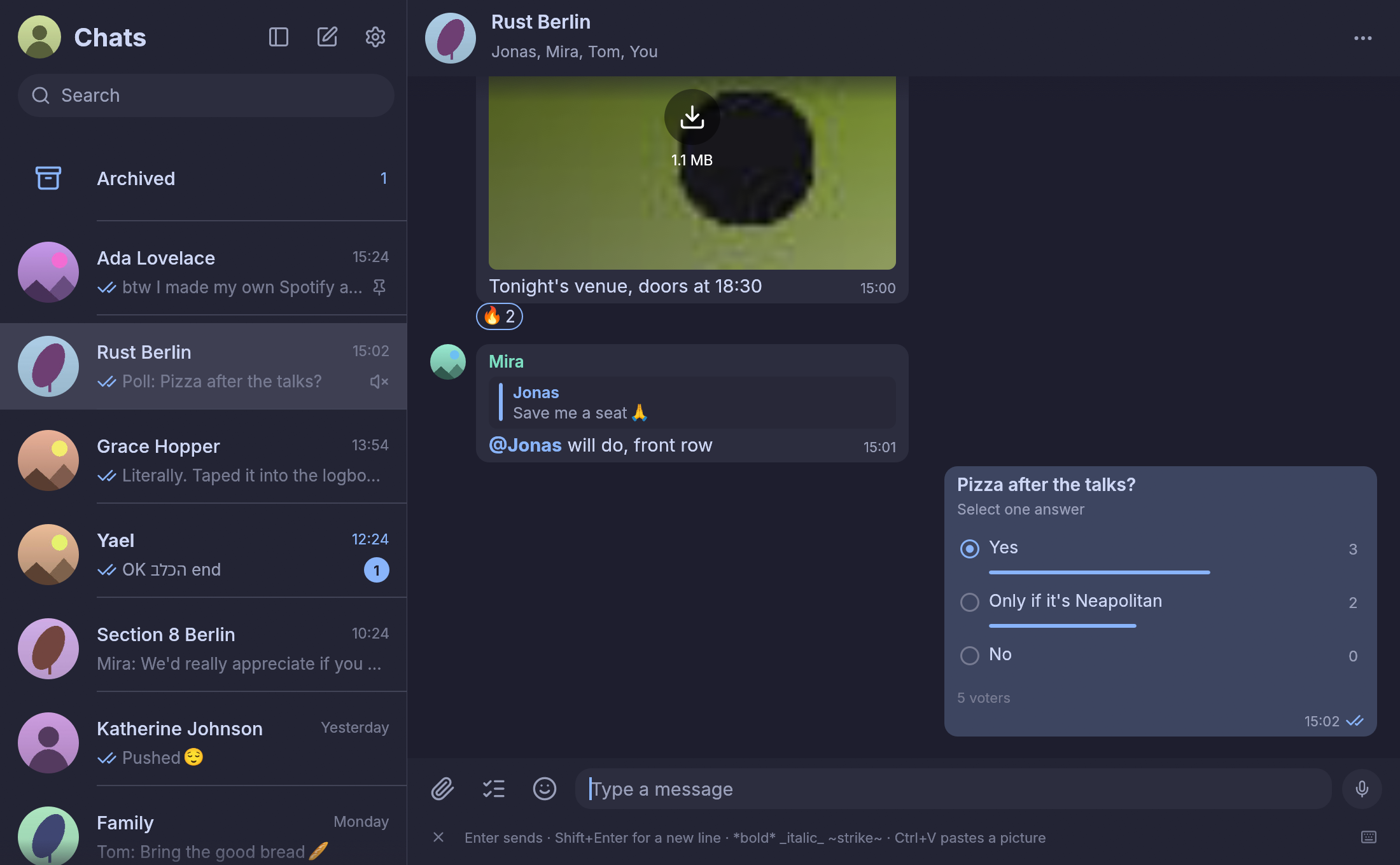
- Create and vote in polls. Use the checklist beside the attachment button to ask a question with single or multiple answers. Vote in the chat, change your selection, or click a selected answer to withdraw it. Earlier results are requested automatically from your phone. By @crmne.
- Make the app match your desktop. Choose Light, Dark, Follow system, or a local JSON palette. Catppuccin, Catppuccin Latte, Nord, Ristretto, and Tokyo Night are included. On Linux, Follow system follows Omarchy and reacts to theme changes without restarting. Ported by @crmne from the Spotifast theme work by @jdubba1 and @crmne.
- Keep the local message archive encrypted. Messages, contacts, and sticker metadata now use SQLCipher, with automatic unlocking through your OS keyring. Existing archives migrate automatically. Cached attachments remain ordinary files. By @crmne; thanks @HalanoSiblee for the report. (#4)
- Install verified updates from inside the app. Supported direct installations can download checksum-verified updates, then restart when you choose. A failed installation can restore the previous copy. Package-managed installations continue to use their package manager. Ported by @crmne from Spotifast's updater work by @coah80 and @crmne.
- See which chats have disappearing messages enabled. A timer badge appears beside the chat picture. Outgoing and forwarded messages honor the destination chat's timer. By @fgrehm and @crmne. (#7, #15)
- Get back to writing with a shortcut. Ctrl+L, or ⌘L on Mac, focuses the message input. The × on the left of the shortcut hints hides the bar; restore it in Settings. By @crmne.
- Install through your preferred package manager. Updated AUR packages, DEB/RPM packages for both Linux architectures, a Flatpak bundle, and a Homebrew cask accompany this release. On Mac:
brew install --cask crmne/tap/zapfast. By @crmne; thanks @olumolu for the Flatpak request. (#3)
Ask the group, then vote right in the conversation. All content below is synthetic demo data.
| Create a poll | Vote and see results |
|---|---|
 |
 |
Fixed
- Idle windows do less unnecessary work. Offscreen animations and history synchronization no longer drive continuous repaints, and Linux theme changes use filesystem notifications. Recovery from repeated app-state conflicts has also improved. By @crmne; thanks @fuuumornin and @nojaf. (#5, #9)
- Windows loads inline images, profile pictures, and stickers correctly. Fixed the Windows file paths passed to the image loader. By @crmne; thanks @letruxux. (#17)
- Windows notifications come from ZapFast, with compact sender pictures. Notifications no longer identify PowerShell as their source or use the avatar as a large inline image. By @crmne; thanks @letruxux. (#19)
- macOS no longer asks where to find
use_default. Notifications use ZapFast's application identity without opening the application chooser. By @crmne. - Hebrew words keep their order in names and conversations. Improved message bodies, previews, and quoted replies, while preserving logical copied text. By @shinycake and @crmne; thanks @idanyashar. (#2, #14)
- Pinned chats keep their order as new messages arrive. Phone mute settings and pin changes survive history replay, and existing archives request a one-time settings refresh. Search ignores accents, and Escape dismisses the current action before closing the conversation. By @crmne; thanks @AlfElFriki. (#13)
- Local application directories are private on Unix. Existing directory permissions are repaired, and startup stops if the directories cannot be prepared safely. By @fgrehm and @crmne. (#11)
- Your own linked devices do not appear as someone typing. Direct and group chats now follow WhatsApp's behavior. By @crmne.
A few limits remain: earlier poll totals depend on history supplied by your phone, and complete historical results are not yet confirmed in every case. Connected-session CPU usage still needs confirmation from reporters, including @SeanPedersen in #20. Poll creation in disappearing-message chats remains unsupported, and Hebrew support is not yet a complete bidirectional-text implementation. The downloadable Flatpak bundle is available now; Flathub submission remains separate. Linux builds require glibc 2.39 or newer and a working Secret Service keyring for archive encryption.
Thanks
@fgrehm and @shinycake for their contributions; @jdubba1 and @coah80 for the Spotifast work reused here; and @HalanoSiblee, @fuuumornin, @nojaf, @AlfElFriki, @idanyashar, @letruxux, @olumolu, @SeanPedersen, and everyone who reported problems and helped test these changes.
Full changelog: v0.13.1...v0.14.0
Contributors


Assets 17
- 878 Bytes
2026-09-16T13:16:51Z - 469 Bytes
2026-09-16T13:23:26Z - 27.8 MB
2026-09-16T13:18:49Z - 28.1 MB
2026-09-16T13:18:49Z - 3.36 KB
2026-09-16T13:23:26Z - 20.7 MB
2026-09-16T13:16:51Z - 22.6 MB
2026-09-16T13:16:51Z - 27.1 MB
2026-09-16T13:16:51Z - 53.5 MB
2026-09-16T13:16:51Z - 21.8 MB
2026-09-16T13:16:51Z -
2026-09-16T12:49:53Z -
2026-09-16T12:49:53Z - Loading
ZapFast 0.13.1
ZapFast 0.13.1 brings a more natural macOS window and fixes group read receipts and message selection.
New
- Native macOS menus for settings, editing, navigation, zoom, and window controls, including standard keyboard shortcuts and editing in file dialogs.
- A more compact macOS window: the traffic lights now share the chat header, leaving more room for messages. The rounded-square Dock icon is restored.
Fixed
- Newly sent group messages show two gray checks only after every recipient receives them, and blue checks only after every recipient reads them. Duplicate receipts and linked devices no longer count as additional readers, and reading a later message does not mark earlier group messages as read. Previously stored receipt statuses are not recalculated.
- Dragging to select short messages now works across incoming and outgoing bubbles, including when the pointer leaves the window.
- Remaining demo links and the documentation screenshot now use Spotifast and spotifast.rocks.
The universal macOS download supports Apple Silicon and Intel Macs and is signed with Developer ID and notarized by Apple.
Full changelog: v0.13.0...v0.13.1
ZapFast 0.13.0
FastsApp is now ZapFast, with a new home at zapfast.rocks. This release also brings signed and notarized macOS downloads.
New
- ZapFast throughout the app: the executable, window, tray, notifications, installers, and newly linked devices use the new name. The GitHub project is now crmne/zapfast.
- Signed and notarized macOS app: the universal DMG is signed with Developer ID, accepted by Apple's notarization service, and includes a validated notarization ticket.
- Renamed Linux packages:
zapfast,zapfast-bin, andzapfast-gitreplace their FastsApp counterparts.
Upgrading
- Your settings, linked session, message archive, saved stickers, caches, and window state move automatically from FastsApp or the earlier fastwhatsapp name. Existing ZapFast data is preserved.
- Quit FastsApp before starting ZapFast. If the old client is still running, launching ZapFast brings its window forward so the session is not used by two clients.
- On macOS, install ZapFast in Applications, then remove the old FastsApp application bundle.
- Use
zapfastto launch a source installation. Existing linked devices may keep the old name on your phone until you link again; relinking is not needed to keep using the app. - Old documentation addresses redirect to their renamed pages.
Full changelog: v0.12.1...v0.13.0
v0.12.1
FastsApp 0.12.1 fixes unread badges, notification cleanup, and unexpected read receipts when using your phone and linked computers together.
Fixed
- Unread state syncs even with blue ticks off. Reading a chat in FastsApp now tells your other linked devices that it was read, independently of the read-receipt preference. Reads made offline are saved and retried when the connection returns.
- Fewer stale unread badges. Replies sent from your phone clear preceding unread messages. Delayed history and read receipts no longer bring cleared badges back or clear newer messages by mistake.
- A hidden window stays unread. Closing FastsApp to the tray or switching away no longer lets stale window focus automatically read messages in the last open chat.
- Read-receipt preferences also cover voice messages. The toggle now controls played receipts, and direct chats check current WhatsApp account privacy before sending read or played receipts.
- Linux notifications follow chat reads. Reading a chat here or on another device dismisses its outstanding desktop notifications, including notifications still being delivered.
Thanks to Andrea for reporting the unread-count and read-receipt inconsistencies.
Download the update from the assets below or the download page. checksums.txt lists SHA-256 checksums for all release files.
Full changelog: v0.12.0...v0.12.1
v0.12.0
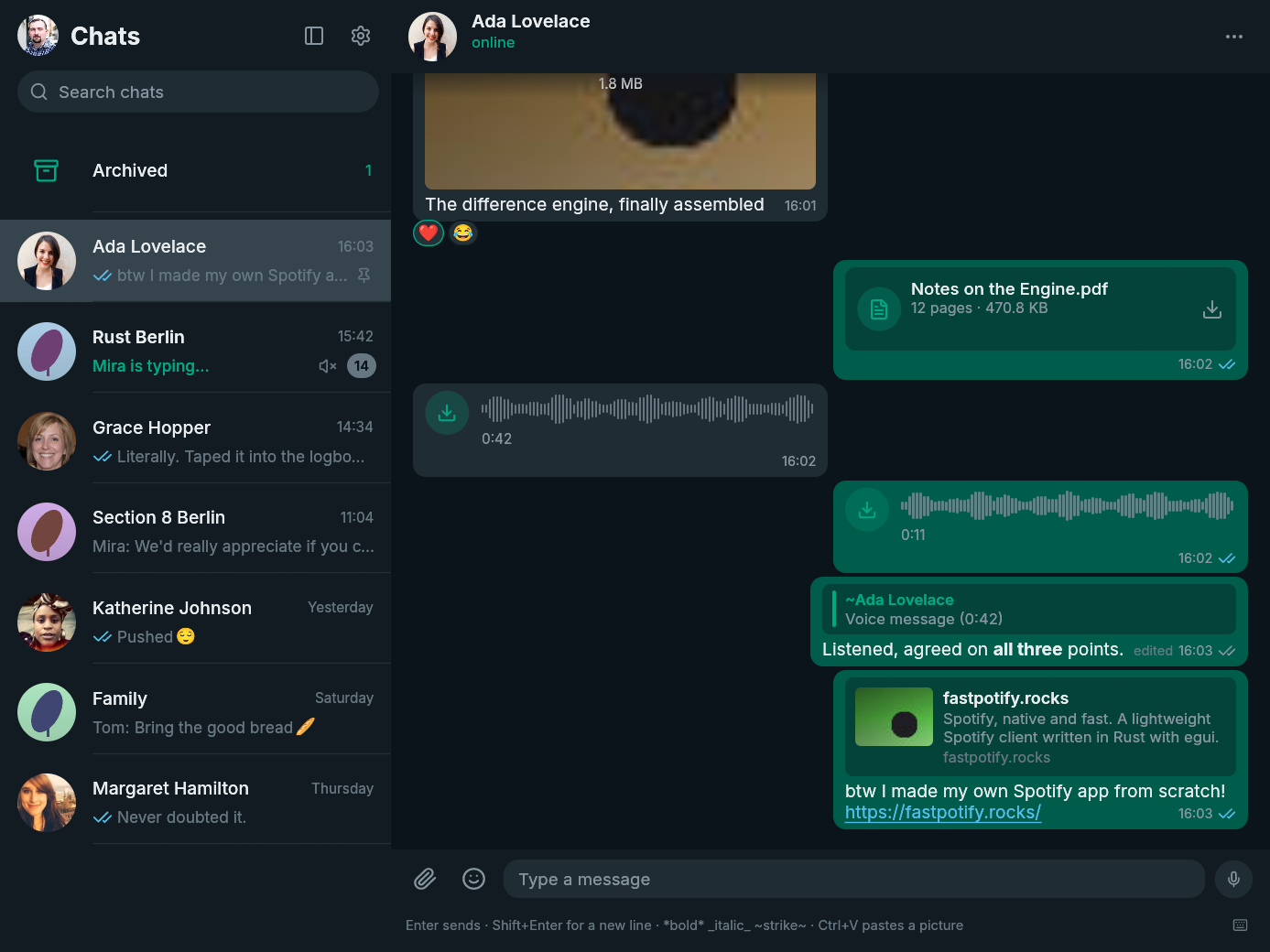
FastsApp 0.12.0 adds message forwarding, so useful text and attachments can move between conversations without leaving the native client.
New
- Forward messages to another chat. Right-click a message, choose Forward, then search for and select the destination. Forwarded messages keep WhatsApp's forwarding marker, and existing media is relayed without uploading the attachment again.
Install
| Platform | Download |
|---|---|
| Arch Linux | fastsapp-bin or fastsapp on the AUR |
| Linux | fastsapp-v0.12.0-x86_64-unknown-linux-gnu.tar.gz or the arm64 tarball |
| macOS | fastsapp-v0.12.0-macos-universal.dmg for Apple Silicon and Intel |
| Windows | fastsapp-v0.12.0-x86_64-pc-windows-msvc-setup.exe or the Windows on ARM installer |
checksums.txt contains the SHA-256 checksum for every file. The macOS build is not notarized, so follow the first-open steps on the download page. Windows may show a SmartScreen warning because the installer is not code-signed.
FastsApp is unofficial and is not affiliated with WhatsApp or Meta. Using an unofficial client may be against WhatsApp's terms of service and could get an account suspended. Use it at your own risk.
Full changelog: v0.11.0...v0.12.0
v0.11.0
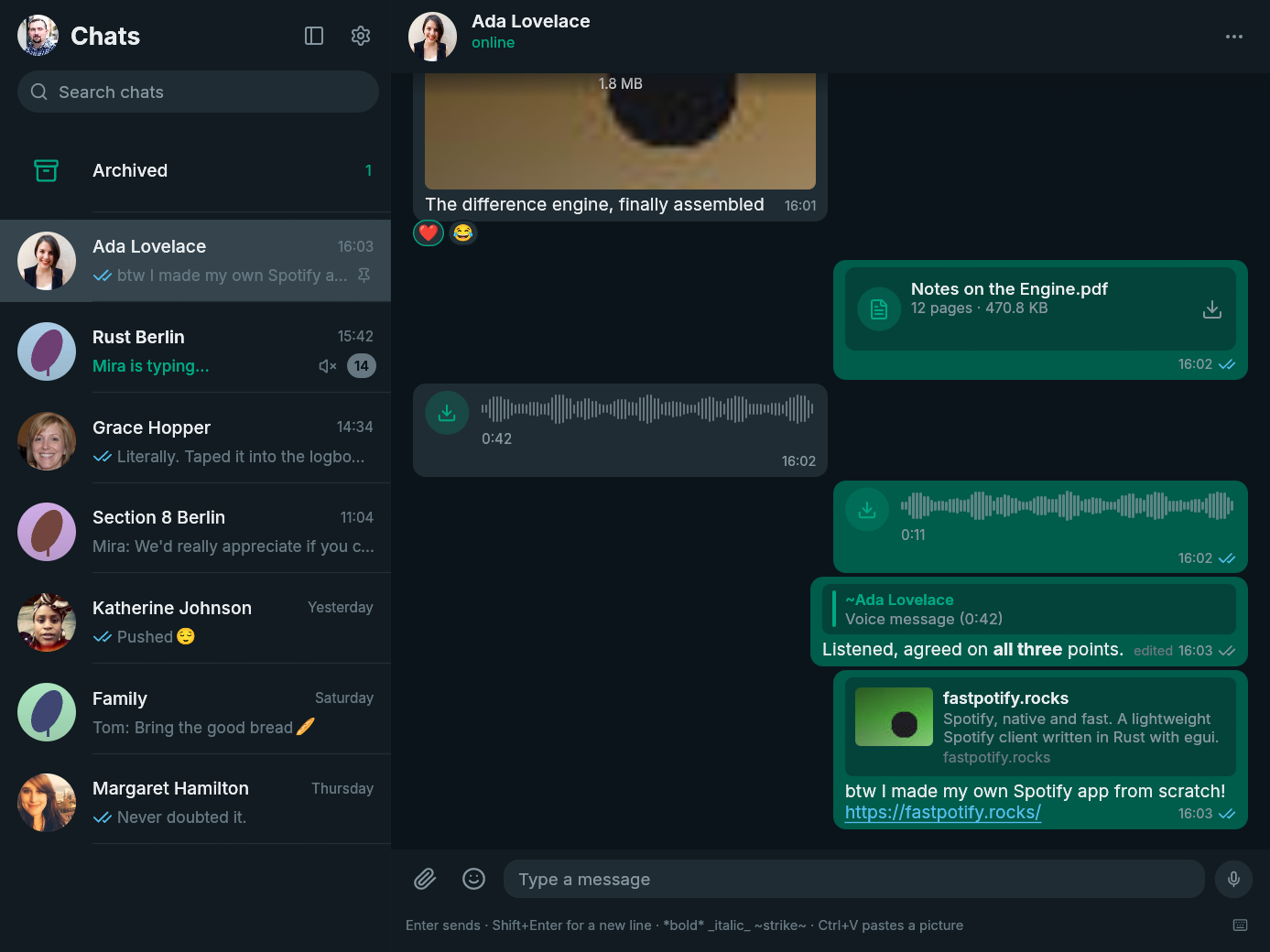
FastsApp 0.11.0 makes writing and moving between conversations faster without taking your hands off the keyboard.
New
- Mention people in group chats. Type
@and part of a member's name or number, move through the matches with the arrow keys, and press Enter to insert a real WhatsApp mention. - Find emoji as you type. Type a Slack-style
:namein the composer to filter emoji in place. The first match is ready, the arrow keys move the selection, and Enter inserts it without moving focus away from your message. - Use the full emoji picker from the keyboard. Opening it focuses its search field, preselects the first result, and supports arrow-key navigation and Enter.
Improved
- The composer is ready when the conversation is. Opening or changing chats, returning from Settings, and reopening the app put focus back in the message field. Search keeps its own focus, and Escape clears it and returns to the composer.
- Keyboard chat switching keeps its place.
Alt+↑andAlt+↓now scroll the chat list as needed so the newly active conversation always remains visible, including among filtered search results.
Install
| Platform | Download |
|---|---|
| Arch Linux | fastsapp-bin or fastsapp on the AUR |
| Linux | fastsapp-v0.11.0-x86_64-unknown-linux-gnu.tar.gz or the arm64 tarball |
| macOS | fastsapp-v0.11.0-macos-universal.dmg for Apple Silicon and Intel |
| Windows | fastsapp-v0.11.0-x86_64-pc-windows-msvc-setup.exe or the Windows on ARM installer |
checksums.txt contains the SHA-256 checksum for every file. The macOS build is not notarized, so follow the first-open steps on the download page. Windows may show a SmartScreen warning because the installer is not code-signed.
FastsApp is unofficial and is not affiliated with WhatsApp or Meta. Using an unofficial client may be against WhatsApp's terms of service and could get an account suspended. Use it at your own risk.
Full changelog: v0.10.1...v0.11.0
v0.10.1
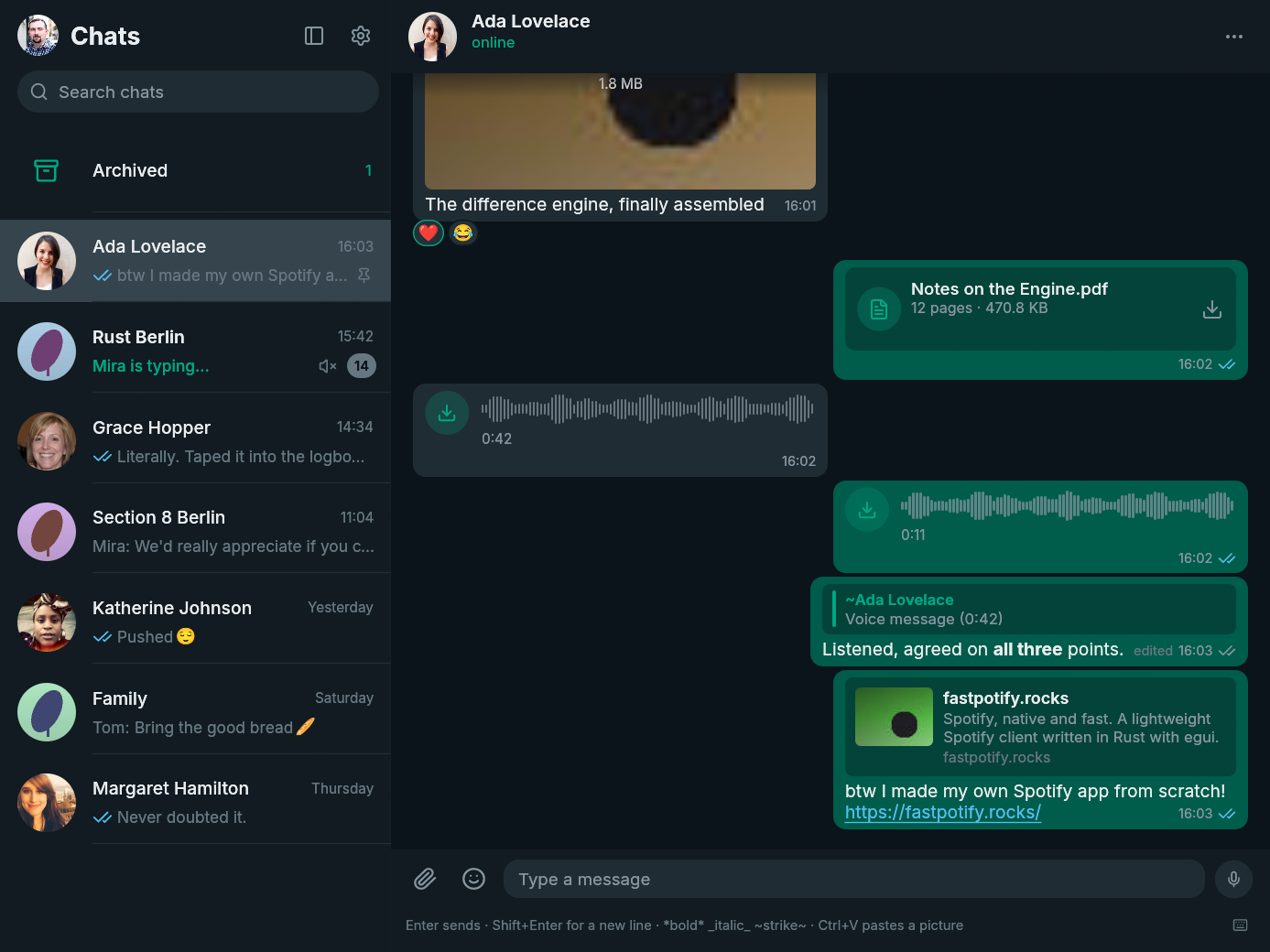
FastsApp 0.10.1 makes new releases visible inside the app and gives macOS and Windows the platform polish they were missing.
New
- Know when an update is ready. FastsApp checks GitHub once a day for a newer stable release and shows a download banner. You can turn the check off in Settings.
- Colour emoji work out of the box on Windows. A bundled Noto Color Emoji fallback fills the gap when the desktop does not provide a usable colour emoji font.
Fixed
- The macOS icon now belongs on the Dock. It uses a properly inset rounded tile with the FastsApp mark in the middle and a soft platform-style shadow.
- Windows executables now carry the FastsApp icon. Explorer, shortcuts, and installed-app entries no longer fall back to a generic program icon.
Install
| Platform | Download |
|---|---|
| Arch Linux | fastsapp-bin or fastsapp on the AUR |
| Linux | fastsapp-v0.10.1-x86_64-unknown-linux-gnu.tar.gz or the arm64 tarball |
| macOS | fastsapp-v0.10.1-macos-universal.dmg for Apple Silicon and Intel |
| Windows | fastsapp-v0.10.1-x86_64-pc-windows-msvc-setup.exe or the Windows on ARM installer |
checksums.txt contains the SHA-256 checksum for every file. The macOS build is not notarized, so follow the first-open steps on the download page. Windows may show a SmartScreen warning because the installer is not code-signed.
FastsApp is unofficial and is not affiliated with WhatsApp or Meta. Using an unofficial client may be against WhatsApp's terms of service and could get an account suspended. Use it at your own risk.
Full changelog: v0.10.0...v0.10.1
v0.10.0
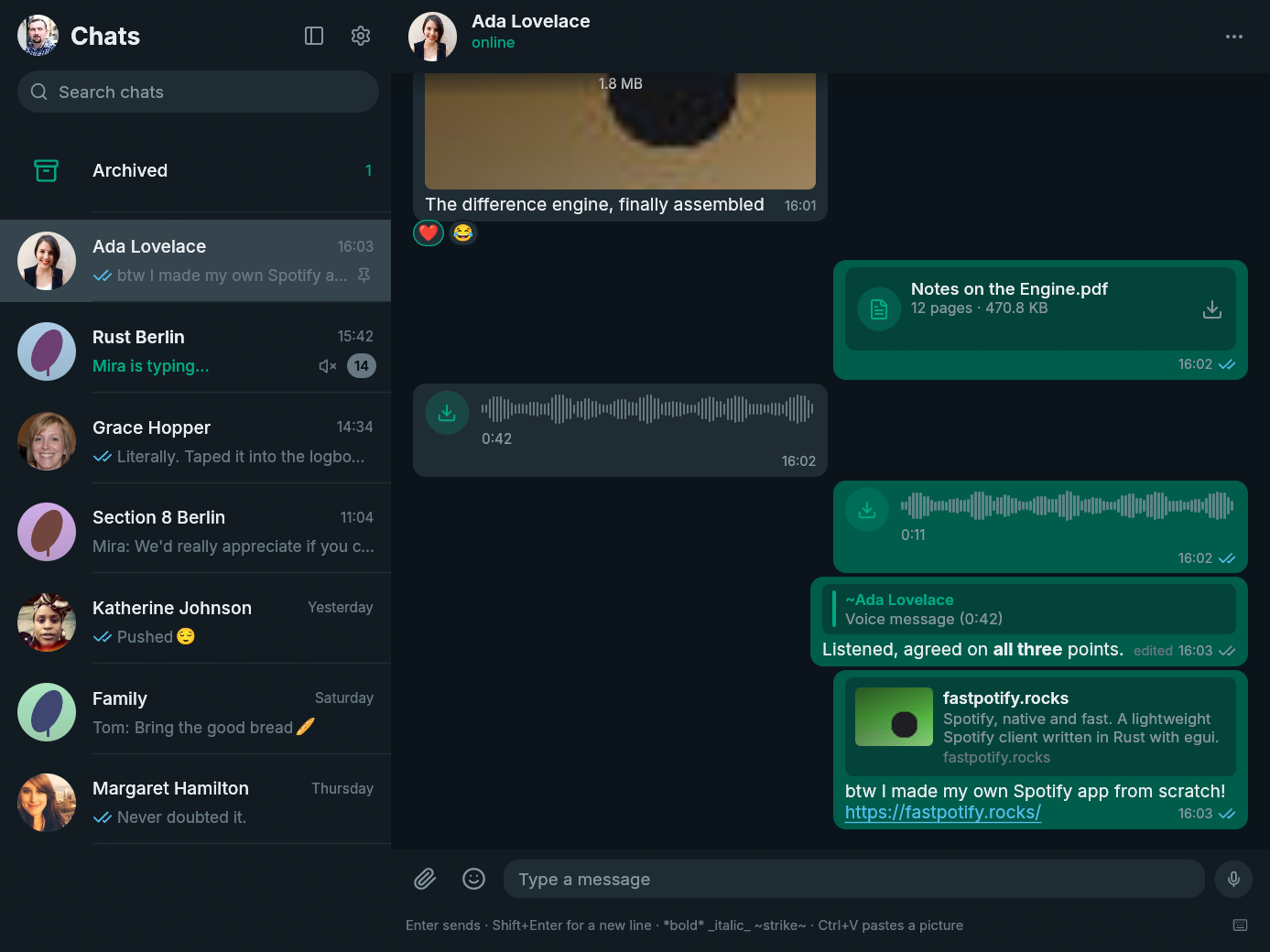
FastsApp is a small native WhatsApp client for Linux, macOS, and Windows. It is written in Rust with egui, has no browser engine, and connects as a linked device through whatsapp-rust.
0.10.0 brings contact management to the desktop. Start a chat from a phone number, message someone you met in a group, and save or rename contacts without picking up your phone. This release also makes the app and its documentation shorter and clearer.
New
- Start a chat from a phone number. Open New contact beside Settings and enter the number with its country code. FastsApp checks that the number is on WhatsApp, then opens the chat. Add a name to save the contact at the same time.
- Message people you meet in groups. Open a group member's card and choose Message, even if you have never chatted before.
- Add or rename contacts from their card. First name and surname sync through WhatsApp to your linked devices. A setting under Chats controls whether the contact is also added to the phone's address book; it is on by default.
Improved
- The app says things more plainly. Settings, dialogs, errors, buttons, and the documentation have had a full plain-language pass.
- Form hints line up with the text you type. Placeholders now use the field's font and size, including the phone-number fields.
Install
| Platform | Download |
|---|---|
| Arch Linux | fastsapp-bin or fastsapp on the AUR |
| Linux | fastsapp-v0.10.0-x86_64-unknown-linux-gnu.tar.gz or the arm64 tarball |
| macOS | fastsapp-v0.10.0-macos-universal.dmg for Apple Silicon and Intel |
| Windows | fastsapp-v0.10.0-x86_64-pc-windows-msvc-setup.exe or the Windows on ARM installer |
checksums.txt contains the SHA-256 checksum for every file. The macOS build is not notarized, so follow the first-open steps on the download page. Windows may show a SmartScreen warning because the installer is not code-signed.
FastsApp is unofficial and is not affiliated with WhatsApp or Meta. Using an unofficial client may be against WhatsApp's terms of service and could get an account suspended. Use it at your own risk.
Full changelog: v0.9.0...v0.10.0
v0.9.0
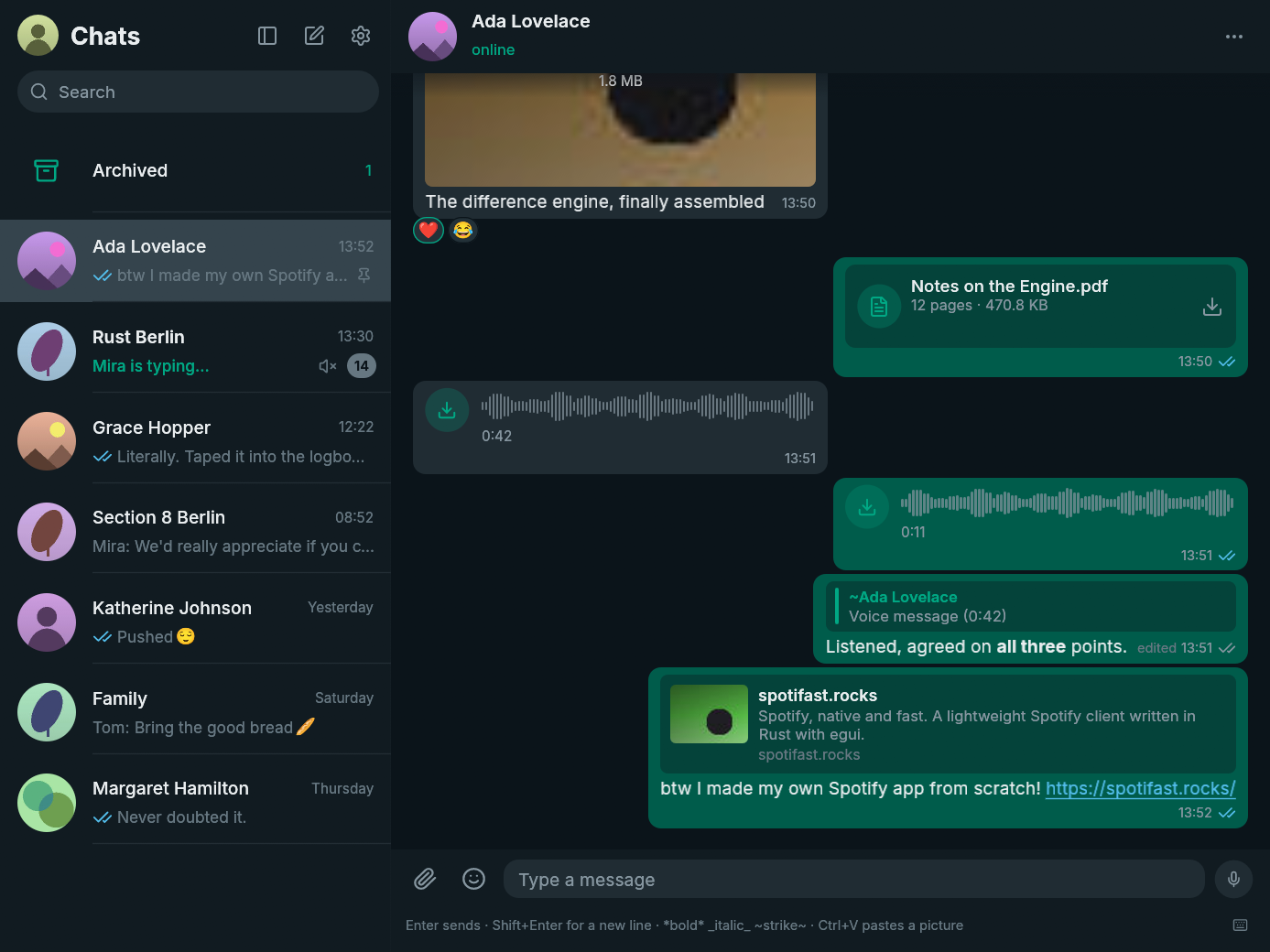
FastsApp is a native WhatsApp client written in Rust with egui: one small binary that starts in a blink, sips memory, and feels like WhatsApp Web without a browser wrapped around it. It speaks the WhatsApp Web protocol through whatsapp-rust, messages stay end-to-end encrypted on your computer, and your history lives in a local SQLite archive that is yours. If this is the first release you are seeing, welcome; the guide lives at fastsapp.rocks.
Sticker packs, in one paste
The sticker tab grew a doorway. Find packs opens the signalstickers.org gallery and its thousands of free packs; copy any pack's link there, and the pack imports the moment the link lands in the field. A .wastickers file from any WhatsApp sticker site works through Open file. Animated packs keep their motion: their APNG frames are converted to animated WebP, the form WhatsApp plays, so they move for the people you send them to. In the picker, a moving sticker plays while your pointer rests on it.
Beyond packs, any sticker that passes through a chat can be kept with a right-click, and the kept ones live in a Saved row. Everything is stored as plain WebP files in a folder of yours; a pack leaves through the little bin beside its name.
A message tells its journey
Right-click a message and it says when it was sent, delivered, and read, each with its moment, in the same menu as everything else. No separate info screen to visit. Hovering a reaction names who gave it, so two hearts under a group message are no longer anonymous.
Typing, the way the phone shows it
Someone typing appears as three rising dots beside their picture, and when several people type at once their pictures half-stack the way the phone draws them. The header says "Mira is typing" with the verb where it belongs.
And the rest
- The GIF search now explains itself when GIPHY refuses a key: the error, a link to developers.giphy.com, and a field to paste your own, right there in the picker (thanks @andpsc for the report, #1).
- A contact's or group's card shows a bigger photo and follows the window: shrink the window and the card shrinks with it instead of overflowing.
- Settings say plainly when your WhatsApp account's own privacy keeps read receipts off, fetched from the account when FastsApp connects.
- The picker's tabs sit centred and stay at the panel's bottom edge.
- Animated stickers no longer leave traces of their earlier frames behind while playing: FastsApp now decodes animated WebP through libwebp itself.
Install
| Platform | Asset |
|---|---|
| Arch Linux | fastsapp-bin or fastsapp on the AUR |
| Linux | fastsapp-v0.9.0-x86_64-unknown-linux-gnu.tar.gz (arm64 beside it) |
| macOS | fastsapp-v0.9.0-macos-universal.dmg (one image for Apple Silicon and Intel) |
| Windows | fastsapp-v0.9.0-x86_64-pc-windows-msvc-setup.exe (arm64 beside it) |
checksums.txt carries the SHA-256 of every file. First start shows a QR code: on the phone, Linked devices, Link a device, point the camera. History replays once, then everything arrives live, and the phone does not need to stay on the same network.
The honest part
FastsApp is an unofficial client and is not affiliated with WhatsApp or Meta. Using an unofficial client may be against WhatsApp's terms of service and could get an account suspended. Use it at your own risk.
Contributors

Assets 10
v0.8.0
Full Changelog: v0.7.0...v0.8.0