Repository navigation
Getting Started


📌 Guide, not policy. INSTALLATION.md governs; where this page differs, the repository wins.
This page takes you from a fresh clone to a compiled workbook that has run the demonstration portfolio and, if you want, the eight test suites. Version 1.0.2 was released on 2026-10-23: you can either download the released workbook (see below) or build one from the macro-free template and the exported VBA source of one commit, as the steps after it describe. Coming from 1.0.1? Its inputs move by header into the new layout: see Moving inputs from 1.0.1.
⚠️ VBA runs with your Office permissions. Review the source, follow your organisation's macro policy, never enable macros in an untrusted workbook, and keep real portfolio data out of the repository, issues and pull requests.
The 1.0.2 release
carries K-SACCR_1.0.2.xlsm, a production workbook (the template and the
engine and sheet macros of src/ at v1.0.2, without the test modules, with
the demonstration portfolio), the user manual K-SACCR_User_Manual_1.0.2.pdf
and SHA256SUMS.txt.
- Download
K-SACCR_1.0.2.xlsmandSHA256SUMS.txt. - Check the workbook's SHA-256 in PowerShell, in the download folder, with
Get-FileHash .\K-SACCR_1.0.2.xlsm -Algorithm SHA256; it must equal the line forK-SACCR_1.0.2.xlsminSHA256SUMS.txt(letter case aside),1ed00eba852d659b121419846e2c6f1e665ed15353f069bc7ffeea96b8ce4f3f. If it differs, delete the file. - Only after the hash check, and if your macro policy allows it, unblock the
file (right-click → Properties → Unblock, or
Unblock-File .\K-SACCR_1.0.2.xlsm), open it and enable macros.
Then go to step 6, Run the demonstration portfolio. Details: INSTALLATION.md › Released workbook. To run the test suites, build a development workbook from source as below.
| Step | What you do | Result |
|---|---|---|
| 1 | Check the host | Windows desktop Excel, 64-bit |
| 2 | Clone and run python tools/check.py
|
Static gates pass on a clean checkout |
| 3 | Save the template as .xlsm
|
A workbook with the 16 sheets and no VBA |
| 4 | Import the VBA (launcher or by hand) | Production or development workbook |
| 5 | Debug → Compile VBAProject | No compile error |
| 6 | Press Run SA-CCR | Results for the demonstration portfolio |
| 7 |
Test_RunAll (development workbook only) |
RESULT=PASS; suites=8; passed=8; failed=0 |
Decided in issue #4 and recorded in INSTALLATION.md › Supported hosts:
| Host | Support level |
|---|---|
| Microsoft 365 or Excel 2016 and later, Windows, 64-bit | Supported target; the recorded Excel runs are on this host |
| Same versions, Windows, 32-bit | Best effort: kept compiling, not certified, untested |
| Excel for Mac, Excel for the web, Excel 2013 and earlier | Not supported |
The VBA project uses only the four default references of a new workbook:
Visual Basic For Applications, Microsoft Excel 16.0 Object Library,
OLE Automation and Microsoft Office 16.0 Object Library. No add-in, DLL,
COM component or Scripting.Dictionary is needed.
| Tool | Needed for |
|---|---|
| Git | Cloning |
| Python 3.10 or later |
python tools/check.py (standard library only) |
| Windows PowerShell, as shipped with Windows | The synchronizer tools/Sync-SACCR-VBA.cmd; not needed for a manual import |
| Microsoft Excel for Windows | Importing, compiling and running the VBA |
Measured on 2026-10-17 with the TEST_Benchmark module on the
supported 64-bit host
(#291):
synthetic CRR portfolios in netting sets of 500 legs, every leg used and every
netting set VALID.
| Legs | Netting sets | Engine run |
|---|---|---|
| 1,000 | 2 | 0.31 s |
| 10,000 | 20 | 1.62 s |
| 50,000 | 100 | 8.50 s |
| 500,000 | 1,000 | 113.93 s |
- No fixed trade limit: 500,000 is the largest size measured, not a cap. The time grows about linearly with the legs; it depends on the machine.
- The Trades dropdowns and validation cover rows 5 to 5,000 only; rows below calculate the same way but are entered without validation.
- A used range that reaches far below the data slows every run (1,000 legs took 1.79 s with the used range inflated to row 105,005, against 0.33 s): delete stray rows, not just their contents, and save.
Details: INSTALLATION.md › Portfolio size.
git clone https://github.com/danielep71/K-SACCR.git
cd K-SACCR
git switch --detach v1.0.2
python tools/check.py
All gates must pass; reports go to the ignored test-results/ folder. The
gates are static: they never compile VBA or open Excel (see
Validation Approach). v1.0.2 is the released source;
for current development, switch to the
active release branch
instead.
Use a clone. Do not use Code → Download ZIP (the archive omits repository plumbing, so the checks do not behave as documented) and do not download single modules through GitHub's Raw view: a clone checks the VBA out with the CRLF line endings the VBE expects, Raw serves the LF form stored in Git.
- Open
src/workbook/SACCR_Template.xlsxfrom the checkout. -
File → Save As → Excel Macro-Enabled Workbook (
.xlsm), saved outside the checkout (or in the ignoredtest-results/). Built workbooks are never committed.
The template holds the 16 sheets, the workbook names, formulas, data validation and the sheet buttons, and no VBA project. Its demonstration portfolio has 17 netting sets and 65 trade rows valued on 2026-09-30 in EUR (see Inputs).
Decide which kind of workbook you are building:
| Kind | Holds | Use |
|---|---|---|
| Production | The seven standard modules of src/ (engine, worksheet functions, sheet macros) and the document modules |
A workbook that calculates |
| Development | The production modules plus every module of tests/modules/
|
A workbook that runs the test suites, which rewrite the input and output sheets |
Never run the test suites in a workbook that holds data you care about.
-
In Excel, turn on File → Options → Trust Center → Trust Center Settings → Macro Settings → Trust access to the VBA project object model. The VBA project must not be password-locked.
-
Close the workbook.
-
Drag the
.xlsmontotools/Sync-SACCR-VBA.cmd, or run it with the workbook's full path:tools\Sync-SACCR-VBA.cmd "C:\path\to\K-SACCR.xlsm"The launcher has no default workbook. Started without one (for example by double-clicking it) it prints
No workbook given. Drag the .xlsm workbook onto this file, or run: ..., pauses and exits with code 1 without starting PowerShell.
The synchronizer then asks two questions:
| # | Prompt | Answers |
|---|---|---|
| 1 | Production or development? [P/D] |
P: engine, worksheet functions and sheet-button macros. D: those plus every test module. Any other answer cancels (exit code 2, workbook unchanged) |
| 2 | Replace the code of these N sheet module(s) as well? [Y/N] |
The worksheet and ThisWorkbook modules hold only Option Explicit, so either answer works. N with nothing else to import exits with code 2 and changes nothing |
It opens the workbook in its own Excel instance with macros, events,
external-link updates and automatic calculation disabled, checks that sheet
names and code names are unchanged, imports the components that
tools/vba-projects.json lists for the chosen mode, saves, and deletes the
temporary *.pre-vba-sync.* backup after a successful save (it keeps it on
failure). The window ends with SUCCESS: SACCR VBA synchronization completed.
or FAILED: ... exit code N, and pauses.
ℹ️ A production synchronization never removes modules. If the workbook already holds
TEST_modules it says so and leaves them; build the production workbook again from the template.
The same script can be run directly from the repository root, for example
.\tools\Sync-SACCR-VBA.ps1 -WorkbookPath "C:\path\to\K-SACCR.xlsm" -Mode Development -IncludeSheets.
Full options, including tools/Sync-SACCR-VBA-Downloads.cmd for modules
received outside the repository, are in
tools/README.md › Local VBA synchronization.
No VBA-project access setting is needed. Open the VBE (Alt+F11), check Tools → References shows only the four defaults, then File → Import File in this order (alphabetical within each folder):
| # | File | Component | Workbook |
|---|---|---|---|
| 1 | src/core/CORE_Config.bas |
CORE_Config |
Both |
| 2 | src/core/CORE_Engine.bas |
CORE_Engine |
Both |
| 3 | src/core/CORE_Export.bas |
CORE_Export |
Both |
| 4 | src/core/CORE_Reconcile.bas |
CORE_Reconcile |
Both |
| 5 | src/core/CORE_Util.bas |
CORE_Util |
Both |
| 6 | src/modules/SACCR_Formulas.bas |
SACCR_Formulas |
Both |
| 7 | src/workbook/M_Main.bas |
M_Main |
Both |
| 8–18 |
tests/modules/TEST_*.bas (Aggregation, Benchmark, CaseRunner, Cases, Formulas, Harness, InputValidation, Invariants, MainState, Reconcile, Suite) |
TEST_* |
Development only |
Document modules (ThisWorkbook.cls and the sh*.cls sheet modules in
src/workbook/) are not imported: importing would create a new class such
as ThisWorkbook1. Open the .cls in a text editor, copy the code below the
Attribute lines and paste it into the existing module. The FormulaTest sheet
keeps the code name shTests. Never paste source into arbitrarily named
modules: the component name (VB_Name) is part of the contract.
In the VBE run Debug → Compile VBAProject. It must finish with no error. A compile error almost always means components from different commits, a duplicate older copy of a module, or an extra reference (see Troubleshooting). Save the workbook.
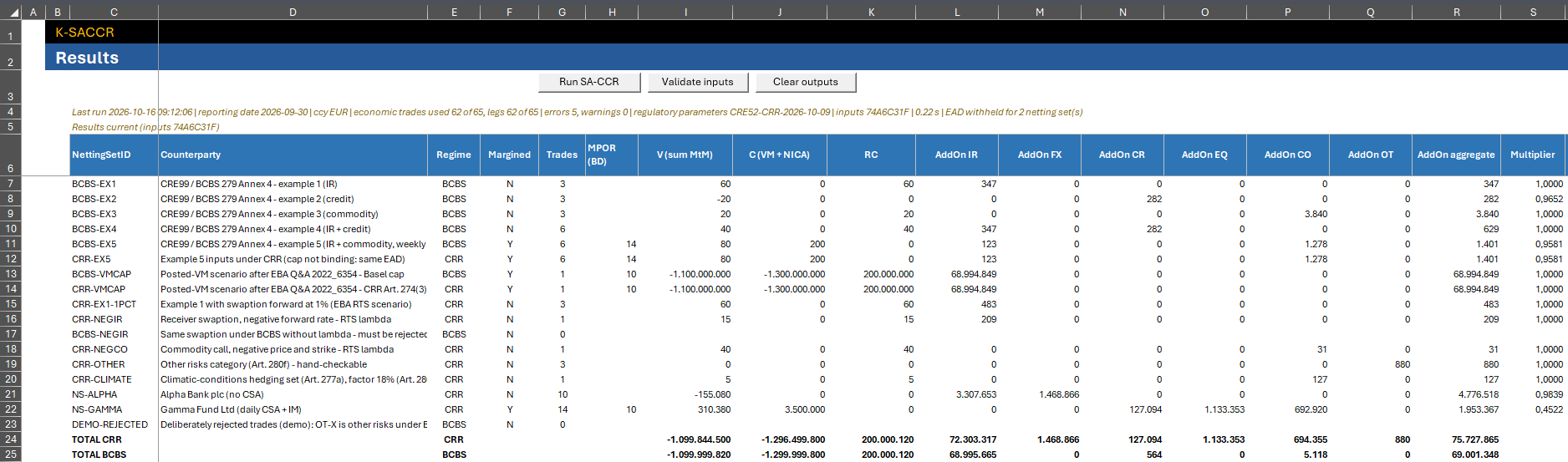
Open the workbook with macros enabled and press Run SA-CCR (on Trades, Results or TestCatalogue). The message box reports the economic trades and legs used, the total EAD per regime, the errors and warnings, and whether the parameters are the regulatory set. For the template's portfolio the repository records:
| Figure | Value |
|---|---|
| Trades used | 62 of 65 (legs and economic trades alike: the demo has no multi-leg trades) |
| Errors / warnings | 5 / 0 |
| Netting sets with EAD withheld | 2 |
| Total EAD CRR | 48,595,558 |
| Total EAD BCBS | 40,784,020 |
| Input fingerprint |
3B2754CA (the 1.0.1 release workbook: 7B68D18F) |
| Run class |
REGULATORY (parameter set CRE52-CRR-2026-10-09) |
The five errors are deliberate: three trades are excluded and two netting sets
(including DEMO-REJECTED) have their EAD withheld; the message splits them
by regime (#276):
EAD withheld for 2 netting set(s) with rejected trades or invalid inputs: BCBS 2.
The two totals are never added together. Then read Outputs and Statuses: the
Results status cell C5 should start with Inputs unchanged since the last run (inputs 3B2754CA) (in 1.0.0: Results current (inputs …)). The fingerprint
covers the input headers, so the new columns of 1.0.2 change it although the
demonstration inputs and their EADs did not change.
Screenshot: Results after the demonstration run
In the Immediate window (Ctrl+G):
Test_RunAllIt runs the harness and the seven suites in turn and prints a summary; the run of 2026-10-22 recorded in the README ended with:
RESULT=PASS; suites=8; passed=8; failed=0; seconds=79,1
The suites rewrite inputs, outputs and Params and restore them afterwards.
Each suite can also be run alone (for example TEST_Harness.RunTests); the
summary is an index, not Excel evidence. See Test Catalogue
for the suites and Validation Approach for the evidence
record.
| What changed since your workbook's commit | What to do |
|---|---|
| Only VBA | Drag the workbook onto tools/Sync-SACCR-VBA.cmd again (or re-import by hand), compile, rerun the tests that apply |
| The template (sheets, columns, headers, workbook names) |
Build a new workbook from src/workbook/SACCR_Template.xlsx and copy your inputs into it. git diff --stat <old-sha> HEAD -- src/workbook/SACCR_Template.xlsx shows whether it changed |
The synchronizer changes code only: it never migrates sheets, cells,
formulas, names, validation or buttons. The engine finds every input and
output table through the workbook name of its first header cell
(NettingSets_Header, Trades_Header, Results_Header, Checks_Header and
the other *_Header names). A workbook built from an older template, or one
whose name was deleted, stops with:
Workbook name '…_Header' is missing or no longer refers to the first header cell, in column C, of … - rebuild the workbook from the template.
For an output table this is the error ERR_OUTPUT_LAYOUT; for an input table
the same text is listed on Checks and the run stops. The cure is the same:
rebuild from the current template. A workbook holding retired module names
(M_Config, M_Engine, M_Util, M_Formulas and older test modules) is
refused by the synchronizer before anything changes.
Version 1.0.2 adds four input columns; every other input keeps its header and meaning.
| Sheet | New columns (from 1.0.2) | For an existing row |
|---|---|---|
| NettingSets | R QCCP (Y/N) and S CCP retains VM, collateral not protected (Y/N), after Margin agreements |
Leave both blank for every netting set that is not a trade exposure to a CCP |
| Trades | AB Settlement type (N/STM) and AC Next reset date, after MtM leg; Comment moves from AB to AD
|
Leave both blank for an ordinary trade |
Moved by header into a workbook built from the 1.0.2 template, a 1.0.1
portfolio with the new columns blank gives the same EAD. A trade whose 1.0.1
Maturity date (M) held the next reset date of a settled-to-market contract
should now be entered with its contractual maturity in M, STM and the
reset date (see Inputs).
A 1.0.1 workbook that only receives the 1.0.2 VBA stops at the NettingSets
or Trades header check. Rebuild it from the 1.0.2 template. Alternatively
add the two NettingSets columns after Margin agreements and insert two Trades
columns before Comment, with the new headers; change NettingSets!$C:$Q to
NettingSets!$C:$S and Trades!$C:$AA to Trades!$C:$AC in the status
formulas of Results C5, Reconciliation C5 and TradeReconciliation C5; and add
CCP and MULTI to the validation list of NettingSets column F. The data
validation of the new columns and the light-red highlight on Results come
only with the new template.
To remove K-SACCR, delete the .xlsm, any *.pre-vba-sync.* backup beside it
and any evidence files you exported, and turn Trust access to the VBA
project object model off again if you enabled it only for the build.
- Workbook Guide — the 16 sheets and their buttons
- Inputs — Params, NettingSets and Trades column by column
- Outputs and Statuses — reading Results and Checks
- Troubleshooting — run stops, launcher messages, macros disabled
- Test Catalogue · Validation Approach
- Open Items and Limitations · Home