Repository navigation
Workbook Guide


📌 Guide, not policy. The template
src/workbook/SACCR_Template.xlsxand the README govern; where this page differs, the repository wins.
A map of the workbook built from the template at v1.0.2: what each of
the 16 sheets is for, where its table starts, which buttons it carries, and
how the workbook tells you whether its results still describe the inputs.
Every sheet keeps two narrow margin columns (A:B) and two margin rows (1:2); every table starts in column C. Tables are found through workbook names, not fixed rows, so rows can move without breaking the engine.
| # | Sheet | Kind | Table starts at (workbook name) | Holds |
|---|---|---|---|---|
| 1 | README |
Guide | — | How to use, sign and input conventions, methodology summary, sheet list, worksheet functions, scope and limitations, and the reference card picture (heading C76) |
| 2 | Params |
Input |
Params_Code (C5), SF_Table (C28:K54), FX_Table (C57:E62) |
Run parameters, supervisory-factor table, FX rates |
| 3 | NettingSets |
Input |
NettingSets_Header (C6) |
One row per netting set, columns C–S |
| 4 | Trades |
Input |
Trades_Header (C4) |
One row per trade leg, columns C–AD |
| 5 | Results |
Output |
Results_Header (C6) |
One row per netting set, TOTAL rows per regime; run summary C4, status C5 |
| 6 | HedgingSets |
Output |
HedgingSets_Header (C5) |
Effective notionals and add-ons per hedging set |
| 7 | Buckets |
Output |
Buckets_Header (C5) |
IR maturity buckets, FX pairs, credit/equity entities, commodity types |
| 8 | TradeCalc |
Output |
TradeCalc_Header (C5) |
Every trade-level quantity, or the reasons a trade was excluded |
| 9 | Checks |
Output |
Checks_Header (C5) |
Errors, warnings and information lines |
| 10 | BankNettingSets |
Input (optional) |
BankNettingSets_Header (C8); settings D4:D6 |
A bank's own figures per netting set |
| 11 | Reconciliation |
Output |
Reconciliation_Header (C6); summary C4, status C5 |
Bank figures against Results |
| 12 | BankTrades |
Input (optional) |
BankTrades_Header (C8); settings D4:D6 |
A bank's own figures per trade leg |
| 13 | TradeReconciliation |
Output |
TradeReconciliation_Header (C6); summary C4, status C5 |
Bank figures against TradeCalc |
| 14 | TestCatalogue |
Regression | Header row 6, tests in rows 7–34 | 28 reference tests read from Results and TradeCalc |
| 15 | FormulaTest |
Unit tests | Tolerance E4 (FormulaTest_Tolerance), header row 6, tests in rows 7–28 |
The SACCR_* functions against Excel's own formulas |
| 16 | Basel_vs_CRR |
Documentation | Header row 5, rows 6–33 | 28 rows comparing CRE52 and the CRR, with the workbook treatment |
Detailed column lists are on Inputs (sheets 2–4), Outputs and Statuses (5–9) and Reconciliation and Evidence (10–13).
The template carries ten form buttons. They call macros of M_Main by name,
so they work once M_Main is imported.
| Sheet | Buttons | Macros |
|---|---|---|
Trades |
Run SA-CCR · Validate inputs · Clear outputs |
RunSACCR · ValidateInputs · ClearOutputs
|
Results |
Run SA-CCR · Validate inputs · Clear outputs |
RunSACCR · ValidateInputs · ClearOutputs
|
TestCatalogue |
Run SA-CCR · Validate inputs · Clear outputs |
RunSACCR · ValidateInputs · ClearOutputs
|
Reconciliation |
Export evidence | ExportEvidence |
| Macro | What it does | What it leaves |
|---|---|---|
RunSACCR |
Recalculates the workbook, validates every input, calculates, writes Results, HedgingSets, Buckets, TradeCalc and Checks, then both reconciliations | A message box with trades used, total EAD per regime, errors and warnings, run class, the netting sets whose EAD is withheld (split by regime), and the reconciliation lines; the Checks sheet is brought forward when the run stops |
ValidateInputs |
Clears the outputs, recalculates and validates; writes Checks only | Message Validation finished: N error(s), M warning(s). and the Checks sheet in front; Results C4 says outputs cleared: press Run SA-CCR to calculate
|
ClearOutputs |
Empties the five output tables and both reconciliations | Results C4 reads Outputs cleared <time>
|
ExportEvidence |
Writes the evidence CSV of the current run to a file you choose | Refused with a reason when anything is out of date; see Reconciliation and Evidence |
Every operation captures Excel's calculation mode, events and screen updating,
changes them for speed, and restores them as it found them, also after a
failure. A second operation started while one runs is refused
(An SA-CCR operation is already running.). For callers without buttons there
are silent entry points (RunSACCR_Silent, ExportEvidence_Silent,
ResultsStatus); see How It Works.
| Convention | Meaning |
|---|---|
| Yellow cells | Inputs. The README sheet says so in step 2 ("Yellow cells are inputs"), Params in its note ("only the yellow values are meant to be changed"), FormulaTest in its note ("on the yellow inputs") |
| Dropdowns and input messages | Data validation on Params, the factor and FX tables, NettingSets, Trades and the bank sheets explains each field and offers the allowed codes |
| Red repeated keys | A repeated key in a keyed column is shown in red (conditional formatting) |
| Bold | The TOTAL rows on Results, and the severity cell of each ERROR line on Checks |
| Red status cell | Results C5 turns red when it reads OUT OF DATE
|
| Light-red rows | Results rows whose status is INVALID or INCOMPLETE (conditional formatting, from 1.0.2), so withheld EADs stand out; VALID, NO TRADES and TOTAL rows are not highlighted |
| Basel_vs_CRR colours | Column G is green when it starts with "Same" and red bold otherwise; column K is black for VERIFIED and red bold otherwise (conditional formatting, #296) |
Data validation guides typing but does not protect against pasted values; the engine checks every input again (see Inputs).
Results carries two cells above its table:
| Cell | Content | Written by |
|---|---|---|
| C4 — run summary |
Last run <time> | reporting date … | ccy … | economic trades used … of …, legs … of … | errors …, warnings … | regulatory parameters CRE52-CRR-2026-10-09 | inputs <fingerprint> | <seconds> s, plus | EAD withheld for N netting set(s): … when any, split by regime (for example | EAD withheld for 2 netting set(s): BCBS 2, #276). Other forms: Last validation …, Last run … FAILED - …, Outputs cleared …
|
The macro, at the end of each operation |
| C5 — status |
Inputs unchanged since the last run (inputs XXXXXXXX); outputs are checked when evidence is exported (1.0.0: Results current (inputs XXXXXXXX)), OUT OF DATE - inputs changed since the last run; press Run SA-CCR., No results: press Run SA-CCR. or Status unavailable: <reason>
|
The formula =ResultsStatusText(SACCR_RunInputs, NettingSets!$C:$S, Trades!$C:$AC, Params!$1:$1048576) ($C:$Q and $C:$AA up to 1.0.1) |
C5 is a formula, not a macro write, so Excel recalculates it whenever an input changes and Undo keeps working. In manual calculation press F9 to refresh it. Reconciliation C5 and TradeReconciliation C5 work the same way for the comparison with the bank's figures. Details are on Outputs and Statuses.
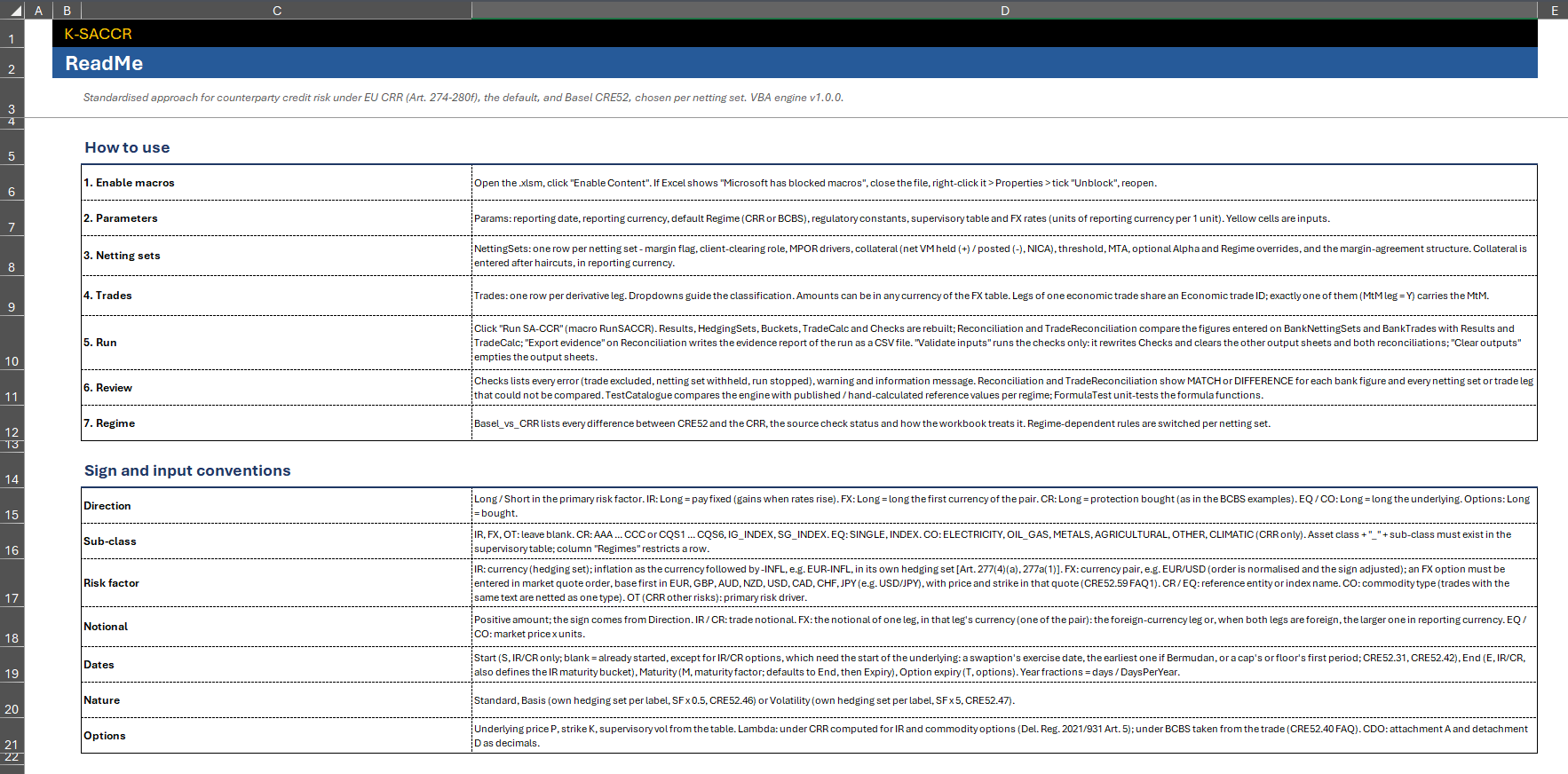
The in-workbook guide: seven "How to use" steps (enable macros, parameters, netting sets, trades, run, review, regime), the sign and input conventions (direction, sub-class, risk factor, notional, dates, nature, options), a methodology summary, the sheet list, the ten worksheet functions, the scope and limitations, and the one-page EAD reference card as a picture at the foot of the sheet: the link in D23 jumps to it (README!C114) instead of opening GitHub (#283).
Screenshot: README sheet
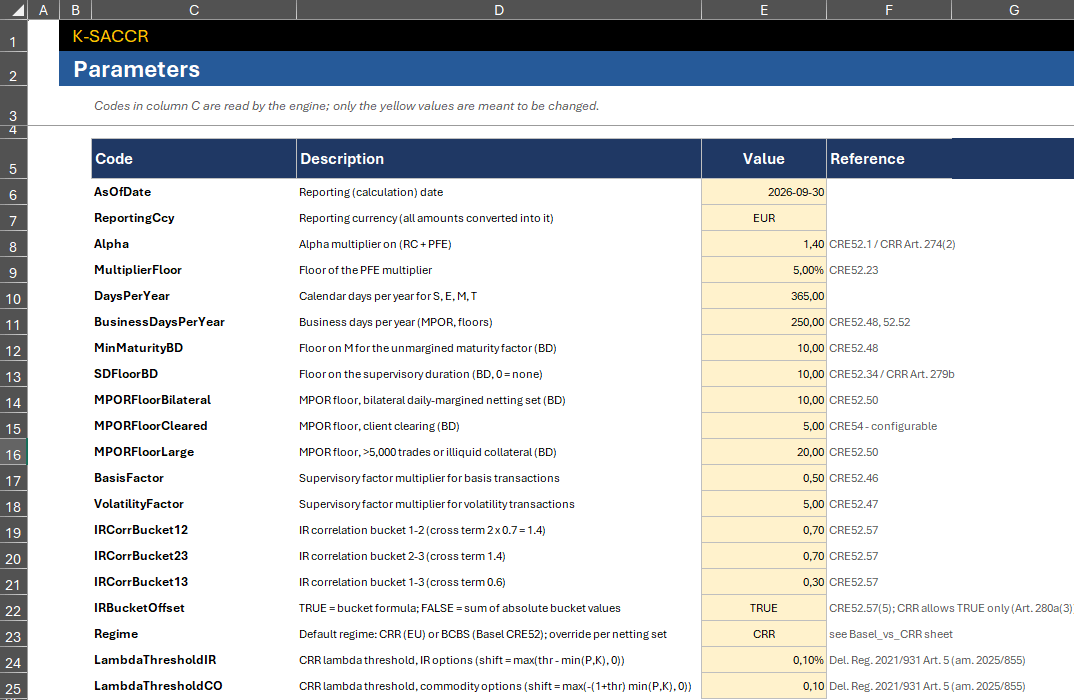
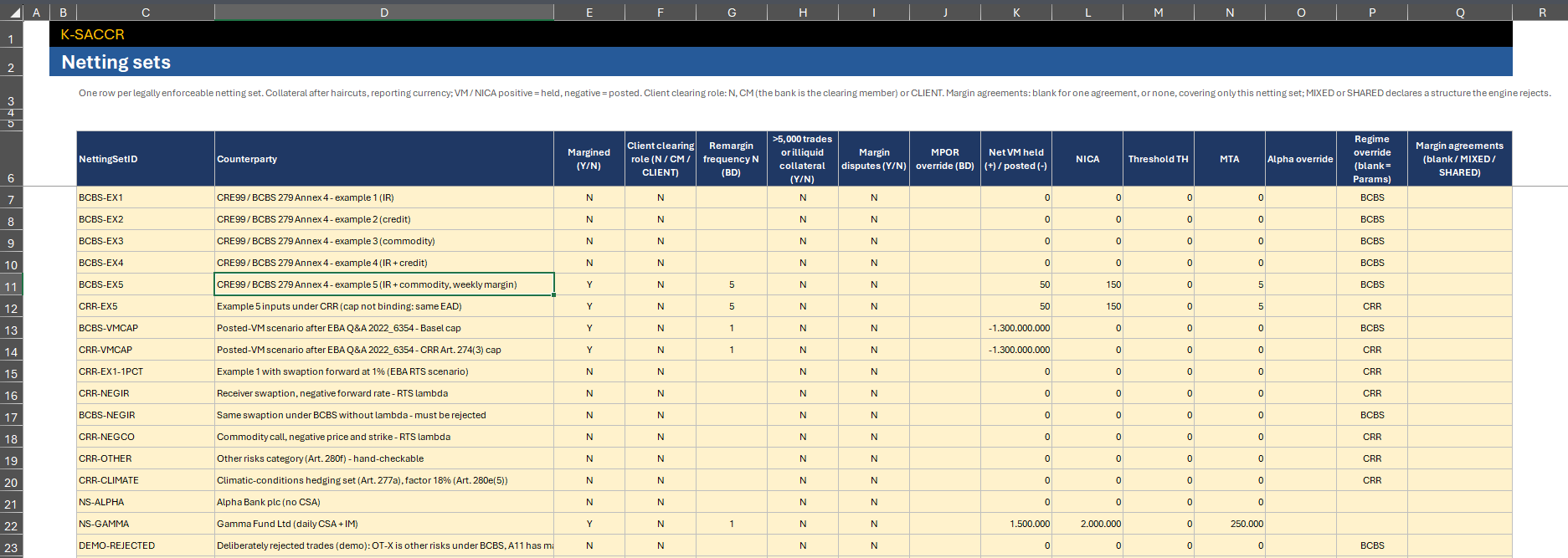
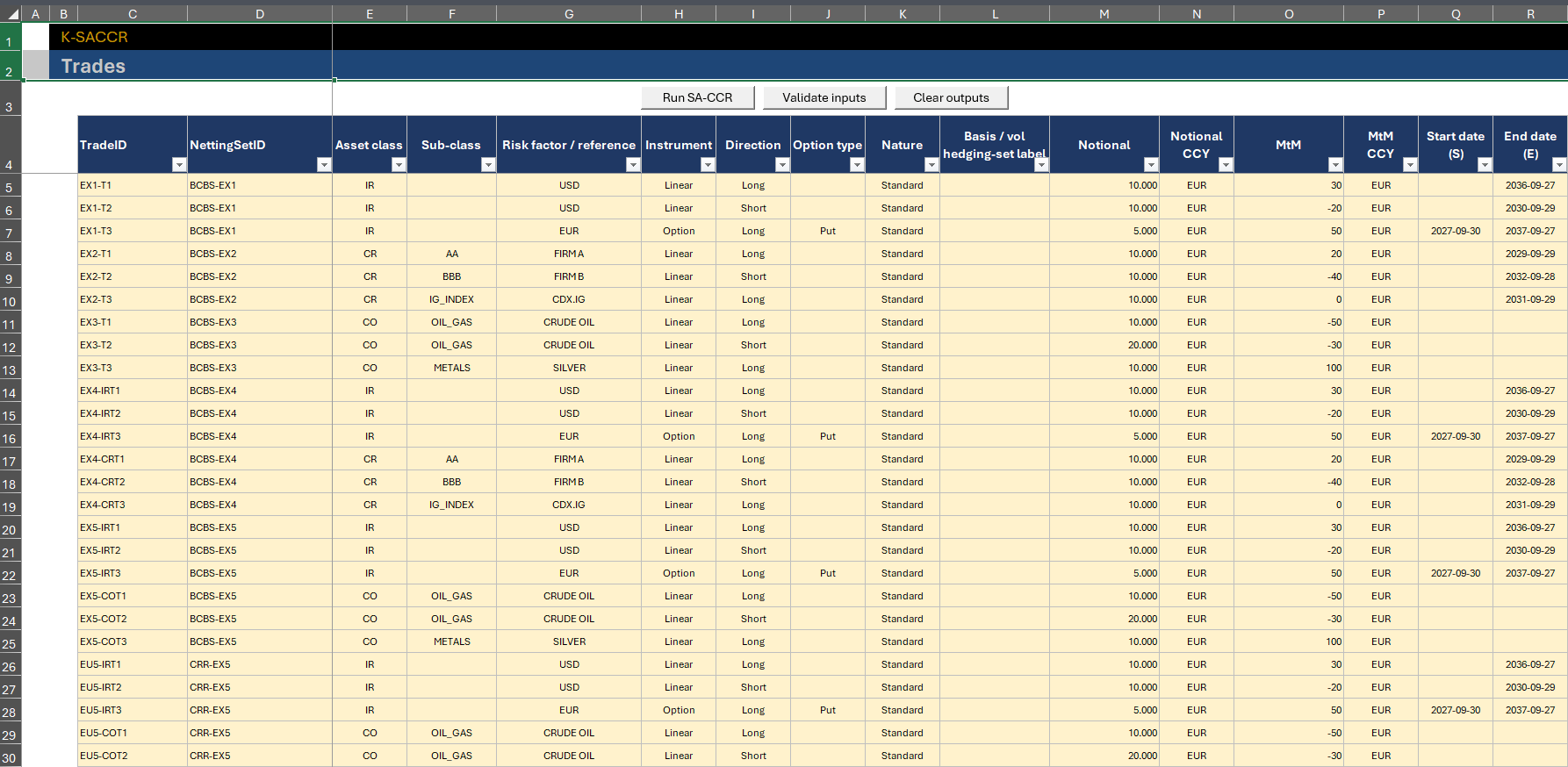
The three input sheets; every column is described on Inputs.
Screenshots: Params, NettingSets and Trades
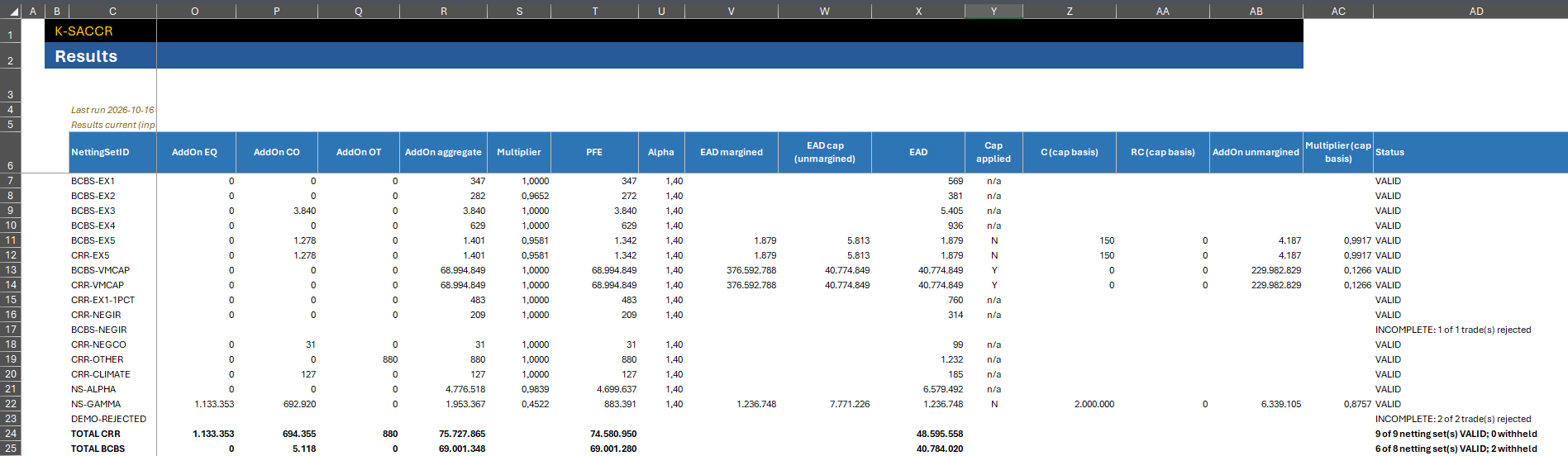
The five output tables, cleared at the start of every operation and rewritten by Run SA-CCR. Read them top-down: Results for the netting set, then HedgingSets and Buckets for aggregation, then TradeCalc for each trade, and Checks for everything rejected or assumed. See Outputs and Statuses.
Screenshots: Results (EAD part) and Checks after the demonstration run

Optional. Enter a bank's own figures; Run SA-CCR compares them with Results and TradeCalc. The template ships both bank sheets empty. See Reconciliation and Evidence.
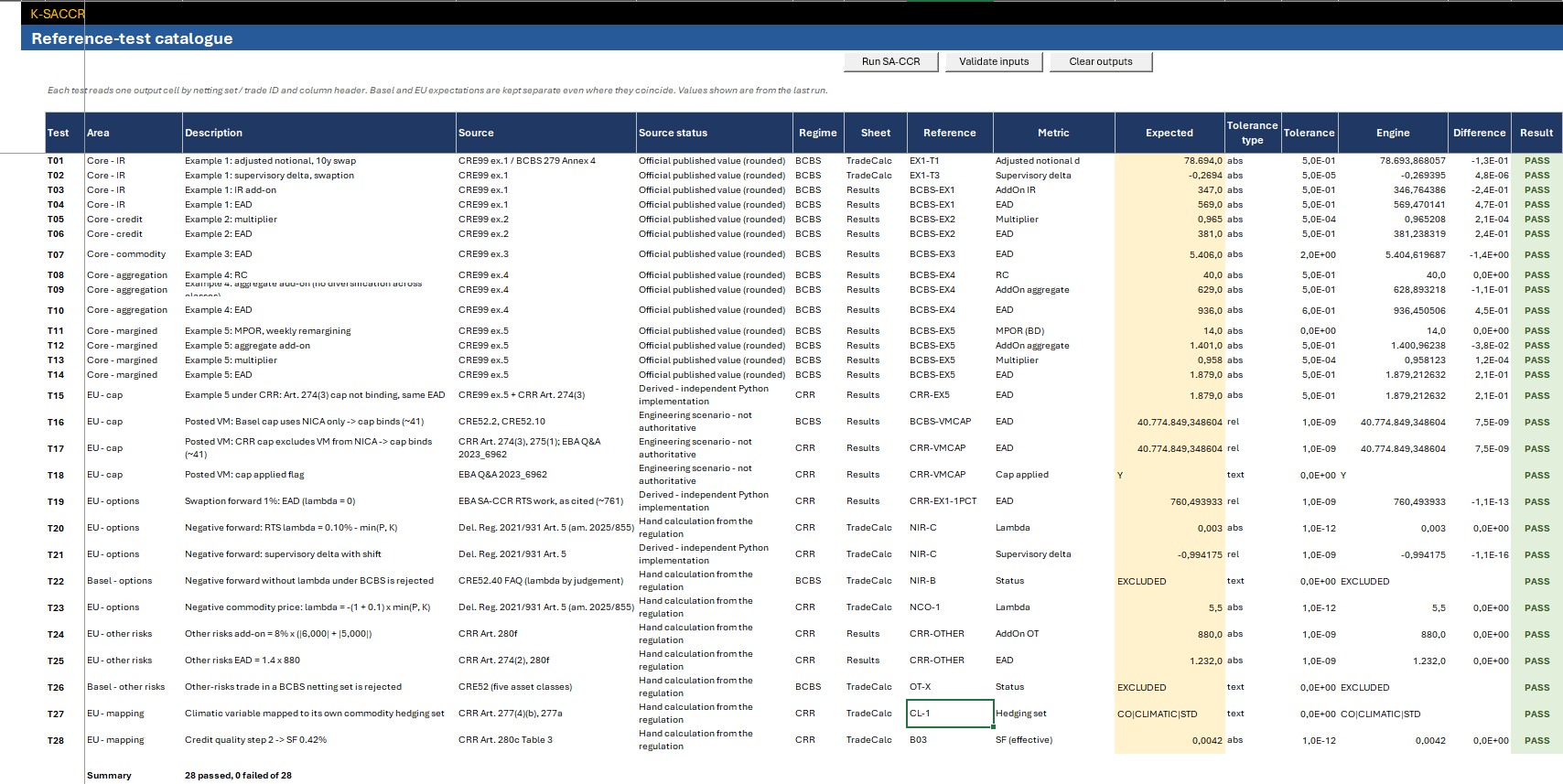
28 reference tests (T01–T28), each reading one output cell by netting-set or
trade ID and column header with INDEX/MATCH, and comparing it with an
expected value and tolerance; E36 summarises (28 passed, 0 failed of 28 on
the recorded run). The sheet reads the demonstration portfolio, in which the
CRE99 amounts are entered in thousands; values shown are those of the last
run. See Test Catalogue.
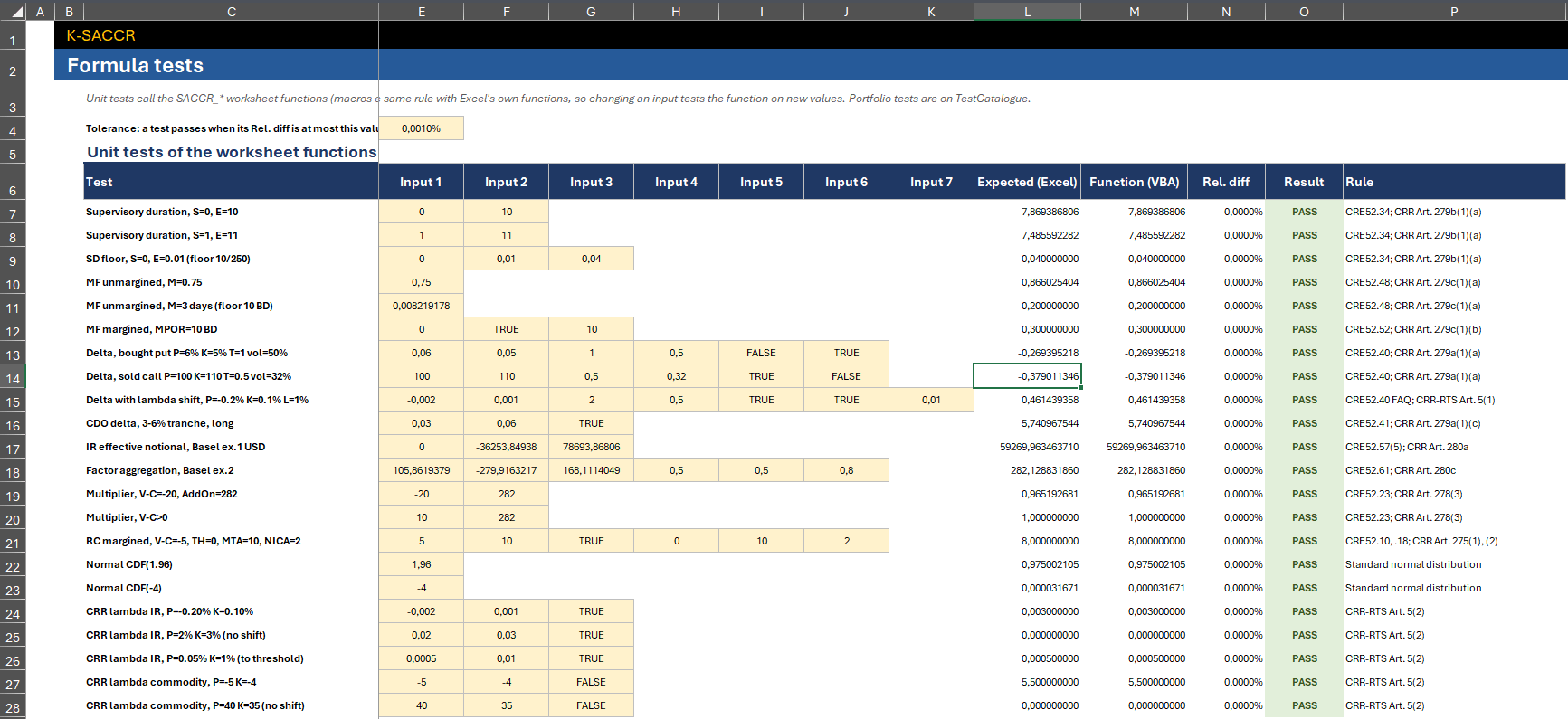
22 unit tests (rows 7–28) of the ten SACCR_* functions against the same
rule written with Excel's own functions, with a tolerance in E4. See
Worksheet Functions.
Screenshots: TestCatalogue and FormulaTest
28 numbered rows, each with the area, the Basel CRE52 rule, the EU CRR rule, whether they are the same or different, the effect on the numbers, the workbook treatment, the tests that cover it and the source-check status. In 1.0.2 (#389) eight rows were completed or qualified and three added (equity and commodity adjusted notional, variable notional or quantity, multiple exchanges and leverage); the Source check header says that it records a text check, not numerical validation. Its header names the texts compared: the CRR consolidated version of 26/06/2026, Delegated Regulation (EU) 2021/931 as amended by (EU) 2025/855, the EBA Q&A, CRE52 with its FAQs and the CRE99 examples. The regulation section of this wiki explains the differences: Basel vs CRR.
Screenshot: Basel_vs_CRR, first 11 rows
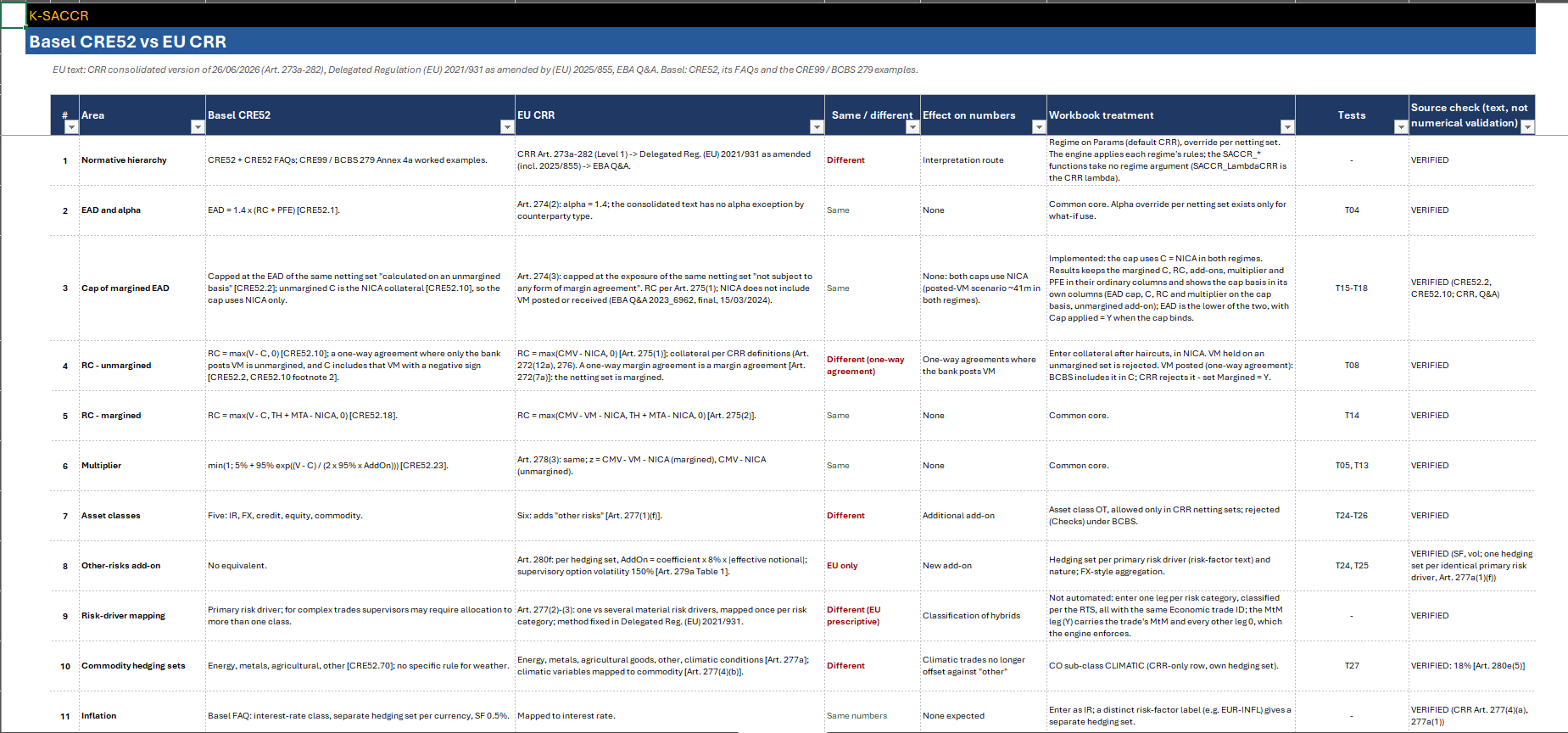
ℹ️ The screenshots were taken in Excel for Windows on 2026-10-16 with the demonstration portfolio, except Basel_vs_CRR, retaken on 2026-10-17 and on 2026-10-20 after the revision of its rows. They do not show the input columns and the Results highlight added in 1.0.2. Their numbers follow that machine's regional settings (decimal comma); the workbook itself reads and writes locale-independent values.
- Getting Started — build, compile and run
- Inputs · Outputs and Statuses · Reconciliation and Evidence
- How It Works — the calculation flow and modules
- Worksheet Functions · Test Catalogue
- Troubleshooting · Home