

Beautiful dev-server error pages rendered to HTML, ANSI or JSON and live updated over SSE. ✨
my-bad turns an error into a plain JSON error report with sourcemapped frames, snippets, causes, component trace and request context.
You can then use my-bad to render that report as a full HTML page, a shadow-DOM overlay for an existing page, or ANSI for the terminal. A small SSE channel keeps browser-based pages live, meaning errors can be updated, the page can reload when the error is fixed, and additional warnings and server logs are surfaced as they occur.

The same report, rendered to the terminal with renderAnsi:
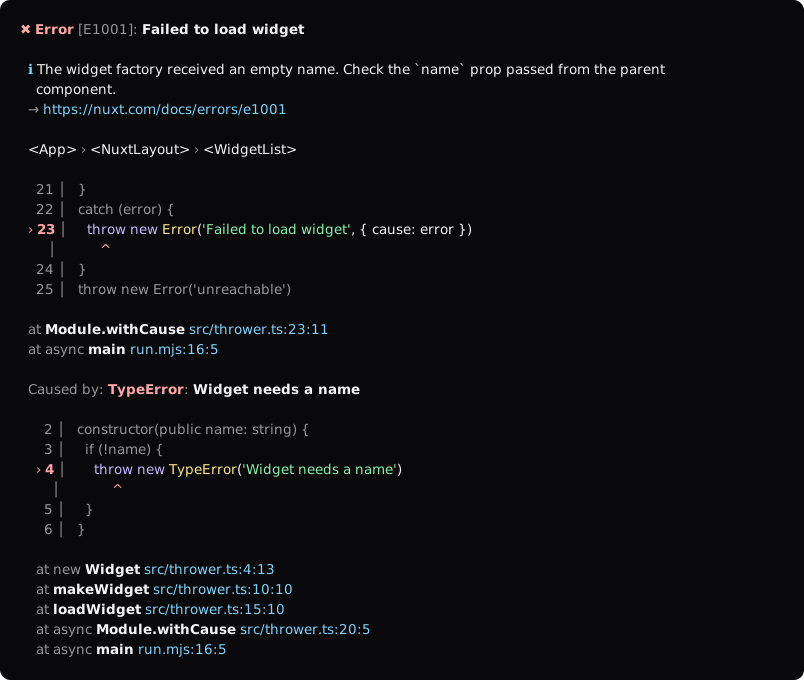
npm install my-badimport { createReport, fsLoader, renderAnsi, renderPage } from 'my-bad'
import { nuxtPreset } from 'my-bad/presets'
const report = await createReport(error, {
cwd: process.cwd(),
loaders: [fsLoader()],
presets: [nuxtPreset({ versions: { nuxt: '4.0.0' } })],
context: { event },
})
console.error(renderAnsi(report))
if (req.headers.accept?.includes('text/html')) {
res.end(renderPage(report, { cwd: process.cwd(), channel: '/__my-bad' }))
}
else {
res.end(JSON.stringify(report))
}Inject the error UI into an existing page (for example a framework's rendered error page). It renders in a shadow root, so host styles cannot leak in, and can be minimised to a picture-in-picture thumbnail so the user can see the page behind it.
import { injectOverlay } from 'my-bad'

html = injectOverlay(html, report, { channel: '/__my-bad', startMinimized: status < 500 })
Use injectOverlay rather than html.replace('</body>', ...): the inlined client contains $ sequences that a string replacement would interpret.
renderPage and renderOverlay inline the client script and stylesheet, which makes the output self-contained at the cost of ~60kB per response. Serve clientAssets yourself and pass the URLs to keep them out of the HTML and let the browser cache them:
import { clientAssets, renderPage } from 'my-bad'

// GET /__my-bad/client.js  -> clientAssets.script (text/javascript)
// GET /__my-bad/client.css -> clientAssets.styles (text/css)
renderPage(report, { assets: { script: '/__my-bad/client.js', styles: '/__my-bad/client.css' } })
Theme overrides stay inline, so a shared stylesheet still themes per response.
The page is dark by default and follows prefers-color-scheme. Everything is derived from a handful of CSS custom properties, so it's possible to restyle it without forking the stylesheet:
import { renderPage } from 'my-bad'
import { nuxtTheme } from 'my-bad/presets'

renderPage(report, { theme: nuxtTheme })

renderPage(report, {
  theme: {
    name: 'Acme',
    url: 'https://acme.dev',
    logo: '<svg viewBox="0 0 32 32">…</svg>', // drawn at 20px in currentColor
    accent: '#ff4f81',
    vars: { '--mb-bg': '#0b0b12', '--mb-font-sans': 'Inter, sans-serif' },
    css: '.mb-name { text-transform: uppercase }',
    scheme: 'dark', // force a scheme instead of following the user
  },
})
Tokens: --mb-accent, --mb-bg, --mb-fg, --mb-font-sans, --mb-font-mono, --mb-radius, plus the --mb-tk-* syntax colours. Text tiers, hairlines and surfaces are mixed from those, and the accent is deepened automatically for small text on light backgrounds.
Frames are mapped by loaders, tried in order:
fsLoader()reads.mapsidecars and inlinesourceMappingURLcomments (Nitro dev builds, tsdown/rollup output).sourceMapLoader({ getSourceMap })takes maps from memory, for module runners (nitroApp.ssrSourceMaps.getSourceMapin Nuxt,runner.moduleCache.getSourceMapin vite-node).viteLoader(server)frommy-bad/viteuses the module graph of aViteDevServer.passthroughLoader()only reads sources, for processes whose stacks are already mapped.
A frame is only mapped when the map has a segment on that exact generated line, so already-mapped stacks are never mapped twice.
console.error(renderAnsi(report, { cwd, icon: false })) // `icon: false` when your logger prints its own badgeFile locations are OSC 8 hyperlinks (via clickable-path) in terminals that support them.
Snippets use a small built-in tokenizer. Plug in your own for richer colours in both HTML and ANSI:
const report = await createReport(error, {
  tokenizer: (line, lang) => myHighlighter(line, lang).map(token => ({ type: 'keyword', text: token.value })),
})import { createChannel } from 'my-bad/channel'
import { fileSink } from 'my-bad/sinks'
const channel = createChannel({ open: true, sink: fileSink('.nuxt/my-bad.jsonl') })
// `open: true` launches `LAUNCH_EDITOR` / `VISUAL` / `EDITOR` at the frame's line, falling back to the OS default app
// Node: mount at the channel base path
server.on('request', (req, res) => channel.handler(req, res).then(handled => handled || next()))
// or fetch-style: await channel.fetchHandler(request)
channel.setError(report) // pages swap content in place
channel.clearError() // pages reload, overlays dismiss
channel.warn(report) // toast
channel.log({ level: 'warn', text: 'careful' }) // streamed to the log drawer
channel.progress({ phase: 'build', percent: 40, message: 'Building server' }) // progress barimport { myBad, useMyBad } from 'my-bad/vite'
export default defineConfig({ plugins: [myBad()] })The plugin maps frames through Vite's module graph, forwards compile errors from the HMR channel as kind: 'compile' reports, mounts the channel at /__my-bad, injects a tiny client into index.html so a running app shows the overlay, and clears it when the next update succeeds. Use useMyBad(server) from your own SSR middleware to build reports and pages with the same configuration.
The client script and stylesheet are served from /__my-bad/client.js and /__my-bad/client.css with content-hashed URLs, rather than inlined into every error page. Pass inlineClient: true for self-contained output.
my-bad/presets exports envPreset, vuePreset, requestPreset (alias h3Preset), nitroPreset and nuxtPreset. Presets contribute frame classification, sections (request, headers with redaction, route, environment), component traces and docs links for error codes.
git clone git@github.com:danielroe/my-bad.git
corepack enable

# run interactive tests
pnpm dev
# run accessibility audit (computed contrast, axe-core, target sizes, focus, motion, reflow)
pnpm test:a11y
# render screenshots of the ui
pnpm screenshot

# re-render the README assets in assets/ (autofix.ci keeps these current)
pnpm assets
# experiment in the playground
pnpm play
pnpm play:viteThis was inspired by youch, which is a phenomenal error page generator, and I would highly recommend it!
Made with ❤️
Published under MIT License.