Releases: darkdarkcocoa/cocoa-recorder
Release list
Cocoa Recorder v2.3.0 — meow countdown & mini mode 🐱🎧

🐱 Cocoa meows now — and fits in the corner of your screen
Two features, one idea: you shouldn't have to babysit a big window just to catch a sound.
DownloadCocoaRecorder.exebelow.
✨ New
🔔 The countdown meows
3 · 2 · 1 used to be silent, which meant staring at the window until it turned pink. Now Cocoa counts out loud — a real little meow on every tick, so you can switch to your DAW, your game, your anything, and still hear exactly when the take begins.
The details were fussed over: the final three ticks always play the same three meows, so the ending becomes a rhythm your hands learn. And at 0 the app is dead silent — Cocoa Recorder records your speakers, so the meow must never end up at the start of your file. It doesn't. If you'd rather count in peace, click the little cat face next to the countdown — she naps (zZ), you record quietly. The five meows are CC0.
🌙 Mini mode
Press the cat-face button in the title bar and the whole studio shrinks — pop! — into a palm-sized card that stays on top of everything:
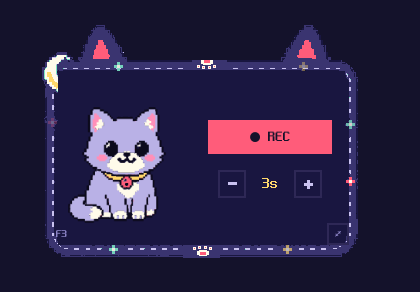
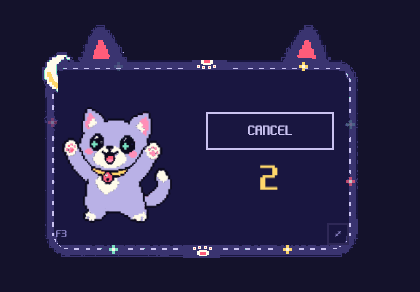
Drag it anywhere. Set the countdown right on it. Press REC — or press the global hotkey shown on the card (F3 where it's free; if another program already owns a combo, the card picks the next one and tells you). It works even while you're in a different window, which is the whole point.
While counting down, Cocoa gets excited and the number bounces with every meow:
And while recording… she puts on her pink headphones, closes her eyes, and bobs along, with little pixel notes floating up:
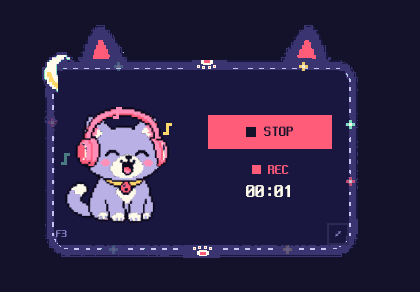
The frame is alive too — its border stars each twinkle on their own clock, and the card has ears, a paw hanging over the top edge, and stitched seams. The card remembers where you left it, and if you close the app in mini mode, it greets you in mini mode next time. The ⤢ button brings the full studio back.
한국어
🐱 코코아가 이제 소리 내어 울고 — 화면 구석에 쏙 들어갑니다
기능은 둘, 생각은 하나예요: 소리 하나 담자고 큰 창을 지키고 앉아 있을 필요는 없다는 것.
아래에서 **CocoaRecorder.exe**를 받으세요.
🔔 카운트다운이 냥냥거립니다
지금까지 3 · 2 · 1은 소리가 없어서, 창이 분홍색으로 바뀔 때까지 지켜봐야 했어요. 이제 코코아가 소리 내어 세어 줍니다 — 숫자마다 진짜 냥 소리가 나서, 작업하던 창으로 넘어가 있어도 녹음이 언제 시작되는지 귀로 알 수 있어요.
디테일에 공을 들였어요. 마지막 세 번은 언제나 같은 냥 셋이 순서대로 울려서, 끝나는 박자가 손에 익습니다. 그리고 0이 되는 순간은 완전히 조용해요 — 이 앱은 스피커 소리를 그대로 담으니까, 냥 소리가 녹음 첫머리에 섞이면 안 되거든요. 안 섞입니다. 조용히 세고 싶으면 카운트다운 옆의 고양이 얼굴을 눌러 주세요. 코코아가 잠들고(zZ) 카운트다운은 침묵합니다. 냥 소리 다섯 개는 CC0이에요.
🌙 미니 모드
타이틀바의 고양이 얼굴 버튼을 누르면 스튜디오 전체가 뿅 하고 손바닥만 한 카드로 줄어들어, 어떤 창 위에든 떠 있습니다. 아무 데나 끌어다 두고, 카운트다운도 카드에서 바로 조절하고, REC를 누르거나 카드에 적힌 전역 단축키(F3 — 다른 프로그램이 선점했으면 다음 후보를 잡아서 알려 줘요)를 누르면 돼요. 다른 창에서 작업하다가 눌러도 됩니다. 그게 이 기능의 존재 이유니까요.
카운트다운 중에는 코코아가 신나서 두 발을 들고, 숫자가 냥 소리에 맞춰 통통 튑니다. 그리고 녹음이 시작되면… 분홍 헤드폰을 끼고 눈을 감은 채 고개를 까딱까딱, 주변엔 픽셀 음표가 떠오릅니다.
카드 자체도 살아 있어요 — 테두리의 별들이 각자 다른 박자로 깜빡이고, 고양이 귀와 위에 걸쳐진 발바닥, 바느질 자국까지. 카드는 마지막 자리를 기억하고, 미니 모드로 닫으면 다음에도 미니 모드로 열립니다. ⤢ 버튼으로 언제든 본창으로 돌아와요.
Full Changelog: v2.2.0...v2.3.0
Cocoa Recorder v2.2.0 — update notice 🔔

🔔 The app can tell you things now
Small release on top of v2.1.0's Moon Studio redesign — mostly about the app knowing how to reach you, and you knowing how to reach it.
DownloadCocoaRecorder.exebelow.
✨ New
You will know when there is a new version. Cocoa Recorder had no way to say "there is something newer" — you had to think to go and look, which nobody does. It now asks GitHub once at launch, and if a newer release exists the Updates link at the bottom of the settings rail turns amber with a NEW badge beside it. Click it and you land on that release's notes.
Clicking also records which release you were told about, so the badge goes quiet until something newer than that appears. Whether you actually updated is not the point — what is remembered is what you have already been shown, so the same news never nags you twice.
The check is a single unauthenticated request with a six-second timeout, and every failure path is silent: no network, no GitHub, no problem. It sends nothing about you and never downloads anything by itself. If you would rather it stayed home, set "CheckForUpdates": false in %LOCALAPPDATA%\CocoaRecorder\settings.json.
A link back to where it was made. A pair of angle brackets next to the envelope opens the repository.
✉ Feedback  ·  ⟨⟩ GitHub
⭳ Updates   [NEW]
🎨 Changed
The app starts in English. It used to read your system language on first launch, so a Korean machine opened straight into Korean and everyone else into English. Now everybody lands on the same first screen and reaches for the KOR | EN toggle if they want the other one.
And it remembers which one you picked. That part matters — without it, a Korean reader would be re-toggling on every single launch. Your choice is saved and restored next time.
한국어
🔔 앱이 말을 걸 수 있게 되었습니다
v2.1.0 Moon Studio 개편 위에 얹는 작은 릴리스입니다. 앱이 사용자에게 닿는 길, 사용자가 앱에 닿는 길에 관한 내용이에요.
아래에서 **CocoaRecorder.exe**를 받으세요.
✨ 새로운 것
새 버전이 나오면 알려 드립니다. 지금까지 코코아 레코더에는 "새 게 나왔어요" 라고 말할 방법이 없었습니다. 사용자가 스스로 "가끔 확인해 볼까?" 하고 생각해야 했는데, 대부분 그러지 않죠. 이제 앱이 켜질 때 GitHub에 한 번 물어보고, 더 새 버전이 있으면 설정 레일 맨 아래의 업데이트 링크가 앰버로 켜지면서 옆에 NEW 배지가 붙습니다. 누르면 그 릴리스의 변경 내역으로 바로 갑니다.
누르는 순간 어떤 릴리스를 안내받았는지가 함께 기억됩니다. 그래서 배지는 그보다 더 새 것이 올라오기 전까지 조용합니다. 실제로 업데이트를 하셨는지는 보지 않아요. 기억하는 것은 "무엇을 이미 안내받았는가"이고, 그래서 같은 소식으로 두 번 귀찮게 하지 않습니다.
확인은 인증 없는 요청 한 번이고 6초 안에 포기합니다. 실패하는 모든 길은 조용합니다 — 인터넷이 없어도, GitHub이 답하지 않아도 녹음기는 녹음기입니다. 사용자에 대한 정보는 아무것도 보내지 않고, 스스로 무언가를 받아오지도 않습니다. 그래도 밖으로 나가는 게 싫으시면 %LOCALAPPDATA%\CocoaRecorder\settings.json에서 "CheckForUpdates": false로 끄실 수 있습니다.
만들어진 곳으로 가는 링크. 편지 아이콘 옆의 꺾쇠 한 쌍을 누르면 저장소가 열립니다.
✉ 건의하기  ·  ⟨⟩ GitHub
⭳ 업데이트  [NEW]
🎨 바뀐 것
앱이 영어로 시작합니다. 지금까지는 첫 실행 때 시스템 언어를 읽어서, 한국어 PC는 곧장 한국어로, 나머지는 영어로 열렸습니다. 이제는 누구나 같은 첫 화면에서 출발하고, 다른 언어를 원하면 KOR | EN 토글로 바꿉니다.
그리고 고른 언어를 기억합니다. 이게 없으면 한국어로 쓰시는 분은 켤 때마다 토글을 다시 눌러야 했을 거예요. 선택한 언어는 저장되어 다음 실행에도 이어집니다.
Cocoa Recorder v2.1.0 — Moon Studio 🌙
🌙 Cocoa moved to the moon
Everything the window draws is new. Same recorder underneath — your files, your folder, your settings all carry over untouched.
DownloadCocoaRecorder.exebelow.
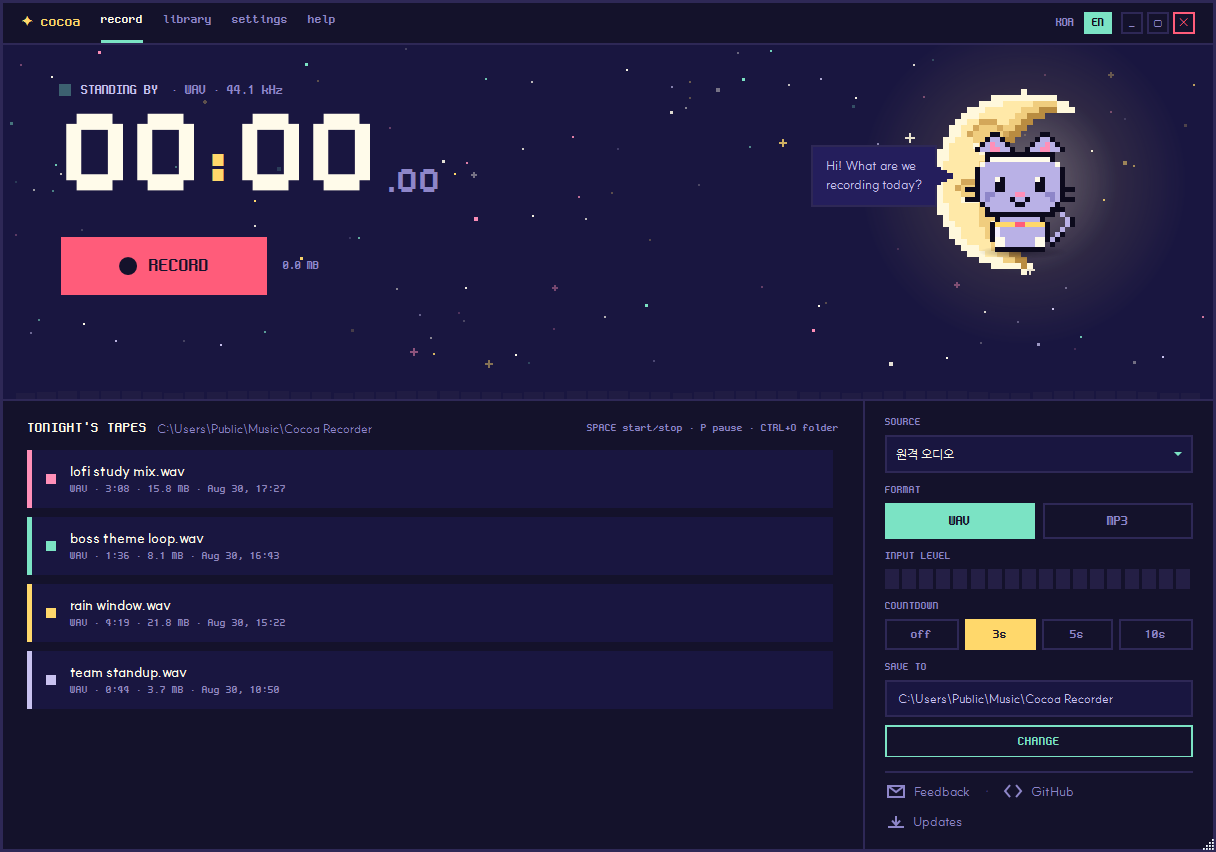
🌌 A whole new night
The pastel pixel look is gone. Cocoa Recorder now sits under a deep-indigo night sky, and the palette keeps exactly three signal colours so you always know what the app is doing at a glance — mint for active, amber for waiting, pink for recording. Nothing else competes for your eye.
The top of the window is a 356-pixel band of sky. 141 stars twinkle there, each on its own clock, drawn from a fixed seed so your sky is always the same sky. Beside them hangs a crescent moon drawn cell by cell — craters and all, no image file anywhere in the app.
The timer is 118 pixels tall now. It is the first thing you see, which is how it should be for a recorder.
🐈 Cocoa is a cat
She used to be a little device with a face. Now she is a 22 × 24 cell cat sitting on the moon, and she tells you what the app is doing without a single word:
- Waiting — sitting quietly, amber collar
- Counting down — ears up, watching
- Recording — ears up, pink collar, swaying side to side while riding the audio level
- Paused — curled up asleep, collar dimmed
Her speech bubble now has a tail that actually points at her.
🗺️ Four tabs
The single screen became four, and each one has a job.
record keeps your four most recent tapes within reach. library holds everything, scrolling. settings takes what does not belong in the side rail — MP3 quality, the fine countdown stepper, the shortcut list.
help is the one worth opening. Press F1 and the whole window turns into a four-step tour that Cocoa narrates herself. Tap any step and she changes pose and collar colour to match what she is explaining. It is in both languages.
📼 A calmer library
Every recording is one row with its own colour bar cycling through the palette. Click a row and play, reveal-in-folder and delete glide in from the right — no buttons cluttering the rows you are not using. Reveal-in-folder is new: it opens Explorer with the file already selected.
✉️ Say something
There was no route from the app to the issue tracker — you had to already know this repository existed. An envelope now sits at the bottom of the settings rail, quiet until you hover it. Clicking opens a new issue, and Cocoa says thank you.
🐛 Fixed
Renaming never worked. Double-clicking a recording's name hid the label and left an empty row — the edit box could not appear, because a local Visibility on it outranked the trigger meant to reveal it. This bug shipped in every release that advertised "double-click to rename". It works now.
Maximising covered the taskbar. A borderless window maximises to the entire monitor unless it is told otherwise. It now stops at the work area.
Everything moved in little jerks. The window was a layered window, which quietly drops it out of GPU compositing and renders the whole thing on the CPU — a thousand stars and sprites included. It keeps its borderless frame and gets hardware rendering back.
Recordings shared colours. Tape colours came from a hash of the filename, so ..._121736 and ..._121754 landed on the same colour and the list looked flat. They cycle through the palette now.
⌨️ One deliberate reversal
v2.0.0 handed Space to whichever button had focus. That was correct by Windows convention, but it meant clicking MP3 or a tab quietly disabled your record shortcut — press Space afterwards and nothing happened.
Space now belongs to the app, always. The only exception is while you are typing a name. Radio groups still answer arrow keys and buttons still answer Enter, so nothing is lost.
한국어
🌙 코코아가 달로 이사했어요
창이 그리는 것이 전부 새로워졌습니다. 속의 녹음기는 그대로예요 — 파일도, 폴더도, 설정도 손대지 않았습니다.
아래에서 **CocoaRecorder.exe**를 받으세요.
🌌 완전히 새로운 밤
파스텔 픽셀은 걷어냈습니다. 이제 코코아 레코더는 깊은 남색 밤하늘 아래에 있고, 신호색은 딱 세 가지만 씁니다 — 민트는 활성, 앰버는 대기, 핑크는 녹음. 그래서 지금 앱이 뭘 하고 있는지 한눈에 들어옵니다.
창 위쪽 356픽셀은 통째로 하늘이에요. 별 141개가 저마다 다른 박자로 반짝입니다. 씨앗값이 고정돼 있어서 언제 켜도 같은 별자리가 뜹니다. 그 옆에는 한 칸씩 그려 낸 초승달이 크레이터까지 갖추고 떠 있어요. 앱 안에 그림 파일은 단 하나도 없습니다.
시간은 118픽셀로 커졌습니다. 녹음기라면 제일 먼저 보여야 할 것이니까요.
🐈 코코아는 고양이가 되었습니다
얼굴이 달린 작은 기계였던 코코아가 달 위에 앉은 22 × 24칸 고양이가 되었어요. 말 없이도 앱의 상태를 알려 줍니다.
- 대기 — 조용히 앉아 있고, 목걸이는 앰버
- 카운트다운 — 귀를 쫑긋 세우고 기다림
- 녹음 중 — 귀를 세운 채 핑크 목걸이를 하고, 소리 크기에 맞춰 오르내리며 옆으로 살랑
- 일시정지 — 몸을 동그랗게 말고 잠듦
말풍선에도 꼬리가 생겨서, 이제 누가 말하는지 제대로 가리킵니다.
🗺️ 탭 네 개
한 화면이던 것이 넷으로 갈라졌고, 각자 할 일이 생겼습니다.
녹음은 최근 테이프 네 개를 손 닿는 곳에 둡니다. 보관함은 전부를 스크롤로 보여 주고요. 설정은 오른쪽 레일에 넣기 애매한 것들 — MP3 품질, 카운트다운 세밀 조정, 단축키 목록 — 을 맡습니다.
열어 볼 만한 건 도움말이에요. **F1**을 누르면 창 전체가 코코아가 직접 네 단계로 설명해 주는 안내로 바뀝니다. 아무 단계나 톡 누르면 지금 설명하는 내용에 맞춰 자세와 목걸이 색이 바뀌어요. 한국어와 영어 둘 다 됩니다.
📼 차분해진 보관함
녹음본마다 자기 색 띠가 붙은 한 줄이 됩니다. 줄을 누르면 재생 · 폴더 열기 · 삭제 버튼이 오른쪽에서 흘러나와요. 쓰지 않는 줄에는 버튼이 없어 목록이 깔끔합니다. 폴더 열기는 새로 생긴 기능인데, 탐색기에서 그 파일이 선택된 채로 열립니다.
✉️ 하고 싶은 말이 있으면
앱에서 이슈 게시판으로 가는 길이 없었습니다. 이 저장소가 있다는 걸 이미 알고 있어야만 갈 수 있었어요. 이제 설정 레일 맨 아래에 편지 한 통이 놓여 있습니다. 평소엔 조용히 있다가 마우스를 올리면 켜져요. 누르면 새 이슈 작성 화면이 열리고, 코코아가 고맙다고 합니다.
🐛 고친 것
이름 바꾸기가 원래 안 됐습니다. 녹음본 이름을 더블클릭하면 글자만 사라지고 빈 줄이 남았어요. 편집칸에 직접 적힌 Visibility 값이, 그걸 드러내려던 트리거보다 우선순위가 높았기 때문입니다. "더블클릭으로 이름 변경"이라고 안내하던 모든 릴리스에 이 버그가 있었어요. 이제 됩니다.
최대화하면 작업 표시줄을 덮었습니다. 테두리 없는 창은 따로 일러 주지 않으면 모니터 전체를 덮습니다. 이제 작업 영역에서 멈춥니다.
모든 움직임이 툭툭 끊겼습니다. 창이 레이어드 윈도우라서 GPU 합성에서 빠져 있었고, 별 천 개와 스프라이트가 전부 CPU로 그려지고 있었어요. 테두리 없는 모습은 그대로 두면서 하드웨어 렌더링을 되찾았습니다.
녹음본 색이 겹쳤습니다. 파일 이름 해시로 색을 정하다 보니 ..._121736과 ..._121754가 같은 색에 몰려 목록이 단색으로 보였어요. 이제 순서대로 돌아갑니다.
⌨️ 하나는 일부러 되돌렸습니다
v2.0.0에서는 Space를 포커스된 버튼에게 양보했습니다. Windows 관례로는 맞지만, MP3나 탭을 한 번 클릭하고 나면 녹음 단축키가 조용히 먹통이 되는 문제가 있었어요.
이제 Space는 언제나 앱의 것입니다. 이름을 입력하는 중일 때만 비켜섭니다. 라디오 묶음은 방향키로, 버튼은 Enter로 여전히 누를 수 있어서 잃은 건 없습니다.
🎨 The Moon Studio direction was designed in Claude Design and built with Claude Code.
Cocoa Recorder v2.0.0 — new name, adjustable countdown
🍫 Reccoo is now Cocoa Recorder
Download
CocoaRecorder.exebelow — releases before this one shippedReccoo.exe.
Your recordings stay put. If you already have aMusic\Reccoofolder, the app keeps opening it exactly as before. Only new installs start out inMusic\Cocoa Recorder.
The repository also moved todarkdarkcocoa/cocoa-recorder; old links redirect on their own.
✨ New
The countdown is yours to set. A − / + stepper sits under the Record button and takes the lead-in anywhere from 0 to 10 seconds. Your choice is remembered between launches.
At 0 it reads Instant and starts recording the moment you press the button — good for grabbing a pile of quick samples without waiting. Turn it up instead and you have time to switch windows, find the video and hit play before recording begins.
This one is entirely thanks to @wojnet, who opened #3 while using Cocoa Recorder to catch samples for their own music 🎧 — and who gently pointed out that three seconds is nowhere near enough time to reach another window. Both halves of that note ended up in the design. Thank you! 🍫
🎨 Changed
A new display face. Text is now set in NeoDunggeunmo. The previous pixel font shipped here in Bold only and was drawn on an 11-pixel grid, while the app renders at 13, 15, 16 and 20 px — none of them a multiple of eleven. Strokes landed on fractional pixels, some coming out two pixels wide and their neighbours one, which filled in dense Hangul syllables and made the whole UI read heavy. NeoDunggeunmo is drawn on a 15-pixel grid, ships a regular weight, and covers all 11,172 Hangul syllables alongside Latin, so both languages now sit evenly at every size the app uses. The large timer keeps Pixelify Sans.
The mascot is now Cocoa, named after the app. It was Recco, then Coco.
The transport row was rebuilt. The countdown control now lines up with the Record button's left edge and the shortcut hint with the Stop button's right edge — in both languages. Previously the row re-centred itself on its own contents, so switching to English pushed it 31 px out of alignment.
🐛 Fixed
Space no longer starts a recording behind your back. The window-level shortcut claimed the space bar before any control could see it, so tabbing to a button or toggle and pressing Space — the key that control exists to answer — began recording instead. Buttons, toggles and radios now keep their own Space, and the shortcut still works everywhere else.
The countdown's on-state is legible. Its indicator used to sit at 1.36:1 against its own track — fainter than the off-state's 4.27:1, so the feature looked less switched on when it was on. It now uses the same treatment as the rest of the app's controls.
Keyboard focus is visible. The segmented controls never drew a focus ring; they now show a dashed outline when you tab to them.
한국어
🍫 Reccoo가 코코아 레코더가 되었습니다
아래에서 **
CocoaRecorder.exe**를 받으세요. 이전 릴리스의 파일명은Reccoo.exe였습니다.
기존 녹음은 그대로 있습니다.Music\Reccoo폴더를 쓰고 계셨다면 앱이 계속 그 폴더를 엽니다. 새로 설치하는 경우에만Music\Cocoa Recorder에서 시작합니다.
저장소 주소도darkdarkcocoa/cocoa-recorder로 옮겼습니다. 예전 주소는 자동으로 연결됩니다.
✨ 새로운 것
카운트다운 시간을 직접 정할 수 있습니다. 녹음 버튼 아래의 − / + 버튼으로 0초에서 10초까지 조절하고, 고른 값은 다음 실행에도 유지됩니다.
0으로 두면 바로라고 표시되며 버튼을 누르는 즉시 녹음이 시작됩니다. 짧은 소리를 여러 개 모을 때 기다릴 필요가 없습니다. 반대로 길게 두면 다른 창으로 넘어가 영상을 찾고 재생을 누를 시간이 생깁니다.
이 기능은 온전히 @wojnet 님 덕분입니다 🎧 코코아 레코더로 직접 만들 음악의 샘플을 모으시다가 #3을 남겨 주셨어요. 3초로는 다른 창까지 갈 수 없다는 말씀도 함께 주셨는데, 그 두 가지가 그대로 설계에 들어갔습니다. 정말 감사합니다! 🍫
🎨 달라진 것
표시용 글꼴을 바꿨습니다. 이제 네오둥근모를 씁니다. 이전 픽셀 글꼴은 굵은 한 벌만 들어 있었고 11픽셀 격자로 그려진 것이었는데, 앱은 13·15·16·20px로 글자를 그립니다. 어느 것도 11의 배수가 아니어서 획이 소수점 위치에 놓였고, 어떤 획은 두 픽셀 어떤 획은 한 픽셀이 되면서 받침이 많은 글자가 메워져 화면 전체가 답답해 보였습니다. 네오둥근모는 15픽셀 격자에 보통 굵기로 그려졌고 한글 11,172자와 라틴 문자를 모두 덮기 때문에, 앱이 쓰는 모든 크기에서 두 언어가 고르게 놓입니다. 큰 타이머 숫자는 Pixelify Sans 그대로입니다.
마스코트 이름이 코코아가 되었습니다. 레코에서 코코를 거쳐 앱 이름과 같아졌습니다.
녹음 버튼 아래 줄을 다시 짰습니다. 카운트다운 조절부의 왼쪽 끝이 녹음 버튼과, 단축키 안내의 오른쪽 끝이 정지 버튼과 맞습니다. 두 언어 모두요. 이전에는 줄이 자기 내용 기준으로 가운데 정렬되어서, 영어로 바꾸면 31픽셀이 어긋났습니다.
🐛 고친 것
Space가 몰래 녹음을 시작하지 않습니다. 창 전체의 단축키가 스페이스바를 먼저 가로채는 바람에, 키보드로 버튼이나 토글에 이동한 뒤 Space를 누르면 그 컨트롤이 아니라 녹음이 시작되었습니다. 이제 버튼·토글·라디오는 자기 Space를 지키고, 그 밖의 자리에서는 단축키가 그대로 동작합니다.
카운트다운이 켜졌을 때 잘 보입니다. 켜짐 표시의 명암비가 1.36:1로, 꺼짐 상태(4.27:1)보다 오히려 흐렸습니다. 켜져 있을 때 덜 켜져 보이던 셈입니다. 이제 앱의 다른 조작부와 같은 방식으로 표시됩니다.
키보드 포커스가 보입니다. 선택 버튼들에 포커스 표시가 없었는데, Tab으로 이동하면 점선 테두리가 나타납니다.
Full Changelog: v1.1.0...v2.0.0
Contributors

Assets 3
Reccoo v1.1.0 - KOR/EN language toggle
✨ New
- KOR | EN language toggle — a segmented control in the title bar switches the entire UI, mascot chatter included, between Korean and English. The app follows your system language on first launch.
🎨 Improved
- Fixed clipped bottom edge on first launch — the default window height is now 852px, so the recordings library renders fully without resizing.
- Removed the dark theme — focusing on the single pastel pixel palette that defines the app.
📝 Docs
- English README is now the default (Korean available as README.ko.md)
- Added CONTRIBUTING.md contributor guide
- Auto-updating version/date badges on the download link, refreshed screenshot
Full Changelog: v1.0.0...v1.1.0
v1.0.0
Reccoo v0.1.0 — 픽셀 아트 사운드 레코더
Reccoo v0.1.0 🎀
귀여운 픽셀 아트 사운드 레코더 첫 릴리스.
다운로드
Reccoo.exe — Windows x64, self-contained single exe (~76 MB)
.NET 런타임이 같이 들어있어서 별도 설치 없이 바로 실행돼. 다운로드 후 더블클릭만 하면 됨.
특징
- 🎨 픽셀 아트 UI — 크림/코랄/민트/라일락 파스텔 팔레트
- 🎤 시스템 사운드 녹음 (
WasapiLoopbackCapture) - 💾 WAV / MP3 토글 (NAudio.Lame)
- 〰️ 라이브 파형 + 18-cell 입력 레벨 미터
- 🐤 마스코트 "레코(Recco)" 픽셀 sprite (idle / recording 모드)
- 📁 녹음 보관함 — 카세트 카드 그리드, 인라인 ▶ / ✕
시스템 요구사항
- Windows 10 / 11 (x64)
- 별도 .NET 런타임 설치 불필요
첫 실행 시
SmartScreen이 알 수 없는 게시자 경고를 띄울 수 있어. "추가 정보" → "실행"으로 진행하면 됨.