Repository navigation
Releases: darkmariachi/teslacamviewer
Release list
TeslaCam Viewer 2.1.0

TeslaCam Viewer 2.1 makes the desktop app easier to start with and to keep using.
New
- Use the folder you already have. On first start, choose between a new library and the folder where you already keep your TeslaCam clips. Your clips are read where they are; nothing is copied or moved. Admin → Library can switch folders later, and each folder keeps its own notes, favorites and collections.
- Plug in and import. When the car's USB drive is plugged in, even before the app was opened, the app offers to import what's new on it.
- A title bar of its own, with a traffic light for the window: amber minimizes, green maximizes, red closes. The app menu sits behind the button at the left.
Handled for you
- Clips you copied or moved into the library yourself are picked up when the app opens, including the drive's whole
TeslaCamfolder dragged in. Nothing is imported twice, and clearing the drive only removes what is safely in the library. - If the library folder goes missing (say, a drive is unplugged), the app says so, keeps everything, and recovers by itself when the folder is back.
- Choosing a folder on a removable drive, or the car's own drive, gets a warning first.
- Clips the car encrypted are counted and explained instead of silently skipped.
- Unplugging the drive during an import stops it cleanly, keeping what was copied.
Downloads
| File | For |
|---|---|
TeslaCam-Viewer-2.1.0-setup.exe |
Windows 10 or 11, installer |
TeslaCam-Viewer-2.1.0-portable.exe |
Windows, runs without installing |
TeslaCam-Viewer-2.1.0-x86_64.AppImage |
Linux, 64-bit |
TeslaCam-Viewer-2.1.0-x64.tar.gz |
Linux, unpack and run teslacam-viewer |
Installed copies of 2.0.0 (the Windows installer and the AppImage) update themselves. The server is ghcr.io/darkmariachi/teslacamviewer:2.1.0 (also latest); see the README.
The Windows builds are still not code-signed, so SmartScreen warns the first time: choose More info, then Run anyway.
TeslaCam Viewer 2.0.0
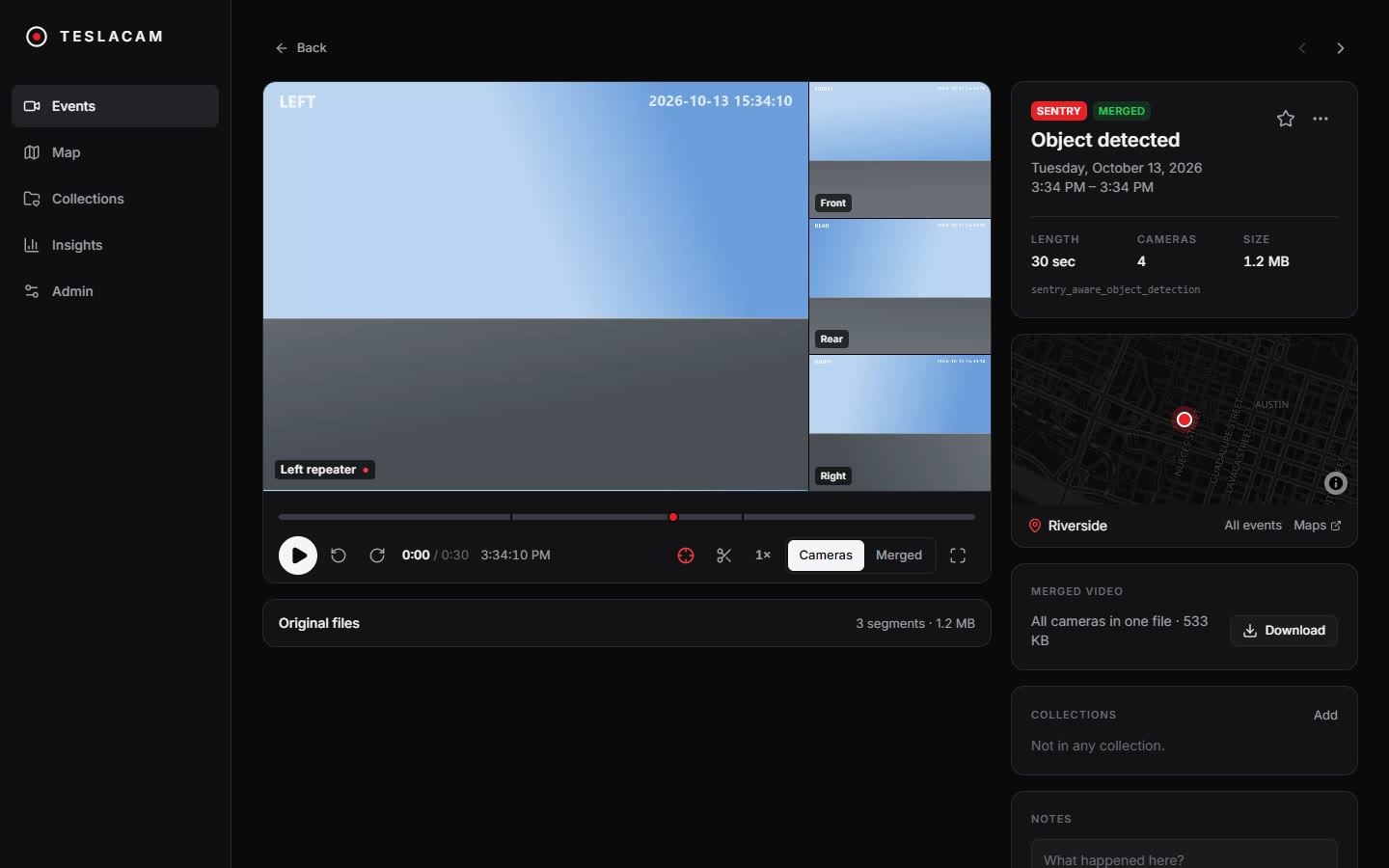
TeslaCam Viewer 2 is a complete rewrite: a fast library for your Tesla's Sentry and dashcam clips, now as a desktop app for Windows and Linux as well as a self-hosted server.
Highlights
- One video per event. Every camera plays in sync on one timeline, the trigger is marked, and playback starts just before it.
- Import from the car's USB drive. The desktop app lists the drive as soon as it is plugged in, skips clips you already have, and can clear the drive afterwards. In a browser, choose the drive's TeslaCam folder.
- Trim ten-minute Sentry recordings down to the minutes around the trigger.
- The car's own event clip plays when you hover over an event.
- Map and insights: where events happened, and patterns by month, hour, weekday, reason and place.
- Merged grid videos and clip export, with hardware encoding on NVIDIA, AMD, Intel and Apple graphics.
- teslausb, optional: see when the car is home, follow uploads, and clean up Sentry events recorded at home.
- Safe deletion through a trash folder, and a built-in Help guide.
Downloads
| File | For |
|---|---|
TeslaCam-Viewer-2.0.0-setup.exe |
Windows 10 or 11, installer |
TeslaCam-Viewer-2.0.0-portable.exe |
Windows, runs without installing |
TeslaCam-Viewer-2.0.0-x86_64.AppImage |
Linux, 64-bit |
TeslaCam-Viewer-2.0.0-x64.tar.gz |
Linux, unpack and run teslacam-viewer |
Or run the server with Docker: ghcr.io/darkmariachi/teslacamviewer:2.0.0 (also latest). See the README.
Good to know
- The Windows builds are not code-signed, so SmartScreen warns the first time: choose More info, then Run anyway.
- If your car has Controls → Safety → Encrypt Dashcam Recordings, turn it off. Encrypted clips can only be played in the car or on Tesla's website.
- The Linux build has been produced and packaged, but not yet tried on a Linux desktop. A macOS version will follow.
- The desktop app updates itself from these releases (the Windows installer and the AppImage). It can be turned off under Help.
Upgrading from v1: v2 indexes your clip folder from scratch and doesn't use v1's database. Favorites from v1 are not carried over.