Repository navigation
Preview and Logging
Batch Text v1.6.0 adds optional text inspection and cumulative text logging directly to the existing Batch Text node. There is no second inspector node and no change to the TEXT output connector, input ordering, native TEXT_LIST support, or delimiter behavior.
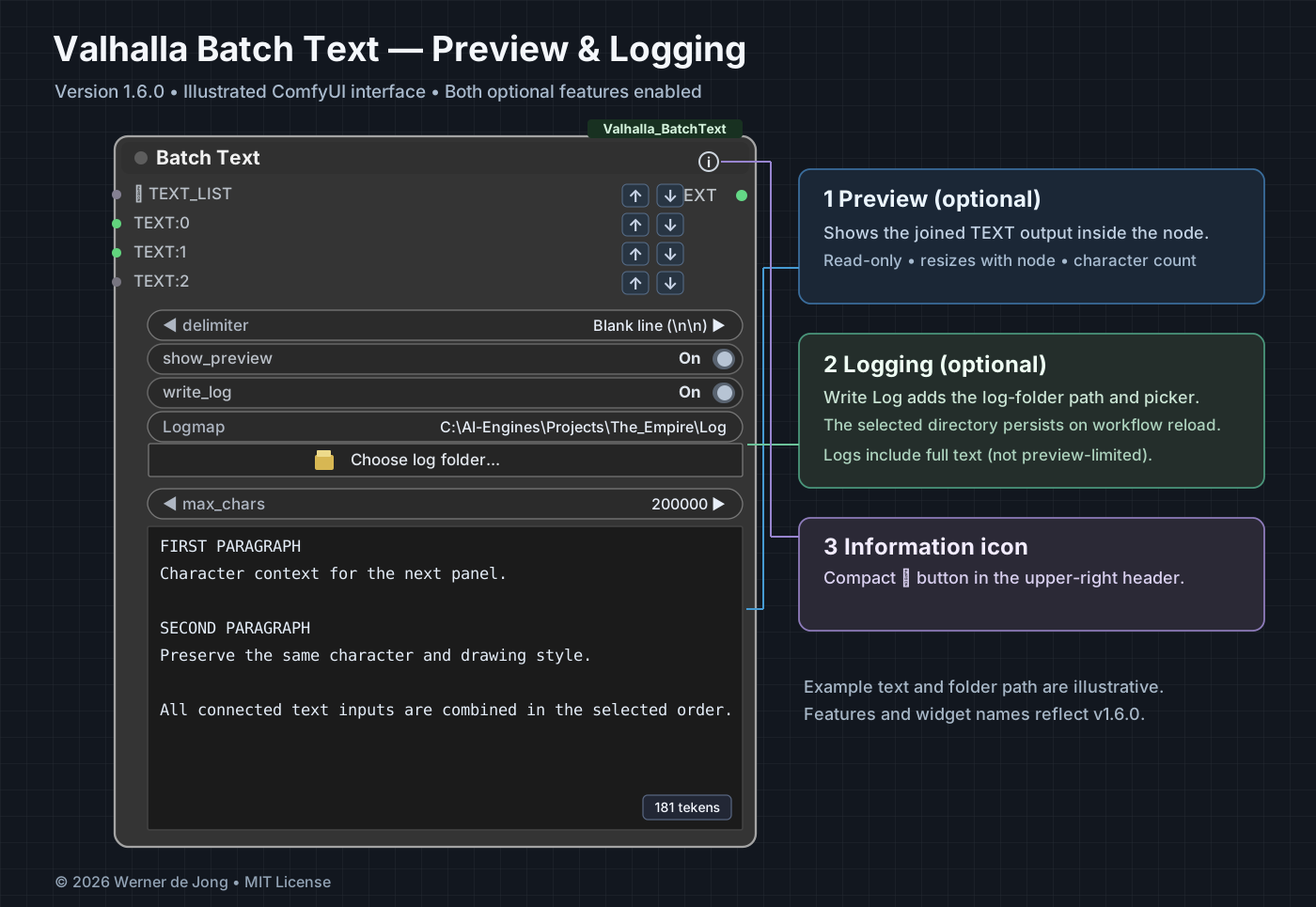
Illustration of the v1.6.0 interface with both options enabled, a selected log folder and example combined text. Not a live ComfyUI screenshot.
- show_preview is off by default. When off, the inspector controls and preview are hidden.
- Turn show_preview on to see the combined text below the delimiter controls, together with the character counter and max_chars.
- The preview is read-only and expands or shrinks with the node.
- max_chars defaults to 200,000, configurable from 100 to 2,000,000. This is a display limit only: the TEXT output and logs contain the full combined text, even when the preview is truncated.
- The small ⓘ icon near the top-right corner opens the information dialog.
write_log is available when show_preview is enabled and is off by default.
When write_log is switched on, two extra controls appear:
- Logmap — the directory displayed within the node.
- 📁 Choose log folder... — opens the server's folder chooser. The selected path is stored in the workflow and restored on reload.
Switching write_log off hides these controls without unexpectedly resizing the node. It also stops new log writes.
Logs contain the complete text, not the shortened preview. Entries are appended in UTF-8 to a workflow-specific timestamped text file; multiple inspection entries in the same execution use a shared file when run metadata is available.
When log_folder is empty, NULL, None, or auto, Batch Text attempts to use the directory containing the saved ComfyUI workflow, including workflow subdirectories.
If the original file location cannot be determined, it falls back to ComfyUI's configured user/default/workflows directory. Browsers cannot disclose the local filesystem path of an arbitrary imported JSON workflow; select a destination explicitly in that case.
For another destination, use Choose log folder... or enter an existing directory in the Logmap field. The chosen location is saved with the workflow. Batch Text does not silently create directories that do not exist.
Windows note: the native folder chooser runs on the ComfyUI server machine and is restricted to localhost requests. On non-Windows hosts or remote access, the native folder picker is not available; configure the path manually.
Connect TEXT:0 = First paragraph and TEXT:1 = Second paragraph; select the Blank line delimiter. Enable show_preview to review both paragraphs within Batch Text. Enable write_log and choose an existing directory to keep a cumulative record after each execution. The TEXT output still sends the complete text unchanged to downstream nodes.
- No preview: enable show_preview, queue the workflow and check the input connections.
- Preview stays blank after execution: restart ComfyUI, hard-refresh the browser (Ctrl+F5), and verify only one installation of Batch Text exists.
- Preview doesn't resize: both Python and JavaScript files must be v1.6.0; the preview uses a flexible-height DOM widget.
- No log written: enable both toggles, check directory existence and write permissions, and inspect the browse button tooltip for errors.
- Choose log folder is unavailable: the GUI picker requires a local Windows ComfyUI server.
Batch Text overview · Reordering Inputs · Installation and Troubleshooting
© 2026 Werner de Jong · MIT License.