3.2 Cubes
(Author: Patrick Pogscheba, date: 12/2023)
Before desccribing all modules used in the puzzlecube system there is a small description how a cube system is installed:
A brief description of implementation details for backend software running on the cubes follows. We are going from bottom (sensor periphery) to top (app).
The sensorboard described earlier mainly provides IMU data (orientation, acceleration and angular velocity) along with relative motion data and neighbourhood information (is another cube docked to one side ?) over the USB interface to the cube PC. It is programmed for the arduino framework. Library management is done via Platform IO (https://platformio.org/)
Each sensor component is handled in its own class, pleae read the sensor docs which are linked in the hardware section and datasheets for more detailed informations:
-
ImuProcessor (Imu.h):
This class queries the IMU unit for multiple values:
- SH2_ROTATION_VECTOR: quaternion representing the rotation of the IMU in reference to the magnetic north
- SH2_LINEAR_ACCELERATION: gravity-compensated acceleration data
- SH2_GYROSCOPE_CALIBRATED: calibrated (with accelerometer and magnetic compass) angular velocity
- SH2_STABILITY_CLASSIFIER: determines if the IMU is moving
In each call of the processing function the sensor is read out until no events are in the queue anymore. For each sensor event a json datagram is generated and added to a string which represents an array of sensor events in JSON and then sent out to the serial interface.
-
RelativeMotion (RelativeMotion.h):
For getting better results on direction estimation the optical flow sensor is used. On each processing step the relative displacement in x and y is read out and wrapped in a json datagram which is sent out via serial bus. The sensor allows to set a mounting height to get absolute displacement values in mm which is set to 25mm above floor by cube design and mounting position. Currently only the directions are interesting but distances can be used later in sensor fusion (currently not implemented).
-
Neighbourhood (Neighbourhood.h):
Neighbourhood processing is done by 4 connected NFC tag readers (PN532) connected to an 8-channel I2C multiplexer (TCA9548A) to overcome the equal I2C adresses. Because there were problems accessing the readers reliably on channel 0 we also allow a second channel for each reader.
Because of the single core cpu and the lengthy read acces to a tag we have to be very reserved on read intervals. After initialization of each reader in each processing step only one reader is accessed in a round robin manner by setting the dedicated MUX-Channel. The single readers are wrapped in a class Contact which performs the reading and json generation. If a tag is found by the reader the UID is stored and the connected state is enabled which is represented in the corresponding json. If no tag is present the second time (just to the prevent heavy toggling) connected state is disabled and the UID is cleared.
When all readers are processed a wrapping json is generated and sent out to the serial interface.Each cube also has to provide 4 NFS-tags on the corresponding position the reader resides when two cubes are connected. Each Tag-ID should be stored with the corresponding cubeside on a configuration file residing on the server backend.
The main control (arduino loop and setup logic) does all the configuration of interfaces (i2c, SPI and serial) together with the task scheduling of each sensor processing:
- Wire0/i2c bus 0: All the NFC tags for neighbourhood detection are running on 1MHz
- Wire1/i2c bus 1: The IMU is connected to Wire 1 and runs on 1MHz, too
- SPI: nothing to do here, managed by library
- Serial: for handling the relative large amount of json data the serial baud rate is set to 230400 (an educated guess which principally could be calculated right ;)
-
Task scheduler: A arduino library is used for task scheduling. There are two tasks with different frame rates running:
- Neighbourhood task (wire0 task) with a time step of 200ms
- motion sensor task (wire1 task) with a framerate of 50ms. Faster would be better here buut the single core cpu wont allow for more in combination with the neighbourhood readings
As a autostarting app-independent entry-point for sensor processing and state communication a backend service was implemented in python which is based on the python services base package described under in Base packages.
It basicly implements the sensorprocessing together with the generation of a cube state (hardware and software informations). There are multiple submodules and classes implemented which are mainly wired by DI and reactive programming.
-
Dependency Injection (file): In the file di.py all the classes and constants are defined which are used throughout the module. An environment file is loaded to read the CUBE_ID which identifies each cube. All the communication information (server ip, client name for MQTT and devices for serial communication) are defined along with the lazy object creation for each used class). The classes defined here are injected into each other as noted in the constructor.
-
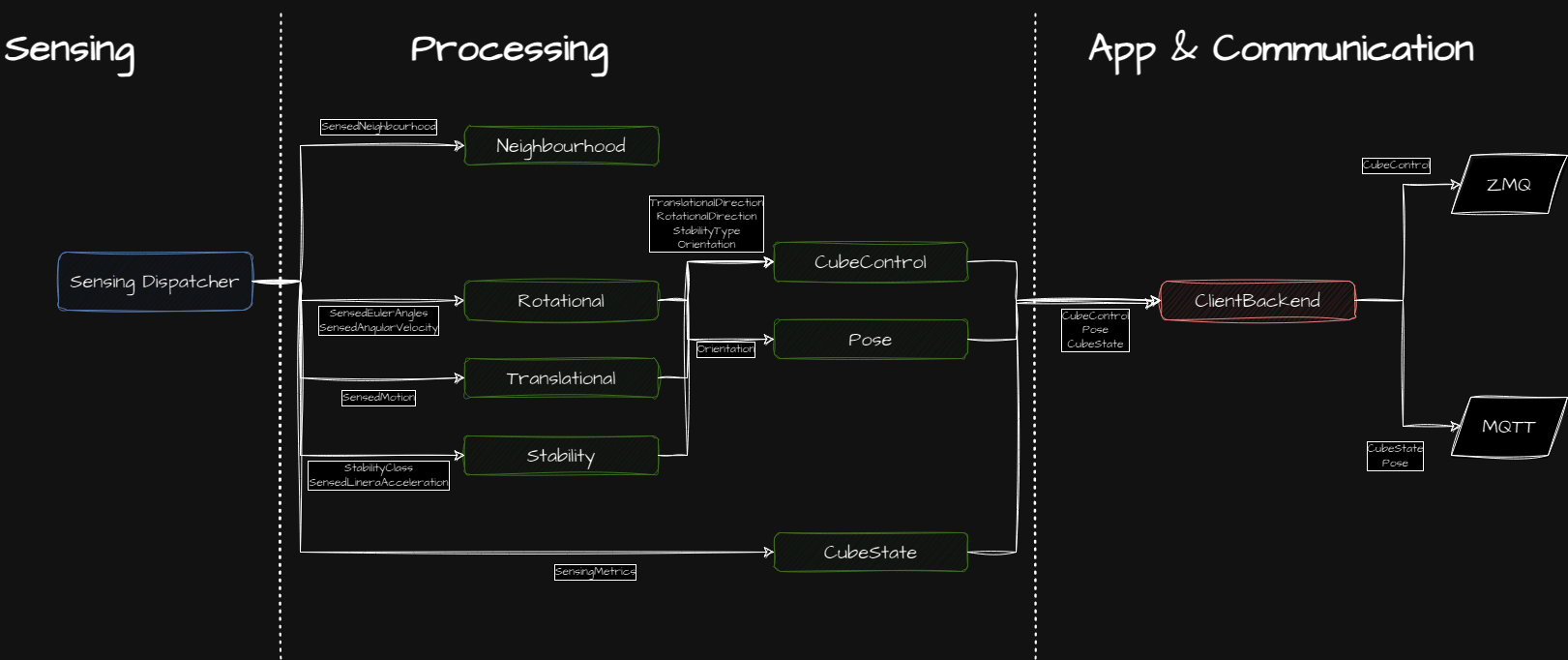
Sensing (module): The sensor events generated by the sensorboard are read in and dispatched to dedicated reactive subjects in the SensorDispatcher. Therefore multiple models are generated as a data class (pydantic) for json data sent from sensorboard.
-
Processing (module): Mainly all the sensor data generated by the Sensor Dispatcher are processed by different processing classes for generating the needed events, e.g. moving state, rotational/translational steps and impulses. Each needed date has a handler which is wired in the main function to the right subject from Sensing Dispatcher. A Scheduler is used to generatetime synced data for the subjects sending out the processed data. The processing can be hierarchical, e.g. the CubeControlProcessor needs data from stability, rotational and translational processing.
An intermediate pose is calculated which is sent out as temp pose to be aggregated at the server side with the tracking data. This pose currently only has orientation set but could be extended for other motion data from the sensor board.
Additionally the CubeStateProcessor is gathering system data (IP, Uptime, etc.), sensor metrics (FPS), service uptime and some additional states to generate a CubeState date which is sent out every second.
-
App implementation (class): This class handles communication over ZMQ (to app) and MQTT and implements data handlers which are connected to the subjects in the main file for being sent out.
The main file main.py is wiring all te reactive subjects to their handlers and starts aync processes.
A principal overview with the main datastreams inside the cube backend service:
The apps are currently developed in Unity with the base package described earlier. Other possibilities are web apps (which could use the base packages for web alongside with new logic to handle cube internal communication over ZMQ) or other engines (start from scratch).
A step-by-step-guide to start a new app in Unity and a tutorial project is following later on.
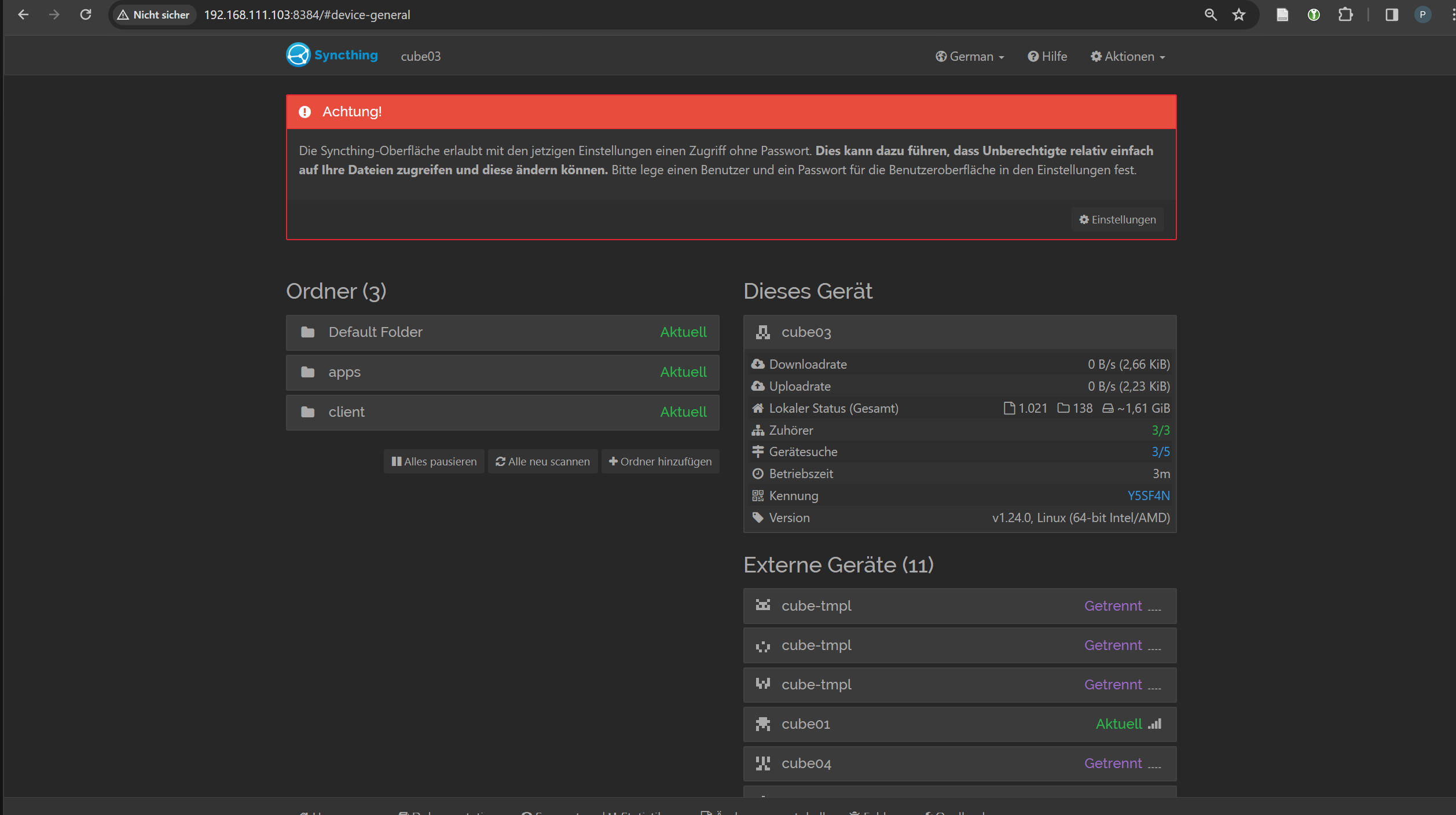
The syncthing service is started after cube initialization. In the web UI the paths from the server should be autodiscovered and then added to the cubes syncs:
- client
- apps
The Cube Backend Service (https://github.com/dasdigitalefoyer/cubes-cube-backend) has a Dockerfile integrated to build an image with the latest version. To deploy the latest code on the cubes the server has a simple docker compose based tool chain to build the image:
...
The built image should be pushed onto the Docker registry on the server:
docker push <TODO>
On the next cube start the new image should be automatically pulled and used on the cube.
For the sensorboard (https://github.com/dasdigitalefoyer/cubes-sensorboard) there is also a docker compose based tool chain integrated on the server. Just build the image and push it to the registry.
...
In the managament app under Cubes (expert mode) there is a button to update the sensorboard which triggers the pull and builds and uploads the new code to the ESP32 sensor board.