
This file was written by an agent.
FileBlade 0.2.0
FileBlade 0.2.0 is a native Omarchy application providing customizable IDE-like sidebars, file workflows, Notes, Skills, Memory, Hooks and MCP panes.
This release adds verified native installation, explicit desktop integration roles, migration, safe shutdown and rollback. It includes newest-first media browsing with a saved order toggle, working video posters, collision handling, desktop Reveal and file chooser integration, and corrected tailnet SFTP refresh.
The <= 0.1.3 plugin is archived; the project didn't work as well with the whole "plugin-in-plugin" system.
New features:
-
Skills, mcp, hooks, memory are all part of FileBlade core
-
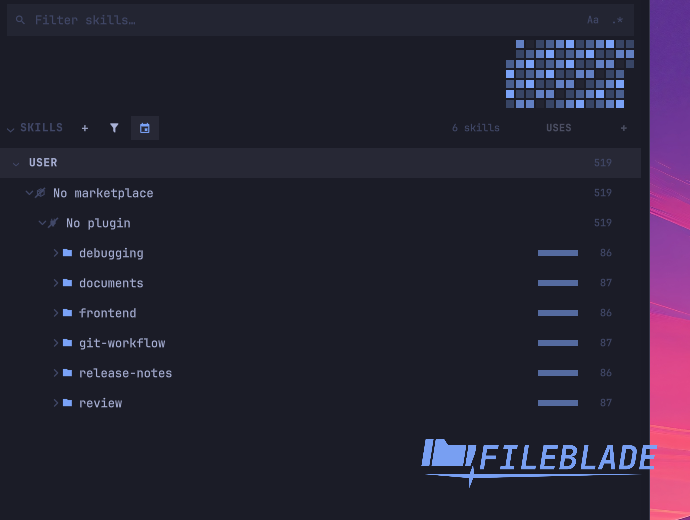
SQLite db for tracking skill and MCP usage, and heatmap to show usage
-
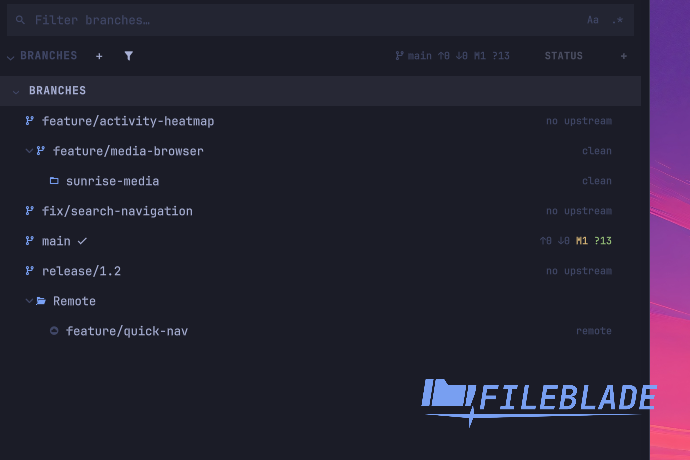
New module "Branches" that shows your git branches (local and remote) and worktrees
-
Improvements for search and git status indicators
-
Support for Tailnet and mounted / unmounted drives
-
Quick access to common trash
-
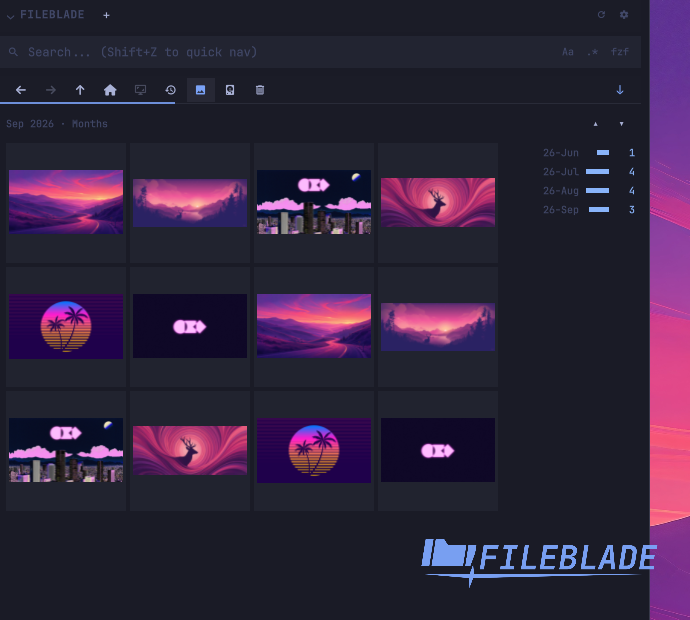
Media mode to see image previews
-
Dataviz of images
-
Improvements to selection wheel
-
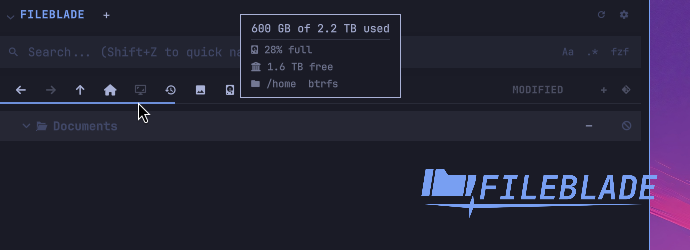
Visualization of drive storage
-
Additional customization
Screenshots use sample data in an isolated workspace 9 session and are cropped
to the feature shown.
Further improvements and fixes
- Media starts newest first, with a saved ascending/descending arrow replacing
the Git and column controls. MP4 posters work with trailing metadata, and
hourly timelines retain every day with 24 bars. - Pickers keep text files visible after media browsing. Reveal preserves the
requested selection while its folder loads. Copy collisions show the decision
dialog, including Keep both. - Terminal actions preserve tmux named and explicit sockets. Herdr targets its
focused pane, Hunk requires Git changes, and opening a file in a new terminal
starts Neovim. Holding Space before leaving a blade opens the drop wheel. - Tailnet SFTP refresh retains connections made through validated SSH aliases.
Drives remains the main volume list; “Volumes in the tree” restores the
optional tree entries and their route to connected peers. - Branches opens beside Properties. A linked worktree nests under its branch;
Enter opens that folder. The main checkout is not repeated as a worktree.
Status uses the same upstream/change counts as the file-tree summary. Branch
switching supports remote branches, and the CLI exposes open, close and list. - Skills and MCP activity updates when transcripts change, with a 60-second
fallback refresh. Counts survive deleted transcripts in the private SQLite
history;fileblade usage skills|mcpreads it andfileblade usage forget
removes it. The former JSON cache is retired. - Skill counts cover Claude Code, Codex, OpenCode, Copilot CLI, Antigravity and
Pi, including namespaced skills and typed commands. MCP counts include
Codex, OpenCode and Copilot CLI; dotted server names, resources and prompts
are counted. Expanding an MCP row shows used tools, resources and prompts,
including failure counts. - Heatmap tooltips show the date, total and agent/user/scheduled shares. Click
or press Enter on a Skills day to filter; Esc clears. Activity refresh does
not rescan skill directories, and the Activity button hides the heatmap. - Skills, Memory, Hooks and MCP run in the bundled Rust backend without Python
helpers. Delete works on their rows, with separate deactivate and symlink
actions. Disabled skills remain visible and usable through their recovery
copy; failed bin reads preserve rows and retry. - Hook edits refuse invalid output or loss of unrelated top-level keys, leaving
the original file unchanged. Notes shows last edit time and word/character
counts while retaining save-error and conflict notices. - Search fields consistently precede pane headers, and
/still opens search.
Toolbar buttons are configurable, hidden buttons retain keyboard routes
except Drives, and row density uses five stops from XS to XL. - Native theme colors reload in both directions. Blade resizing no longer
triggers cursor warps or jumps to maximum width. Drive usage can be hidden
per Files tab;fileblade space [PATH]reports the same capacity. - Unknown actions and malformed bindings are skipped with a notice. Older
versions preserve newer settings/keybinding version markers, and reads
identify the version that wrote each file. - Native installation rejects mixed payload versions, checks the advertised
archive version and target, and supports safe shutdown, migration, updates
and rollback. Long state paths and launcher paths with reserved characters
are supported. Desktop roles restore owned entries while preserving newer
user choices; shipped bindings use the public CLI. - Native CLI helpers share the running authority for reads and mutations.
fileblade doctorreports blocked recovery as unhealthy, and refused module,
slot, tab and screen commands exit unsuccessfully. - Extensions can reuse the image grid, thumbnail cache, timeline and five-step
image-size control. Module icons appear consistently in the picker, settings
and pane header. - Every documented feature has screenshot and short-video evidence under
features/.
Installation and verification
Install the native app on an up-to-date x86-64 Omarchy system:
curl -fsSL https://raw.githubusercontent.com/data-goblin/fileblade/v0.2.0/install.sh | sh
fileblade
Desktop integration is experimental and opt-in. For shortcuts and login startup:
fileblade native roles enable --role bindings
fileblade native roles enable --role autostart
Alternatively, download fileblade-native-0.2.0-1-x86_64.pkg.tar.zst and install it with sudo pacman -U.
To verify the downloads, download every attached asset into one directory and run:
sha256sum --check --strict SHA256SUMSThe bootstrap separately verifies the archive SHA-256, advertised version/target and complete payload inventory before installation. SHA-256 verifies integrity; these manifests are not signed.
111 feature guides with screenshot/video proof · Build provenance
The bundled backend was independently reproduced and signed by the
exact-commit provenance build.
The attached fileblade-bin.sigstore.json verifies the attached backend and the
identical backend inside both native packages; it does not sign the complete archives.
gh attestation verify ./fileblade-bin --bundle ./fileblade-bin.sigstore.json \
  --repo data-goblin/fileblade \
  --signer-workflow data-goblin/fileblade/.github/workflows/bundle-provenance.yml \
  --source-digest b58a46f847134fd8228dc1506b4605b6f62ed523 \
  --signer-digest b58a46f847134fd8228dc1506b4605b6f62ed523 \
  --deny-self-hosted-runners