



A React currency input that formats as you type, with h/k/m/b multiplier
shortcuts designed for modern desktop and mobile browsers.
Zero runtime dependencies. Unstyled by default.
Open the playground in StackBlitz → · Browse every state in Storybook → · Framework examples →
npm install react-financial-inputimport { useState } from 'react';
import { FinancialInput } from 'react-financial-input';
export const AmountField = () => {
const [amount, setAmount] = useState<number | null>(null);
return (
<>
<label htmlFor="amount">Amount</label>
<FinancialInput id="amount" value={amount} onChange={setAmount} />
</>
);
};Type 1234567 and you get 1,234,567; type 2.5m and you get 2,500,000.
onChange gives you a number, or null while the value is incomplete —
never NaN. Want strings instead? valueType="string".
Want it styled? One import, opt-in:
import 'react-financial-input/styles.css';Showing currency flags? Windows has no flag glyphs of its own, so the font ships too. Importing it is what makes flags work on every OS, at 80 kB:
import 'react-financial-input/flags.css';React 18 or newer (>=18.0.0). Nothing else.
Submitting a native
<form>? Do not putnameon the input — it submits the formatted"1,234.56". Use a hidden field.
| Digits group as you type |  |
2.5m expands to millions |
 |
| Backspace across a separator |  |
| Paste is sanitised, not refused |  |
| Undo, one step per edit |  |
Symbol and separators from Intl |
 |
| Search, for when 162 is the list |  |
locale and currency come from Intl, and the symbol follows the locale,
not the currency — SEK reads SEK in en-US and kr only in sv-SE.
Grouping follows the locale too, including the Indian lakh/crore system:
en-IN gives 1,23,45,67,890, not 1,234,567,890.
| Refused keystrokes flash |  |
| Clear button, undoable |  |
| Multiplier keys for a numeric keypad | 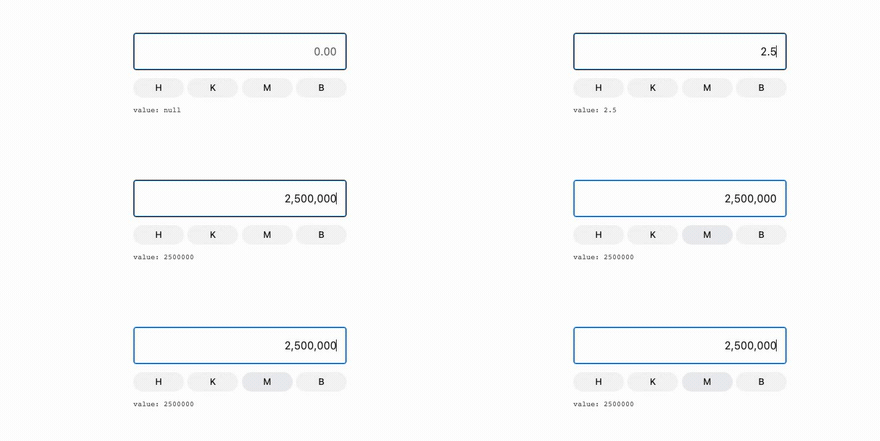 |
All of these are off by default — the component renders a bare <input>,
and the hook gives you the behaviour to render yourself. See
the extras.
Most currency inputs ask for a numeric keypad, which has no letter keys — so
2.5m cannot be typed on a phone at all. This one reads InputEvent.inputType
rather than guessing from key codes, so paste, drag-drop, cut, word delete and
Android IME composition each have a case rather than a shrug.
The design notes have the reasoning, the input event cheatsheet and the device support matrix.
Every native <input> prop is passed through and ref is forwarded, except
four: value, defaultValue and onChange carry the number or the canonical
string rather than DOM strings, and onError is the refused-keystroke
callback, not the DOM's. type is always text.
| Prop | Type | Default | Description |
|---|---|---|---|
value |
number | string | null |
undefined |
Typed by valueType. A string may be canonical, display, or 2.5m. |
onChange |
(value: number | string | null) => void |
— | The number, or canonical text — never the formatted string. |
valueType |
'number' | 'string' |
'number' |
Which of the two value and onChange speak. |
onError |
() => void |
— | Called when a keystroke is refused. |
options.scale |
number |
2 |
Maximum decimal places. 0 refuses the decimal point. |
options.maxDigits |
number |
11 |
Maximum integer digits. |
options.locale |
string |
— | BCP 47 tag. Supplies separators and the currency symbol. |
options.currency |
string |
— | ISO 4217 code. The symbol is returned, not put in the value. |
options.groupSeparator |
string |
',' |
Overrides the locale. |
options.decimalSeparator |
string |
'.' |
Overrides the locale. |
options.shortcuts |
Record<string, number> |
h/k/m/b |
Characters to multipliers. Must be powers of ten. |
options.range |
'ALL' | 'POSITIVE' |
'ALL' |
'POSITIVE' refuses negatives. |
options.inputMode |
'text' | 'decimal' | 'numeric' |
'text' |
Which keyboard mobile raises. |
options.flashOnError |
boolean |
true |
Flash on a refused keystroke. Colour only; add rfi-input--shake for motion. |
| Key | Multiplier |
|---|---|
h |
×100 |
k |
×1,000 |
m |
×1,000,000 |
b |
×1,000,000,000 |
Typing one on its own reads as one of that unit, so k gives 1,000. Override
with options.shortcuts.
Keep the formatting and validation, bring your own input:
import { useFinancialInput } from 'react-financial-input';

const { getInputProps } = useFinancialInput({ value, onChange: setValue });

<TextField slotProps={{ htmlInput: getInputProps() }} />; // MUI
<Input {...getInputProps()} />; // Chakra
The hook returns everything the extras are built from:
| Returned | For |
|---|---|
getInputProps() |
Spread onto any input |
applyShortcut(character) |
Multiplier tap targets |
clear() |
A clear button. Undoable, like any other edit |
symbol, symbolPosition |
The currency symbol and which side it belongs on |
numericValue, displayValue |
The committed number, and what is on screen |
canonicalValue |
The string to send onward — no grouping, . fraction |
parseAmount('$1,234.56 USD') gives 1234.56, and parseAmount('2.5m') gives
2500000 — the same rules the input applies to a paste, as one call, with no
DOM. Currency lists, search and flag emoji come from Intl rather than a
bundled table.
All of it is in UTILS.md.
- EXAMPLES.md — Next.js, React Hook Form, Formik, MUI, Chakra, TanStack Form, plain forms, and how to test it.
- UTILS.md — the non-React exports: parsing, formatting, currency lists, search, flags.
- DESIGN.md — why it behaves as it does: the state model and controlled mode, the mobile keyboard trade-off, exact multipliers, the input event cheatsheet, the device support matrix, styling — and what it does not do: numbers above 2^53, and the rows nobody has tested on real hardware.
- CONTRIBUTING.md — architecture rules and local setup.
- CI.md — what each workflow does, and how to publish.
- HISTORY.md — where it came from, why it stalled for two years, and what real devices taught it.
MIT