Repository navigation
Home
PulseDeck is a fast, dark-first desktop music player for Windows, macOS, and Linux built around a local SQLite library, non-blocking background DSP audio analysis, synced lyrics, a built-in metadata editor, automatic GitHub updates, and a full Dual-Deck DJ Booth with optional Auto-Mix harmonic transitions.
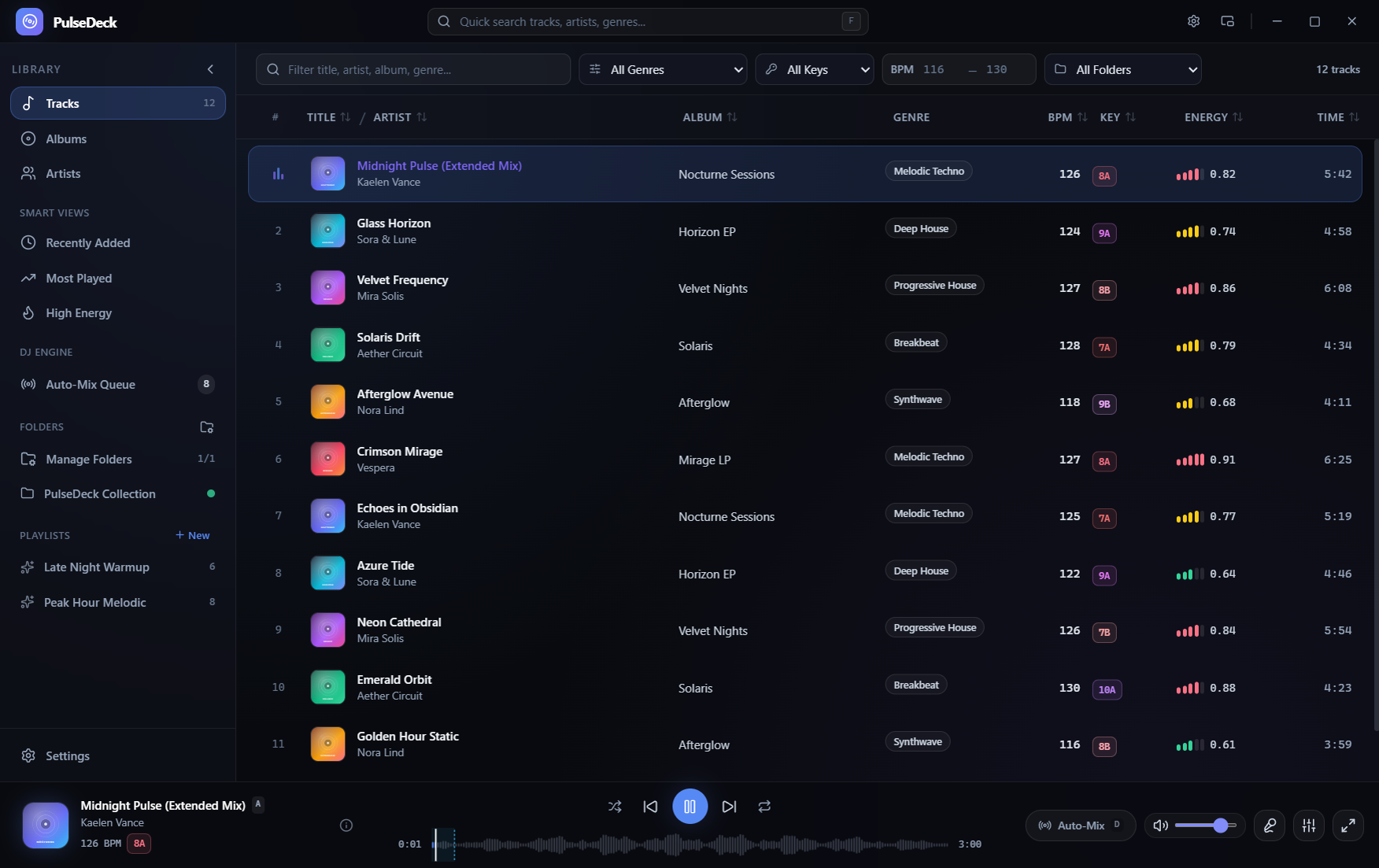
-
Normal Playback First: Plays tracks sequentially out of the box with Shuffle (
S) and Repeat (R— Off / Repeat All / Repeat One), plus a persistent compact Mini-Player and global media key support. -
Full DJ Booth & Opt-In Auto-Mix: Open DJ Booth in the left sidepanel to drag and drop tracks onto Deck A and Deck B, tweak 3-Band EQ + Kill switches, Color Filter, Tempo ±12%, Cue/Loops, and a live Crossfader, or toggle Auto-Mix (
D) for automatic BPM & Camelot Wheel transitions. -
Zero-Wait Background Audio Analysis: Automatically detects BPM, Musical & Camelot Key (
1A–12B), ReplayGain loudness normalization, Energy score, 200-bar clickable waveforms, and intro/outro silence cues. -
Synced & Static Lyrics (
L): Resolves cached lyrics, local.lrc/.txtsidecars, embedded audio tags, and LRCLIB (prioritizing time-synced karaoke lyrics), with click-to-seek and persistent per-track timing offsets. -
Track Info & Tag Editor (
I): Inspect codec, bitrate, sample rate, and channel layout, or edit metadata and cover artwork directly inside PulseDeck with rescan protection. -
Automatic Updates: Check for new GitHub releases directly in Settings → Software Updates (with automatic in-app download & restart-to-install on Windows installer and Linux AppImage builds, plus one-click downloads for macOS,
.deb/.rpm, and Windows portable).
| Page | What You'll Find |
|---|---|
| Installation & Updates | Windows NSIS & Portable installers, macOS Apple Silicon & Intel .dmg packages, Linux .AppImage/.deb/.rpm packages, SmartScreen/Gatekeeper steps, in-app GitHub auto-updates, and local storage paths. |
| Music Library & Playback | Adding watched folders, supported audio formats, instant search & filters, Smart Views, Playlists, sequential/shuffle/repeat playback, and Mini-Player mode. |
| Page | What You'll Find |
|---|---|
| DJ Booth & Auto-Mix | Drag-and-drop track loading onto Deck A & Deck B, full per-deck controls, interactive crossfader, searchable Whole Library browser alongside Up Next, and harmonic Auto-Mix scoring. |
| Audio Analysis & DSP | How background Web Worker analysis computes BPM, Camelot keys, ReplayGain, Energy, waveforms, and silence cues, plus the Dual-Deck Web Audio routing chain. |
| Page | What You'll Find |
|---|---|
| Lyrics & Metadata Editor | Synced LRC playback, timing offset adjustments, .lrc/.txt import, LRCLIB custom search, and the Track Info modal (I) for inspecting files and editing tags/covers. |
| Page | What You'll Find |
|---|---|
| Settings & Shortcuts | Every section inside Settings (Ctrl+, / ⌘+,), accent color presets, dynamic album-art theming, and the complete keyboard & media shortcut table. |
| Troubleshooting & FAQ | Solutions for Windows SmartScreen, macOS Gatekeeper, Linux AppImage (libfuse2 / --no-sandbox), missing tracks, restoring file tags, lyrics sync timing, and updating older builds. |