Repository navigation
DJ Booth and Auto Mix
PulseDeck includes a complete Dual-Deck DJ Booth inside its Web Audio engine alongside an optional harmonic Auto-Mix scheduler. Whether you want manual hands-on deck mixing or hands-free smart DJ transitions, both live side by side.
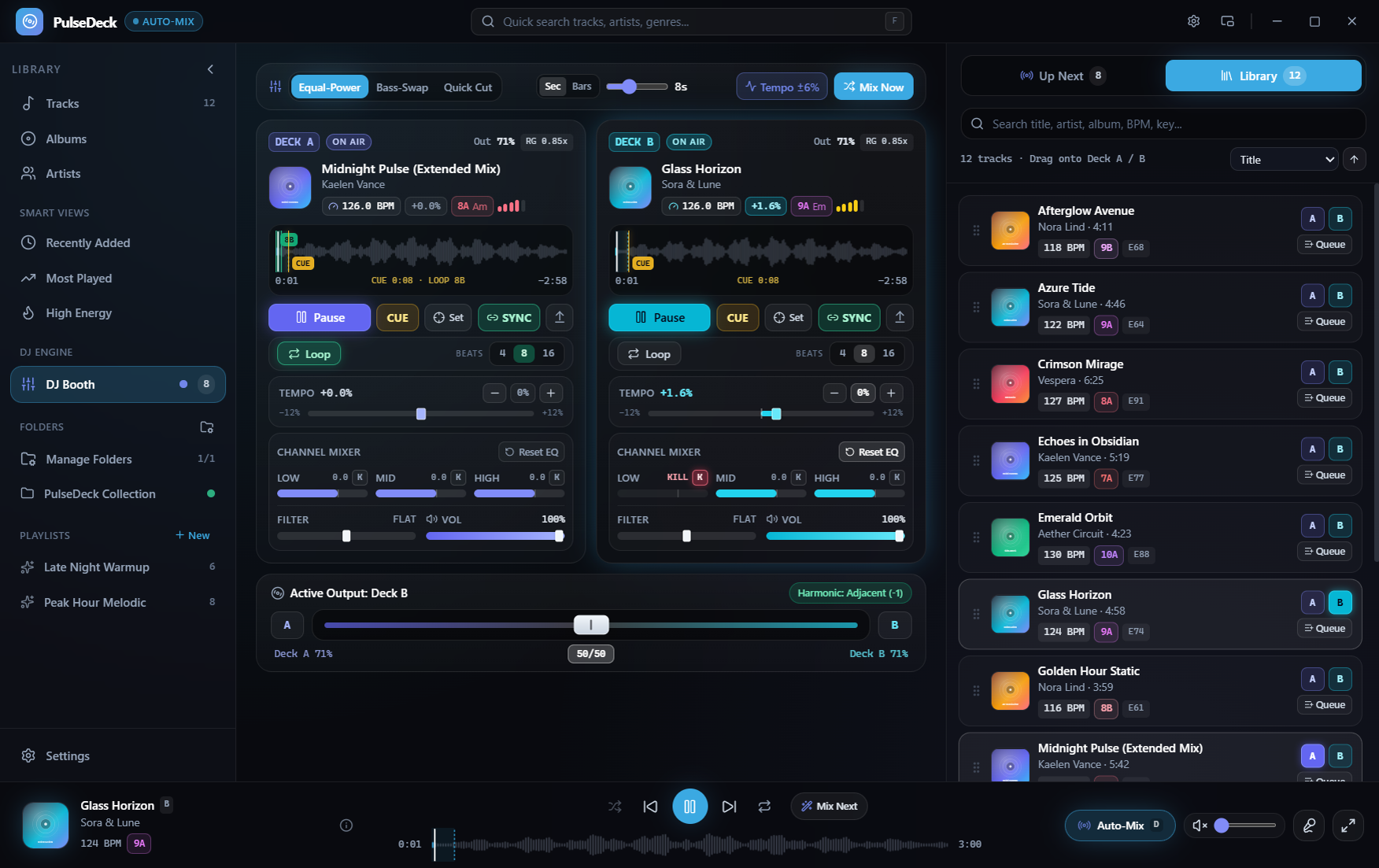
Access DJ Booth directly from the DJ Engine → DJ Booth item in the left sidepanel (added in v1.2.0 to keep Now Playing and Lyrics focused on the active track). When Auto-Mix is active or a crossfade is in progress, the sidepanel icon pulses and displays a live badge—and clicking the live transition indicator pill (A→B · 45%) in the bottom player bar also jumps straight to the DJ Booth.
The right-hand panel in the DJ Booth has two tabs:
-
Up Next— Shows the upcoming harmonic Auto-Mix queue, anchor track, lock/reorder/reroll/remove buttons, and source scope (Library, Folder, or Playlist). -
Library— Displays your entire music library right inside the DJ Booth with:- Instant multi-token Search (matches Title, Artist, Album, Genre, BPM, and Camelot Key).
- Quick Sort (
Title,BPM,Key,Energy,Recently Added) with ascending/descending toggle. -
A/BQuick-Load Buttons on every row to load a track straight onto Deck A or Deck B. -
+ QueueButton to insert and lock a track into your Auto-Mix queue.
Grab any track row from either Up Next or Library and drop it directly onto Deck A or Deck B. Dropping a track loads and decodes it onto that deck immediately without interrupting playback on the opposite deck.
Both Deck A and Deck B run independent audio chains and transport controls:
-
Independent Transport:
- Play / Pause — Start, resume, or pause Deck A and Deck B independently without stopping the other deck.
-
Cue / Set (
Set) — Defaults to the DSP-detected intro cue; click Cue to snap back to the cue point (or click Set while playing/paused to save a custom cue point). -
BPM Sync (
SYNC) — Pitch-matches the deck's tempo to the opposite deck's live effective BPM (supporting1x,0.5xhalf-time, and2xdouble-time ratios within±12%). -
Eject (
↑) — Unloads the deck cleanly.
- Interactive Waveform: Click anywhere on either Deck A's or Deck B's waveform to seek independently. Displays both the yellow CUE marker and any active green LOOP region directly over the waveform peaks.
-
Beat Loops:
- Toggle Loop on or off and switch between
4,8, or16beat loop lengths. - Loop duration is calculated accurately from the track's BPM (
(60 / BPM) × beats) and updates dynamically if you switch beat counts mid-loop.
- Toggle Loop on or off and switch between
-
Tempo / Pitch Fader (
±12%):- Smooth pitch slider (
0.88xto1.12x),-/+pitch nudge buttons (±0.5%),0%reset button, and live shifted-BPM readout.
- Smooth pitch slider (
-
Channel Mixer Strip:
-
3-Band EQ (
Low/Mid/High) spanning-24 dBto+12 dB, each paired with an instantK(Kill) switch (cuts-24 dBwithout forgetting your fader value) plus a one-click Reset EQ button. -
Bipolar Color Filter: Sweep smoothly from LPF (
120 Hz – 18 kHzlow-pass on the left), through FLAT bypass in the center, to HPF (60 Hz – 8 kHzhigh-pass on the right). Double-click the slider or badge to reset toFLAT. -
Channel Volume (
VOL 0%–100%): Independent per-deck output trim before the crossfader.
-
3-Band EQ (
At the bottom of the DJ Booth:
- Drag the Crossfader smoothly between Deck A (
0%) and Deck B (100%) using equal-power cosine/sine gain curves, or clickA,50/50, orBfor instant snaps. - Displays the live Active Output Deck and real-time Camelot Harmonic Compatibility label between Deck A and Deck B (e.g., Exact Match, Adjacent (+1), Relative Major/Minor).
Toggle Auto-Mix anytime via the D shortcut, the bottom bar Auto-Mix pill, or inside the DJ Booth / Settings. When enabled, PulseDeck evaluates candidates from your chosen scope (Library, Folder, or Playlist) and ranks upcoming tracks across four factors:
| Factor | How It Scores Candidates |
|---|---|
| BPM Compatibility | Scores close BPM matches highest (<= 6% spread), including smooth half-time (0.5x) and double-time (2x) transitions. |
| Camelot Wheel Harmony | Rewards Exact Match (8A → 8A), Adjacent fifths (8A ↔ 7A / 9A), Relative Major/Minor (8A ↔ 8B), and smooth energy boosts (+2 / +7 steps). |
| Genre & Energy Flow | Prefers cohesive genre transitions and gradual energy shifts rather than jarring jumps. |
| Anti-Repeat & Early-Skip Adaptation | Penalizes recently played tracks and back-to-back songs by the same artist. Skipping a track before the Early-Skip Threshold (default 20s) lowers weights for that track/artist/genre for the current session; selecting a manual track smoothly crossfades (1.75s) and re-anchors the upcoming Auto-Mix queue around your new pick. |
Configure transitions in the top bar of the DJ Booth or in Settings → Auto-Mix & DJ Engine:
- Equal-Power: 64-point cosine/sine crossfade curves with constant perceived loudness.
- Bass-Swap: Equal-power blend with an automated low-band EQ crossfade between 40% and 60% progression to keep basslines tight.
-
Quick Cut: Crisp
0.5scut near the outro cue for punchy transitions.
Mix lengths can be configured in Seconds (4s–16s) or Bars (4 / 8 / 16 BPM-aligned bars) with optional Tempo Match (±6%) rate ramping.